Win7-deleted Windows Live folder from Program Files(x86) How 2 Replace

Windows Lover

New member
Hi there : )

My mom wanted to remove windows live messenger but she couldnt see it on her add/remove list, so she went and deleted the entire windows live folder from the Program Files (x86) I am trying to reinstall windows live essentials with no luck. The first time i tryed it said it was already installed but didnt show up on the add and remove list.

I used Ccleaner and then tryed again this time i revieved an error: 8007007e. We tried system restore to earliest date available but it is still the same

Any help or suggestions would be greatly appreciated ty : )
 

My Computer

OS
windows 7 x64
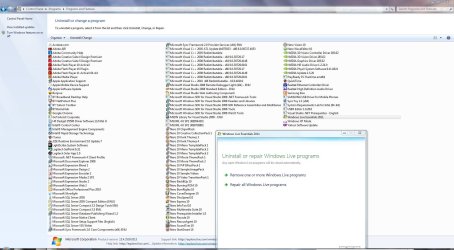
Go into Control Panel>Programs>Uninstall a Program and highlight Windows Live Essentials then choose Repair All Windows Live Programs.

CP.JPG
 

My Computer

Computer Manufacturer/Model Number
HP Pavilion Elite 495UK
OS
Windows 7 Ultimate SP1 64-Bit
CPU
Intel Core i7 870 @ 2.93GHz
Motherboard
MSI 2A9C (CPU1)
Memory
8Gb Dual-Channel DDR3 @ 664MHz
Graphics Card(s)
nVidia GeForce GTX 460 1024MB dedicated RAM
Sound Card
Realtek HD Audio
Monitor(s) Displays
HP2310i
Screen Resolution
1920 x 1080
Hard Drives
1x1954GB Hitachi HDS22020ALA 330 (RAID), 1x1954GB Hitachi External for backup and storage
PSU
460W
Case
HP Elite
Cooling
Air cooled
Keyboard
Logitech K750 solar-powered keyboard
Mouse
Logitech Wireless M180 mouse
Internet Speed
2Mb
Other Info
Pure Avanti Flow Internet Radio with iPod Dock, 64Gb iPod, HP USB Speakers, Sony MDR-V500 Headphones, Sony Vaio F-Series Laptop

My Computer

Computer Manufacturer/Model Number
HP, Dell, Gateway, Toshiba - 4 laptops and 2 desktops
OS
Vista, Windows7, Mint Mate, Zorin, Windows 8
CPU
from 1.6GHz Duo to i7
Monitor(s) Displays
2x HP w2207
Hard Drives
5x HDD, 7x SSD, 12x Externals
Keyboard
with trackball - no mices
Mouse
Trackball mice
Internet Speed
DSL 6000
We have set it back to the earliest possible restore point with no luck. we re installed windows live essentials and then tried signing in but receive error: 8007007e and windows live essentials is still not on the add/remove programs list. Im really confused. is there some sort of a stand alone live messenger. and if it said installed successfully why doesnt it show up on add/remove list. what about replacing the folder she deleted from Program Files, what if i copied the Windows Live Folder from another machine and pasted it in here Programs files x86? would that work/
 

My Computer

OS
windows 7 x64
Did you try Shadow Explorer. It is not a system reset but it mounts the shadows and lets you pick any file/folder.
 

My Computer

Computer Manufacturer/Model Number
HP, Dell, Gateway, Toshiba - 4 laptops and 2 desktops
OS
Vista, Windows7, Mint Mate, Zorin, Windows 8
CPU
from 1.6GHz Duo to i7
Monitor(s) Displays
2x HP w2207
Hard Drives
5x HDD, 7x SSD, 12x Externals
Keyboard
with trackball - no mices
Mouse
Trackball mice
Internet Speed
DSL 6000
Hiya... no go. Replaced the windows live folder from Shadow Explorer and still the same after reboot. Window Live Essentials is not on the Add/Remove list and same error: 8007007e. hmmmmmmm is there a stand alone windows meessenger? i mean im outta idea here
 

My Computer

OS
windows 7 x64

My Computer

Computer Manufacturer/Model Number
HP Pavilion Elite 495UK
OS
Windows 7 Ultimate SP1 64-Bit
CPU
Intel Core i7 870 @ 2.93GHz
Motherboard
MSI 2A9C (CPU1)
Memory
8Gb Dual-Channel DDR3 @ 664MHz
Graphics Card(s)
nVidia GeForce GTX 460 1024MB dedicated RAM
Sound Card
Realtek HD Audio
Monitor(s) Displays
HP2310i
Screen Resolution
1920 x 1080
Hard Drives
1x1954GB Hitachi HDS22020ALA 330 (RAID), 1x1954GB Hitachi External for backup and storage
PSU
460W
Case
HP Elite
Cooling
Air cooled
Keyboard
Logitech K750 solar-powered keyboard
Mouse
Logitech Wireless M180 mouse
Internet Speed
2Mb
Other Info
Pure Avanti Flow Internet Radio with iPod Dock, 64Gb iPod, HP USB Speakers, Sony MDR-V500 Headphones, Sony Vaio F-Series Laptop
Hi Same thing.. it says it installed but Window Live Messenger or Essentials is not on the Add/Remove list and same error: 8007007e. Now Im looking for self-destruct button this machine
 

My Computer

OS
windows 7 x64
It looks like you have deleted more than just the folder. If you remember what you have done, you may recover that from the shadows too.
 

My Computer

Computer Manufacturer/Model Number
HP, Dell, Gateway, Toshiba - 4 laptops and 2 desktops
OS
Vista, Windows7, Mint Mate, Zorin, Windows 8
CPU
from 1.6GHz Duo to i7
Monitor(s) Displays
2x HP w2207
Hard Drives
5x HDD, 7x SSD, 12x Externals
Keyboard
with trackball - no mices
Mouse
Trackball mice
Internet Speed
DSL 6000
Hi,

Iv just been assured that she only deleted the the Windows Live folder after she said that Windows Live Messenger nor Windows Live Essentials did not appear on her windows and and remove list or her Ccleaner Installed Programs list* and other suggestions would be greatly appreciated ty : )
 

My Computer

OS
windows 7 x64
Hi,

Iv just been assured that she only deleted the the Windows Live folder after she said that Windows Live Messenger nor Windows Live Essentials did not appear on her windows and and remove list or her Ccleaner Installed Programs list* and other suggestions would be greatly appreciated ty : )
But as you have seen, that is apparently not the whole story. If that was the only folder deleted and you put it back, there is no reason why it is still on the blink.
 

My Computer

Computer Manufacturer/Model Number
HP, Dell, Gateway, Toshiba - 4 laptops and 2 desktops
OS
Vista, Windows7, Mint Mate, Zorin, Windows 8
CPU
from 1.6GHz Duo to i7
Monitor(s) Displays
2x HP w2207
Hard Drives
5x HDD, 7x SSD, 12x Externals
Keyboard
with trackball - no mices
Mouse
Trackball mice
Internet Speed
DSL 6000
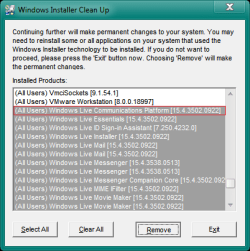
Try Installing and running the Windows Installer Cleanup Tool and selecting Windows Live, and click remove for everything based on Windows Live; mine shows over 20:

Example2.png
 

My Computer

Computer type
PC/Desktop
Computer Manufacturer/Model Number
Novatech iRush Pro
OS
Windows 7 Ultimate SP1 - 64 Bit
CPU
Intel Core i5 2500k
Motherboard
Foxconn H67M-S/H67M-V/H67
Memory
2x4GB DDR3 1333Hz
Graphics Card(s)
Ati Radeon 6770
Sound Card
None
Monitor(s) Displays
Samsung S22B150
Screen Resolution
1920x1080
Hard Drives
2x500GB
PSU
500W
Cooling
Fan
Keyboard
HP KU0316
Mouse
Wireless Logitech M185
Internet Speed
20MB/s
Antivirus
Avast Free
Browser
Google Chrome
Other Info
Logitech M185 Mouse
KU-M316 Keyboard
Hi ty for responding I used msicuu2 to remove Windows live installers but more then half of them didnt delete so i then tried MicrosoftFixit.ProgramInstallUninstall and then after that i tried re installing win live essent and got error code: 0x80070643 went to help page it asked to turn ion firewall but it was all ready on so then it suggested repairing net frame work wich i did and then tryed reinstalling win live essent and go t the error code: 0x80070643 im lost now lolol
 

My Computer

OS
windows 7 x64

My Computer

Computer Manufacturer/Model Number
HP Pavilion Elite 495UK
OS
Windows 7 Ultimate SP1 64-Bit
CPU
Intel Core i7 870 @ 2.93GHz
Motherboard
MSI 2A9C (CPU1)
Memory
8Gb Dual-Channel DDR3 @ 664MHz
Graphics Card(s)
nVidia GeForce GTX 460 1024MB dedicated RAM
Sound Card
Realtek HD Audio
Monitor(s) Displays
HP2310i
Screen Resolution
1920 x 1080
Hard Drives
1x1954GB Hitachi HDS22020ALA 330 (RAID), 1x1954GB Hitachi External for backup and storage
PSU
460W
Case
HP Elite
Cooling
Air cooled
Keyboard
Logitech K750 solar-powered keyboard
Mouse
Logitech Wireless M180 mouse
Internet Speed
2Mb
Other Info
Pure Avanti Flow Internet Radio with iPod Dock, 64Gb iPod, HP USB Speakers, Sony MDR-V500 Headphones, Sony Vaio F-Series Laptop
Hi seavixen32 ty,

I just followed those instructions to the t, the thing is win live essent isnt on the add and remove list at all. this machine was system restored and after the system restore, win live essent wasn't on the add and remove list so they went in a deleted the win live folder from Program files x86, then when trying to reinstall win live essent she received the message that win live essent was already installed, so i tried to remove all the win installers with msicuu2 and that didn't work so i tried using MicrosoftFixit.ProgramInstallUninstall.Run and that seemed to do something i dont know what though lol and i rebooted cleaned with ccleaner and then tryed to re install win live essent and received the error code 0x80070643
 

My Computer

OS
windows 7 x64

My Computer

Computer type
PC/Desktop
Computer Manufacturer/Model Number
Novatech iRush Pro
OS
Windows 7 Ultimate SP1 - 64 Bit
CPU
Intel Core i5 2500k
Motherboard
Foxconn H67M-S/H67M-V/H67
Memory
2x4GB DDR3 1333Hz
Graphics Card(s)
Ati Radeon 6770
Sound Card
None
Monitor(s) Displays
Samsung S22B150
Screen Resolution
1920x1080
Hard Drives
2x500GB
PSU
500W
Cooling
Fan
Keyboard
HP KU0316
Mouse
Wireless Logitech M185
Internet Speed
20MB/s
Antivirus
Avast Free
Browser
Google Chrome
Other Info
Logitech M185 Mouse
KU-M316 Keyboard
Hi ty for responding,
Yes I tried Windows Install Clean Up but it didnt work it didnt remove the installers and i was told that it actually is discontinued by microsoft because it can do damage and i was refered to MicrosoftFixit.ProgramInstallUninstall. I used that tool and it removed all the win live from its list, rebooted and trryed to reinsta win live essent and recieved this error code 0x80070643 source WLXSuite

and i forgot to add
i fired up Windows Install Clean Up utility again and all 20 or so of the installers are still there : ( i tried highlighting each win live installer one at a time and selected remove then it just hangs
 

My Computer

OS
windows 7 x64
Cut to the chase and reinstall Windows - it'll be quicker in the long run by the look of things. :)
 

My Computer

Computer Manufacturer/Model Number
HP Pavilion Elite 495UK
OS
Windows 7 Ultimate SP1 64-Bit
CPU
Intel Core i7 870 @ 2.93GHz
Motherboard
MSI 2A9C (CPU1)
Memory
8Gb Dual-Channel DDR3 @ 664MHz
Graphics Card(s)
nVidia GeForce GTX 460 1024MB dedicated RAM
Sound Card
Realtek HD Audio
Monitor(s) Displays
HP2310i
Screen Resolution
1920 x 1080
Hard Drives
1x1954GB Hitachi HDS22020ALA 330 (RAID), 1x1954GB Hitachi External for backup and storage
PSU
460W
Case
HP Elite
Cooling
Air cooled
Keyboard
Logitech K750 solar-powered keyboard
Mouse
Logitech Wireless M180 mouse
Internet Speed
2Mb
Other Info
Pure Avanti Flow Internet Radio with iPod Dock, 64Gb iPod, HP USB Speakers, Sony MDR-V500 Headphones, Sony Vaio F-Series Laptop
Back
Top