
Hello there, my first post here 
When i'm trying to save something from my browser to a desktop, i should see a "desktop" shortcut, but it only shows "favourites" icon, which is empty(also i cannot expand it). Favourites are also missing just when navigating on windows folders, not just when saving something from web.
I've had this problem for a while, tried to figure out what's wrong, follow many tutorials from this website, but nothing helped. I've added a new string value IsShortcut to a registry, which was missing, restored a Favourites folder location (which was fine by the way). Don't know if it is related, but it feels like the windows copy which i've installed is kinda strange, because other thing which is not working on it, is screen brighntess, i have all the buttons, but i cannot change it in any way, tried everything
Please advise me what's wrong. Here's how everything looks on my laptop:
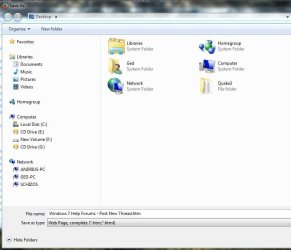
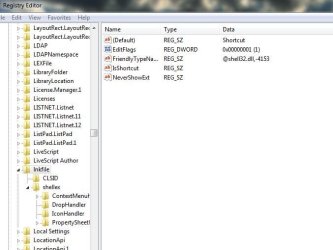

When i'm trying to save something from my browser to a desktop, i should see a "desktop" shortcut, but it only shows "favourites" icon, which is empty(also i cannot expand it). Favourites are also missing just when navigating on windows folders, not just when saving something from web.
I've had this problem for a while, tried to figure out what's wrong, follow many tutorials from this website, but nothing helped. I've added a new string value IsShortcut to a registry, which was missing, restored a Favourites folder location (which was fine by the way). Don't know if it is related, but it feels like the windows copy which i've installed is kinda strange, because other thing which is not working on it, is screen brighntess, i have all the buttons, but i cannot change it in any way, tried everything
Please advise me what's wrong. Here's how everything looks on my laptop:
My Computer
- Computer type
- Laptop
- Computer Manufacturer/Model Number
- Acer V3-771G
- OS
- win7
- CPU
- i7
- Memory
- 8gb
- Graphics Card(s)
- Nvidia
- Hard Drives
- samsung ssd evo
- Antivirus
- avira
- Browser
- mozilla