Win7 Fonts

Bertison

Senior Learner
Power User
VIP
Local time
9:29 PM
Messages
423
Location
Lincolnshire, UK.
Hi everyone.
I would bet this has been asked before, BUT ...

How can I remove the excessive amount of Fonts in Windows 7?:eek: There are many that I have attempted to delete, but I am given the message that it is not possible to remove them. :confused:Why is this, and is there a Fix? After all, fonts are a memory-eater!

Thanks.
 

My Computer

Computer type
PC/Desktop
Computer Manufacturer/Model Number
bertison
OS
Windows 7/64 HPremium.
CPU
AMD FX-6300.
Motherboard
Asus M5A78L-M LE/USB3.
Memory
Corsair (2x4) GB DDR3 CMXGX3M2A1337CL9.
Graphics Card(s)
NVidia/Gigabyte GT730 (2GB) GDDR5.
Sound Card
Onboard.
Monitor(s) Displays
Iiyama PLE2407HDS.
Screen Resolution
1920 x 1280
Hard Drives
Desktop: 1TB. WD10EZEX-00BN5A0.
Zyxel nsa310 NAS: 2TB Seagate Barracuda 7200.14.
Cache Drive: Sandisk SDSSDRC032G.
Laptop Lenovo B50/80 128 GB SSD.
PSU
Corsair 750M.
Case
Coolermaster N300.
Cooling
FRONT: (2X) 140mm. TOP: (1x) 120mm. REAR: (1x) 120mm.
Keyboard
Logitech K290
Mouse
Trust Optical Wired
Internet Speed
15 Mb Down, 0.55 Up.
Antivirus
Kaspersky Total Security 2017, Hitman Pro.
Browser
Firefox.
Other Info
NETWORK:
Sky "Q box" and router.
Desktop & NAS - 30 Metres Cat6 Ethernet wired, via TP-Link 4-port switch.
Lenovo B50/80 Laptop, 2x Wileyfox phones, Lenovo TAB3-8 tablet - all wireless.
Grandchildren, their parents and friends as bandwidth 'parasites' at various times!
Fonts don't use any memory, they just sorta lay on your drive until called upon for use. They take up very little space as well.

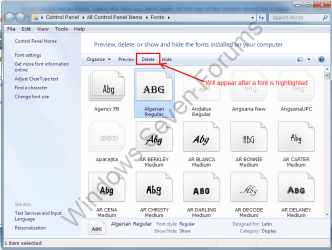
Go to Control Panel>Fonts, select the font you don't want. At the top of the window should be a Delete option, click it and *poof* it's gone. :)
Some items may not display properly however.
Font.PNG
 

My Computer

Computer type
PC/Desktop
Computer Manufacturer/Model Number
Home Built Desktop By DataTech
OS
Windows 7 Ultimate X64 SP1
CPU
Intel i5-2550K, Differing ~4.4-4.8GHz No built in GPU
Motherboard
ASUS P8Z68-V PRO/GEN3
Memory
16GB G.Skill Sniper 1866MHz @ 2133MHz 2x8GB
Graphics Card(s)
ASUS GTX650TIB-DC2OC-2GD5, (650TI Boost)
Sound Card
Onboard Realtek 5-1
Monitor(s) Displays
Samsung P2570HD
Screen Resolution
1920x1080
Hard Drives
Samsung 840 Pro 256GB SSD for OS, 500GB Seagate Constellation (Enterprise drive) for Data
PSU
Corsair HX650W
Case
Inwin Dragon Rider
Cooling
Hyper 212 EVO w/two Noctua fans, push-pull, @1300 RPM
Keyboard
E-Z Eyes, bright yellow keys with large characters
Mouse
steelseries SENSEI Laser Pro Gaming
Internet Speed
48-51Mbs Mbs down, 11 Mbs up Xfinity Cable
Antivirus
Norton Internet Security 2013
Browser
IE 10, Opera, Pale Moon if needed
Other Info
4 case fans, LG BluRay-RE, ASUS DVD-RW, Mr. Fusion power supply, 1.21 gigawatts.
Hi! Bertison, welcome to 7F :)

Most likely the reason you can not delete certain fonts is they are the default fonts (System Fonts) that Windows needs in order to properly display the results of your input from your keyboard.

It is also necessary for communication with third-party programs, and the Internet.

A quick look in the tutorial section here at 7F:
http://www.sevenforums.com/tutorials/1076-fonts-delete.html
 
Last edited:

My Computer

Computer type
PC/Desktop
Computer Manufacturer/Model Number
Gateway DX4831-01e (Mid-Tower Desktop)
OS
Originally Win 7 Hm Prem x64 Ver 6.1.7600 Build 7601-SP1 | Upgraded to Windows 10 December 14, 2019
CPU
Intel i3 530 2.93GHz, 2933MHz 2 Cores 4 Logical Processors
Motherboard
Gateway H57M01 133 megahertz
Memory
6GB of 1,333MHz DDR3 SDRAM
Graphics Card(s)
32MB Intel Graphics Media Accelerator HD IGChip
Sound Card
Realtek High Definition Audio
Monitor(s) Displays
Gateway HX2000 20inch TFT active matrix TN
Screen Resolution
1600 x 900 x 59 hertz
Hard Drives
WDC WD10EADS-00M2B0 [HDD] (1000.20 GB) -- drive 0,
HL-DT-ST DVDRAM GH41N [CD-ROM dr]
Four card readers, and Four USB 2.0
PSU
300watts.
Case
Mid-Tower Desktop
Cooling
Stock from Gateway
Keyboard
Natural Ergonomic Keyboard 4000, see Other Info
Mouse
Orig. Gateway wore out now using Insignia USB wired optical
Internet Speed
Vz FIOS 10ms png 57.64Mbps down 65.53Mbps up Speedtest.org
Antivirus
Zamana Anti-logger with Anti-malware, MSE, Windows Firewall,
Browser
IE11.0.9600.19399-Upd ver11.0.135, Firefox 68.0.1 x64
Other Info
System Specs by Belarc.

BIOS: American Megatrends Inc. P01-A0 11/17/2009

Replaced the MS 'Natural' Standard PS/2 Enhanced 101-102 Keyboard with a new Natural Ergonomic Keyboard 4000 on August 1st 2014.

Canon Pixma MG3222 Printer.

Updated to IE11 on 12102015 | Fios Quantum Router g1100

Additional AV: SpywareBlaster, manual Mbam, SAS

My Computer

Computer Manufacturer/Model Number
Custom
OS
Windows 7 Ultimate x64 SP1
CPU
Intel Core i7-3960X
Motherboard
Intel DX79SI
Memory
16 GB GSkill DDR3-2133 CL9
Graphics Card(s)
EVGA SC GTX 680
Sound Card
Onboard Realtek
Monitor(s) Displays
Dell 2005FPW
Screen Resolution
1680x1050
Hard Drives
Intel 520 SSD 240 GB,
2x Seagate 7200.12 1 TB
PSU
Corsair 850W HX
Case
Corsair 500R
Cooling
Corsair H100
Keyboard
Microsoft Natural 4000
Be careful what you do delete. I noticed recently that all my web pages were in italics and when I checked the Fonts folder the Arial Italic font was nowhere to be seen.

In the end, I copied the font from one of my networked computers and pasted it into my Fonts folder.

Personally, I'd be inclined to leave the Fonts folder alone. Sod's law says that as soon as you delete a font you'll need it.
 
Last edited:

My Computer

Computer Manufacturer/Model Number
HP Pavilion Elite 495UK
OS
Windows 7 Ultimate SP1 64-Bit
CPU
Intel Core i7 870 @ 2.93GHz
Motherboard
MSI 2A9C (CPU1)
Memory
8Gb Dual-Channel DDR3 @ 664MHz
Graphics Card(s)
nVidia GeForce GTX 460 1024MB dedicated RAM
Sound Card
Realtek HD Audio
Monitor(s) Displays
HP2310i
Screen Resolution
1920 x 1080
Hard Drives
1x1954GB Hitachi HDS22020ALA 330 (RAID), 1x1954GB Hitachi External for backup and storage
PSU
460W
Case
HP Elite
Cooling
Air cooled
Keyboard
Logitech K750 solar-powered keyboard
Mouse
Logitech Wireless M180 mouse
Internet Speed
2Mb
Other Info
Pure Avanti Flow Internet Radio with iPod Dock, 64Gb iPod, HP USB Speakers, Sony MDR-V500 Headphones, Sony Vaio F-Series Laptop
In general, I agree with you. On the other hand, note that the page I linked to only moves the fonts to a different folder - they are always there for you to copy back if you ever feel the need.

I have used this for many months on many computers and it seemed to work. Your mileage may vary, though ...
 

My Computer

Computer Manufacturer/Model Number
Custom
OS
Windows 7 Ultimate x64 SP1
CPU
Intel Core i7-3960X
Motherboard
Intel DX79SI
Memory
16 GB GSkill DDR3-2133 CL9
Graphics Card(s)
EVGA SC GTX 680
Sound Card
Onboard Realtek
Monitor(s) Displays
Dell 2005FPW
Screen Resolution
1680x1050
Hard Drives
Intel 520 SSD 240 GB,
2x Seagate 7200.12 1 TB
PSU
Corsair 850W HX
Case
Corsair 500R
Cooling
Corsair H100
Keyboard
Microsoft Natural 4000
Hi everyone.
I would bet this has been asked before, BUT ...

How can I remove the excessive amount of Fonts in Windows 7?:eek: There are many that I have attempted to delete, but I am given the message that it is not possible to remove them. :confused:Why is this, and is there a Fix? After all, fonts are a memory-eater!

Thanks.

Fonts are NOT a memory-eater as you put it, unless they are used. Otherwise, they just sit on your hard drive doing nothing and taking up very little space. Don't obsess over a non-issue.
 

My Computer

Computer Manufacturer/Model Number
Custom
OS
Windows 7 Ultimate RTM (Technet)
CPU
3.00 gigahertz Intel Core2 Duo E8400
Motherboard
ASUSTeK Computer INC. P5K/EPU Rev 1.xx
Memory
4GB
Graphics Card(s)
ATI Radeon X1950 Pro
Sound Card
Built in HD Audio
Monitor(s) Displays
22" Gateway LCD
Screen Resolution
1920 x 1200
Hard Drives
ST3160023A [Hard drive] (160.04 GB) -- drive 0, rev 8.01, ST3500630AS [Hard drive] (500.11 GB) -- drive 2, rev 3.AAK
ST3500630AS [Hard drive] (500.11 GB) -- drive 1, rev 3.AAK
Keyboard
Logitech G11
Mouse
Microsoft Wireless Laser Mouse 5000
Internet Speed
13.44 Mbps
Actually even if you remove them you WILL NOT reclaim that space used by them. You will only remove one hardlink reference to the font. It will continue to take up space until all hardlink references are deleted. So you save NOTHING.
 

My Computer

Computer type
PC/Desktop
Computer Manufacturer/Model Number
Alienware Aurora ALX R4
OS
Windows 10 Pro (x64)
CPU
Intel Core i7-3930K (3.2GHz - 4.5GHz)
Motherboard
Alienware Aurora-R4 x79
Memory
4x Samsung 4GB PC3-12800 DDR3 (16GB 1600MHz)
Graphics Card(s)
Nvidia Geforce GTX 690
Sound Card
SteelSeries Siberia Elite
Monitor(s) Displays
Dell UltraSharp U3011
Screen Resolution
2560x1600
Hard Drives
Samsung 850 Pro 256 GB, Seagate 1TB Desktop Hybrid HDD, 2x Western Digital 4TB Green HDD
PSU
875W Some Dell PSU <.<
Case
Alienware Aurora ALX
Cooling
Custom Liquid Cooling (EK CPU & GPU blocks) dual EK 480RAD
Keyboard
Logitech G710+ Mechanical
Mouse
Logitech G700s
Internet Speed
Verizon Fios (50 mbps average)
Other Info
Server: Intel NUC D54250WYK: i5-4250U, 16GB, 256 GB mSATA, Windows Server 2012 R2
Well, for me the motivation was not disk space or memory (I have plenty of both).
The issue was that in most applications, the list of fonts becomes very large. I have many additional fonts installed, and it is very irritating to scroll through large font lists filled with fonts that I will never use, to get to the ones that I want.

If you do have such an annoyance, the solution I pointed to works. Otherwise, as many of you have pointed out - don't fix it if it ain't broke.
 

My Computer

Computer Manufacturer/Model Number
Custom
OS
Windows 7 Ultimate x64 SP1
CPU
Intel Core i7-3960X
Motherboard
Intel DX79SI
Memory
16 GB GSkill DDR3-2133 CL9
Graphics Card(s)
EVGA SC GTX 680
Sound Card
Onboard Realtek
Monitor(s) Displays
Dell 2005FPW
Screen Resolution
1680x1050
Hard Drives
Intel 520 SSD 240 GB,
2x Seagate 7200.12 1 TB
PSU
Corsair 850W HX
Case
Corsair 500R
Cooling
Corsair H100
Keyboard
Microsoft Natural 4000
Back
Top