If you want to do an in-place Upgrade between Win7 versions, MS wants you to buy an Anytime Upgrade which simply unlocks the extra features without any install at all.
So normally it would require a clean install of Home Premium. However, adapting a
popular registry workaround you can fool the installer into thinking that Home Basic is actually home Premium and it is doing a Repair Install - an upgrade over itself in Win7.
Open Regedit as Administrator, change the circled keys to exactly this wording:
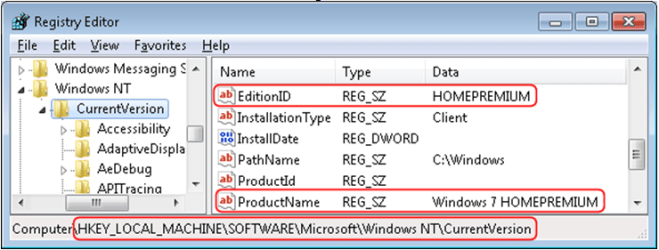
All programs, files and settings are kept in place while Home Premium is installed, you only need to activate with your Premium key afterwards.
Burn the ISO to DVD using ImgBurn at 4x with verify, or you can extract the Win7 ISO files to the desktop and run the in-Place Upgrade from there.
View attachment 44091
Select "connect to the internet during install" to get the latest drivers/updates during install, more will arrive via Windows Updates.

