I installed 7 as UEFI months ago and needed to restore from an image. When restoring from image I could not boot from the Windows 7 SP1 disk without legacy enabled... it would sit at the "Starting Windows" screen with the graphics pulsating (not frozen) and ultimately do nothing.
So, I booted with legacy mode enabled and restored. My OS drive is installed as EFI and has an EFI partition, but I can't boot without legacy mode enabled. Why??
My Computer
At a glance
Windows 7 Pro x64Intel I7-4700MQ32 GBNvidia Quadro K3100M
What program did you use for restoring the image to the HDD?
Did you do a Disk restore or only a partition restore?
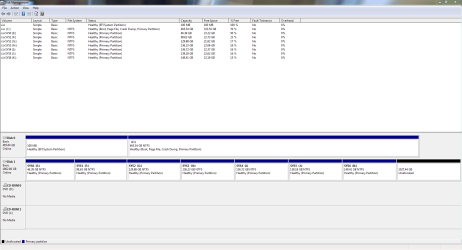
Open Disk management (C:\Windows\System32\diskmgmt.msc), Maximize the window, expand the columns so we can read them and with the sniping tool (%windir%\system32\SnippingTool.exe) take a snapshot of the hole window.
Post it here as an attachment. Use the paper clip - Browse to the file - upload
I just used the standard Windows 7 utility for imaging.
I've downloaded Macrium Reflect free and will start using that soon. I'm thinking of installing Windows 8.1 with Start8. I never wanted to touch anything after 7 because I hated the UI, but 8 seems like it would be ok now with the aforementioned UI software and I would have the benefits of quicker booting and more reliability with UEFI.
Attachments
DiskMgmt_.PNG
38.9 KB
· Views: 5
Last edited:
My Computer
At a glance
Windows 7 Pro x64Intel I7-4700MQ32 GBNvidia Quadro K3100M
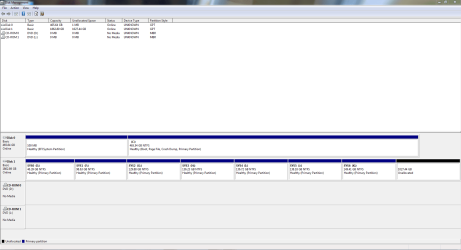
Another snippet shows my OS disk (disk 0) and image disk (disk 1) with GPT partition style, but shows dvd rom as MBR... not sure if that has any meaning.
Attachments
DiskMgmt2.PNG
30.1 KB
· Views: 7
My Computer
At a glance
Windows 7 Pro x64Intel I7-4700MQ32 GBNvidia Quadro K3100M
You're booting disk 0 as UEFI!!!
Win 7 isn't compatible with secure boot that is the default for Win 8.x and Win 10.
To install win 7, secure boot must be disabled.
Depending on the BIOS manufacturer, it can be made by setting secure boot = off, some are by setting OS=other and some are by setting CSM=on.
Yours seems to be setting as Legacy.
I don't have a way to see the Dell BIOS options but if you want to take a picture on the settings I can have a look.