
Solved Win7, Linux Mint and VMWare on same machine ?

ian50

New member
Guru
VIP
Local time
5:47 PM
Messages
206
I am attracted to the idea of running Win7 and Linux (Mint 18.3 now, I think) on the same machine, with one of these (preferably Linux) installed through VMWare as I find the idea of constantly rebooting from one OS to the other unappealing.

Why look at this ? Win7 is ending its' career (for example,no one is writing drivers anymore), Win10 is repulsive in its' rudeness to users ... and in any case, MS says Windows is not moving past Win10. So Linux for internet security may be a sensible route, with Win7 available for the (expensive) applications I have - CAD etc.

There is a whole segment on this forum dedicated to the dual boot of Win7 and Linux. I've carefully read through most of them, but the threads are quite old, so UEFI is not covered, the recommended tools don't exist now, or are so changed that the tutorials now make no sense, and in any case I prefer to avoid the dual boot setup. I'm aware that using a virtual OS chews up machine resource, but how much needs to be allocated to a virtual OS is obviously moot.

Any one have a setup like this operating satisfactorily, please ?
 

My Computer

Computer type
Laptop
Computer Manufacturer/Model Number
HP 250 G7
OS
Windows 7 Pro x64
CPU
Intel i5-8265U
Motherboard
Intel Coffee Lake
Memory
8gb
Graphics Card(s)
Intel Iris Plus 655
Sound Card
Realtek HDA
Monitor(s) Displays
Generic
Screen Resolution
1366 x 768
Hard Drives
Crucial P5 NVMe 1Tb internal
WD's 4Tb, 3Tb, 2 x 2Tb external
Mouse
Logi wireless
Internet Speed
45 Mbps
Antivirus
AVG
Browser
Firefox 88, Pale Moon 29, Brave 129
Other Info
Combination of i5-8265U with Crucial P5 achieves Crystal Bench scores > 5000

Iris Plus GPU (Whiskey Lake) driver from BioStar

HP 250 G7 is a budget machine
That's quite easy to do such a setup. The Windows installation is a normal single-boot one, the default. Then all the drivers and basic software and runtimes as usual.
VMWare is a normal program, just one more in the list.
Then comes Linux Mint inside. Creating a virtual machine and installing another OS inside is also pretty easy. It's once again a single-boot setup, again the default, so it won't carry any serious trouble.

I don't expect anything like this to pose serious trouble, it's mostly the normal installs within a VM. All software in both OSs should "just work" (maybe except games on Linux, where the virtual machines are exceptionally poor).
Are you facing any concrete problem with it?


Win7 is ending its' career (for example,no one is writing drivers anymore)

Both things are simply not true. Windows 7 works exactly the same as always, and it doesn't like that it'll become obsolete in the foreseable future. Also most hardware have drivers out there for Windows 7, just look at their websites to find them.
The fact that Microsoft decided to pull "support" means ABSOLUTELY NOTHING to the user and the working of the system. And considering Windows has not seen a major update since Vista, it seems Win7 has still a lot of life remaining.
 

My Computer

Computer type
Laptop
Computer Manufacturer/Model Number
Toshiba Sattelite A665-S6092
OS
Windows 7 Ultimate x64
CPU
Intel Core i7-740QM
Memory
8 GB DDR3
Graphics Card(s)
NVIDIA GeForce 330GT
Screen Resolution
1366x768
Hard Drives
Samsung 840 SSD 500GB
1TB USB3 external HD
Cooling
Coolermaster Notepal U3 notebook cooling pad
Internet Speed
3mbps ASDL
Antivirus
ClamWin 0.98.7
Browser
Opera 12.17 x86 (main), Firefox 38 (sec), IE11 (last resort)
Virtual box is a free software for running virtual PC's and you can run any o/s from MS-DOS to new systems the best of virtual PC's is they run virtual drivers so you can change PC's copy the file and it will still run on totally different hardware no problems
 

My Computer

Computer type
PC/Desktop
OS
win 8 32 bit
@Alejandro85

Thanks for the reply - although it was not helpful, I think. Just repeating my query with superciliousness is not useful.

My original query outlined a possible situation and asked if anyone is operating such a system. From your reply, I would think that you are not.

[As an aside, my comments on "end of life" for Win7 are accurate. For example, Intel chips G6 and upwards are specifically manufactured so that Win7 will not run on them, only Win8 and up. There are many newer wifi chips that only work with Win10 and do not have Win7 drivers. As existing hardware ages, new replacements will not run Win7. When MS eventually stops patching Win7 security, it will slowly become vulnerable online.]

Now, I hope someone who is operating a system such as I've outlined may be kind enough to comment.
 
Last edited:

My Computer

Computer type
Laptop
Computer Manufacturer/Model Number
HP 250 G7
OS
Windows 7 Pro x64
CPU
Intel i5-8265U
Motherboard
Intel Coffee Lake
Memory
8gb
Graphics Card(s)
Intel Iris Plus 655
Sound Card
Realtek HDA
Monitor(s) Displays
Generic
Screen Resolution
1366 x 768
Hard Drives
Crucial P5 NVMe 1Tb internal
WD's 4Tb, 3Tb, 2 x 2Tb external
Mouse
Logi wireless
Internet Speed
45 Mbps
Antivirus
AVG
Browser
Firefox 88, Pale Moon 29, Brave 129
Other Info
Combination of i5-8265U with Crucial P5 achieves Crystal Bench scores > 5000

Iris Plus GPU (Whiskey Lake) driver from BioStar

HP 250 G7 is a budget machine
samuria

Thanks for that. Very helpful and I'm examining it now.

One of the possible issues I had perceived with VMWare (many years since I last used it) is that it may require installation on a Linux box with Win7 then running as client - the reverse of what I am examining. Virtualbox seems not to have this perceived limitation.
 

My Computer

Computer type
Laptop
Computer Manufacturer/Model Number
HP 250 G7
OS
Windows 7 Pro x64
CPU
Intel i5-8265U
Motherboard
Intel Coffee Lake
Memory
8gb
Graphics Card(s)
Intel Iris Plus 655
Sound Card
Realtek HDA
Monitor(s) Displays
Generic
Screen Resolution
1366 x 768
Hard Drives
Crucial P5 NVMe 1Tb internal
WD's 4Tb, 3Tb, 2 x 2Tb external
Mouse
Logi wireless
Internet Speed
45 Mbps
Antivirus
AVG
Browser
Firefox 88, Pale Moon 29, Brave 129
Other Info
Combination of i5-8265U with Crucial P5 achieves Crystal Bench scores > 5000

Iris Plus GPU (Whiskey Lake) driver from BioStar

HP 250 G7 is a budget machine
W7 Host & Linux Mint 18.2 Virtual Machine

I am attracted to the idea of running Win7 and Linux (Mint 18.3 now, I think) on the same machine, with one of these (preferably Linux) installed through VMWare as I find the idea of constantly rebooting from one OS to the other unappealing.

Why look at this ? Win7 is ending its' career (for example,no one is writing drivers anymore), Win10 is repulsive in its' rudeness to users ... and in any case, MS says Windows is not moving past Win10. So Linux for internet security may be a sensible route, with Win7 available for the (expensive) applications I have - CAD etc.

There is a whole segment on this forum dedicated to the dual boot of Win7 and Linux. I've carefully read through most of them, but the threads are quite old, so UEFI is not covered, the recommended tools don't exist now, or are so changed that the tutorials now make no sense, and in any case I prefer to avoid the dual boot setup. I'm aware that using a virtual OS chews up machine resource, but how much needs to be allocated to a virtual OS is obviously moot.

Any one have a setup like this operating satisfactorily, please ?
I have a setup like the one you describe (but I'm using MBR).

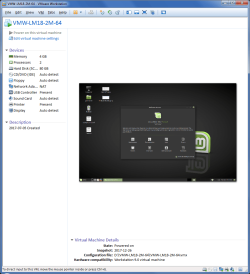
I regularly use a LM18.2 VM in VMware Workstation 9 on a W7 Ultimate Host.
I have VMware Tools installed.
The VM is stored on an SSD.

I not sure that this configuration will protect W7 from Internet malware (when browsing using the VM). :(
VMwWS9 - LM18-2 VM.png
Note:
The screenshot is showing the Console View
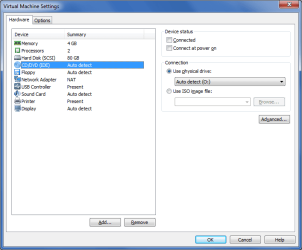
Using VMware, you should be able to create an empty VM and then run the Linux Mint Live CD/DVD/USB/ISO on it, just like you can with real hardware.
VMwWS9 - Use Live Distro.png
You could then test if it works to your satisfaction.
Obviously the Live version will be a bit slow and unresponsive.

I also run Windows VMs in VMware Player 14 on a LM18.3 Host.
I have VMware Tools installed.
I have an XP VM, which I use to play old Windows games and it runs smoothly enough (IMO).
My W10 Pro (1703) VM also runs smoothly (isolated from the network).

Unless you want to run modern games, I would suggest that you use a Linux Host and a Windows VM:

  • You should be able to avoid W7 driver issues
  • Your Linux Host OS shouldn't be affected by Windows malware
  • LM18.3 uses less resources, so more can be allocated to the Windows VM (e.g. cores & RAM)
 

My Computer

Computer type
PC/Desktop
Computer Manufacturer/Model Number
n/a
OS
W7 Ultimate SP1, LM19.2 MATE, W10 Home 1703, W10 Pro 1703 VM, #All 64 bit
CPU
AMD Phenom II x6 1100T, 3.3 GHz
Motherboard
ASUS M4A88T-M/USB3 (AM3)
Memory
12GB DDR3 1333 G-Skill (4GB x 2), G-Skill (2GB x 2)
Graphics Card(s)
NVIDIA GeForce GTX 660
Sound Card
Realtek?
Monitor(s) Displays
Samsung S23B350
Screen Resolution
1920x1080
Hard Drives
WD Green 2TB (SATA), WD Green 3TB (SATA), WD Blue 4TB (SATA), WD Blue 6TB (SATA)
PSU
Cooler Master
Case
Antec GX300 Tower
Cooling
3x Antec TRICOOL 120mm Fans
Mouse
Wired Optical
Internet Speed
DSL
Antivirus
Avast
Browser
Pale Moon (64 bit)
Other Info
2018-12-27 Upgraded HDDs
2015-12-10 Upgraded case, graphics card, storage
2015-08-15 Upgraded motherboard & RAM
2015-07-15 Upgraded LM17.1 to LM17.2
@lehnerus2000


Thanks greatly for that https://www.sevenforums.com/members/lehnerus2000.htmlvery helpful reply. Looking at the details you provided, the setup is close to one I had roughly figured on.

A few questions, if I can:

a) Win7 needs an NFT disk format and an MBR control. Both of these are easily achievable under UEFI "bios" if Secure Boot is disabled and Legacy Boot enabled. Is this an issue at all, do you think ? (I ask because of your comment on MBR)

b) from my experiences with various UNIX/LINUX versions long ago and far away, working drivers for various hardware configs did present problems. Is this still the case, do you think ? I ask this because in the VM setup screens you posted, the network card (eg) is describes as NAT, so I wonder at this ...

c) you suggest that a Linux box running Win7 in the VM installation is best. Could you say why, please, as then I wonder about "activation", product keys etc - all the MS paraphenalia.
 

My Computer

Computer type
Laptop
Computer Manufacturer/Model Number
HP 250 G7
OS
Windows 7 Pro x64
CPU
Intel i5-8265U
Motherboard
Intel Coffee Lake
Memory
8gb
Graphics Card(s)
Intel Iris Plus 655
Sound Card
Realtek HDA
Monitor(s) Displays
Generic
Screen Resolution
1366 x 768
Hard Drives
Crucial P5 NVMe 1Tb internal
WD's 4Tb, 3Tb, 2 x 2Tb external
Mouse
Logi wireless
Internet Speed
45 Mbps
Antivirus
AVG
Browser
Firefox 88, Pale Moon 29, Brave 129
Other Info
Combination of i5-8265U with Crucial P5 achieves Crystal Bench scores > 5000

Iris Plus GPU (Whiskey Lake) driver from BioStar

HP 250 G7 is a budget machine
ian50,

Your questions in post #7 illustrate a common confusion regarding virtual machines. This will become clearer to you once you start working with VMs, but the trick is to pretend a VM is a completely independent machine. It's a separate machine, with its own hard drive, its own sound card, its own network adapter ... albeit, they're all emulated or "virtual", but the point is they are not the same as the real hardware in your host machine.

For illustration, the attached screenshot shows Device Manager running in my host machine (Win7) and Device Manager running in a VirtualBox VM (XP). Notice how different a lot of the hardware devices are. If you can grasp the concept that they are different machines, it will help you put some context around your questions.

A VM has it's own virtual hard disk. Your host machine's disk can be UEFI/GPT/NTFS while your VM's disk is BIOS/MBR/FAT32, for example. They're different machines, so they have no relation to each other. It's a non-issue.

A linux (or Windows) VM will need drivers for the VM's hardware devices, which have no relation to the host's hardware devices. Fortunately, the devices emulated by the virtualization software tend to be more common, popular types, so it's almost a certainty linux (or Windows) drivers are readily available for those devices.

As for your last question, like lehnerus2000 I am running linux VMs (Mint 18 and Ubuntu 16) in a Win7 host, although I'm using VirtualBox while he's using VMware. As for whether it's better to setup Win7 host+linux VM vs. linux host+Win7 VM, I don't think it really matters that much ... though I do note your principle concern is Win7's presumed vulnerability to internet malware.

As Alejandro85 tried to point out to you, Win7 is not going to stop working, and not everyone agrees Win7 will soon become significantly more vulnerable than Win10. But if that is what you're concerned about, then it does change the host vs. VM rationale.

I'll let others address the Windows activation issues (I personally don't see it as a factor, as you'll need to deal with activation regardless of whether it's on the host or the VM), but in terms of potential exposure to malware, it ultimately would be better to have Windows in the VM.

Your host is always going to be exposed to the internet. Your VM is only exposed when you're running the VM. If you think Windows is going to be the more vulnerable OS, then it's better to have it be the VM, where it will be exposed less often.

Note I'm not opining how safe Win7 will be to continue using--that's for another thread. I'm personally not that concerned, but I'm just answering your questions and laying out the rationale.
 

Attachments

  • vbox-xp.jpg
    vbox-xp.jpg
    310.5 KB · Views: 1

My Computer

Computer type
PC/Desktop
Computer Manufacturer/Model Number
Dell Optiplex 7050
OS
Windows 7/8.1/10 multiboot
CPU
Intel Core i7-7700
Motherboard
Dell, Intel Q270 chipset
Memory
48GB (2x16GB Crucial DDR4-3200 + 2x8GB Hynix DDR4-2400)
Graphics Card(s)
Intel HD630 + AMD Radeon R7 450 PCIe
Monitor(s) Displays
Asus VC279 (27")
Screen Resolution
1920x1080
Hard Drives
Toshiba M.2 NVMe (256GB),
Samsung 960 Evo (500GB),
WD Red Plus 80EFBX (8TB)
dg1261

Thank you for your reply.

I need to clear up some misconceptions in your comment first.

a) I do NOT think Win7 will stop working - that particular straw man was fronted up without any evidence. There is newer hardware now being marketed on which Win7 will just not install or run and Win7 drivers are not being developed for these.; a very different issue to "just stop working". I am only "junior" on this forum because I've only been reading here for a month or so. [Some very useful threads]. I do think Win7 will slowly become vulnerable to developing insecurities as MS stops patching it (as have all the previous now unsupported OS's), which is why I am looking at the Win7/Linux setup here, although it's obviously not urgent. I certainly appreciate the relevant comments here.

b) I have used VM's before, so I'm fully aware that they appropriate resources to appear and act as if these resources belong to the VM. That was noted in my first post, but I have only used a Unix box hosting VMWare for a Win client, not the reverse. Please, do not add patronising straw men comments to your useful and relevant ones.

Having cleared that air, your comment on the host always being exposed to the internet is valid, of course. My caution about using a Linux host was really about the hardware drivers being available or not for Linux (an issue I had before, although a long time ago), and then trying to avoid having to recover Win7 from an image file and ditching Linux. Since my earlier post#7, I've installed VirtualBox in a Win7 host and tested Mint18.3 in it. So far, the supplied drivers are ok although I've yet to test the printer capabilities; it does appear that using a Linux host for a VM machine running Win7 won't run into any Linux driver obstacles for simple net purposes when the Linux desktop is used for that purpose.

Yes, Win7 activation as a VM client remains a potential issue, but again none of this is urgent - just interesting.

So despite the minor misunderstandings, the comments from yourself and lehnerus2000 have been very helpful indeed.
 

My Computer

Computer type
Laptop
Computer Manufacturer/Model Number
HP 250 G7
OS
Windows 7 Pro x64
CPU
Intel i5-8265U
Motherboard
Intel Coffee Lake
Memory
8gb
Graphics Card(s)
Intel Iris Plus 655
Sound Card
Realtek HDA
Monitor(s) Displays
Generic
Screen Resolution
1366 x 768
Hard Drives
Crucial P5 NVMe 1Tb internal
WD's 4Tb, 3Tb, 2 x 2Tb external
Mouse
Logi wireless
Internet Speed
45 Mbps
Antivirus
AVG
Browser
Firefox 88, Pale Moon 29, Brave 129
Other Info
Combination of i5-8265U with Crucial P5 achieves Crystal Bench scores > 5000

Iris Plus GPU (Whiskey Lake) driver from BioStar

HP 250 G7 is a budget machine
Hello, is it okay to add some info here, just for the sake of testing without activation?
There's an option from Microsoft website a premade virtual disk for Windows 7, 8, and 10. I think the XP and Vista were taken out. Windows 7 has a four gig size. You can download it and ready to use. It expires after 90 days but you can roll back using a snapshot. I don't know if the free version of VMware has the snapshot but for Virtualbox, it has. Here's the link of virtual disks https://developer.microsoft.com/en-us/microsoft-edge/tools/vms/
 

My Computer

Computer type
PC/Desktop
Computer Manufacturer/Model Number
MSI
OS
Windows 7 guest, Debian host
CPU
AMD FX-6100
Motherboard
880GMS-E41(FX)(MS-7641)
Memory
DDR3/16384 MBytes/2000.6MHz
Graphics Card(s)
AMD Radeon HD 5500 Series
Sound Card
Built-in
Monitor(s) Displays
Samsung SyncMaster S23B300
Screen Resolution
1920x1080
Hard Drives
ST1000DM003-9YN162 ATA Device
WDC WD5000AAKX-00ERMAQ ATA Device
PSU
500W NAXN
Case
APOLLO
Cooling
XY
Keyboard
Logitech
Mouse
Samsung
Internet Speed
.79Mbps/1.71Mbps
Antivirus
Microsoft Security Essentials
Browser
Google Chrome/FireFox/Internet Explorer
Other Info
3in1 creative speaker
Convert Current W7 Install to VM?

a) Win7 needs an NFT disk format and an MBR control. Both of these are easily achievable under UEFI "bios" if Secure Boot is disabled and Legacy Boot enabled. Is this an issue at all, do you think ? (I ask because of your comment on MBR)
I can't really comment on this as my hardware only supports MBR.
I've never used UEFI.
Also I always use AMD based hardware, so I can't comment on any Intel idiosyncrasies.

b) from my experiences with various UNIX/LINUX versions long ago and far away, working drivers for various hardware configs did present problems. Is this still the case, do you think ? I ask this because in the VM setup screens you posted, the network card (eg) is describes as NAT, so I wonder at this ...
When I've installed a Linux Distro, everything has worked out-of-the-box on my PCs, but I generally don't use the latest-and-greatest hardware.
However as many people say "Your Mileage May Vary".

I swapped from Ubuntu 10.04 to Linux Mint in 2013 when I couldn't get my new graphics card to work correctly (I hated Unity so Ubuntu 12.04 was unacceptable).

I chose NAT (Network Address Translation) for the network settings as I hoped it would provide additional protection compared to using the "Bridged" option.

c) you suggest that a Linux box running Win7 in the VM installation is best. Could you say why, please, as then I wonder about "activation", product keys etc - all the MS paraphenalia.
My reasons are:
Unless you want to run modern games, I would suggest that you use a Linux Host and a Windows VM:

  • You should be able to avoid W7 driver issues
  • Your Linux Host OS shouldn't be affected by Windows malware
  • LM18.3 uses less resources, so more can be allocated to the Windows VM (e.g. cores & RAM)
Also as dg1261 posted:
I'll let others address the Windows activation issues (I personally don't see it as a factor, as you'll need to deal with activation regardless of whether it's on the host or the VM), but in terms of potential exposure to malware, it ultimately would be better to have Windows in the VM.

Your host is always going to be exposed to the internet. Your VM is only exposed when you're running the VM. If you think Windows is going to be the more vulnerable OS, then it's better to have it be the VM, where it will be exposed less often.
You should be able to activate W7 normally even if it is a VM.
However MS wants everyone to move to W10, so they may throw up obstacles.

You could try converting your current Activated W7 install to a VM (via a Macrium Reflect Image).
Convert a Macrium Reflect Image to a VM.

Your PC may struggle as your CPU doesn't have much grunt and your Total RAM is only 4GB. :(
 

My Computer

Computer type
PC/Desktop
Computer Manufacturer/Model Number
n/a
OS
W7 Ultimate SP1, LM19.2 MATE, W10 Home 1703, W10 Pro 1703 VM, #All 64 bit
CPU
AMD Phenom II x6 1100T, 3.3 GHz
Motherboard
ASUS M4A88T-M/USB3 (AM3)
Memory
12GB DDR3 1333 G-Skill (4GB x 2), G-Skill (2GB x 2)
Graphics Card(s)
NVIDIA GeForce GTX 660
Sound Card
Realtek?
Monitor(s) Displays
Samsung S23B350
Screen Resolution
1920x1080
Hard Drives
WD Green 2TB (SATA), WD Green 3TB (SATA), WD Blue 4TB (SATA), WD Blue 6TB (SATA)
PSU
Cooler Master
Case
Antec GX300 Tower
Cooling
3x Antec TRICOOL 120mm Fans
Mouse
Wired Optical
Internet Speed
DSL
Antivirus
Avast
Browser
Pale Moon (64 bit)
Other Info
2018-12-27 Upgraded HDDs
2015-12-10 Upgraded case, graphics card, storage
2015-08-15 Upgraded motherboard & RAM
2015-07-15 Upgraded LM17.1 to LM17.2
Botard

Thanks for that information. I'd played with the virtual disks of XP in VM's ages ago but didn't keep up with the addition of the Win7 OS.

Very helpful, thank you.
 

My Computer

Computer type
Laptop
Computer Manufacturer/Model Number
HP 250 G7
OS
Windows 7 Pro x64
CPU
Intel i5-8265U
Motherboard
Intel Coffee Lake
Memory
8gb
Graphics Card(s)
Intel Iris Plus 655
Sound Card
Realtek HDA
Monitor(s) Displays
Generic
Screen Resolution
1366 x 768
Hard Drives
Crucial P5 NVMe 1Tb internal
WD's 4Tb, 3Tb, 2 x 2Tb external
Mouse
Logi wireless
Internet Speed
45 Mbps
Antivirus
AVG
Browser
Firefox 88, Pale Moon 29, Brave 129
Other Info
Combination of i5-8265U with Crucial P5 achieves Crystal Bench scores > 5000

Iris Plus GPU (Whiskey Lake) driver from BioStar

HP 250 G7 is a budget machine
@lehnerus2000

Again, thank you for your thoughtful and detailed reply at #11.

Your comment that MS is pushing people onto Win10 underlies my initial motivation for this topic. Intel has agreed (aquiesced ?) to this in that Intel CPU's higher than G6 (ie. G7, G8 to date) will not install or run Win7 together with various Intel wifi and audio chips. Slowly, as one's hardware breaks down, replacing it will push Win7 out into the cold. That will take a while, though - I ran a backup Win2k/XP notebook installation that took about 15 years to fall off its' twig.

"Converting a Macrium Reflect image to a VM" - wonderful !! I'd dismissed that possibility as being too optimistic, too Pollyanna, to be viable. Yet it's not, it seems. Activation is an issue - MS has required PC manufacturers to encode the Product Key in the BIOS (now UEFI) since Win7, then "activate" it online after installation. If you install a legally purchased Win7 ISO over this, the BIOS encode remains but the new Product Key and online activation are now entered into the Registry. So a Macrium Reflect image restores these Registry settings into the VM and overcomes the activation issue ... I think :confused:

So again, very helpful comment. Something to test that may resolve a pointed issue.
 

My Computer

Computer type
Laptop
Computer Manufacturer/Model Number
HP 250 G7
OS
Windows 7 Pro x64
CPU
Intel i5-8265U
Motherboard
Intel Coffee Lake
Memory
8gb
Graphics Card(s)
Intel Iris Plus 655
Sound Card
Realtek HDA
Monitor(s) Displays
Generic
Screen Resolution
1366 x 768
Hard Drives
Crucial P5 NVMe 1Tb internal
WD's 4Tb, 3Tb, 2 x 2Tb external
Mouse
Logi wireless
Internet Speed
45 Mbps
Antivirus
AVG
Browser
Firefox 88, Pale Moon 29, Brave 129
Other Info
Combination of i5-8265U with Crucial P5 achieves Crystal Bench scores > 5000

Iris Plus GPU (Whiskey Lake) driver from BioStar

HP 250 G7 is a budget machine
I have windows 10 as host xp, Ubuntu, win 7 and Phoenix OS, as guests ....sometimes I run all at once noe issues
 

My Computer

OS
Windows 10
Which VM are you using ? And, I guess, how much RAM do you have to allocate to each of these ?

Most interesting to me - I'm assuming the Win7 installation is in a VM (if that's wrong, please correct me) with a Win10 host. How did you activate the VM Win7 install ? Lehnerus2000 above has suggested deploying a Win7 Macrium Reflect image into the VM - I have yet to test this but it seems a very likely solution.
 

My Computer

Computer type
Laptop
Computer Manufacturer/Model Number
HP 250 G7
OS
Windows 7 Pro x64
CPU
Intel i5-8265U
Motherboard
Intel Coffee Lake
Memory
8gb
Graphics Card(s)
Intel Iris Plus 655
Sound Card
Realtek HDA
Monitor(s) Displays
Generic
Screen Resolution
1366 x 768
Hard Drives
Crucial P5 NVMe 1Tb internal
WD's 4Tb, 3Tb, 2 x 2Tb external
Mouse
Logi wireless
Internet Speed
45 Mbps
Antivirus
AVG
Browser
Firefox 88, Pale Moon 29, Brave 129
Other Info
Combination of i5-8265U with Crucial P5 achieves Crystal Bench scores > 5000

Iris Plus GPU (Whiskey Lake) driver from BioStar

HP 250 G7 is a budget machine
Welllllllll I av vmware workstation..... and yes win 10 is host as it's best for majority of graphics applications cad gaming etc ....licensing mhhhhhh let's just say they are easily has through various means
 
Last edited:

My Computer

OS
Windows 10
I thought the original point was to avoid W10 and continuing to use W7. :)

OTOH, If you want to play the latest games, you probably have no choice but to run W10. :(
 

My Computer

Computer type
PC/Desktop
Computer Manufacturer/Model Number
n/a
OS
W7 Ultimate SP1, LM19.2 MATE, W10 Home 1703, W10 Pro 1703 VM, #All 64 bit
CPU
AMD Phenom II x6 1100T, 3.3 GHz
Motherboard
ASUS M4A88T-M/USB3 (AM3)
Memory
12GB DDR3 1333 G-Skill (4GB x 2), G-Skill (2GB x 2)
Graphics Card(s)
NVIDIA GeForce GTX 660
Sound Card
Realtek?
Monitor(s) Displays
Samsung S23B350
Screen Resolution
1920x1080
Hard Drives
WD Green 2TB (SATA), WD Green 3TB (SATA), WD Blue 4TB (SATA), WD Blue 6TB (SATA)
PSU
Cooler Master
Case
Antec GX300 Tower
Cooling
3x Antec TRICOOL 120mm Fans
Mouse
Wired Optical
Internet Speed
DSL
Antivirus
Avast
Browser
Pale Moon (64 bit)
Other Info
2018-12-27 Upgraded HDDs
2015-12-10 Upgraded case, graphics card, storage
2015-08-15 Upgraded motherboard & RAM
2015-07-15 Upgraded LM17.1 to LM17.2
Win 10 is not half bad ...better than 7 to me n I use tons of old software ...And I find that all of my stuff are compatible with 10
 

My Computer

OS
Windows 10
lehnerus2000

" ... the original point was to avoid W10 and continuing to use W7"

Well, that's my point, anyway.

But how to install Win7 into a Linux VM and handle the activation issue is one of the considerations. Your suggested solution of installing a Macrium Reflect image into the VM is still the most potent. The Macrium website page that you linked to discusses the legal methods of deploying a full Win7 image into a VM. I'm looking at that carefully now - it needs the commercial version of Macrium, which is not necessarily so cheap - and it seems a good answer.

I've also looked at the Linux sites for experiences of the ins and outs of VM's with various versions of Ubuntu. A hornet's nest at times with furious kernel swaps and changes of versions, but both VBox and Linux are freeware so coping is the obvious choice.

You've been very helpful here.
 

My Computer

Computer type
Laptop
Computer Manufacturer/Model Number
HP 250 G7
OS
Windows 7 Pro x64
CPU
Intel i5-8265U
Motherboard
Intel Coffee Lake
Memory
8gb
Graphics Card(s)
Intel Iris Plus 655
Sound Card
Realtek HDA
Monitor(s) Displays
Generic
Screen Resolution
1366 x 768
Hard Drives
Crucial P5 NVMe 1Tb internal
WD's 4Tb, 3Tb, 2 x 2Tb external
Mouse
Logi wireless
Internet Speed
45 Mbps
Antivirus
AVG
Browser
Firefox 88, Pale Moon 29, Brave 129
Other Info
Combination of i5-8265U with Crucial P5 achieves Crystal Bench scores > 5000

Iris Plus GPU (Whiskey Lake) driver from BioStar

HP 250 G7 is a budget machine
Win 10 is not half bad ...better than 7 to me n I use tons of old software ...And I find that all of my stuff are compatible with 10
If you don't mind the always-on Telemetry and you can stop it from installing dodgy drivers/updates/upgrades, W10 runs smoothly.

I got sick of having to spend hours fixing W10 after updating/upgrading. :sick:
Now I keep my W10 Home and W10 Pro VM disconnected from our network.
Its the only way to be sure W10 can't send Telemetry, or download dodgy drivers/updates/upgrades.

@lehnerus2000

" ... the original point was to avoid W10 and continuing to use W7"

Well, that's my point, anyway.
That's what I thought. :)

But how to install Win7 into a Linux VM and handle the activation issue is one of the considerations. Your suggested solution of installing a Macrium Reflect image into the VM is still the most potent. The Macrium website page that you linked to discusses the legal methods of deploying a full Win7 image into a VM. I'm looking at that carefully now - it needs the commercial version of Macrium, which is not necessarily so cheap - and it seems a good answer.
I'm using Macrium Reflect Free (v6.3).
I've created VMs from Macrium Reflect Free Images.

It should be straightforward if your PC only has one OS installed.
You may need a W7 install disc if you have boot issues.

Macrium Reflect does include a Boot Repair tool, but I haven't used it, so I can't comment.
Make sure you create the Macrium Reflect Recovery disc before you start experimenting.

My PCs are multi-boot and I've never been able to get more than one OS to work after the "Image to VHD" conversion.
I tried to create a VM of my triple boot system (XP, W7 & LM) but I ended up having to create 3 separate VMs.

I used this (old) procedure:
http://kb.macrium.com/knowledgebasearticle50005.aspx
 

My Computer

Computer type
PC/Desktop
Computer Manufacturer/Model Number
n/a
OS
W7 Ultimate SP1, LM19.2 MATE, W10 Home 1703, W10 Pro 1703 VM, #All 64 bit
CPU
AMD Phenom II x6 1100T, 3.3 GHz
Motherboard
ASUS M4A88T-M/USB3 (AM3)
Memory
12GB DDR3 1333 G-Skill (4GB x 2), G-Skill (2GB x 2)
Graphics Card(s)
NVIDIA GeForce GTX 660
Sound Card
Realtek?
Monitor(s) Displays
Samsung S23B350
Screen Resolution
1920x1080
Hard Drives
WD Green 2TB (SATA), WD Green 3TB (SATA), WD Blue 4TB (SATA), WD Blue 6TB (SATA)
PSU
Cooler Master
Case
Antec GX300 Tower
Cooling
3x Antec TRICOOL 120mm Fans
Mouse
Wired Optical
Internet Speed
DSL
Antivirus
Avast
Browser
Pale Moon (64 bit)
Other Info
2018-12-27 Upgraded HDDs
2015-12-10 Upgraded case, graphics card, storage
2015-08-15 Upgraded motherboard & RAM
2015-07-15 Upgraded LM17.1 to LM17.2
Back
Top