Solved Win7 not recognising new 3rd HDD

OldNick

New member
Member
Local time
8:02 PM
Messages
68
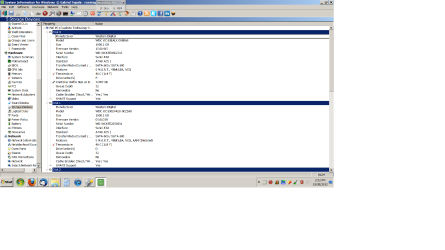
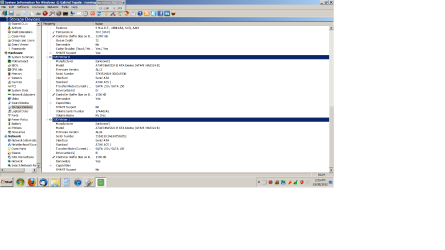
The BIOS sees it. System Info for Windows sees it, but shows no drive letter. Device Mangler lists all 3 drives, but is not much help because Properties shows no Volume or capacity for any of the HDDs.

Can I assume this drive is an unformatted blank? How do I format it if Win is not seeing it?

Any help really appreciated.
 

My Computer My Computer

Computer Manufacturer/Model Number
HP Compaq 620
OS
Windows 7 Home Premium 32bit
CPU
Intel
Motherboard
Don't know
Memory
2GB
Graphics Card(s)
onboard
Sound Card
onboard
Monitor(s) Displays
inbuilt
Hard Drives
250GB WD 7200
PSU
inbuilt
Case
laptop
Cooling
???
Before we can offer the best advice we need to see a screenshot of your fully-expanded disk management layout please.

By fully-expanded, we need to see not only the partitions but a full view of their respective titles.

If the drive hasn't been partitioned Windows won't see it.
 

My Computer My Computer

Computer Manufacturer/Model Number
HP Pavilion Elite 495UK
OS
Windows 7 Ultimate SP1 64-Bit
CPU
Intel Core i7 870 @ 2.93GHz
Motherboard
MSI 2A9C (CPU1)
Memory
8Gb Dual-Channel DDR3 @ 664MHz
Graphics Card(s)
nVidia GeForce GTX 460 1024MB dedicated RAM
Sound Card
Realtek HD Audio
Monitor(s) Displays
HP2310i
Screen Resolution
1920 x 1080
Hard Drives
1x1954GB Hitachi HDS22020ALA 330 (RAID), 1x1954GB Hitachi External for backup and storage
PSU
460W
Case
HP Elite
Cooling
Air cooled
Keyboard
Logitech K750 solar-powered keyboard
Mouse
Logitech Wireless M180 mouse
Internet Speed
2Mb
Other Info
Pure Avanti Flow Internet Radio with iPod Dock, 64Gb iPod, HP USB Speakers, Sony MDR-V500 Headphones, Sony Vaio F-Series Laptop
Thanks for the reply. I am not sure what you mean, but I hope thsi works.
 

Attachments

  • discs1.png
    discs1.png
    65.6 KB · Views: 11
  • discs2.png
    discs2.png
    66 KB · Views: 7
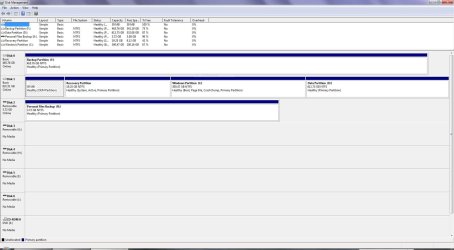
  • discs3.png
    discs3.png
    66.1 KB · Views: 5

My Computer My Computer

Computer Manufacturer/Model Number
HP Compaq 620
OS
Windows 7 Home Premium 32bit
CPU
Intel
Motherboard
Don't know
Memory
2GB
Graphics Card(s)
onboard
Sound Card
onboard
Monitor(s) Displays
inbuilt
Hard Drives
250GB WD 7200
PSU
inbuilt
Case
laptop
Cooling
???
No... what is needed is a screenshot from running DISKMGMT.MSC.

Then maximize it to full-screen and spread the columns so that the test in each cell of the upper-half is fully readable.
 

My Computer My Computer

Computer type
PC/Desktop
Computer Manufacturer/Model Number
Home-built, two systems (1) and (2)
OS
Windows 7 Pro x64 (1), Win7 Pro X64 (2)
CPU
i5-3350p 3.1Ghz/6MB-cache (1); E8400 3.0Ghz/6MB-cache (2)
Motherboard
ASUS P8Z77-V Pro (1); ASUS P5Q3 (2)
Memory
8GB PC3-12800 DDR3 (1); 4GB PC3-10600 DDR3 (2)
Graphics Card(s)
ATI HD7750 (1), (see TV cards); ATI R7 250 (2)
Sound Card
Realtek ALC892 HD Audio (1); Realtek ALC1200 HD Audio (2)
Monitor(s) Displays
Eizo HD2441W LCD, Eizo S2433W (1); Eizo 24" S2433W (2)
Screen Resolution
1920x1200, 1920x1200 (1); 1920x1200 (2)
Hard Drives
(1) 1TB SATA-II (7200RPM), 2x2TB SATA-III (7200RPM), 250GB SATA-III (10000RPM) for OS; 2x2TB external USB 3.0

(2) 320GB SATA-II (7200RPM), 750GB SATA-II (7200RPM), 150GB SATA-II (10000RPM) for OS; 2TB external USB 3.0
PSU
Nesteq ECS-6001 600W (1); Nesteq ECS-5001 500W (2)
Case
Acousti-Case 360 (1) and (2)
Cooling
Noctua NH-U12P SE2 for CPU, 2x120mm case fans (1) and (2)
Keyboard
IBM PS/2 (1) and (2)
Mouse
Logitech MX Revolution wireless (1); Microsoft wired (2)
Internet Speed
100mbps down / 10mbps up
Antivirus
Microsoft Security Essentials; Malwarebyte Anti-Malware Pro
Browser
Firefox
Other Info
Ceton InfiniTV 4-tuner cablecard-enabled TV card as well as Hauppauge HVR-2250 OTA/ATSC 2-tuner TV card in (1), running under Win7 WMC
This is what we need.

DM.JPG
 

My Computer My Computer

Computer Manufacturer/Model Number
HP Pavilion Elite 495UK
OS
Windows 7 Ultimate SP1 64-Bit
CPU
Intel Core i7 870 @ 2.93GHz
Motherboard
MSI 2A9C (CPU1)
Memory
8Gb Dual-Channel DDR3 @ 664MHz
Graphics Card(s)
nVidia GeForce GTX 460 1024MB dedicated RAM
Sound Card
Realtek HD Audio
Monitor(s) Displays
HP2310i
Screen Resolution
1920 x 1080
Hard Drives
1x1954GB Hitachi HDS22020ALA 330 (RAID), 1x1954GB Hitachi External for backup and storage
PSU
460W
Case
HP Elite
Cooling
Air cooled
Keyboard
Logitech K750 solar-powered keyboard
Mouse
Logitech Wireless M180 mouse
Internet Speed
2Mb
Other Info
Pure Avanti Flow Internet Radio with iPod Dock, 64Gb iPod, HP USB Speakers, Sony MDR-V500 Headphones, Sony Vaio F-Series Laptop
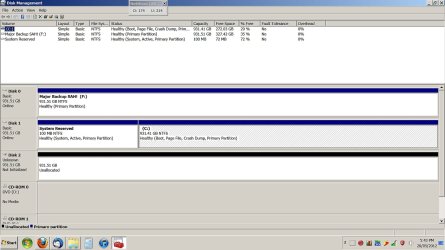
Thanks again guys. I think I am seeing the answer but I will ask you to confirm. The disk is a blank.

See attached, but also when I ran diskmgmt.msc I was told that I had to initialise the new drive before it could be used. That seems pretty definitive.

EDIT: Uploaded a better shot.
 

Attachments

  • better discs.jpg
    better discs.jpg
    116.6 KB · Views: 7
Last edited:

My Computer My Computer

Computer Manufacturer/Model Number
HP Compaq 620
OS
Windows 7 Home Premium 32bit
CPU
Intel
Motherboard
Don't know
Memory
2GB
Graphics Card(s)
onboard
Sound Card
onboard
Monitor(s) Displays
inbuilt
Hard Drives
250GB WD 7200
PSU
inbuilt
Case
laptop
Cooling
???
Initialising a drive is the same as giving the drive a partition.

Every new drive needs to be intialised and formatted before you can use it.

Just right-click the drive in question, choose the option to create a new volume (partition), then give the new partition a quick format and a drive letter.

Windows should then see it, but you may need to reboot first.
 

My Computer My Computer

Computer Manufacturer/Model Number
HP Pavilion Elite 495UK
OS
Windows 7 Ultimate SP1 64-Bit
CPU
Intel Core i7 870 @ 2.93GHz
Motherboard
MSI 2A9C (CPU1)
Memory
8Gb Dual-Channel DDR3 @ 664MHz
Graphics Card(s)
nVidia GeForce GTX 460 1024MB dedicated RAM
Sound Card
Realtek HD Audio
Monitor(s) Displays
HP2310i
Screen Resolution
1920 x 1080
Hard Drives
1x1954GB Hitachi HDS22020ALA 330 (RAID), 1x1954GB Hitachi External for backup and storage
PSU
460W
Case
HP Elite
Cooling
Air cooled
Keyboard
Logitech K750 solar-powered keyboard
Mouse
Logitech Wireless M180 mouse
Internet Speed
2Mb
Other Info
Pure Avanti Flow Internet Radio with iPod Dock, 64Gb iPod, HP USB Speakers, Sony MDR-V500 Headphones, Sony Vaio F-Series Laptop
OK. Thanks.

I was worried that maybe Win 7 was not seeing the drive, although it had data on it. I realise that an empt6y drive will not be seen by Windows. I was worried that somehow Windows would not see a drive that _did_ have data on it. I think that has happened.....:)

As I said, when I started to use the diskmgmt.msc utility, I started to believe that the disc was empty.

So. Thanks for the help guys, again.
 

My Computer My Computer

Computer Manufacturer/Model Number
HP Compaq 620
OS
Windows 7 Home Premium 32bit
CPU
Intel
Motherboard
Don't know
Memory
2GB
Graphics Card(s)
onboard
Sound Card
onboard
Monitor(s) Displays
inbuilt
Hard Drives
250GB WD 7200
PSU
inbuilt
Case
laptop
Cooling
???
You're very welcome.

If you feel your problem has been resolved, please mark the thread as solved.

If you need further help, don't hesitate to post back.
 

My Computer My Computer

Computer Manufacturer/Model Number
HP Pavilion Elite 495UK
OS
Windows 7 Ultimate SP1 64-Bit
CPU
Intel Core i7 870 @ 2.93GHz
Motherboard
MSI 2A9C (CPU1)
Memory
8Gb Dual-Channel DDR3 @ 664MHz
Graphics Card(s)
nVidia GeForce GTX 460 1024MB dedicated RAM
Sound Card
Realtek HD Audio
Monitor(s) Displays
HP2310i
Screen Resolution
1920 x 1080
Hard Drives
1x1954GB Hitachi HDS22020ALA 330 (RAID), 1x1954GB Hitachi External for backup and storage
PSU
460W
Case
HP Elite
Cooling
Air cooled
Keyboard
Logitech K750 solar-powered keyboard
Mouse
Logitech Wireless M180 mouse
Internet Speed
2Mb
Other Info
Pure Avanti Flow Internet Radio with iPod Dock, 64Gb iPod, HP USB Speakers, Sony MDR-V500 Headphones, Sony Vaio F-Series Laptop
I'm still not quite sure. The diskmgmt.msc app is still under windows. Can I be sure that the drive is empty, based on what I am seeing? I do not want to unnecessarily lose data. As I say I would just like confirmation.
 

My Computer My Computer

Computer Manufacturer/Model Number
HP Compaq 620
OS
Windows 7 Home Premium 32bit
CPU
Intel
Motherboard
Don't know
Memory
2GB
Graphics Card(s)
onboard
Sound Card
onboard
Monitor(s) Displays
inbuilt
Hard Drives
250GB WD 7200
PSU
inbuilt
Case
laptop
Cooling
???
I am sorry. I should clarify. I called this a new drive. But it's not new. It is a drive that I had in the cupboard. It came from another PC and I am surprised that it is blank/empty. That is why I am being cautious.
 

My Computer My Computer

Computer Manufacturer/Model Number
HP Compaq 620
OS
Windows 7 Home Premium 32bit
CPU
Intel
Motherboard
Don't know
Memory
2GB
Graphics Card(s)
onboard
Sound Card
onboard
Monitor(s) Displays
inbuilt
Hard Drives
250GB WD 7200
PSU
inbuilt
Case
laptop
Cooling
???
There can be no data in unallocated space.
 

My Computer My Computer

Computer Manufacturer/Model Number
HP, Dell, Gateway, Toshiba - 4 laptops and 2 desktops
OS
Vista, Windows7, Mint Mate, Zorin, Windows 8
CPU
from 1.6GHz Duo to i7
Monitor(s) Displays
2x HP w2207
Hard Drives
5x HDD, 7x SSD, 12x Externals
Keyboard
with trackball - no mices
Mouse
Trackball mice
Internet Speed
DSL 6000
Ok. Thanks. I have done some silly things recently with computers and I wanted to be sure.

BTW your reply sounds like a good line for a SciFi movie. :D

"There can be no data in unallocated space......"

Off to format a disc and thank you all. I will mark as solved.
 

My Computer My Computer

Computer Manufacturer/Model Number
HP Compaq 620
OS
Windows 7 Home Premium 32bit
CPU
Intel
Motherboard
Don't know
Memory
2GB
Graphics Card(s)
onboard
Sound Card
onboard
Monitor(s) Displays
inbuilt
Hard Drives
250GB WD 7200
PSU
inbuilt
Case
laptop
Cooling
???
You're very welcome.

If it's any consolation to you, we've all done silly things with a computer, it was ever thus. :)
 

My Computer My Computer

Computer Manufacturer/Model Number
HP Pavilion Elite 495UK
OS
Windows 7 Ultimate SP1 64-Bit
CPU
Intel Core i7 870 @ 2.93GHz
Motherboard
MSI 2A9C (CPU1)
Memory
8Gb Dual-Channel DDR3 @ 664MHz
Graphics Card(s)
nVidia GeForce GTX 460 1024MB dedicated RAM
Sound Card
Realtek HD Audio
Monitor(s) Displays
HP2310i
Screen Resolution
1920 x 1080
Hard Drives
1x1954GB Hitachi HDS22020ALA 330 (RAID), 1x1954GB Hitachi External for backup and storage
PSU
460W
Case
HP Elite
Cooling
Air cooled
Keyboard
Logitech K750 solar-powered keyboard
Mouse
Logitech Wireless M180 mouse
Internet Speed
2Mb
Other Info
Pure Avanti Flow Internet Radio with iPod Dock, 64Gb iPod, HP USB Speakers, Sony MDR-V500 Headphones, Sony Vaio F-Series Laptop
HAH! I do wish to comment that this has been a really direct and helpful thread. They can otherwise sometimes. This was excellent. That's not a "feel good" I reckon good news should get back as well, sometimes.
 

My Computer My Computer

Computer Manufacturer/Model Number
HP Compaq 620
OS
Windows 7 Home Premium 32bit
CPU
Intel
Motherboard
Don't know
Memory
2GB
Graphics Card(s)
onboard
Sound Card
onboard
Monitor(s) Displays
inbuilt
Hard Drives
250GB WD 7200
PSU
inbuilt
Case
laptop
Cooling
???
We're just pleased your problem has been solved.
 

My Computer My Computer

Computer Manufacturer/Model Number
HP Pavilion Elite 495UK
OS
Windows 7 Ultimate SP1 64-Bit
CPU
Intel Core i7 870 @ 2.93GHz
Motherboard
MSI 2A9C (CPU1)
Memory
8Gb Dual-Channel DDR3 @ 664MHz
Graphics Card(s)
nVidia GeForce GTX 460 1024MB dedicated RAM
Sound Card
Realtek HD Audio
Monitor(s) Displays
HP2310i
Screen Resolution
1920 x 1080
Hard Drives
1x1954GB Hitachi HDS22020ALA 330 (RAID), 1x1954GB Hitachi External for backup and storage
PSU
460W
Case
HP Elite
Cooling
Air cooled
Keyboard
Logitech K750 solar-powered keyboard
Mouse
Logitech Wireless M180 mouse
Internet Speed
2Mb
Other Info
Pure Avanti Flow Internet Radio with iPod Dock, 64Gb iPod, HP USB Speakers, Sony MDR-V500 Headphones, Sony Vaio F-Series Laptop
I am sorry. I should clarify. I called this a new drive. But it's not new. It is a drive that I had in the cupboard. It came from another PC and I am surprised that it is blank/empty. That is why I am being cautious.
If you FORMAT this drive then any data previously on it is [theoretically] lost.

The fact that you say it "is not new", but that "I had it in the cupboard, and it came from another PC" is consistent with your "I am surprised that it is blank/empty". But of course the mystery is why it doesn't appear to have a partition on it, nor any file type (e.g. NTFS).

What was the old computer machine environment from which it came? Was it previously FAT, FAT32, NTFS, from a Mac, what?

I suspect that if you go ahead and create a new partition on what Windows believes is an "empty" drive that you've really lost access to whatever was there before.

What was this drive in its previous life???

You've checked this thread as "solved", but was it really? Did you actually create a partition (say as NTFS) and all of your previous data on this drive was still there? I can't imagine that would be true.

So exactly what does "solved" mean? Is the drive now simply 100% empty and usable under Windows, but with all previous data lost and that's acceptable? Or what?
 

My Computer My Computer

Computer type
PC/Desktop
Computer Manufacturer/Model Number
Home-built, two systems (1) and (2)
OS
Windows 7 Pro x64 (1), Win7 Pro X64 (2)
CPU
i5-3350p 3.1Ghz/6MB-cache (1); E8400 3.0Ghz/6MB-cache (2)
Motherboard
ASUS P8Z77-V Pro (1); ASUS P5Q3 (2)
Memory
8GB PC3-12800 DDR3 (1); 4GB PC3-10600 DDR3 (2)
Graphics Card(s)
ATI HD7750 (1), (see TV cards); ATI R7 250 (2)
Sound Card
Realtek ALC892 HD Audio (1); Realtek ALC1200 HD Audio (2)
Monitor(s) Displays
Eizo HD2441W LCD, Eizo S2433W (1); Eizo 24" S2433W (2)
Screen Resolution
1920x1200, 1920x1200 (1); 1920x1200 (2)
Hard Drives
(1) 1TB SATA-II (7200RPM), 2x2TB SATA-III (7200RPM), 250GB SATA-III (10000RPM) for OS; 2x2TB external USB 3.0

(2) 320GB SATA-II (7200RPM), 750GB SATA-II (7200RPM), 150GB SATA-II (10000RPM) for OS; 2TB external USB 3.0
PSU
Nesteq ECS-6001 600W (1); Nesteq ECS-5001 500W (2)
Case
Acousti-Case 360 (1) and (2)
Cooling
Noctua NH-U12P SE2 for CPU, 2x120mm case fans (1) and (2)
Keyboard
IBM PS/2 (1) and (2)
Mouse
Logitech MX Revolution wireless (1); Microsoft wired (2)
Internet Speed
100mbps down / 10mbps up
Antivirus
Microsoft Security Essentials; Malwarebyte Anti-Malware Pro
Browser
Firefox
Other Info
Ceton InfiniTV 4-tuner cablecard-enabled TV card as well as Hauppauge HVR-2250 OTA/ATSC 2-tuner TV card in (1), running under Win7 WMC
Thanks for the reply.

Having used the diskmgmt.msc tool and seen that it, too could not find anything, I went ahead and formatted the drive.

I figured two things: the data could not be devastatingly critical :D and recovering it was not going to be easy.

So yes. I was happy to accept that there was no data on the drive, and it's now formatted and ready to use as an empty drive.

Like you I am puzzled why the drive should show as completely blank and unformatted. I am not able to tell you what its history was, regarding file systems etc. To be honest I needed some more storage space, and found this drive.
 

My Computer My Computer

Computer Manufacturer/Model Number
HP Compaq 620
OS
Windows 7 Home Premium 32bit
CPU
Intel
Motherboard
Don't know
Memory
2GB
Graphics Card(s)
onboard
Sound Card
onboard
Monitor(s) Displays
inbuilt
Hard Drives
250GB WD 7200
PSU
inbuilt
Case
laptop
Cooling
???
Back
Top