Win7 not updated in very long time having issues

freedda

New member
Local time
12:02 PM
Messages
1
My laptop has sat idle for about a year. Today I charged it, started it up, and the first thing I tried was to initiate windows updates. It keeps saying I have 10 updates, but it fails to download them.

In suspect that I may have to first find earlier updates and install them as a sort of precursor to installing the more recent updates.

So, would installing the System Update Readiness Tool help me?
Any other suggestions (from a non-tech person)?

Thanks, David.
 

My Computer My Computer

Computer type
Laptop
Computer Manufacturer/Model Number
Lenovo
OS
WA - Washington

My Computer My Computer

Computer type
PC/Desktop
Computer Manufacturer/Model Number
medionl/Aspire 6930G/acer x55a
OS
W7 home premium 32bit/W7HP 64bit/w10 tp insider ring
CPU
E5300 dual core
Motherboard
medion MS7366
Memory
3gb
Graphics Card(s)
Nvidia Geforce 7100 Nforce 630i
Monitor(s) Displays
avixc
Internet Speed
n (isp resticted to 72)
Antivirus
mse/pands
Browser
palemoon
Other Info
Belkin Fd7050 n USB using Railink RT2870 drivers, more upto date
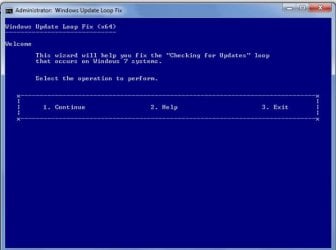
Fix:Windows 7 Update stuck on "Checking for updates"

About two weeks ago, I had this checking for updates loop when I tried to update my Zotac mini-PC paired with my LG TV. ( It hadn't been updated for over a year :D)

This recent article (30 Jun 2017) by aakkam22 helped me to Fix: Windows 7 Update stuck on "Checking for updates" https://answers.microsoft.com/en-us...-updates/ad6cfeef-232a-49b4-a57b-39978eea6630

Just run the x64 or x32 wizard.bat ( appropriate for your system) and follow the instructions. The whole process takes quite a bit of time but saves you manually carrying out the various steps. Makes life easy for the lazy. :)

20-09-2017 22-39-25.jpg

:note: Note: The Wizard works very well but only on windows 7 SP1.
So if you want to run it on Windows 7, make sure that you have Windows 7 SP1. Otherwise
you must first install the SP1-update manually.
 
Last edited:

My Computer My Computer

OS
Windows 7 Home Premium 32 bit
Back
Top