Win7/OL 2016 - Can't display some HTML msgs becasue IE can't open them

JackPollack

New member
Local time
5:56 AM
Messages
20
Windows 7 & Outlook 2016 - Can't display some embedded HTML images

Using Windows 7 with Outlook 2016.

Some HTML emails with external embedded pictures are not showing the pictures. When I read those messages they cause a schannel error 36887 (error 40 & 70) in the event log.

If I'm not mistaken HTML messages get rendered in Outlook using Internet Explorer.

I can certainly replocate the errors in Internet Explorer by trying to open the url to the embedded picture directly in IE
This link in IE https://www.askwoody.com/wp-content/...-fastie-so.png for example gives the following error
"This page can’t be displayed
Turn on SSL 3.0, TLS 1.0, TLS 1.1 and TLS 1.2 in Advanced settings"


Untitled.jpg

I Think I have the latest Win7 update that added TLS etc. (I'm no sure what KB it was). My IE options/advanced have SSL2, SSL3, TLS1, TLS1.1, TLS1.2 (SSL2, SSL3 are unchecked). I have tried turning on/off different combinations of these protocols but still can't connect to the example site above.

My default browser for web browsing is FireFox, but as I said earlier I think that OL still uses IE to render HTML

I'm not sure why IE cant make a secure connection. Could it be a SSL cert issue?
Any way to update the IE certs if needed?
Any way to fix this at an OS level or to have Outlook use a different HTML rendering engine?

I dont not have Edge installed. My default browser is FireFox

Thanks in advance
 
Last edited:

My Computer My Computer

At a glance

Windows 7 64
OS
Windows 7 64
W7 IE11 is no longer supported, use another browser/program/app to open them
 

My Computer My Computer

At a glance

W7 home premium 32bit/W7HP 64bit/w10 tp insid...E5300 dual core3gbNvidia Geforce 7100 Nforce 630i
Computer type
PC/Desktop
Computer Manufacturer/Model Number
medionl/Aspire 6930G/acer x55a
OS
W7 home premium 32bit/W7HP 64bit/w10 tp insider ring
CPU
E5300 dual core
Motherboard
medion MS7366
Memory
3gb
Graphics Card(s)
Nvidia Geforce 7100 Nforce 630i
Monitor(s) Displays
avixc
Internet Speed
n (isp resticted to 72)
Antivirus
mse/pands
Browser
palemoon
Other Info
Belkin Fd7050 n USB using Railink RT2870 drivers, more upto date
not helpful!
 

My Computer My Computer

At a glance

Windows 7 64
OS
Windows 7 64
I don't use Outlook for various reasons. I originally thought your issue was SNI related, but it appears Internet Explorer supports SNI as of version 7 in Vista. It was XP that didn't support SNI. There are many websites that use SNI (think shared servers) I think SNI incompatibility in XP can be elevated with some kind of proxy. More or less just a band-aid for an old OS.

I just looked at that link you gave. He's using TLS 1.3.

TLS 1.3 is the latest and while not all websites use it now, they will eventually. My website is configured (and should) allow a user to connect via TLS 1.2 or 1.3 depending on their browser capabilities. All others should be rejected. It's something I should test now that I think of it. LOL

I have to tell you. Check out Thunderbird as an email client. It even has built-in PGP (though, I don't use their implementation myself). You can even run Thunderbird portable. What is a portable App? Simple, it doesn't install. You can run it on any computer and still have your email client. (But there may be some security considerations if you run the portable version on someone else's computer. Just sayin').

You could also run more than one Thunderbird instance with Thunderbird portable. You may need to configure the ini file though. Read the readme file included on that.


How to Import a File in Outlook 2010 | Small Business - Chron.com

Ways to Import PST Files to Mozilla Thunderbird

Thunderbird — Make Email Easier. — Thunderbird

Mozilla Thunderbird Portable (email) | PortableApps.com

- - - Updated - - -

It looks like there is limited support for TLS 1.3 (Experimental) in IE 11. Make sure you have all the IE 11 updates. (cross check the last or first three to four numbers of the update versus your installed updates and this catalog). Microsoft Update Catalog (Click the Products tab above to organize the list for your OS).

Also, it appears an update for IE 11 is needed for HSTS (HTTP Strict Transport Security). All this means in simple terms is that a browser uses a built-in and updated list of websites (quite literally) to see if that website uses a secure connection via HTTPS. If that website does, the browser will connect as such and ONLY as such. No downgrade potential via some man in the middle or what ever.
 

My Computer My Computer

At a glance

Windows 7 Ultimate x64
Computer type
PC/Desktop
OS
Windows 7 Ultimate x64

My Computer My Computer

At a glance

Windows 7 Pro SP1 64 bit8 GB
Computer type
Laptop
Computer Manufacturer/Model Number
Dell M6500 Precision Work Station
OS
Windows 7 Pro SP1 64 bit
Memory
8 GB
Screen Resolution
1920x
Internet Speed
30 Mbps
Antivirus
Norton Security
Browser
IE 11
Hi F22 Simpilot,
Thanks for your detailed post.

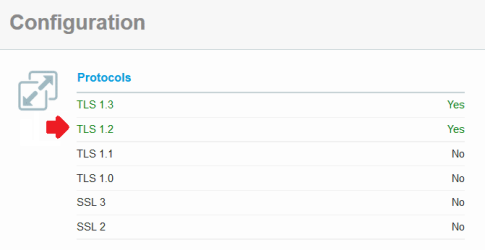
I just ran a SSL report and it looks to me that the site can support TLS 1.2 or TLS 1.3
Untitled.png


As far as I know TLS 1.3 is not supported in Win7 but I should be able to connect with TLS 1.2 and IE since I have the Windows TLS update installed. I also checked and I am all up to date on all of the other IE updates including the update for HSTS.

I have confirmed the inability for Outlook to read the message from this site on 3 other machines. All are Win7 with either OL 2010 or 2016. Also IE cant connect to this site on all machines.

Keep in mind that I dont really care about IE specifically as I use firefox, but I would like to be able to render those HTML messages in Outlook if possible and I dont know if that requires getting IE to be able to connect to those sites.

Outlook is the heart of everything I do with many customized views, task filters etc. So I can't/wont just give it up to render a few HTML messages, but I sure would like to fix it if I could.

- - - Updated - - -

wither 2 Thanks for your link. I already saw that site. Nothing there really helps with my issue either.
 
Last edited:

My Computer My Computer

At a glance

Windows 7 64
OS
Windows 7 64
WOW F22!
Thanks for taking the time to make that video. I actually learned a few things about SSL Labs and the SSL report they provide.

Unfortunately as far as my issue is concerned I already have FireFox set as my default browser. I never use IE directly. I only mention it because I suspect that Outlook is using IE or some components of IE to render the HTML messages. I still suspect this is true since the SSL report doesn't have a handshake simulation specifically for Outlook.

Just to clarify, my issue is not when I click on a link in an email that FF is not opening, it is when reading some select (small number) of HTML email messages (I just used the Ask Woody as an example because that is one that comes up weekly and I dont have any other examples at the moment on hand)

Thank you again for taking the time to make the video, the first part was very informative.
 

My Computer My Computer

At a glance

Windows 7 64
OS
Windows 7 64
Just to clarify, my issue is not when I click on a link in an email that FF is not opening, it is when reading some select (small number) of HTML email messages (I just used the Ask Woody as an example because that is one that comes up weekly and I dont have any other examples at the moment on hand)

Yes, it appears IE is used to render (fetch) the HTML content of emails. As such, and in your example, the askwoody domain is using TLS 1.3 and it seems IE is not able to fetch that HTML linked resource from a TLS 1.3 link. We know this is true based on SSLLabs' results for IE. Though, askwoody also supports TLS 1.2 and I know IE has that functionality, not sure why IE just doesn't downgrade to TLS 1.2. Never the less, the SSLLabs' website still indicates that IE is incompatible with askwoody.

Watch this informative YouTube video on why you may have this issue, and note what I said about IE's TLS 1.3 limited support and SSLLabs' report on IE not working with the askwoody website. I'm not going to parse the video here to render because you'll want to go to YouTube and read the video description if interested in part 2 and a potential hack. Outlook View in Browser still uses Internet Explorer - YouTube Again, I don't use Outlook so can't vouch for anything in the video or the mentioned VBS script. And you have to be very careful with VBS scripts... Well, you have to be careful with lots of things. Especially parsing HTML in emails...

JackPollack said:
Outlook is the heart of everything I do with many customized views, task filters etc. So I can't/wont just give it up to render a few HTML messages, but I sure would like to fix it if I could.

I could help bring you over to Thunderbird. I'm sure Thunderbird has all that capability and more you described, especially with the use of the add-on ecosystem infrastructure. And like I said, you can use portable Thunderbird and since that doesn't install you can use it for a test bed to see how things work and learn about how to migrate to it (just don't set it as your default email handler for testing use). I know Thunderbird probably goes against the ethos of many companies, but just by the fact it's free is a good reason to use it. Never mind its great features. On the other hand, Outlook comes bundled with Microsoft's Office crap so a company is going to be tied to it all - and that's exactly what Microsoft wants... If I ran the show it wouldn't be like that, though I'd have to do some training, but it isn't that difficult to migrate over. It's all point and click anyway. It's not like my employee is having to do complex work like integrate Ruby on Rails with an API hosted via AWS and configuring ACLs or something. LOL
 

My Computer My Computer

At a glance

Windows 7 Ultimate x64
Computer type
PC/Desktop
OS
Windows 7 Ultimate x64
Back
Top