
Please excuse the long post and screen shots [SS] but obviously no one can't help me without knowing all the facts & details.
I CAN share files from the Mac to the win7 pc. the first time - the pc asked for a pw and I used my login pw - now it doesn't require a pw to access & xfer my files.
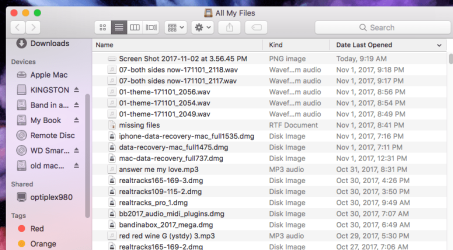
on the Mac: I go to finder and in the left pane scroll down to" shared" and see Optiplex 980 and click on it (ss1)
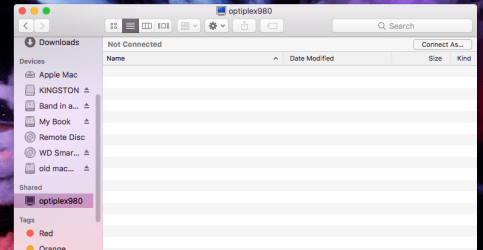
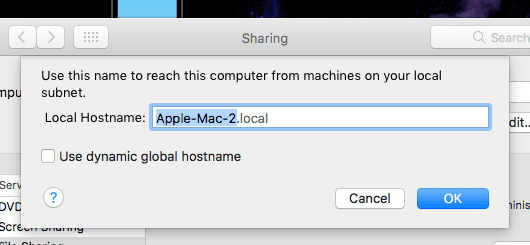
which brings up the next screen (ss2). just below the tool bar and to the left it says "not connected" and to the far right it says "connect as". whenever I click on connect as it bring up the next screen (SS3). my name (rogercarpenter) is there whenever the screen comes up - I did not enter it. I have tried EVERY pw that I can think of but nothing works. the login pw doesn't work either. don't know if it could be an issue but I use the same login pw on here as I do on the win7 pc. it says (ss3): Enter your name and pw for the server optiplex 980. I don't have a clue as to what that means.
I am including some more screen shots showing various settings and config for the Mac.
any help - greatly app
5string
NOTE: Screen shots 1,2 & 3 appear in order with ss1 being at the top
I CAN share files from the Mac to the win7 pc. the first time - the pc asked for a pw and I used my login pw - now it doesn't require a pw to access & xfer my files.
on the Mac: I go to finder and in the left pane scroll down to" shared" and see Optiplex 980 and click on it (ss1)
which brings up the next screen (ss2). just below the tool bar and to the left it says "not connected" and to the far right it says "connect as". whenever I click on connect as it bring up the next screen (SS3). my name (rogercarpenter) is there whenever the screen comes up - I did not enter it. I have tried EVERY pw that I can think of but nothing works. the login pw doesn't work either. don't know if it could be an issue but I use the same login pw on here as I do on the win7 pc. it says (ss3): Enter your name and pw for the server optiplex 980. I don't have a clue as to what that means.
I am including some more screen shots showing various settings and config for the Mac.
any help - greatly app
5string
NOTE: Screen shots 1,2 & 3 appear in order with ss1 being at the top
Attachments


Last edited:
My Computer
At a glance
win7 prof ver6.1.7.601 64 bit
- Computer type
- PC/Desktop
- OS
- win7 prof ver6.1.7.601 64 bit


