
rivrbyte17
New member
- Local time
- 9:21 AM
- Messages
- 11
I already sent questions to CANON concerning this issue, but since this O.S. is an WIN7, maybe it's hardware is not supported to newer camera technology. (Device drivers)
New Camera, maybe too old O.S., which I doubt, since lots of people still use Win7.
On Christmas Eve I shot about 18 HD Videos with this SX50 HS camera.
Today, when trying to transfer videos from my DURACELL 200X SDHC 32GB FLASH CARD, to my Windows 7 PRO(64) 8GB DDR2 / INTEL Quad Q6600 2.4GHz CORE 2, USB 2.0.
I first tried to COPY/PASTE ALL the videos, total of 3.41GB in my Movie Folder on WIN EXplorer. Prior to this I already unloaded many Jpg pictures into another Photo Folder, with no issues.
About 1/7th into this, it froze. I went back into the WIN EXplorer to try this again, but this time, the right folder side noted that "THE FOLDER IS EMPTY", even though I saw on the 32GB Flash drive the following:
32GB Duracell(J
100_12
CanonMSC
So I had to restart the computer again, to be able to see the contents of my flash drive again. This happened every single time I tried to move these videos to my hard drive.
The Card reader I'm using is a HC IOGEAR 56-1 Reader 2.0.
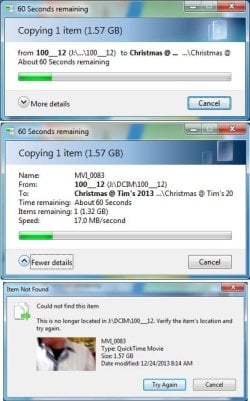
Below are a few photos in concession, on what I saw. Could it be I need to upgrade to a 3.0 USB MoBo, or just upgrade my MoBo with more memory, along with a faster CPU, like a I7?
I was able to see both photos, and videos on the Flash card, so I doubt it was the issue of not installing the device driver for this card reader. Thanks!
NOTE, On the bottom image, I saw this even though the flash SD card was still connected.
New Camera, maybe too old O.S., which I doubt, since lots of people still use Win7.
On Christmas Eve I shot about 18 HD Videos with this SX50 HS camera.
Today, when trying to transfer videos from my DURACELL 200X SDHC 32GB FLASH CARD, to my Windows 7 PRO(64) 8GB DDR2 / INTEL Quad Q6600 2.4GHz CORE 2, USB 2.0.
I first tried to COPY/PASTE ALL the videos, total of 3.41GB in my Movie Folder on WIN EXplorer. Prior to this I already unloaded many Jpg pictures into another Photo Folder, with no issues.
About 1/7th into this, it froze. I went back into the WIN EXplorer to try this again, but this time, the right folder side noted that "THE FOLDER IS EMPTY", even though I saw on the 32GB Flash drive the following:
32GB Duracell(J
100_12
CanonMSC
So I had to restart the computer again, to be able to see the contents of my flash drive again. This happened every single time I tried to move these videos to my hard drive.
The Card reader I'm using is a HC IOGEAR 56-1 Reader 2.0.
Below are a few photos in concession, on what I saw. Could it be I need to upgrade to a 3.0 USB MoBo, or just upgrade my MoBo with more memory, along with a faster CPU, like a I7?
I was able to see both photos, and videos on the Flash card, so I doubt it was the issue of not installing the device driver for this card reader. Thanks!
NOTE, On the bottom image, I saw this even though the flash SD card was still connected.
Attachments
My Computer
- Computer type
- PC/Desktop
- OS
- 64 WIN 7 PRO
