Win7 & Raid 0

NigyRob

New member
Local time
6:10 PM
Messages
4
Hi
I'm about to set up a RAID 0 configuration (2 x 1TB HDD's) with Windows 7 installed and have a question -

  1. I've read somewhere you can set up various partitions and use one of them for page filing. Am I able to do this with a RAID 0 set up?
Cheers
Nige :D
 

My Computer

Computer Manufacturer/Model Number
Own Build
OS
Windows 7 Pro 64 bit
CPU
Intel E8400
Motherboard
Gigabyet EP35-DSP3
Memory
8gig
Graphics Card(s)
Nvidia GeForce 8600GT
Monitor(s) Displays
Acer 23" G235H LCD & Acer 19"
Hard Drives
Samsung 2 x 1TB Spinpoint F3 SATA II 7200RPM 32M
Case
Centurion
Cooling
Standard Air
Internet Speed
ADSL2+
Hi,

I think you can. Howver, before you proceed down the RAID route, do yourself a favour and visit some of the many threads here concerning installtion of Windows 7 and RAID arrays. Generally, it has been a very unhappy experience. Use the SEARCH fucntion on the forums to check them out.

I do not believe you will gain significant benefit out of installing the OS to the RAID. It depends exactly your reasons for wanting to use the RAID option in the first place. Don't forget that RAID0 has no redundancy : one disk fails, you need to rebuild everything.

Regards,
Golden
 

My Computer

Computer type
PC/Desktop
Computer Manufacturer/Model Number
Golden Mk. I.4
OS
Windows 10 Pro x64 ; Xubuntu x64
CPU
Intel i7 860 @ 2.80 GHz O/C'ed to 4.0GHz
Motherboard
Gigabyte P55A-UD3R Rev.1. Award BIOS F13
Memory
16GB Corsair Vengance DDR3 @ 661 MHz Dual Channel (9-9-9-24)
Graphics Card(s)
EVGA NVidia GTX 560 1024MB
Sound Card
Realtek Integrated
Monitor(s) Displays
Dual Samsung SyncMaster 2494HS
Screen Resolution
1920*1080 and 1920*1080
Hard Drives
1*Samsung 840 EVO 120GB SSD;
1*OCZ Vertex 2 60GB SSD;
2*Samsung F3 SpinPoint 1TB in RAID0;
1*Samsung F1 SpinPoint 1TB;
2*Western Digital 1TB External USB 3.0
1*Western Digital 500GB External USB 3.0
1*Seagate 500GB External USB 2.0
PSU
Thermaltake ToughPower QFan 750W
Case
Thermaltake Element S VK60001W2Z
Cooling
Corsair H60 Water Cooling, 2*230mm and 2*80mm case fans
Keyboard
Logitech G110
Mouse
Logitech MX518
Hi Golden
Thanks for the advice but you know how it is when you get an idea in your head and just want to do it for the hell of it.

I'm not too concerned about data loss as I will be uploading everything I want to save to my NAS.
I really just wanted to give it a go so I can say i did it and it worked! :cool:

Not sure how I'm going to get the page filing in the separate partition
though....but thats another project!!

Thanks for the reply
Cheers
Nige:D
 

My Computer

Computer Manufacturer/Model Number
Own Build
OS
Windows 7 Pro 64 bit
CPU
Intel E8400
Motherboard
Gigabyet EP35-DSP3
Memory
8gig
Graphics Card(s)
Nvidia GeForce 8600GT
Monitor(s) Displays
Acer 23" G235H LCD & Acer 19"
Hard Drives
Samsung 2 x 1TB Spinpoint F3 SATA II 7200RPM 32M
Case
Centurion
Cooling
Standard Air
Internet Speed
ADSL2+
@NigyRob

If this is just RAID 0 for fun or testing or just to see if it can be done. Then go for it and let us know your results.

To answer your question RAID 0 is just making 1 big drive out of 2. So all you need to do is setup the RAID 0 in your motherboard BIOS or in your SATA card. If you don't have RAID on the MB or an add-on card then you will not be able to Install Windows 7 and use RAID 0 for the OS boot. You would need to install on a single drive and then have 2 other drives to make the RAID 0 from within the OS.
 

My Computer

Computer type
PC/Desktop
Computer Manufacturer/Model Number
Dell OP7010
OS
Windows 7 Enterprise (x64); Windows Server 2008 R2 (x64)
Memory
16GB
Monitor(s) Displays
4 Dell 24" LCD
Screen Resolution
1280x1024
Keyboard
Dell
Mouse
Dell Optical
Internet Speed
40meg
Hi,

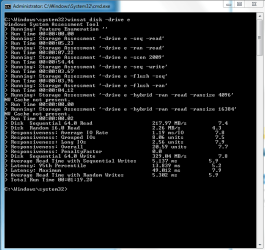
As a data drive RAID0 is extremely fast (see my result below). As an OS hosting drive, I think the benefit is negligible since Windows 7 is 90+% read. Follow WindowsStar advice to setup the RAID0 and let us know what performance you get. Again the note of caution : if one drive fails, the entire RAID fails and you will need to setup from scratch.

Good luck,
Golden
 

Attachments

  • Capture.PNG
    Capture.PNG
    14.5 KB · Views: 42

My Computer

Computer type
PC/Desktop
Computer Manufacturer/Model Number
Golden Mk. I.4
OS
Windows 10 Pro x64 ; Xubuntu x64
CPU
Intel i7 860 @ 2.80 GHz O/C'ed to 4.0GHz
Motherboard
Gigabyte P55A-UD3R Rev.1. Award BIOS F13
Memory
16GB Corsair Vengance DDR3 @ 661 MHz Dual Channel (9-9-9-24)
Graphics Card(s)
EVGA NVidia GTX 560 1024MB
Sound Card
Realtek Integrated
Monitor(s) Displays
Dual Samsung SyncMaster 2494HS
Screen Resolution
1920*1080 and 1920*1080
Hard Drives
1*Samsung 840 EVO 120GB SSD;
1*OCZ Vertex 2 60GB SSD;
2*Samsung F3 SpinPoint 1TB in RAID0;
1*Samsung F1 SpinPoint 1TB;
2*Western Digital 1TB External USB 3.0
1*Western Digital 500GB External USB 3.0
1*Seagate 500GB External USB 2.0
PSU
Thermaltake ToughPower QFan 750W
Case
Thermaltake Element S VK60001W2Z
Cooling
Corsair H60 Water Cooling, 2*230mm and 2*80mm case fans
Keyboard
Logitech G110
Mouse
Logitech MX518
Back
Top