Win7 randomly disconnects from Internet

skynardlynard

New member
Local time
4:39 PM
Messages
5
So, basically I'm posting for my GF who is all the way in Colorado.
---------------
Win7 Pro.
Randomly Disconnects from internet.
Not the router.

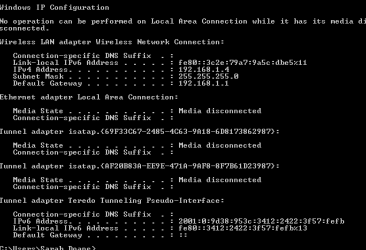
Is anything out of the ordinary with this ipconfig?
 

Attachments

  • Untitled picture.png
    Untitled picture.png
    5.6 KB · Views: 17

My Computer

OS
Win7 Pro
Well everything is disconnected here anyway so I can't see what could potentially be the problem if there was something wrong it would be the ipv4 address. Try adding a static ip address to make sure there are no ip conflicts on the network.
 

My Computer

Computer Manufacturer/Model Number
Acer Aspire 5517
OS
Windows 7 Ultimate x64
CPU
AMD athlon x64 dual core 1.6 Ghz
Memory
4GB
Graphics Card(s)
ATI Radeon HD 3200 Graphics 1915 MB memory
Monitor(s) Displays
15.6" widescreen
Screen Resolution
1366x768
Hard Drives
320GB
Internet Speed
10mbps
Well everything is disconnected here anyway so I can't see what could potentially be the problem if there was something wrong it would be the ipv4 address. Try adding a static ip address to make sure there are no ip conflicts on the network.

Awesome, thanks for the response.
I will talk with her on how to add a static IP.
She was disconnected from the internet when she screenshot the ipconfig, i am going to get one of her connected.

I am leaving work right now, but I will be back tomorrow morning with an update...or more problems. lol.

Thanks!
:)

*edit*
Not sure if this is helpful, but her roomie uses an Apple and they both connect to the same router...not sure if their IP's conflict due to OS issues. Just putting it out there.
 

My Computer

OS
Win7 Pro
Morning update!
IPconfig screenshot while connected, anything appear to be "strange"?
Is it possible that her roomie's Apple could be booting her off the router due to IP conflicts?

side question - when changing over to a static IP, her IPv4 address needs to change, correct? maybe to 192.168.1.5? I am still used to XP, maybe their is another thread that can help explain it to her. Thank you in advance for any help i receive.
 

Attachments

  • after.png
    after.png
    3.6 KB · Views: 12
Last edited:

My Computer

OS
Win7 Pro
I assume that nobody has anything...the IPConfig (above) is normal?
 

My Computer

OS
Win7 Pro
Morning update!
IPconfig screenshot while connected, anything appear to be "strange"?
Is it possible that her roomie's Apple could be booting her off the router due to IP conflicts?

side question - when changing over to a static IP, her IPv4 address needs to change, correct? maybe to 192.168.1.5? I am still used to XP, maybe their is another thread that can help explain it to her. Thank you in advance for any help i receive.

try 192.168.1.5 and if that doesn't work you've got some other problem
Google
 

My Computer

Computer Manufacturer/Model Number
Acer Aspire 5517
OS
Windows 7 Ultimate x64
CPU
AMD athlon x64 dual core 1.6 Ghz
Memory
4GB
Graphics Card(s)
ATI Radeon HD 3200 Graphics 1915 MB memory
Monitor(s) Displays
15.6" widescreen
Screen Resolution
1366x768
Hard Drives
320GB
Internet Speed
10mbps
Thanks programmer40,
I will have her set it tonight.

Thanks for the response. :)
 

My Computer

OS
Win7 Pro
Sorry if i may jump in can you please switch back to DHCP in the Wireless Network Connection TCPIPv4 settings and post an ipconfig /all for review it gives us a bit more information than an ipconfig.

Also can you please get your girlfriend to download xirrus wi-fi inspector below:

Wi-Fi Inspector | Xirrus

Can you get your girlfriend to open it up and take a screenshot using alt+printscreen or ctrl+printscreen and save it to the desktop and send it to you in a email, then can you copy and paste it into your next reply please.

This will give us information on signal strength and any possible channel interference which could be relevant to the disconnections please.
 

My Computer

Computer Manufacturer/Model Number
HP Compaq 6715B
OS
Windows 7 Ultimate x64
CPU
AMD turion 64x2 TL-64 2.2Ghz
Motherboard
HC030
Memory
Sodimm DDR2 4GB
Graphics Card(s)
ATI Radeon 1250 128MB IGP
Hard Drives
Fujitsu Siemens 500GB sata 3.0 Gb/s
Back
Top
