win7 repair and recovery not accessible after resizing partitions

- F11 starts hp environment like "Ramdisk Options" does now
- post #15 shows the output of original BCD C:\Users\Administrator>bcdedit /store C:\sources\acronis111209\Laufwerk(C)\Boot\bcd /enum all
- if I use reagentc /disable the store looks different afterwards
diabled:
Code:
C:\Users\Administrator>bcdedit /enum all
Windows-Start-Manager
---------------------
Bezeichner              {bootmgr}
device                  partition=H:
description             Windows Boot Manager
locale                  de-DE
inherit                 {globalsettings}
extendedinput           Yes
default                 {current}
resumeobject            {158181c0-9a00-11db-8a1d-b11d19fd3102}
displayorder            {current}
                        {6d9f7130-2281-11e1-8857-2c41385e3f8f}
toolsdisplayorder       {memdiag}
timeout                 30
Windows-Startladeprogramm
-------------------------
Bezeichner              {current}
device                  partition=C:
path                    \Windows\system32\winload.exe
description             Windows 7
locale                  de-DE
inherit                 {bootloadersettings}
recoveryenabled         No
osdevice                partition=C:
systemroot              \Windows
resumeobject            {158181c0-9a00-11db-8a1d-b11d19fd3102}
nx                      OptIn
Windows-Startladeprogramm
-------------------------
Bezeichner              {572bcd60-ffa7-11d9-aae0-0007e994107d}
device                  ramdisk=[boot]\sources\boot.wim,{ramdiskoptions}
path                    \windows\system32\boot\winload.exe
description             Microsoft Windows PE 2.0
osdevice                ramdisk=[boot]\sources\boot.wim,{ramdiskoptions}
systemroot              \windows
detecthal               Yes
winpe                   Yes
ems                     Yes
Windows-Startladeprogramm
-------------------------
Bezeichner              {6d9f7130-2281-11e1-8857-2c41385e3f8f}
device                  ramdisk=[G:]\Recovery\WindowsRE\Winre.wim,{6d9f7131-2281-11e1-8857-2c41385e3f8f}
path                    \windows\system32\winload.exe
description             Windows Recovery Environment
inherit                 {bootloadersettings}
osdevice                ramdisk=[G:]\Recovery\WindowsRE\Winre.wim,{6d9f7131-2281-11e1-8857-2c41385e3f8f}
systemroot              \windows
nx                      OptIn
winpe                   Yes
Wiederaufnahme aus dem Ruhezustand
----------------------------------
Bezeichner              {158181c0-9a00-11db-8a1d-b11d19fd3102}
device                  partition=C:
path                    \Windows\system32\winresume.exe
description             Windows Resume Application
locale                  de-DE
inherit                 {resumeloadersettings}
filedevice              partition=C:
filepath                \hiberfil.sys
debugoptionenabled      No
Windows-Speichertestprogramm
----------------------------
Bezeichner              {memdiag}
device                  partition=H:
path                    \boot\memtest.exe
description             Windows Memory Diagnostic
locale                  de-DE
inherit                 {globalsettings}
badmemoryaccess         Yes
EMS-Einstellungen
-----------------
Bezeichner              {emssettings}
bootems                 Yes
Debuggereinstellungen
---------------------
Bezeichner              {dbgsettings}
debugtype               Serial
debugport               1
baudrate                115200
RAM-Defekte
-----------
Bezeichner              {badmemory}
Globale Einstellungen
---------------------
Bezeichner              {globalsettings}
inherit                 {dbgsettings}
                        {emssettings}
                        {badmemory}
Startladeprogramm-Einstellungen
-------------------------------
Bezeichner              {bootloadersettings}
inherit                 {globalsettings}
                        {hypervisorsettings}
Hypervisoreinstellungen
-------------------
Bezeichner              {hypervisorsettings}
hypervisordebugtype     Serial
hypervisordebugport     1
hypervisorbaudrate      115200
Einstellungen zur Ladeprogrammfortsetzung
-----------------------------------------
Bezeichner              {resumeloadersettings}
inherit                 {globalsettings}
Geräteoptionen
--------------
Bezeichner              {4cbd1d8e-2250-11e1-85fc-2c41385e3f8f}
description             Ramdisk Options orig
ramdisksdidevice        unknown
ramdisksdipath          \Recovery\WindowsRE\boot.sdi
Geräteoptionen
--------------
Bezeichner              {6d9f7131-2281-11e1-8857-2c41385e3f8f}
description             Ramdisk Options
ramdisksdidevice        partition=G:
ramdisksdipath          \Recovery\WindowsRE\boot.sdi
Optionen zum RAM-Datenträgersetup
---------------------------------
Bezeichner              {ramdiskoptions}
description             Ramdisk Options
ramdisksdidevice        boot
ramdisksdipath          \boot\boot.sdi

enable (4 loaders, 3 ramdisk, HP recov and ramdisk have been doubled with new guid):
Code:
C:\Users\Administrator>ReAgentC /enable
REAGENTC.EXE: Vorgang erfolgreich ausgeführt
C:\Users\Administrator>bcdedit /enum all
Windows-Start-Manager
---------------------
Bezeichner              {bootmgr}
device                  partition=H:
description             Windows Boot Manager
locale                  de-DE
inherit                 {globalsettings}
extendedinput           Yes
default                 {current}
resumeobject            {158181c0-9a00-11db-8a1d-b11d19fd3102}
displayorder            {current}
                        {6d9f7130-2281-11e1-8857-2c41385e3f8f}
toolsdisplayorder       {memdiag}
timeout                 30
customactions           0x1000085000001
                        0x5400000f
custom:5400000f         {06c30f27-229f-11e1-81c2-2c41385e3f8f}
Windows-Startladeprogramm
-------------------------
Bezeichner              {06c30f27-229f-11e1-81c2-2c41385e3f8f}
device                  ramdisk=[G:]\Recovery\WindowsRE\Winre.wim,{06c30f28-229f-11e1-81c2-2c41385e3f8f}
path                    \windows\system32\winload.exe
description             Windows Recovery Environment
inherit                 {bootloadersettings}
osdevice                ramdisk=[G:]\Recovery\WindowsRE\Winre.wim,{06c30f28-229f-11e1-81c2-2c41385e3f8f}
systemroot              \windows
nx                      OptIn
winpe                   Yes
Windows-Startladeprogramm
-------------------------
Bezeichner              {current}
device                  partition=C:
path                    \Windows\system32\winload.exe
description             Windows 7
locale                  de-DE
inherit                 {bootloadersettings}
recoverysequence        {06c30f27-229f-11e1-81c2-2c41385e3f8f}
recoveryenabled         Yes
osdevice                partition=C:
systemroot              \Windows
resumeobject            {158181c0-9a00-11db-8a1d-b11d19fd3102}
nx                      OptIn
Windows-Startladeprogramm
-------------------------
Bezeichner              {572bcd60-ffa7-11d9-aae0-0007e994107d}
device                  ramdisk=[boot]\sources\boot.wim,{ramdiskoptions}
path                    \windows\system32\boot\winload.exe
description             Microsoft Windows PE 2.0
osdevice                ramdisk=[boot]\sources\boot.wim,{ramdiskoptions}
systemroot              \windows
detecthal               Yes
winpe                   Yes
ems                     Yes
Windows-Startladeprogramm
-------------------------
Bezeichner              {6d9f7130-2281-11e1-8857-2c41385e3f8f}
device                  ramdisk=[G:]\Recovery\WindowsRE\Winre.wim,{6d9f7131-2281-11e1-8857-2c41385e3f8f}
path                    \windows\system32\winload.exe
description             Windows Recovery Environment
inherit                 {bootloadersettings}
osdevice                ramdisk=[G:]\Recovery\WindowsRE\Winre.wim,{6d9f7131-2281-11e1-8857-2c41385e3f8f}
systemroot              \windows
nx                      OptIn
winpe                   Yes
Wiederaufnahme aus dem Ruhezustand
----------------------------------
Bezeichner              {158181c0-9a00-11db-8a1d-b11d19fd3102}
device                  partition=C:
path                    \Windows\system32\winresume.exe
description             Windows Resume Application
locale                  de-DE
inherit                 {resumeloadersettings}
filedevice              partition=C:
filepath                \hiberfil.sys
debugoptionenabled      No
Windows-Speichertestprogramm
----------------------------
Bezeichner              {memdiag}
device                  partition=H:
path                    \boot\memtest.exe
description             Windows Memory Diagnostic
locale                  de-DE
inherit                 {globalsettings}
badmemoryaccess         Yes
EMS-Einstellungen
-----------------
Bezeichner              {emssettings}
bootems                 Yes
Debuggereinstellungen
---------------------
Bezeichner              {dbgsettings}
debugtype               Serial
debugport               1
baudrate                115200
RAM-Defekte
-----------
Bezeichner              {badmemory}
Globale Einstellungen
---------------------
Bezeichner              {globalsettings}
inherit                 {dbgsettings}
                        {emssettings}
                        {badmemory}
Startladeprogramm-Einstellungen
-------------------------------
Bezeichner              {bootloadersettings}
inherit                 {globalsettings}
                        {hypervisorsettings}
Hypervisoreinstellungen
-------------------
Bezeichner              {hypervisorsettings}
hypervisordebugtype     Serial
hypervisordebugport     1
hypervisorbaudrate      115200
Einstellungen zur Ladeprogrammfortsetzung
-----------------------------------------
Bezeichner              {resumeloadersettings}
inherit                 {globalsettings}
Geräteoptionen
--------------
Bezeichner              {06c30f28-229f-11e1-81c2-2c41385e3f8f}
description             Ramdisk Options
ramdisksdidevice        partition=G:
ramdisksdipath          \Recovery\WindowsRE\boot.sdi
Geräteoptionen
--------------
Bezeichner              {4cbd1d8e-2250-11e1-85fc-2c41385e3f8f}
description             Ramdisk Options orig
ramdisksdidevice        unknown
ramdisksdipath          \Recovery\WindowsRE\boot.sdi
Geräteoptionen
--------------
Bezeichner              {6d9f7131-2281-11e1-8857-2c41385e3f8f}
description             Ramdisk Options
ramdisksdidevice        partition=G:
ramdisksdipath          \Recovery\WindowsRE\boot.sdi
Optionen zum RAM-Datenträgersetup
---------------------------------
Bezeichner              {ramdiskoptions}
description             Ramdisk Options
ramdisksdidevice        boot
ramdisksdipath          \boot\boot.sdi
 

My Computer My Computer

At a glance

win7_home_64i56GBHD6770
Computer Manufacturer/Model Number
hp-DV7 Notebook
OS
win7_home_64
CPU
i5
Motherboard
hp
Memory
6GB
Graphics Card(s)
HD6770
The difference between the two BCD outputs is exactly as expected.

reagentc /disable = delete one recovery loader + its device options + removing customactions pointing to deleted recovery loader + amend basic Windows 7 loader (to not recovery enabled).


So you can now start Windows 7 and start Recovery - anything else ?
 

My Computer My Computer

At a glance

Win 8 RP, Win 7, XPIntel
Computer Manufacturer/Model Number
Acer Notebook
OS
Win 8 RP, Win 7, XP
CPU
Intel
only F11 is not working :(
 

My Computer My Computer

At a glance

win7_home_64i56GBHD6770
Computer Manufacturer/Model Number
hp-DV7 Notebook
OS
win7_home_64
CPU
i5
Motherboard
hp
Memory
6GB
Graphics Card(s)
HD6770
If the manual bcd edits won't do it, I would run HP Factory Recovery disks which should have been made at Setup or can be ordered from Tech Support, possibly for little cost if PC is new. This should restore everything as before. Recover Windows 7 Operating System Using HP Recovery - HP Klantenondersteuning (Nederland - Nederlands)

You can try first running any full HD image backup but it may not restore the hotkeys.

I've not seen resizing C cause this problem on HP, even after conversion to Logical to add more subpartitions. It's Recovery Partition is pretty resilient and normally survives even after doing a clean reinstall to C.

Check also your ESC menu at boot to see what you find.
 
I burned those disks of course, but boyans got to 90% alreaedy ... so still hoping for the last kick ;-)
 

My Computer My Computer

At a glance

win7_home_64i56GBHD6770
Computer Manufacturer/Model Number
hp-DV7 Notebook
OS
win7_home_64
CPU
i5
Motherboard
hp
Memory
6GB
Graphics Card(s)
HD6770
...I've not seen resizing C cause this problem on HP, even after conversion to Logical to add more subpartitions.

Maybe it was the fact, that I had to move the recovery partition after shrínking C.

How could I achieve my wished structure from within w7 ?? .. structure see post #17
 

My Computer My Computer

At a glance

win7_home_64i56GBHD6770
Computer Manufacturer/Model Number
hp-DV7 Notebook
OS
win7_home_64
CPU
i5
Motherboard
hp
Memory
6GB
Graphics Card(s)
HD6770
What we've helped do in the past which seems to work fine is convert C to logical, shrink it and use that space to add any other needed Logical sub-partitions.

This doesn't move the Recovery partition which can be problematic as we're seeing in two other threads here today.

I'd consider backing up, run Factory Recovery disks to set it back to factory condition, then do the above using Disk Mgmt or if necessary free Partition Wizard bootable CD, then set it up once you know it works.

Save a Win7 backup image so you have path back.
 
Last edited:
I burned those disks of course, but boyans got to 90% alreaedy ... so still hoping for the last kick ;-)

1. Create Custom Bootstrap Action - give it "Recovery loader" and say F10 as parameters. (two selections and confirm.). The tool implements over 100 key codes but not F11 and F12 :cry:.

2. Edit "customactions" element in {bootmgr} - replace the value(F10) with the value(F11) you should have written down on paper (see begin of thread).

You can delete the id of recovery loader from boot menu (bootmgr->DisplayOrder element) so it will not be visible. This would give the final touch to the exercise.
 

My Computer My Computer

At a glance

Win 8 RP, Win 7, XPIntel
Computer Manufacturer/Model Number
Acer Notebook
OS
Win 8 RP, Win 7, XP
CPU
Intel
THX to both of you ...
0. but Partition magic has gparted built into it. Does it have any further advantage over it (most time it will have anolder version of gp)

1 is done

2. I restored C:\boot undera folder c:\acronis. Now I am not allowed do delete this folder, because it has elements like bootmgr within it ... What to do ??

3. boyans
a) I tried custom action. F11 does not work in Biossetup :(, but works on the boot menue. Then I deleted the OEM custom type action from bootloader, so just custom action is left. Now F11 is not even working in bootmenue. reagentc /disable /enable brings back OEM_custom type.
Maybe the following reagentc options regarding image and bootkey might help...your suggestion, how should it be used ? which code ? 0x1000085000001 0x5400000f ?
Code:
REAGENTC.EXE [Optionen]
  Folgende Optionen können angegeben werden:
  /setreimage /path  <Verzeichnisname> [/target <Verzeichnisname>]
  [/bootkey <Abfragecode>]
             Legt den Speicherort des vom Benutzer bereitgestellten
             Windows RE-Abbilds fest.
             Die optionale Option "/target" gibt den Pfad des Speicherorts
             der Windows-Installation an.
             Die optionale Option "/bootkey" gibt den Abfragecode für
             eine OEM-spezifische Starttaste an.
  /setosimage [/path <Verzeichnisname> [/target <Verzeichnisname>]]
  [/customtool]
             "/path" legt den Speicherort der vom Benutzer bereitgestellten
             Setupdateien für das Betriebssystem fest.
             Alternativ gibt "/customtool" an, dass in Windows RE ein Abbild-
             tool angegeben wurde.
b)
... maybe it has something to do with the different ramdisks. look at the ramdisk from hp (first on the left, I left it in the store but it is not used). I looked on a backup I made from the new PC and also there it says unknown device Data = byte[72]. maybe we should copy the old id to a new id and use this ???
Can you please explain this unknow device data .. is it a hp special ?
 
Last edited:

My Computer My Computer

At a glance

win7_home_64i56GBHD6770
Computer Manufacturer/Model Number
hp-DV7 Notebook
OS
win7_home_64
CPU
i5
Motherboard
hp
Memory
6GB
Graphics Card(s)
HD6770
are you guys with your families today :party: I am just about restoring :geek: waiting for final comands
 

My Computer My Computer

At a glance

win7_home_64i56GBHD6770
Computer Manufacturer/Model Number
hp-DV7 Notebook
OS
win7_home_64
CPU
i5
Motherboard
hp
Memory
6GB
Graphics Card(s)
HD6770
I restored all partitions and now F11 is working. F8 does NOT....

What I want:
F11 .. starts Recovery environment from HP recovery partition .. so far OK
F8 .. should start recovery environment from Microsoft C:\windows\system32

BCD after restore:
Code:
C:\Windows\system32>reagentc /info
Erweiterte Konfiguration für die Wiederherstellungsumgebung
    Windows RE aktiviert:        1
    Windows RE bereitgestellt:         1
    Setup aktiviert:        1
    Benutzerdefiniertes Wiederherstellungstool: 1
    WinRE.WIM-Verzeichnis:  [URL="file://\\?\GLOBALROOT\device\harddisk0\partition2\Recovery\WindowsRE"]\\?\GLOBALROOT\device\harddisk0\partition2\Recovery\WindowsRE[/URL]
    Wiederherstellungsumgebung: [URL="file://\\?\GLOBALROOT\device\harddisk0\partition2\Recovery\WindowsRE"]\\?\GLOBALROOT\device\harddisk0\partition2\Recovery\WindowsRE[/URL]
    BCD-ID:               9d8711c8-f4b3-11e0-bdd6-fe10d78c86f8
    Setupdateien:
    Wiederherstellungsvorgang:   4
    Vorgangsparameter:
    Boot Startschlüssel-Abfragecode    0x8500
C:\>bcdedit /enum all
Windows-Start-Manager
---------------------
Bezeichner              {bootmgr}
device                  partition=\Device\HarddiskVolume1
description             Windows Boot Manager
locale                  de-DE
inherit                 {globalsettings}
extendedinput           Yes
default                 {current}
resumeobject            {158181c0-9a00-11db-8a1d-b11d19fd3102}
displayorder            {current}
                        {586e2855-22a2-11e1-8ffc-2c41385e3f8f}
toolsdisplayorder       {memdiag}
timeout                 5
customactions           0x1000085000001
                        0x5400000f
custom:5400000f         {586e2855-22a2-11e1-8ffc-2c41385e3f8f}
Windows-Startladeprogramm
-------------------------
Bezeichner              {current}
device                  partition=C:
path                    \Windows\system32\winload.exe
description             Windows 7
locale                  de-DE
inherit                 {bootloadersettings}
recoverysequence        {586e2855-22a2-11e1-8ffc-2c41385e3f8f}
recoveryenabled         Yes
osdevice                partition=C:
systemroot              \Windows
resumeobject            {158181c0-9a00-11db-8a1d-b11d19fd3102}
nx                      OptIn
Windows-Startladeprogramm
-------------------------
Bezeichner              {572bcd60-ffa7-11d9-aae0-0007e994107d}
device                  ramdisk=[boot]\sources\boot.wim,{ramdiskoptions}
path                    \windows\system32\boot\winload.exe
description             Microsoft Windows PE 2.0
osdevice                ramdisk=[boot]\sources\boot.wim,{ramdiskoptions}
systemroot              \windows
detecthal               Yes
winpe                   Yes
ems                     Yes
Windows-Startladeprogramm
-------------------------
Bezeichner              {586e2855-22a2-11e1-8ffc-2c41385e3f8f}
Wiederaufnahme aus dem Ruhezustand
----------------------------------
Bezeichner              {158181c0-9a00-11db-8a1d-b11d19fd3102}
device                  partition=C:
path                    \Windows\system32\winresume.exe
description             Windows Resume Application
locale                  de-DE
inherit                 {resumeloadersettings}
filedevice              partition=C:
filepath                \hiberfil.sys
debugoptionenabled      No
Windows-Speichertestprogramm
----------------------------
Bezeichner              {memdiag}
device                  partition=\Device\HarddiskVolume1
path                    \boot\memtest.exe
description             Windows Memory Diagnostic
locale                  de-DE
inherit                 {globalsettings}
badmemoryaccess         Yes
EMS-Einstellungen
-----------------
Bezeichner              {emssettings}
bootems                 Yes
Debuggereinstellungen
---------------------
Bezeichner              {dbgsettings}
debugtype               Serial
debugport               1
baudrate                115200
RAM-Defekte
-----------
Bezeichner              {badmemory}
Globale Einstellungen
---------------------
Bezeichner              {globalsettings}
inherit                 {dbgsettings}
                        {emssettings}
                        {badmemory}
Startladeprogramm-Einstellungen
-------------------------------
Bezeichner              {bootloadersettings}
inherit                 {globalsettings}
                        {hypervisorsettings}
Hypervisoreinstellungen
-------------------
Bezeichner              {hypervisorsettings}
hypervisordebugtype     Serial
hypervisordebugport     1
hypervisorbaudrate      115200
Einstellungen zur Ladeprogrammfortsetzung
-----------------------------------------
Bezeichner              {resumeloadersettings}
inherit                 {globalsettings}
Geräteoptionen
--------------
Bezeichner              {586e2856-22a2-11e1-8ffc-2c41385e3f8f}
description             HP Recovery Manager (ramdisk)
ramdisksdidevice        unknown
ramdisksdipath          \Recovery\WindowsRE\boot.sdi
Optionen zum RAM-Datenträgersetup
---------------------------------
Bezeichner              {ramdiskoptions}
description             Ramdisk Options
ramdisksdidevice        boot
ramdisksdipath          \boot\boot.sdi

BCD after reagent /disable:
Code:
C:\Windows\system32>reagentc /info
Erweiterte Konfiguration für die Wiederherstellungsumgebung
    Windows RE aktiviert:        0
    Windows RE bereitgestellt:         1
    Setup aktiviert:        1
    Benutzerdefiniertes Wiederherstellungstool: 1
    WinRE.WIM-Verzeichnis:  [URL="file://\\?\GLOBALROOT\device\harddisk0\partition2\Recovery\WindowsRE"]\\?\GLOBALROOT\device\harddisk0\partition2\Recovery\WindowsRE[/URL]
    Wiederherstellungsumgebung:
    BCD-ID:               00000000-0000-0000-0000-000000000000
    Setupdateien:
    Wiederherstellungsvorgang:   4
    Vorgangsparameter:
    Boot Startschlüssel-Abfragecode    0x8500
C:\Windows\system32>reagentc /disable
REAGENTC.EXE: Vorgang erfolgreich ausgeführt
C:\Windows\system32>bcdedit /enum all
Windows-Start-Manager
---------------------
Bezeichner              {bootmgr}
device                  partition=S:
description             Windows Boot Manager
locale                  de-DE
inherit                 {globalsettings}
extendedinput           Yes
default                 {current}
resumeobject            {158181c0-9a00-11db-8a1d-b11d19fd3102}
displayorder            {current}
                        {586e2855-22a2-11e1-8ffc-2c41385e3f8f}
toolsdisplayorder       {memdiag}
timeout                 5
customactions           0x1000085000001
                        0x5400000f
custom:5400000f         {586e2855-22a2-11e1-8ffc-2c41385e3f8f}
Windows-Startladeprogramm
-------------------------
Bezeichner              {current}
device                  partition=C:
path                    \Windows\system32\winload.exe
description             Windows 7
locale                  de-DE
inherit                 {bootloadersettings}
recoverysequence        {586e2855-22a2-11e1-8ffc-2c41385e3f8f}
recoveryenabled         Yes
osdevice                partition=C:
systemroot              \Windows
resumeobject            {158181c0-9a00-11db-8a1d-b11d19fd3102}
nx                      OptIn
Windows-Startladeprogramm
-------------------------
Bezeichner              {572bcd60-ffa7-11d9-aae0-0007e994107d}
device                  ramdisk=[boot]\sources\boot.wim,{ramdiskoptions}
path                    \windows\system32\boot\winload.exe
description             Microsoft Windows PE 2.0
osdevice                ramdisk=[boot]\sources\boot.wim,{ramdiskoptions}
systemroot              \windows
detecthal               Yes
winpe                   Yes
ems                     Yes
Windows-Startladeprogramm
-------------------------
Bezeichner              {586e2855-22a2-11e1-8ffc-2c41385e3f8f}
Wiederaufnahme aus dem Ruhezustand
----------------------------------
Bezeichner              {158181c0-9a00-11db-8a1d-b11d19fd3102}
device                  partition=C:
path                    \Windows\system32\winresume.exe
description             Windows Resume Application
locale                  de-DE
inherit                 {resumeloadersettings}
filedevice              partition=C:
filepath                \hiberfil.sys
debugoptionenabled      No
Windows-Speichertestprogramm
----------------------------
Bezeichner              {memdiag}
device                  partition=S:
path                    \boot\memtest.exe
description             Windows Memory Diagnostic
locale                  de-DE
inherit                 {globalsettings}
badmemoryaccess         Yes
EMS-Einstellungen
-----------------
Bezeichner              {emssettings}
bootems                 Yes
Debuggereinstellungen
---------------------
Bezeichner              {dbgsettings}
debugtype               Serial
debugport               1
baudrate                115200
RAM-Defekte
-----------
Bezeichner              {badmemory}
Globale Einstellungen
---------------------
Bezeichner              {globalsettings}
inherit                 {dbgsettings}
                        {emssettings}
                        {badmemory}
Startladeprogramm-Einstellungen
-------------------------------
Bezeichner              {bootloadersettings}
inherit                 {globalsettings}
                        {hypervisorsettings}
Hypervisoreinstellungen
-------------------
Bezeichner              {hypervisorsettings}
hypervisordebugtype     Serial
hypervisordebugport     1
hypervisorbaudrate      115200
Einstellungen zur Ladeprogrammfortsetzung
-----------------------------------------
Bezeichner              {resumeloadersettings}
inherit                 {globalsettings}
Geräteoptionen
--------------
Bezeichner              {586e2856-22a2-11e1-8ffc-2c41385e3f8f}
description             HP Recovery Manager (ramdisk)
ramdisksdidevice        unknown
ramdisksdipath          \Recovery\WindowsRE\boot.sdi
Optionen zum RAM-Datenträgersetup
---------------------------------
Bezeichner              {ramdiskoptions}
description             Ramdisk Options
ramdisksdidevice        boot
ramdisksdipath          \boot\boot.sdi

BCD after reagent enable:
Code:
C:\Windows\system32>reagentc /enable
REAGENTC.EXE: Vorgang erfolgreich ausgeführt
C:\Windows\system32>reagentc /info
Erweiterte Konfiguration für die Wiederherstellungsumgebung
    Windows RE aktiviert:        1
    Windows RE bereitgestellt:         1
    Setup aktiviert:        1
    Benutzerdefiniertes Wiederherstellungstool: 1
    WinRE.WIM-Verzeichnis:  [URL="file://\\?\GLOBALROOT\device\harddisk0\partition2\Recovery\WindowsRE"]\\?\GLOBALROOT\device\harddisk0\partition2\Recovery\WindowsRE[/URL]
    Wiederherstellungsumgebung: [URL="file://\\?\GLOBALROOT\device\harddisk0\partition2\Recovery\WindowsRE"]\\?\GLOBALROOT\device\harddisk0\partition2\Recovery\WindowsRE[/URL]
    BCD-ID:               586e2857-22a2-11e1-8ffc-2c41385e3f8f
    Setupdateien:
    Wiederherstellungsvorgang:   4
    Vorgangsparameter:
    Boot Startschlüssel-Abfragecode    0x8500
REAGENTC.EXE: Vorgang erfolgreich ausgeführt
C:\Windows\system32>bcdedit /enum all
Windows-Start-Manager
---------------------
Bezeichner              {bootmgr}
device                  partition=S:
description             Windows Boot Manager
locale                  de-DE
inherit                 {globalsettings}
extendedinput           Yes
default                 {current}
resumeobject            {158181c0-9a00-11db-8a1d-b11d19fd3102}
displayorder            {current}
                        {586e2855-22a2-11e1-8ffc-2c41385e3f8f}
toolsdisplayorder       {memdiag}
timeout                 5
customactions           0x1000085000001
                        0x5400000f
custom:5400000f         {586e2857-22a2-11e1-8ffc-2c41385e3f8f}
Windows-Startladeprogramm
-------------------------
Bezeichner              {current}
device                  partition=C:
path                    \Windows\system32\winload.exe
description             Windows 7
locale                  de-DE
inherit                 {bootloadersettings}
recoverysequence        {586e2857-22a2-11e1-8ffc-2c41385e3f8f}
recoveryenabled         Yes
osdevice                partition=C:
systemroot              \Windows
resumeobject            {158181c0-9a00-11db-8a1d-b11d19fd3102}
nx                      OptIn
Windows-Startladeprogramm
-------------------------
Bezeichner              {572bcd60-ffa7-11d9-aae0-0007e994107d}
device                  ramdisk=[boot]\sources\boot.wim,{ramdiskoptions}
path                    \windows\system32\boot\winload.exe
description             Microsoft Windows PE 2.0
osdevice                ramdisk=[boot]\sources\boot.wim,{ramdiskoptions}
systemroot              \windows
detecthal               Yes
winpe                   Yes
ems                     Yes
Windows-Startladeprogramm
-------------------------
Bezeichner              {586e2855-22a2-11e1-8ffc-2c41385e3f8f}
Windows-Startladeprogramm
-------------------------
Bezeichner              {586e2857-22a2-11e1-8ffc-2c41385e3f8f}
device                  ramdisk=[R:]\Recovery\WindowsRE\Winre.wim,{586e2858-22a2-11e1-8ffc-2c41385e3f8f}
path                    \windows\system32\winload.exe
description             Windows Recovery Environment
inherit                 {bootloadersettings}
osdevice                ramdisk=[R:]\Recovery\WindowsRE\Winre.wim,{586e2858-22a2-11e1-8ffc-2c41385e3f8f}
systemroot              \windows
nx                      OptIn
winpe                   Yes
Wiederaufnahme aus dem Ruhezustand
----------------------------------
Bezeichner              {158181c0-9a00-11db-8a1d-b11d19fd3102}
device                  partition=C:
path                    \Windows\system32\winresume.exe
description             Windows Resume Application
locale                  de-DE
inherit                 {resumeloadersettings}
filedevice              partition=C:
filepath                \hiberfil.sys
debugoptionenabled      No
Windows-Speichertestprogramm
----------------------------
Bezeichner              {memdiag}
device                  partition=S:
path                    \boot\memtest.exe
description             Windows Memory Diagnostic
locale                  de-DE
inherit                 {globalsettings}
badmemoryaccess         Yes
EMS-Einstellungen
-----------------
Bezeichner              {emssettings}
bootems                 Yes
Debuggereinstellungen
---------------------
Bezeichner              {dbgsettings}
debugtype               Serial
debugport               1
baudrate                115200
RAM-Defekte
-----------
Bezeichner              {badmemory}
Globale Einstellungen
---------------------
Bezeichner              {globalsettings}
inherit                 {dbgsettings}
                        {emssettings}
                        {badmemory}
Startladeprogramm-Einstellungen
-------------------------------
Bezeichner              {bootloadersettings}
inherit                 {globalsettings}
                        {hypervisorsettings}
Hypervisoreinstellungen
-------------------
Bezeichner              {hypervisorsettings}
hypervisordebugtype     Serial
hypervisordebugport     1
hypervisorbaudrate      115200
Einstellungen zur Ladeprogrammfortsetzung
-----------------------------------------
Bezeichner              {resumeloadersettings}
inherit                 {globalsettings}
Geräteoptionen
--------------
Bezeichner              {586e2856-22a2-11e1-8ffc-2c41385e3f8f}
description             HP Recovery Manager (ramdisk)
ramdisksdidevice        unknown
ramdisksdipath          \Recovery\WindowsRE\boot.sdi
Geräteoptionen
--------------
Bezeichner              {586e2858-22a2-11e1-8ffc-2c41385e3f8f}
description             Ramdisk Options
ramdisksdidevice        partition=R:
ramdisksdipath          \Recovery\WindowsRE\boot.sdi
Optionen zum RAM-Datenträgersetup
---------------------------------
Bezeichner              {ramdiskoptions}
description             Ramdisk Options
ramdisksdidevice        boot
ramdisksdipath          \boot\boot.sdi
 

My Computer My Computer

At a glance

win7_home_64i56GBHD6770
Computer Manufacturer/Model Number
hp-DV7 Notebook
OS
win7_home_64
CPU
i5
Motherboard
hp
Memory
6GB
Graphics Card(s)
HD6770
You have a normal F8 Advanced Boot Options menu except that Repair My Computer is not showing on it, after running full Factory Recovery on all partitions?

Please post up a screenshot of your maximized Disk Mgmt drive map with listings, using Snipping Tool in Start Menu.
 
THX for helping ... but i finally reinstalled and resized the partitions within win7 ... and everything is fine now
 

My Computer My Computer

At a glance

win7_home_64i56GBHD6770
Computer Manufacturer/Model Number
hp-DV7 Notebook
OS
win7_home_64
CPU
i5
Motherboard
hp
Memory
6GB
Graphics Card(s)
HD6770
I would like to thank boyan for his inputs here and the excellent utility.

I was lost and searched the web thin on advice as to how to enable the F11-key at boot. Now I have solved this and it works great (even though I believe the original layout of the F11-key was built into the MBR-code/displayed on the BIOS screen).


I just have a few questions:
  • The Recovery volume is listed with the wrong name in the boot menu even though the settings are correct (double checked) and shows up correctly in Windows/System GUI. The choice "RAM disk" boots the Recovery partition but is displayed wrongly. Also, the boot manager is displayed in English even though locale is da-DK. See code below...
  • Is it possible to boot a VHD which contains the files of a bootable CD/DVD? Other ways to put a bootable media in here?
  • Can I put a bat or cmd file in the tools section or is this only for DOS exe's?
I have enclosed output from bcdedit below. This has been edited from Vistax86 (original BCD) - should anything be different in Win7x64 especially with regard to resume and memory settings (x86PaeMode, AllowBadMemory etc.)? What is "hidden_integer" (custom:47000005 301989892 2) used for?

Thanks,
Søren

Code:
Windows Boot Manager
--------------------
id              {9dea862c-5cdd-4e70-acc1-f32b344d4795}
device                  partition=C:
path                    \bootmgr
description             Windows Boot Manager
locale                  da-DK
inherit                 {7ea2e1ac-2e61-4728-aaa3-896d9d0a9f0e}
default                 {fe197d77-7d89-11e0-a4a6-6c626d73adb8}
resumeobject            {fe197d77-7d89-11e0-a4a6-6c626d73adb8}
displayorder            {fe197d77-7d89-11e0-a4a6-6c626d73adb8}
                        {a06974e0-99f5-11e1-8f20-001e4c11e7b1}
toolsdisplayorder       {b2721d73-1db4-4c62-bf78-c548a880142d}
timeout                 5
displaybootmenu         Yes
customactions           0x1000085000001
                        0x5400000f
custom:5400000f         {a06974e0-99f5-11e1-8f20-001e4c11e7b1}
Windows Boot Loader
-------------------
id              {a06974e0-99f5-11e1-8f20-001e4c11e7b1}
device                  ramdisk=[M:]\Recovery\WindowsRE\Winre.wim,{a06974e1-99f5-11e1-8f20-001e4c11e7b1}
path                    \windows\system32\winload.exe
description             HP Recovery Manager
osdevice                ramdisk=[M:]\Recovery\WindowsRE\Winre.wim,{a06974e1-99f5-11e1-8f20-001e4c11e7b1}
systemroot              \windows
nx                      OptIn
detecthal               Yes
winpe                   Yes
custom:46000010         Yes
Windows Boot Loader
-------------------
id              {fe197d77-7d89-11e0-a4a6-6c626d73adb8}
device                  partition=C:
path                    \Windows\system32\winload.exe
description             Windows 7 Home Premium
locale                  da-DK
inherit                 {6efb52bf-1766-41db-a6b3-0ee5eff72bd7}
recoverysequence        {a06974e0-99f5-11e1-8f20-001e4c11e7b1}
recoveryenabled         Yes
osdevice                partition=C:
systemroot              \Windows
resumeobject            {b98edb9c-cb23-11e0-b1bb-806e6f6e6963}
nx                      OptIn
Forts‘t efter dvale
---------------------
id              {b98edb9c-cb23-11e0-b1bb-806e6f6e6963}
device                  partition=C:
path                    \Windows\system32\winresume.exe
description             Windows Resume Application
locale                  da-DK
inherit                 {1afa9c49-16ab-4a5c-901b-212802da9460}
filedevice              partition=C:
filepath                \hiberfil.sys
pae                     No
debugoptionenabled      No
custom:42000002         \system32\winresume.exe
custom:45000001         2
custom:46000004         Yes
Windows Hukommelsestester
-------------------------
id              {b2721d73-1db4-4c62-bf78-c548a880142d}
device                  partition=C:
path                    \boot\memtest.exe
description             Windows Hukommelsesdiagnosticering
locale                  da-DK
inherit                 {7ea2e1ac-2e61-4728-aaa3-896d9d0a9f0e}
badmemoryaccess         Yes
custom:45000001         1
custom:47000005         301989892
                        2
EMS-indstillinger
------------
id              {0ce4991b-e6b3-4b16-b23c-5e0d9250e5d9}
bootems                 Yes
Fejlfindingsindstillinger
-----------------
id              {4636856e-540f-4170-a130-a84776f4c654}
debugtype               Serial
debugport               1
baudrate                115200
RAM-fejl
-----------
id              {5189b25c-5558-4bf2-bca4-289b11bd29e2}
Globale indstillinger
---------------
id              {7ea2e1ac-2e61-4728-aaa3-896d9d0a9f0e}
inherit                 {4636856e-540f-4170-a130-a84776f4c654}
                        {0ce4991b-e6b3-4b16-b23c-5e0d9250e5d9}
                        {5189b25c-5558-4bf2-bca4-289b11bd29e2}
Indstillinger for afsnittet Boot Loader
--------------------
id              {6efb52bf-1766-41db-a6b3-0ee5eff72bd7}
inherit                 {7ea2e1ac-2e61-4728-aaa3-896d9d0a9f0e}
Indstillinger for afsnittet Resume Loader
----------------------
id              {1afa9c49-16ab-4a5c-901b-212802da9460}
inherit                 {7ea2e1ac-2e61-4728-aaa3-896d9d0a9f0e}
Enhedsindstillinger
--------------
id              {a06974e1-99f5-11e1-8f20-001e4c11e7b1}
description             Ramdisk Device Options
ramdisksdidevice        partition=M:
ramdisksdipath          \Recovery\WindowsRE\boot.sdi
 
Last edited:

My Computer My Computer

At a glance

Windows 7 Home Premium 64bitIntel Core 2 Quad Q6600@3Ghz (Kentsfield)8GB Kingston KTH-XW4400C6 (PC2-6400)MSI N560GTX-448
Computer type
PC/Desktop
Computer Manufacturer/Model Number
HPm9067.sc-a
OS
Windows 7 Home Premium 64bit
CPU
Intel Core 2 Quad Q6600@3Ghz (Kentsfield)
Motherboard
IPIBL-LB (Benicia-GL8E)
Memory
8GB Kingston KTH-XW4400C6 (PC2-6400)
Graphics Card(s)
MSI N560GTX-448
Sound Card
Realtek® ALC888S High Definition Audio
Monitor(s) Displays
HPw2207h (HDMI) + HPw2207 (DVI)
Screen Resolution
1920x1080x32
Hard Drives
Samsung 840 EVO SSD, 250GB (OS)
ST2000DM0001x2 RAID1, 2TB (Data)
PSU
Chieftec A85 CTB-650S (650 Watts)
Case
HP
Cooling
HP
Keyboard
Logitech MX 5500 Revolution
Mouse
Logitech MX 5500 Revolution
Internet Speed
70/35 Mbps
Antivirus
MSE
Browser
IE11
on boot try F8 repetidably or alt f10 :)
 

My Computer My Computer

At a glance

windows 7 64 bit home premiumIntel(R) Core(TM)2 Quad CPU Q8300 @ 2.50GHz4gb
Computer Manufacturer/Model Number
Compaq cq5306uk
OS
windows 7 64 bit home premium
CPU
Intel(R) Core(TM)2 Quad CPU Q8300 @ 2.50GHz
Memory
4gb
Hard Drives
1 tb
Cooling
fan
Sorry to necro this thread, but it has the most technical info about this issue that I've seen on the web.

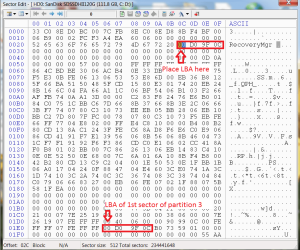
I was determined to figure out how to restore F11 functionality on boot after moving the recovery partition. It turns out that it is pretty simple. The LBA of the first sector of the recovery partition is hard-coded into the MBR at a certain address. Updating these 4 bytes with the new starting LBA of the recovery partition restores functionality of the F11 key. Although it's simple, I wouldn't recommend that the average user follow these instructions, as you could render your computer unbootable. At the very least, make sure you can boot from an alternate disk so you can fix the MBR if you mess it up.

The particular model I worked on is an HP Mini 311-1037NR. The addresses I'm mentioning might only pertain to that model or at least the version of MBR that it uses. For other models, I would recommend checking the original MBR (prior to moving/resizing) and comparing the two offsets I mention below. If they don't match, you'll need to find out where the first address is located in your MBR and use documentation to locate the LBA of the first sector of your recovery partition (as long it is partition 3, it should be the address I mention, though).

You need a tool that can read / write the MBR. I used BootICE.

The first thing I'd recommend is to backup your current MBR to a file: Make sure the correct disk is selected in the destination disk dropdown and click Process MBR, then Backup MBR. After you've successfully backed up, return to the main screen and click Sector Edit.

It should open sector 0 by default. If not, make sure you are editing sector 0. The starting LBA for partition 3 is stored in offset 1E6-1E9 (4 bytes - don't change this data, only read it.). These bytes need to be replicated over the values stored at offset 02C-02F (this is the address that tells HP Recovery Manager where the recovery partition is). The attached image explains this graphically. Click save after you've edited the data. Reboot and try your F11 key.
 

Attachments

  • hexnew.png
    hexnew.png
    36.8 KB · Views: 0

My Computer My Computer

At a glance

Windows 8.1 64-bit
Computer type
PC/Desktop
OS
Windows 8.1 64-bit
Thanks for updating as our threads are found in searches long after first active, so we try to keep them updated. Yours if very valuable info to add and will help many for years going forward.
 
Back
Top