
Win7 - 'Select the operating system you want to install' MISSING

win7freak000

New member
Local time
1:07 AM
Messages
14
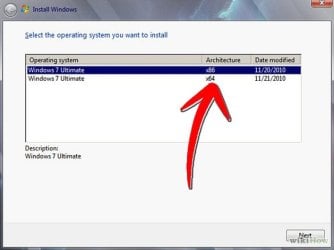
I am installing Win7 Ultimate (CLEAN Installation) on my Desktop, and I noticed that I do not have the options to select either 64bit or 32bit as shown in the attached pic and from the below link.

If I DO NOT see these options, does this mean my Win7 DVD is a OEM version?
Sorry, I am rusty on this, and is there any way to tell on the box or DVD if its OEM or not? I just picked it up from a local Tech shop.
But, according to this guide below, I should get this option to select 64 or 32 bit and I do not get a prompt for this. It just takes me to the formatting section.

http://www.wikihow.com/Install-Windows-7-for-Beginners
 

Attachments
  • 629px-Install-Windows-7-for-Beginners-Step-6.jpg
    629px-Install-Windows-7-for-Beginners-Step-6.jpg
    23.1 KB · Views: 19

My Computer My Computer

At a glance

Windows 7 Ultimate 32 bit
Computer type
PC/Desktop
OS
Windows 7 Ultimate 32 bit
Windows 7 only comes on a dvd with either 32 bit or 64 bit software, not both. What you see or are referring to is a dvd that`s been burned with both bit versions on it. It is not sold that way.

If you do not know what they sold you, you won`t know until after it`s installed.

You paid for it, you should know exactly what they sold you, either oem or retail.

Although, I`ve just looked and seen both bit versions can come on 1 dvd. Your key will activate either the 32 or 64 bit software.
 

My Computer My Computer

At a glance

Windows 10 Pro x64Intel Core i7 6700KGSkill TridentZ RGB 16GB 3600 16-16-16-36EVGA GTX 980 Ti SC x2
Computer type
PC/Desktop
Computer Manufacturer/Model Number
Skylake Special #666
OS
Windows 10 Pro x64
CPU
Intel Core i7 6700K
Motherboard
Asus Sabertooth Z170 Mark 1
Memory
GSkill TridentZ RGB 16GB 3600 16-16-16-36
Graphics Card(s)
EVGA GTX 980 Ti SC x2
Sound Card
Realtek High Definition
Monitor(s) Displays
AOC G2460PG
Screen Resolution
1920 x 1080 144Hz
Hard Drives
Samsung 860 Pro 256GB, Seagate Barracuda 4TB x2
PSU
EVGA 1000 P2, EVGA White Custom Braided Cables
Case
Corsair Vengeance C70 Gunmetal Black
Cooling
Corsair H100i v2, Corsair ML120 x2, Thermal Grizzly Kryonaut
Keyboard
Logitech G910 Orion Spectrum
Mouse
Logitech G700s
Internet Speed
Verizon Fios Quantum Gateway 75/75
Antivirus
Windows Defender, Malwarebytes Free 3.8.3
Browser
Chrome
Other Info
Corsair SP120 x4, LG Blu-ray Drive, Durabrand HT-395 100 Watt Dolby Digital Amp, Corsair H2100 Wireless 7.1 Headset
Ok, so that explains it. Thanks!!!
Now I see it...Its OEM...!!!!! :confused:

Maybe off-Topic...And Im sorry. But one more quick question.

So MS said that it will stop selling retail versions of Win7 next year.
My local online tech shops here has only OEM versions.
So does searching on the net, there all OEMs...No retail.
Does this mean that it is OK to have an OEM copy of Win7 rather than the retail one?
I was really hoping that is was retail so I can install it on more than one PC.

If I call MS, since I do have the serial key, maybe they can re-activate for me if I decide to install this on a new PC in the future. Does MS have a number that I can call to re-activate on a new PC?
 

My Computer My Computer

At a glance

Windows 7 Ultimate 32 bit
Computer type
PC/Desktop
OS
Windows 7 Ultimate 32 bit
There is no difference between oem and retail.

You get 1 year of support with retail, no support with oem, but who needs it.

And you can not install retail on any pc you want and activate it, retail can only be used and activated on one pc at a time.

If you try to use the same key on another machine and try to activate windows with it, you will get a message telling you the key is already in use.
 

My Computer My Computer

At a glance

Windows 10 Pro x64Intel Core i7 6700KGSkill TridentZ RGB 16GB 3600 16-16-16-36EVGA GTX 980 Ti SC x2
Computer type
PC/Desktop
Computer Manufacturer/Model Number
Skylake Special #666
OS
Windows 10 Pro x64
CPU
Intel Core i7 6700K
Motherboard
Asus Sabertooth Z170 Mark 1
Memory
GSkill TridentZ RGB 16GB 3600 16-16-16-36
Graphics Card(s)
EVGA GTX 980 Ti SC x2
Sound Card
Realtek High Definition
Monitor(s) Displays
AOC G2460PG
Screen Resolution
1920 x 1080 144Hz
Hard Drives
Samsung 860 Pro 256GB, Seagate Barracuda 4TB x2
PSU
EVGA 1000 P2, EVGA White Custom Braided Cables
Case
Corsair Vengeance C70 Gunmetal Black
Cooling
Corsair H100i v2, Corsair ML120 x2, Thermal Grizzly Kryonaut
Keyboard
Logitech G910 Orion Spectrum
Mouse
Logitech G700s
Internet Speed
Verizon Fios Quantum Gateway 75/75
Antivirus
Windows Defender, Malwarebytes Free 3.8.3
Browser
Chrome
Other Info
Corsair SP120 x4, LG Blu-ray Drive, Durabrand HT-395 100 Watt Dolby Digital Amp, Corsair H2100 Wireless 7.1 Headset
I am SOOOOOOOO deperate for Windows 7 now, So in that case, I will buy one or two more Win7 DVDs. Whatever it takes. I dont care, I will spend the money. As I do NOT want to move to Win8 anytime soon....:(

And even if its a 32-bit version of Win7, I do not care, as long as its Win7 I will be a happy camper.
 

My Computer My Computer

At a glance

Windows 7 Ultimate 32 bit
Computer type
PC/Desktop
OS
Windows 7 Ultimate 32 bit
If I call MS, since I do have the serial key, maybe they can re-activate for me if I decide to install this on a new PC in the future.

An OEM license is only valid for the PC it is originally installed/activated on.
An OEM license can not be transferred to a new PC.
A RETAIL license can be transferred to a new PC.

With an OEM license you should be able to upgrade anything except the motherboard without activation issues.
If you upgrade to a new motherboard, it will be detected as a new PC.

You can use 32-bit or 64-bit with the same license, even if your disc only has 32-bit and you want 64-bit (or vice-versa)...
You can download the latest genuine correct bit version you want for your licensed version from here:
Windows 7 Direct Download Links

Here's a good tutorial on installing Win 7 worth reading...
http://www.sevenforums.com/tutorials/219487-clean-reinstall-factory-oem-windows-7-a.html
 

My Computer My Computer

At a glance

Multi-Boot W7_Pro_x64 W8.1_Pro_x64 W10_Pro_x6...AMD Athlon II x4 6206GB GSkill DDR2 800AMD 4670 GPU + AMD 4200 IGP
Computer type
PC/Desktop
Computer Manufacturer/Model Number
home built
OS
Multi-Boot W7_Pro_x64 W8.1_Pro_x64 W10_Pro_x64 +Linux_VMs +Chromium_VM
CPU
AMD Athlon II x4 620
Motherboard
Gigabyte GA-MA785G-UD3H
Memory
6GB GSkill DDR2 800
Graphics Card(s)
AMD 4670 GPU + AMD 4200 IGP
Sound Card
on board Realtek ALC889A
Monitor(s) Displays
RCA 40" LCD TV, Insignia 32" LCD TV, HP 15" LCD monitor
Screen Resolution
1680 x 1050
Hard Drives
OCZ Vertex 3 120GB,
Samsung F3 1TB (3),
Several others - WD, Seagate, Hitachi, ...
PSU
Corsair 500 W
Case
Rosewill mid tower
Cooling
CM 90mm rifle
Keyboard
Gyration wireless, Logitech wireless, Dell USB wired
Mouse
Gyration wireless, Logitech wireless, V7 USB wired
Internet Speed
Spectrum - 100Mbps D / 10Mbps U
Antivirus
Avast, MBAM3, EMET, WinPatrol
Browser
Pale Moon, Firefox, IE
Other Info
2 multi-boot PC's
Mainly HTPC/Office/Gen purpose (no gaming).
Trendnet USB KVM.
LG DVD burner/Blue Ray Player.
Tray system for removable SATA backup drives.

Not currently OCd, under-volted.
I use Hybrid sleep, rarely re-boot or shutdown.

Hauppauge HD-PVR, Avermedia PCIe TV Tuner, Hauppauge PCI TV Tuner.
Back
Top