Solved Win7 set up interrupted, now won't load software

Chapter1

New member
Local time
5:32 PM
Messages
7
I have a new machine and was starting the setup.
The specs are:
Acer Aspire M5910
Win7 Home Premium 64-bit
3GB RAM
HDD 1TB

When I put it on, the set up started but didn't recognize the keyboard or mouse. Since I was stuck, I switched off the computer and started again. This time all seemed well, the set up started and the 'location' window was OK. But, then the mouse wouldn't work and I couldn't get out of the set up. So, I switched it off again. After hooking up a different keyboard and mouse, I tried again.

Now, I am in a continual loop of Win Error Recovery and Windows Boot Manager

Windows Boot Manager tells me to Insert Win installation disc and restart computer.
Software is preloaded, so I don't have this and since I couldn't set up, I don't have a recovery disc.

Below, it says:
File:\Windows\ststem32\config\system
Status: 0xc000014c
Info: Windows failed to load because the system registry file is missing, or corrupt.

Help with solving this problem would be hugely appreciated! Many thanks
 

My Computer My Computer

Computer type
Laptop
Computer Manufacturer/Model Number
Asus Ultrabook M8
OS
Win7 home premium SP1 64-bit
CPU
Intel core i5-2467M
Memory
4gb
Hard Drives
128gb
Antivirus
Avast Int Sec

My Computer My Computer

Computer type
PC/Desktop
Computer Manufacturer/Model Number
Self Assembled
OS
Microsoft Windows 10 Pro Insider Preview 64-bit
CPU
Intel(R) Core(TM) i3-4130 CPU @ 3.40GHz
Motherboard
Gigabyte Technology Co., Ltd. B85M-D3H
Memory
Corsair Vengence 4GB x2 (8.00GB Dual-Channel DDR3 @ 798MHz)
Graphics Card(s)
2047MB GeForce GTS 450 (ZOTAC International)
Sound Card
Onboard (Realtek High Definition Audio)
Monitor(s) Displays
LG Flatron E2040T
Screen Resolution
1600x900
Hard Drives
Western Digital 1 TB
Seagate 500 GB
PSU
Corsair VS550
Case
Cooler Master K380
Cooling
Cooler Master Seidon 120V Plus
Keyboard
Logitech MK260r
Mouse
Logitech MK260r
Internet Speed
PMPL Broadband
Antivirus
Windows Defender + MBAM
Browser
Firefox
Other Info
Dell Studio 15" Laptop
Thank you for the help. A great relief!
Have downloaded the iso file.
I am currently on my old machine, WIN xp.
Do I create the cd in the usual way ... will that be OK for the new Win7 machine?
Sorry ... having had one problem, I don't want to create another for lack of asking a basic question!

Thanks.
 

My Computer My Computer

Computer type
Laptop
Computer Manufacturer/Model Number
Asus Ultrabook M8
OS
Win7 home premium SP1 64-bit
CPU
Intel core i5-2467M
Memory
4gb
Hard Drives
128gb
Antivirus
Avast Int Sec
question about repair disc

Re: creating disc as per your advice ...

Error window came up .....
"Confirm Stream Loss"
The file 'windows-7-64-bit-repair-disc.iso' has extra information attached that might be lost if you continue copying. The contents of the file will not be affected.

It looks as if the iso file copied onto the dvd .... is it OK to assume this or is there a way to double check all is well, before I start the repair?

Many thanks.
 

My Computer My Computer

Computer type
Laptop
Computer Manufacturer/Model Number
Asus Ultrabook M8
OS
Win7 home premium SP1 64-bit
CPU
Intel core i5-2467M
Memory
4gb
Hard Drives
128gb
Antivirus
Avast Int Sec
You'll need to burn the ISO file to CD using ImgBurn at 4x speed, then boot it. ImgBurn - Free software downloads and software reviews - CNET Download.com

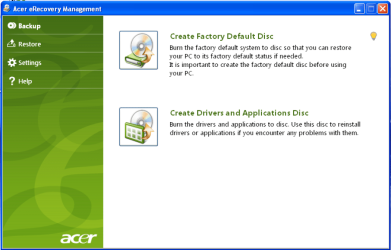
If Startup Repair isn't able to fix it, try running Acer eRecovery from it's hotkey at boot or using Recovery Disks you order from Acer Tech Support: Acer Support: Frequently Asked Questions list for Recovery media and Restoring a system to factory load

Tech Support as well as full hardware warranty are included for the first year, and Acer will often ship the disks free in the first 90 days after purchase. They can also help you with your problem and may want to replace the unit if it is that new.

You can also use a Win7 installation DVD to clean reinstall without the Acer bloatware and useless factory utiltiies which have much better versions built into Win7. Here are the steps: Reinstalling Windows 7
 
Last edited:
I have a new machine and was starting the setup.

I would return to seller for FREE REPAIR or Replacement. Use the warranty.
 

My Computer My Computer

OS
ME/XP/Vista/Win7
one last try before I contact the shop?

Many thanks to both gregrocker and theog for your time and advice.
I have tried to create the dvd with the iso file, but no success. I downloaded ImgBurn & it looks very useful. Unfortunately, it seems that my plextor has died; it's not something that I use very often.

My last thought is whether I can get the iso file onto a usb flash drive? I have ones that have enough capacity.

If this can't/doesn't work, then I'm off back to the shop where I bought it.
Many thanks again. What a weekend!
 

My Computer My Computer

Computer type
Laptop
Computer Manufacturer/Model Number
Asus Ultrabook M8
OS
Win7 home premium SP1 64-bit
CPU
Intel core i5-2467M
Memory
4gb
Hard Drives
128gb
Antivirus
Avast Int Sec
Since you're trying to burn a DVD I'm assuming you've got the Win7 installation ISO which requires a DVD, instead of Win7 Repair CD ISO. Win7 Home Premium x64 SP1 English Official ISO download

Write the ISO to flash stick using Universal USB Installer with Win7 in dropdown menu.

Then boot using Acer one-time BIOS Boot Menu key F12, while HD remains set to boot first in BIOS setup.

Follow these steps to get a clean reinstall of factory OEM: Reinstalling Windows 7

If you intend to try repairs first, use the DVD's System Recovery Options to run Startup Repair repeatedly.
 
now it is clear

I am being very stupid .... should have been cd. Apologies.
Too much reading so as to try and do the right thing ... and I end up doing the wrong thing. Time to stop and take a break before taking any action. I will report back. Thank you once again.
 

My Computer My Computer

Computer type
Laptop
Computer Manufacturer/Model Number
Asus Ultrabook M8
OS
Win7 home premium SP1 64-bit
CPU
Intel core i5-2467M
Memory
4gb
Hard Drives
128gb
Antivirus
Avast Int Sec
resolved

Now that it is Monday, I talked to Acer's tech help. They explained and talked me through using the key combinations that return the machine to default factory settings. That worked and all is now OK, the computer installation is complete.

Many thanks again for the help over the weekend. Even though I wimped out at following the ISO-flash drive remedy, I have learned so much in the past couple of days and will continue to learn through reading here at the forum. The support is terrific and much appreciated.
 

My Computer My Computer

Computer type
Laptop
Computer Manufacturer/Model Number
Asus Ultrabook M8
OS
Win7 home premium SP1 64-bit
CPU
Intel core i5-2467M
Memory
4gb
Hard Drives
128gb
Antivirus
Avast Int Sec
That was also my first suggestion for you to run Factory Recovery if Startup Repair didn't work.
 
All points noted. Will do. Always more to learn! Many thanks again to all.
 

My Computer My Computer

Computer type
Laptop
Computer Manufacturer/Model Number
Asus Ultrabook M8
OS
Win7 home premium SP1 64-bit
CPU
Intel core i5-2467M
Memory
4gb
Hard Drives
128gb
Antivirus
Avast Int Sec
Back
Top