Win7 SP1 registry help. No access to Admin

JSmith2011

New member
Local time
10:12 AM
Messages
28
First off, this site is awesome so thank you to the contributors who make this place great.

My work laptop (Lenovo Win7 SP1) has been crapping out lately with random restarts etc

I have two accounts on this machine (primary is JS with full admin control) second is Admin with zero control.

My primary (JS) profile will NOT load and gives me the user profile error. I did the registry tweak of changing the .bak and resetting the values to 0. This worked briefly and now it’s back to messing up once again. I do have access to the 2ndary profile (Admin) but it has limited rights to change anything.

I am in a big time bind here so if anyone could help, it would be greatly appreciated.

Things of note which I have already tried and have failed:
- start in safe mode (doesn’t work)
Edited registry values (briefly worked)
I cannot lose my C: data nor am I able to back it up seeing as I don’t have any rights.

Please help!! Thanks in advance!!.
 

My Computer My Computer

At a glance

Win7 SP16GB
Computer type
Laptop
Computer Manufacturer/Model Number
Lenovo
OS
Win7 SP1
Memory
6GB
If I understood right, you now can only log in as Admin that has no administrator rights.

Under Admin, try to enable the Administrator account.
Open CMD window and type

net user administrator /active:yes
 

My Computers My Computers

  • At a glance

    Windows 7 HP 64i5 6600K - 800MHz to 4200MHz4+4G GSkill DDR4 3000IG - Intel 530
    Computer type
    PC/Desktop
    Computer Manufacturer/Model Number
    custom build
    OS
    Windows 7 HP 64
    CPU
    i5 6600K - 800MHz to 4200MHz
    Motherboard
    GA-Z170-HD3P
    Memory
    4+4G GSkill DDR4 3000
    Graphics Card(s)
    IG - Intel 530
    Monitor(s) Displays
    Samsung 226BW
    Screen Resolution
    1680x1050
    Hard Drives
    (1) -1 SM951 – 128GB M.2 AHCI PCIe SSD drive for Windows 7 and Lubuntu
    (2) -1 WD SATA 3 - 1T for Data
    (3) -1 WD SATA 3 - 1T for backup
    PSU
    Thermaltake 450W TR2 gold
    Keyboard
    Old and good Chicony mechanical keyboard
    Mouse
    Logitech mX performance - 9 buttons (had to disable some)
    Internet Speed
    500Mb/s
    Browser
    Firefox 64
    Other Info
    TinyWall firewall
  • At a glance

    Windows 7 Proi7-4500U 800MHz to 3.0GHz(4+4)G DDR3 1600IG intel 4400 + NVIDIA GeForce GT 745M
    Computer type
    Laptop
    System Manufacturer/Model Number
    Asus Q550LF
    OS
    Windows 7 Pro
    CPU
    i7-4500U 800MHz to 3.0GHz
    Motherboard
    Asus Q550LF
    Memory
    (4+4)G DDR3 1600
    Graphics Card(s)
    IG intel 4400 + NVIDIA GeForce GT 745M
    Sound Card
    Realtek
    Monitor(s) Displays
    LG Display LP156WF4-SPH1
    Screen Resolution
    1920 x 1080
    Hard Drives
    BX500 120G SSD for Windows and programs +
    1T HDD for data
    Internet Speed
    500 Mb/s
    Browser
    Firefox
    Other Info
    TinyWall firewall
Hi Mega, that is correct. I’ve broken my back trying to get it working and still no luck.

I also tried your suggestion last night with no luck. I believe the system files are corrupted because even trying to login to the secondary account is giving my computer a heart attack.
 

My Computer My Computer

At a glance

Win7 SP16GB
Computer type
Laptop
Computer Manufacturer/Model Number
Lenovo
OS
Win7 SP1
Memory
6GB
Just another point of reference:
I have 4-5 profile registry lines for some reason. Some are labeled .TMP. Once this computer loads up, I’ll screenshot it for you
 

My Computer My Computer

At a glance

Win7 SP16GB
Computer type
Laptop
Computer Manufacturer/Model Number
Lenovo
OS
Win7 SP1
Memory
6GB
You may want to try a repair install. It sounds like Windows corruption for sure and the cause of this may in fact be your HDD. So I would at least backup your important data now. You can do so with an external USB HDD.

You can also clone your current computer to an external USB HDD with AOMEI Backupper. But it may copy over corrupt files.

Repair Install


Something else that might be going on here is just that the profile is corrupt, obviously. It can be fixed, but can you create another account with Admin rights?
 

My Computer My Computer

At a glance

Windows 7 Ultimate x64
Computer type
PC/Desktop
OS
Windows 7 Ultimate x64
Use boot media to copy any valuable data to a safe place.

After that, try a restore point to a time before you had the problem.

boot media includes windows explorer, internet, browser, disk management, shadowcopyview, Aomei partition manager, Aomei Backupper, Eset antivirus, windows system recovery options, and lots of other useful tools.

17514x86.iso

17514x64-v9.iso
 
Last edited:

My Computers My Computers

  • At a glance

    7 X64i5 84002x8gb 3200mhz
    Computer type
    PC/Desktop
    OS
    7 X64
    CPU
    i5 8400
    Motherboard
    gigabyte b365m ds3h
    Memory
    2x8gb 3200mhz
    Hard Drives
    various
    PSU
    pure power 11 400w cm
    Case
    Coolermaster
    Cooling
    cryorig m9i
  • At a glance

    7x64g54008gb ddr4 2400
    Computer type
    PC/Desktop
    OS
    7x64
    CPU
    g5400
    Motherboard
    ga b365m ds3h
    Memory
    8gb ddr4 2400
    PSU
    xfx pro 450w
Nope, the “Admin” account won’t let me create another profile anymore for some reason
 

My Computer My Computer

At a glance

Win7 SP16GB
Computer type
Laptop
Computer Manufacturer/Model Number
Lenovo
OS
Win7 SP1
Memory
6GB
Then try a system restore and if that don't work go back and read what else I said.
 

My Computer My Computer

At a glance

Windows 7 Ultimate x64
Computer type
PC/Desktop
OS
Windows 7 Ultimate x64
System restore doesn’t have a restore point unfortunately.

It’s still on the welcome screen but I hear the HDD churning so I’ll have access to Admin hopefully shortly
 

My Computer My Computer

At a glance

Win7 SP16GB
Computer type
Laptop
Computer Manufacturer/Model Number
Lenovo
OS
Win7 SP1
Memory
6GB
Ok update: was able (somehow) to log into JS in safe mode. Pictures incoming so thanks for your patience.
 

My Computer My Computer

At a glance

Win7 SP16GB
Computer type
Laptop
Computer Manufacturer/Model Number
Lenovo
OS
Win7 SP1
Memory
6GB
Not sure why the pictures won’t populate.

I was able to change user permissions and make “Admin” the administrator for the account. “JS” is now a standard user.
 

My Computer My Computer

At a glance

Win7 SP16GB
Computer type
Laptop
Computer Manufacturer/Model Number
Lenovo
OS
Win7 SP1
Memory
6GB
BACKUP your data on an external disk.

Now that you have a working account lets do the basic

Open a CMD window and type
chkdsk c: /f
It will say it is in use and if you want to schedule to next boot = Yes
Reboot
Pay attention on the results, specially bad blocks or bad clusters.

If disk is ok, under windows open a CMD window and type
sfc /scannow
If it finds any problems, reboot and run it 3 more times, rebooting after each scan.
 

My Computers My Computers

  • At a glance

    Windows 7 HP 64i5 6600K - 800MHz to 4200MHz4+4G GSkill DDR4 3000IG - Intel 530
    Computer type
    PC/Desktop
    Computer Manufacturer/Model Number
    custom build
    OS
    Windows 7 HP 64
    CPU
    i5 6600K - 800MHz to 4200MHz
    Motherboard
    GA-Z170-HD3P
    Memory
    4+4G GSkill DDR4 3000
    Graphics Card(s)
    IG - Intel 530
    Monitor(s) Displays
    Samsung 226BW
    Screen Resolution
    1680x1050
    Hard Drives
    (1) -1 SM951 – 128GB M.2 AHCI PCIe SSD drive for Windows 7 and Lubuntu
    (2) -1 WD SATA 3 - 1T for Data
    (3) -1 WD SATA 3 - 1T for backup
    PSU
    Thermaltake 450W TR2 gold
    Keyboard
    Old and good Chicony mechanical keyboard
    Mouse
    Logitech mX performance - 9 buttons (had to disable some)
    Internet Speed
    500Mb/s
    Browser
    Firefox 64
    Other Info
    TinyWall firewall
  • At a glance

    Windows 7 Proi7-4500U 800MHz to 3.0GHz(4+4)G DDR3 1600IG intel 4400 + NVIDIA GeForce GT 745M
    Computer type
    Laptop
    System Manufacturer/Model Number
    Asus Q550LF
    OS
    Windows 7 Pro
    CPU
    i7-4500U 800MHz to 3.0GHz
    Motherboard
    Asus Q550LF
    Memory
    (4+4)G DDR3 1600
    Graphics Card(s)
    IG intel 4400 + NVIDIA GeForce GT 745M
    Sound Card
    Realtek
    Monitor(s) Displays
    LG Display LP156WF4-SPH1
    Screen Resolution
    1920 x 1080
    Hard Drives
    BX500 120G SSD for Windows and programs +
    1T HDD for data
    Internet Speed
    500 Mb/s
    Browser
    Firefox
    Other Info
    TinyWall firewall
Mega, chkdsk c: /f says I need to be in an elevated mode. Any idea how to get to an elevated mode of command prompt?
 

My Computer My Computer

At a glance

Win7 SP16GB
Computer type
Laptop
Computer Manufacturer/Model Number
Lenovo
OS
Win7 SP1
Memory
6GB
Error: Windows Resource Protection could not perform the requested operation when I ran the sfc /scannow test.
 

My Computer My Computer

At a glance

Win7 SP16GB
Computer type
Laptop
Computer Manufacturer/Model Number
Lenovo
OS
Win7 SP1
Memory
6GB
Right click on CMD link and choose Run as Administrator.
 

My Computers My Computers

  • At a glance

    Windows 7 HP 64i5 6600K - 800MHz to 4200MHz4+4G GSkill DDR4 3000IG - Intel 530
    Computer type
    PC/Desktop
    Computer Manufacturer/Model Number
    custom build
    OS
    Windows 7 HP 64
    CPU
    i5 6600K - 800MHz to 4200MHz
    Motherboard
    GA-Z170-HD3P
    Memory
    4+4G GSkill DDR4 3000
    Graphics Card(s)
    IG - Intel 530
    Monitor(s) Displays
    Samsung 226BW
    Screen Resolution
    1680x1050
    Hard Drives
    (1) -1 SM951 – 128GB M.2 AHCI PCIe SSD drive for Windows 7 and Lubuntu
    (2) -1 WD SATA 3 - 1T for Data
    (3) -1 WD SATA 3 - 1T for backup
    PSU
    Thermaltake 450W TR2 gold
    Keyboard
    Old and good Chicony mechanical keyboard
    Mouse
    Logitech mX performance - 9 buttons (had to disable some)
    Internet Speed
    500Mb/s
    Browser
    Firefox 64
    Other Info
    TinyWall firewall
  • At a glance

    Windows 7 Proi7-4500U 800MHz to 3.0GHz(4+4)G DDR3 1600IG intel 4400 + NVIDIA GeForce GT 745M
    Computer type
    Laptop
    System Manufacturer/Model Number
    Asus Q550LF
    OS
    Windows 7 Pro
    CPU
    i7-4500U 800MHz to 3.0GHz
    Motherboard
    Asus Q550LF
    Memory
    (4+4)G DDR3 1600
    Graphics Card(s)
    IG intel 4400 + NVIDIA GeForce GT 745M
    Sound Card
    Realtek
    Monitor(s) Displays
    LG Display LP156WF4-SPH1
    Screen Resolution
    1920 x 1080
    Hard Drives
    BX500 120G SSD for Windows and programs +
    1T HDD for data
    Internet Speed
    500 Mb/s
    Browser
    Firefox
    Other Info
    TinyWall firewall
Ok, ran chkdsk and here are the results:

Checking file system on C:
The type of the file system is NTFS.

A disk check has been scheduled.
Windows will now check the disk.

CHKDSK is verifying files (stage 1 of 5)...
421120 file records processed. File verification completed.
1325 large file records processed. 0 bad file records processed. 0 EA records processed. 112 reparse records processed. CHKDSK is verifying indexes (stage 2 of 5)...
508422 index entries processed. Index verification completed.
0 unindexed files scanned. 0 unindexed files recovered. CHKDSK is verifying security descriptors (stage 3 of 5)...
421120 file SDs/SIDs processed. Cleaning up 263 unused index entries from index $SII of file 0x9.
Cleaning up 263 unused index entries from index $SDH of file 0x9.
Cleaning up 263 unused security descriptors.
Security descriptor verification completed.
43652 data files processed. CHKDSK is verifying Usn Journal...
37221616 USN bytes processed. Usn Journal verification completed.
CHKDSK is verifying file data (stage 4 of 5)...
Read failure with status 0xc0000185 at offset 0x7a6490000 for 0x10000 bytes.
Read failure with status 0xc0000185 at offset 0x7a6490000 for 0x1000 bytes.
Windows replaced bad clusters in file 32
of name \$Extend\$RmMetadata\$TxfLog\$TxfLog.blf.
Read failure with status 0xc0000185 at offset 0x1c888a8000 for 0x10000 bytes.
Read failure with status 0xc0000185 at offset 0x1c888a8000 for 0x1000 bytes.
Windows replaced bad clusters in file 235865
of name \Users\JS\ntuser.dat.
Read failure with status 0xc0000185 at offset 0x1d27548000 for 0x10000 bytes.
Read failure with status 0xc0000185 at offset 0x1d27548000 for 0x1000 bytes.
Windows replaced bad clusters in file 235889
of name \Users\JS\AppData\Local\MICROS~1\Windows\UsrClass.dat.
Windows replaced bad clusters in file 249328
of name \PROGRA~2\MICROS~1\Windows\WER\REPORT~2\AP834A~1\WER14D~1.MD~.
421104 files processed. File data verification completed.
CHKDSK is verifying free space (stage 5 of 5)...
8679845 free clusters processed. Free space verification is complete.
Adding 3 bad clusters to the Bad Clusters File.
Correcting errors in the Volume Bitmap.
Windows has made corrections to the file system.

165044247 KB total disk space.
129569144 KB in 367554 files.
220848 KB in 43653 indexes.
12 KB in bad sectors.
534859 KB in use by the system.
65536 KB occupied by the log file.
34719384 KB available on disk.

4096 bytes in each allocation unit.
41261061 total allocation units on disk.
8679846 allocation units available on disk.

Internal Info:
00 6d 06 00 52 46 06 00 95 be 0b 00 00 00 00 00 .m..RF..........
97 12 00 00 70 00 00 00 00 00 00 00 00 00 00 00 ....p...........
a8 66 3c 00 50 01 3a 00 90 1e 3a 00 00 00 3a 00 .f<.P.:...:...:.

Windows has finished checking your disk.
Please wait while your computer restarts.

Ok......so what does all that mean? haha Seems like it cleared up some bad clusters yea?
 

My Computer My Computer

At a glance

Win7 SP16GB
Computer type
Laptop
Computer Manufacturer/Model Number
Lenovo
OS
Win7 SP1
Memory
6GB
Any idea how to get my JS working properly? Fortunately it appears all of my old files are still there (and accessible!). Thanks!

It's still giving me the user profile error.

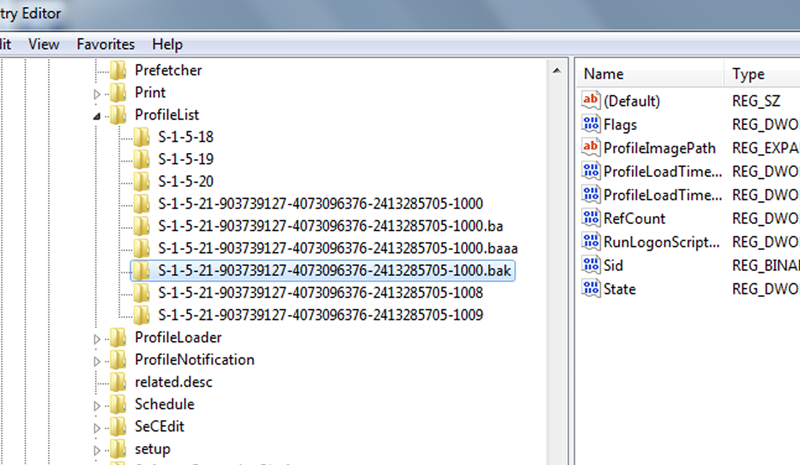
ETA: Here is the registry list

anr0d2W.png


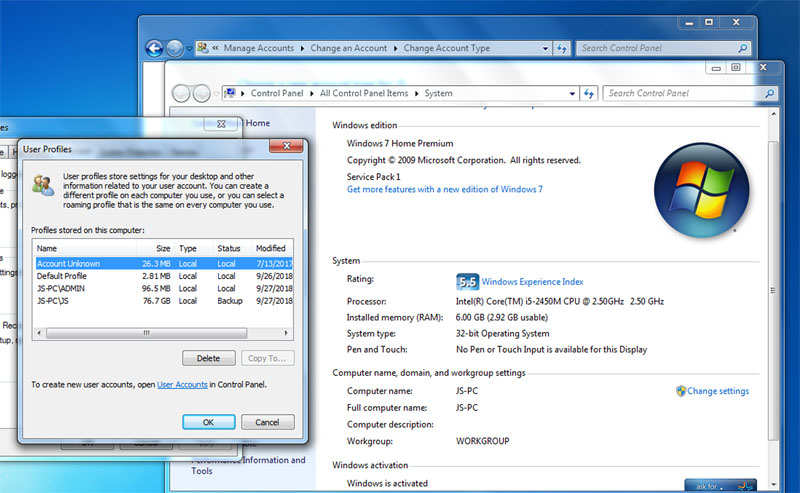
Here is the User Profiles:

AgLE3zS.jpg
 
Last edited:

My Computer My Computer

At a glance

Win7 SP16GB
Computer type
Laptop
Computer Manufacturer/Model Number
Lenovo
OS
Win7 SP1
Memory
6GB
Like I already stated, and according to your chkdsk results, it looks like your hard drive is on the way out. Read my post again on page one and heed my advice now.
 

My Computer My Computer

At a glance

Windows 7 Ultimate x64
Computer type
PC/Desktop
OS
Windows 7 Ultimate x64
What did you see exactly that would lead you to that conclusion? Something from the chkdsk results or what?

Also, to answer your previous question "Something else that might be going on here is just that the profile is corrupt, obviously. It can be fixed, but can you create another account with Admin rights?": Yes, I can and have done so which is the profile I'm on now (Admin w/admin rights).
 

My Computer My Computer

At a glance

Win7 SP16GB
Computer type
Laptop
Computer Manufacturer/Model Number
Lenovo
OS
Win7 SP1
Memory
6GB
Yes, the chckdsk results as I stated.

Read failure with status 0xc0000185 at offset 0x7a6490000 for 0x10000 bytes.
Read failure with status 0xc0000185 at offset 0x7a6490000 for 0x1000 bytes.
Windows replaced bad clusters in file 32
of name \$Extend\$RmMetadata\$TxfLog\$TxfLog.blf.
Read failure with status 0xc0000185 at offset 0x1c888a8000 for 0x10000 bytes.
Read failure with status 0xc0000185 at offset 0x1c888a8000 for 0x1000 bytes.
Windows replaced bad clusters in file 235865
of name \Users\JS\ntuser.dat.
Read failure with status 0xc0000185 at offset 0x1d27548000 for 0x10000 bytes.
Read failure with status 0xc0000185 at offset 0x1d27548000 for 0x1000 bytes.

You also have bad clusters.
 

My Computer My Computer

At a glance

Windows 7 Ultimate x64
Computer type
PC/Desktop
OS
Windows 7 Ultimate x64
Back
Top