
HansTroost
New member
Dear all,
One of my Win7 PC's STOPPED showing my NAS and the shares on it in Windows Explorer. One of the shares (Pictures) was mapped as network drive P:: That also stopped worken.
It worked flawless for > 1,5 year and it stopped. As far as I remember, I did nothing that could make this happen (...as far as I remember...!). Last months I tried everything I found on the internet that possibly could solve this, but no success.
I'll try to picture the situation as clear as I can:
I have 2 Win7 PC's: a Desktop - having the problem -, with WIN7 Home Premium (EN) and a Laptop (WIN7 Home Premium NL, Dutch), not having the problem and showing the NAS and its share fine. Both are wired to the same switch. My wife is using an XP-machine - still, but I'm changing it to Lubuntu now - also showing the NAS and its shares properly in the windows explorer.
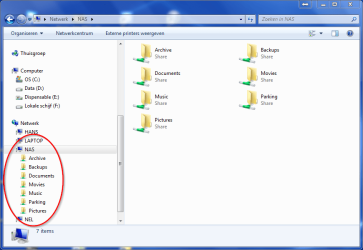
Screenshot from the Laptop, showing the NAS properly: WIN7-NL_Nas-shown.png
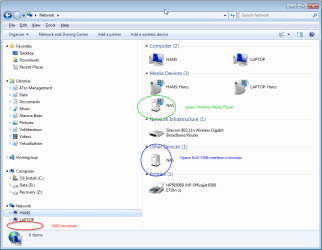
Screenshot from the problem machine, the Desktop, NOT showing the NAS and its shares properly: WIN7-EN_NAS_not_shown.png
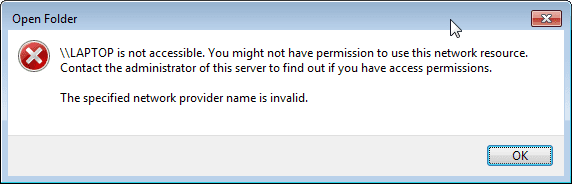
When trying to access other devices, like the Laptop, from Windows Explorer, I get this error message, the same as when I try to map a network drive to a NAS-share: WIN7-EN_no-access-to-share.png
In contradiction to this (?), my file backup tool on this desktop (Cobian Backup) easily accesses the NAS and creates backup-folders on it and indeed backs up the selected files:
(from Cobian Backup log file)
2014-04- 2014-04-19 16:02:01 *** A new backup has started. Number of tasks in queue: 1 ***
2014-04-19 16:02:04 Preventing the system from entering sleep mode...
2014-04-19 16:02:04 ** Backing up the task "Data" **
2014-04-19 16:02:04 Counting the files for the task "Data"...
2014-04-19 16:02:05 Creating the destination directory "\\NAS\Backups\Hans\Files\D 2014-04-19-160205 (Incremental)"
2014-04-19 16:02:05 The destination directory "\\NAS\Backups\Hans\Files\D 2014-04-19-160205 (Incremental)" has been successfully created
2014-04-19 16:02:05 Backing up the directory "D:\"
So fighting with the problem for some time now (I think it started somewhere January/February) I kindly ask you for any helping tip you can think of. Please keep in mind: my network is working fine (given the other proper functioning machines), internet works, backups from the "problem desktop" are running fine as well.
An additional and most possibly related malfunction: at the same time the desktop also stopped exposing itself to the homegroup on the WIN7-NL laptop. The shares from the laptop are shown in the homegroup on the desktop and are readable/writeable.
I checked the advanced setting for (homegroup-)sharing on both machines: identical!
Functionally: I cannot work with the NAS-shares on the desktop anaymore....
Can anybody help me out? What - if anything - did I do wrong?
Best regards,
Hans Troost
One of my Win7 PC's STOPPED showing my NAS and the shares on it in Windows Explorer. One of the shares (Pictures) was mapped as network drive P:: That also stopped worken.
It worked flawless for > 1,5 year and it stopped. As far as I remember, I did nothing that could make this happen (...as far as I remember...!). Last months I tried everything I found on the internet that possibly could solve this, but no success.
I'll try to picture the situation as clear as I can:
I have 2 Win7 PC's: a Desktop - having the problem -, with WIN7 Home Premium (EN) and a Laptop (WIN7 Home Premium NL, Dutch), not having the problem and showing the NAS and its share fine. Both are wired to the same switch. My wife is using an XP-machine - still, but I'm changing it to Lubuntu now - also showing the NAS and its shares properly in the windows explorer.
Screenshot from the Laptop, showing the NAS properly: WIN7-NL_Nas-shown.png
Screenshot from the problem machine, the Desktop, NOT showing the NAS and its shares properly: WIN7-EN_NAS_not_shown.png
When trying to access other devices, like the Laptop, from Windows Explorer, I get this error message, the same as when I try to map a network drive to a NAS-share: WIN7-EN_no-access-to-share.png
In contradiction to this (?), my file backup tool on this desktop (Cobian Backup) easily accesses the NAS and creates backup-folders on it and indeed backs up the selected files:
(from Cobian Backup log file)
2014-04- 2014-04-19 16:02:01 *** A new backup has started. Number of tasks in queue: 1 ***
2014-04-19 16:02:04 Preventing the system from entering sleep mode...
2014-04-19 16:02:04 ** Backing up the task "Data" **
2014-04-19 16:02:04 Counting the files for the task "Data"...
2014-04-19 16:02:05 Creating the destination directory "\\NAS\Backups\Hans\Files\D 2014-04-19-160205 (Incremental)"
2014-04-19 16:02:05 The destination directory "\\NAS\Backups\Hans\Files\D 2014-04-19-160205 (Incremental)" has been successfully created
2014-04-19 16:02:05 Backing up the directory "D:\"
So fighting with the problem for some time now (I think it started somewhere January/February) I kindly ask you for any helping tip you can think of. Please keep in mind: my network is working fine (given the other proper functioning machines), internet works, backups from the "problem desktop" are running fine as well.
An additional and most possibly related malfunction: at the same time the desktop also stopped exposing itself to the homegroup on the WIN7-NL laptop. The shares from the laptop are shown in the homegroup on the desktop and are readable/writeable.
I checked the advanced setting for (homegroup-)sharing on both machines: identical!
Functionally: I cannot work with the NAS-shares on the desktop anaymore....
Can anybody help me out? What - if anything - did I do wrong?
Best regards,
Hans Troost
Attachments
My Computer
At a glance
Win 7 Home Premium x64 SP1Inter Core i7 3770 3.4 GHz 8MB LGA11558,00 GB Dual-Channel DDR3 @ 666MHz (9-9-9-24)MSI GeForce N550GTX-TI-MD1GD5 V2
- Computer type
- PC/Desktop
- Computer Manufacturer/Model Number
- custom build
- OS
- Win 7 Home Premium x64 SP1
- CPU
- Inter Core i7 3770 3.4 GHz 8MB LGA1155
- Motherboard
- MSI Z77A-G45 - Socket 1155 - ATX
- Memory
- 8,00 GB Dual-Channel DDR3 @ 666MHz (9-9-9-24)
- Graphics Card(s)
- MSI GeForce N550GTX-TI-MD1GD5 V2
- Hard Drives
- 112GB INTEL SSDSC2CW120A3 ATA Device (SSD)
1863GB Seagate ST2000DM001-9YN164 ATA Device (SATA)
- Antivirus
- Microsoft Security Essentials 4.4.304.0
- Browser
- Firefox 28.0
