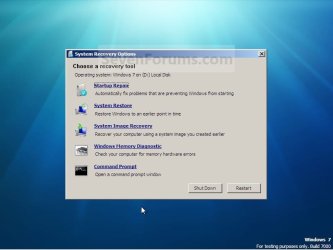
Win7 stuck on logo, safe mode crashes

Haller

New member
Local time
7:26 AM
Messages
2
Hi, my pc with win7 got a problem that freezes it on windows logo on boot. Before that problem, i had to reboot pc after i installed newest version of ccleaner and while running, it freezed my pc. Similar thing happened to my different pc years ago, so i thought i could fix it. I accessed safe mode, and that booted fine, i disabled some startup programs, including ccleaner, which may have slowed down the pc. That did not help. I ran startup repair, which took about 15mins. No help, tried to run last known good config and that didnt help either. Now i wanted to try /scannow but the problem has just gotten worse. When i try booting in safe mode, it crashes. I did repair again because after first time, it allowed me to choose system restore, command prompt etc. but now it allowed me to only run repair after it.

-Stuck in win7 logo
-Run in safe mode to disable programs on boot
-Tried to boot with last known good configuration
-Still stuck, run repair. Decided to skip system restore, command prompt etc. because i thought i could access safe mode again
-Now safe mode crashes whereas it worked just fine before the last 2 steps
-Run repair again but it doesn't bring up the options to system restore, command prmpt etc, only option is system repair and it hasn't helped.

So the problem is still the same, stuck in win7 logo but while trying to fix it, i managed to make safe mode crash and i can't access system restore or command prompt anymore. I also don't have access to any kind of boot cd/usb.

Edit 1: now the normal boot goes past the windows logo and crashes few seconds after that. Before, it was just stuck on logo forever, waited about an hour just to see if it works at all. Safe mode crashes too.
 
Last edited:

My Computer My Computer

At a glance

Win 7 32bit
Computer type
PC/Desktop
OS
Win 7 32bit
Hi Haller,

Welcome to SevenForums!

Start your computer and immediately begin repeatidly pressing the F8 key (it may be a different F key on your machine, trial and error might be required).

Windows 7 displays a menu of special startup options you can choose. Use the up-arrow and down-arrow keys to move the menu's highlight to Last Known Good Configuration (Advanced), and then press Enter.
 

My Computer My Computer

At a glance

Win 10 x64, Linux Lite, Win 7 x64, BlackArch,...
Computer type
PC/Desktop
Computer Manufacturer/Model Number
HP Desktop & Compaq Laptop
OS
Win 10 x64, Linux Lite, Win 7 x64, BlackArch, & Kali
Hard Drives
Samsung 850 Pro 256Gb,
Hitachi HDD 1Tb,
Crucial MX SSD 250Gb
Segate 3Tb USB 3.0 Ext. Backup HDD
Internet Speed
150Mbps dn, 20Mbps up
Antivirus
Avast Free, Malwarebytes Anti-Exploit & Anti-Ransomware
Browser
Firefox, Chrome, Opera, & VPN
I already did what Snick suggested, used Last Known Good Configuration. Either because of that or something else, windows is not stuck in logo anymore, now it crashes few seconds after that. It loads a black screen with mouse cursos visible and then crashes and reboots. The worst thing is that the same thing happens with safe mode now. Mouse cursor is bigger because it boots with bad resolution, but the same black screen for few seconds and then crashes. Safe mode worked perfectly before I tried system repair and last known good configuration.


In the picture is the exact same menu i got after the first startup repair. Now after i did it again, the only option it gives me is Startup repair. There are NO options to choose System Restore, System Image Recovery, System Memory Diagnostics or Command Prompt. Why would those 4 options suddenly disappear between two different startup repairs.
 

Attachments

  • IMG_0067.JPG
    IMG_0067.JPG
    43.1 KB · Views: 0
Last edited:

My Computer My Computer

At a glance

Win 7 32bit
Computer type
PC/Desktop
OS
Win 7 32bit
Welcome to the Forum.

From the point on last image, choose Command Prompt.
Type Dir C:
If not your disk, type Dir D:
When you find your disk, type chkdsk Y: /f (replace Y: with your disk)

Pay attention on the results, specially bad blocks or bad clusters.
 

My Computers My Computers

  • At a glance

    Windows 7 HP 64i5 6600K - 800MHz to 4200MHz4+4G GSkill DDR4 3000IG - Intel 530
    Computer type
    PC/Desktop
    Computer Manufacturer/Model Number
    custom build
    OS
    Windows 7 HP 64
    CPU
    i5 6600K - 800MHz to 4200MHz
    Motherboard
    GA-Z170-HD3P
    Memory
    4+4G GSkill DDR4 3000
    Graphics Card(s)
    IG - Intel 530
    Monitor(s) Displays
    Samsung 226BW
    Screen Resolution
    1680x1050
    Hard Drives
    (1) -1 SM951 – 128GB M.2 AHCI PCIe SSD drive for Windows 7 and Lubuntu
    (2) -1 WD SATA 3 - 1T for Data
    (3) -1 WD SATA 3 - 1T for backup
    PSU
    Thermaltake 450W TR2 gold
    Keyboard
    Old and good Chicony mechanical keyboard
    Mouse
    Logitech mX performance - 9 buttons (had to disable some)
    Internet Speed
    500Mb/s
    Browser
    Firefox 64
    Other Info
    TinyWall firewall
  • At a glance

    Windows 7 Proi7-4500U 800MHz to 3.0GHz(4+4)G DDR3 1600IG intel 4400 + NVIDIA GeForce GT 745M
    Computer type
    Laptop
    System Manufacturer/Model Number
    Asus Q550LF
    OS
    Windows 7 Pro
    CPU
    i7-4500U 800MHz to 3.0GHz
    Motherboard
    Asus Q550LF
    Memory
    (4+4)G DDR3 1600
    Graphics Card(s)
    IG intel 4400 + NVIDIA GeForce GT 745M
    Sound Card
    Realtek
    Monitor(s) Displays
    LG Display LP156WF4-SPH1
    Screen Resolution
    1920 x 1080
    Hard Drives
    BX500 120G SSD for Windows and programs +
    1T HDD for data
    Internet Speed
    500 Mb/s
    Browser
    Firefox
    Other Info
    TinyWall firewall

My Computer My Computer

At a glance

Win 10 x64, Linux Lite, Win 7 x64, BlackArch,...
Computer type
PC/Desktop
Computer Manufacturer/Model Number
HP Desktop & Compaq Laptop
OS
Win 10 x64, Linux Lite, Win 7 x64, BlackArch, & Kali
Hard Drives
Samsung 850 Pro 256Gb,
Hitachi HDD 1Tb,
Crucial MX SSD 250Gb
Segate 3Tb USB 3.0 Ext. Backup HDD
Internet Speed
150Mbps dn, 20Mbps up
Antivirus
Avast Free, Malwarebytes Anti-Exploit & Anti-Ransomware
Browser
Firefox, Chrome, Opera, & VPN
... There are NO options to choose System Restore, System Image Recovery, System Memory Diagnostics or Command Prompt. ...
why does the image you posted show the options?
 

My Computer My Computer

At a glance

Microsoft Windows 7 Home Premium 64-bit 7601 ...Pentium(R) Dual-Core CPU E5300 @ 2.60GHz6.00 GBIntel(R) G33/G31 Express Chipset Family
Computer type
PC/Desktop
Computer Manufacturer/Model Number
HP (HP-P6212F)
OS
Microsoft Windows 7 Home Premium 64-bit 7601 Multiprocessor Free Service Pack 1
CPU
Pentium(R) Dual-Core CPU E5300 @ 2.60GHz
Motherboard
PEGATRON CORPORATION Benicia
Memory
6.00 GB
Graphics Card(s)
Intel(R) G33/G31 Express Chipset Family
Sound Card
Realtek High Definition Audio
Monitor(s) Displays
24'' HP WS LCD
Screen Resolution
1920 x 1080 x 32 bits (4294967296 colors) @ 60 Hz
Hard Drives
(1) ATA Hitachi HDT72106 SCSI Disk Device (2) Generic- Compact Flash USB Device (3) Generic- MS/MS-Pro USB Device (4) Generic- SD/MMC USB Device (5) Generic- SM/xD-Picture USB Device (6) Verbatim STORE N GO USB Device
Keyboard
Logitech G510s
Mouse
Logitech Trackball M570
Antivirus
Microsoft Security Essentials / Malwarebytes
Browser
IE / Firefox / Chrome
Back
Top