
Solved Win7 to Win7 slow network transfers

mrtn

New member
Local time
7:53 PM
Messages
9
Hi

I have tried searching the forums and tried all possible solutions but none of them seem to work.

My setup is as follows:

"Server":
Windows 7 Professional x86
Connected to Draytek 2820n MIMO router with Gigabit Cat6 cable (Win reports 1Gbps)

(brand new) Laptop:
Windows 7 Professional x64
Intel Centrino Ultimate-N 6300
Connected to the same router wirelessly 802.11n (Win reports 300-450mbps)

Router:
WPA2 AES

I seem to have a problem with server to laptop transfer speeds which look to be capped at approx 3-3.5 MB/s. It seems too low for a 802.11n speed to me!

I feel like I have tried everything:

1. Removed antivirus, disabled windows firewalls on both computers
2. Removed Remote Differential Compression on both computers
3. Disabled autotuning
4. Tested server's HDD with SeaTools
5. Disabled IPv6 on both computers
6. Disabled Large Send Offload in NIC's advanced properties on the server
7. Screenshot from NetCPS is attached below

Any help would be much appreciated!
 

Attachments
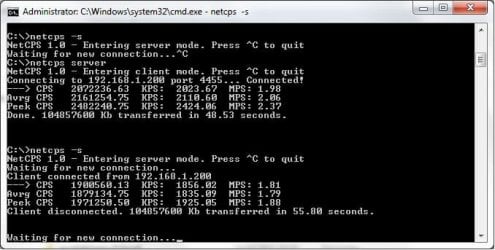
  • NetCPS.jpg
    NetCPS.jpg
    38.4 KB · Views: 113

My Computer My Computer

At a glance

Windows 7 Professional x64
OS
Windows 7 Professional x64
A question if i may, how far away is the laptop from the wifi router?

Distance affects transfer speeds tremendously...

As an example, I've a laptop hooked up via GbE (1Gbps) using CAT-6 cables to a router that is transfering files to another laptop thats using Wireless N @ 150Mbps..

When the laptop on wireless in right on top of the router i get 8 - 10 MB/s speeds, when it's in a room separated by a couple of walls, it drops to as low as 2-3 MB/s..

Physical obstacles and distance from the router are two major factors... Also try to rule out interference from any other 2.4 GHz devices in the vicinity.... Any other wireless networks in the area using the same channel perhaps? If so, try changing the Upper and Control channels to a different number in the router configuration....

Getting 300+ Mbps requires a dual band 2.4GHz channels which may be impinging on the spectrum that other nearby networks are using.... leading to interference and poorer than expected performance...
 

My Computer My Computer

At a glance

Windows 7 x64 Professional SP1Intel C2D T9550 2.66 GHz @ 2.793 GHz (Thanks ...8 GB DDR3ATI MOBILITY RADEON 4670
Computer Manufacturer/Model Number
DELL SXPS 1640
OS
Windows 7 x64 Professional SP1
CPU
Intel C2D T9550 2.66 GHz @ 2.793 GHz (Thanks ThrottleStop!!)
Motherboard
Intel PM45
Memory
8 GB DDR3
Graphics Card(s)
ATI MOBILITY RADEON 4670
Sound Card
CREATIVE XFI AUDIO NOTEBOOK
Monitor(s) Displays
16.1 WLED
Screen Resolution
1920x1080
Hard Drives
Seagate ST9500420AS 500GB (465GiBi) 7200 RPM Drive

External Drives:-
2 TB WD Essentials x 3
1 TB WD Mybook Gen 1
1 TB WD Mybook Gen 2
1 TB Seagate
1 TB Seagate
320 GB WD Scorpio Black (enclosed)
PSU
90W Dell Power Brick
Case
Dell Chassis
Cooling
Coolermaster Cooling Pad
Keyboard
Built-in backlighted Keyboard
Mouse
Logitech Wireless Mini Mouse
Internet Speed
4/0.5
  • Like
Reactions: JMH
Double check you have not got bandwidth restrictions set in your Draytek router as they have that functionality, and should it be enabled then it would explain matters...
 

My Computer My Computer

At a glance

W7 x64Intel Q9300 2.5Ghz Quad LGA775 (Would like Q9...4Gb OCZ Gold 1,333MhzPalit HD4850 O/C Sonic 512Mb DDR3, Dual DViD's
Computer Manufacturer/Model Number
Custom built machine
OS
W7 x64
CPU
Intel Q9300 2.5Ghz Quad LGA775 (Would like Q9650)
Motherboard
Gigabyte GA-EP45T-UD3R (F6 Bios)
Memory
4Gb OCZ Gold 1,333Mhz
Graphics Card(s)
Palit HD4850 O/C Sonic 512Mb DDR3, Dual DViD's
Sound Card
Azalia to twin Samson 50w Studio Monitors
Monitor(s) Displays
Twin Dell (E-IPS) U2311H 23.6" Screens
Screen Resolution
1920 x 1080 @ 60Hz
Hard Drives
Crucial M4 SSD, archives on twin Western Digital Caviar Black WD2002FAEX, 2TB, 7200rpm HDD's, Samsung Ritemaster CD/DVD Burner...
PSU
OCZ 600w
Case
Lian-Li PC8 acoustifoamed' aluminium tower
Cooling
Scythe 140mm Zipang
Keyboard
Cherry PS/2 custom model
Mouse
Lenovo USB laser "Thinkpad" Mouse
Internet Speed
ADSL2+ @14Mbps downstream & Cat6 Gigabit Ethernet
Antivirus
NOD32
Browser
Opera
Other Info
Silicon Dust HD Homerun Dual FTA (Ethernet) TV Tuners, Dray Tek Vigor 2850Vn router and 8x HP Gigabit Switch. Lian-Li CR26 Card Reader, Canon MF4430 iSensys laser printer/scanner.
Hi

The laptop is in normally approx. 5m on a straigh line from the router, with one plasterboard wall in between. The signal strenght is shown as excellent 5/5 bars. I have actually just taken the laptop and laid it next to the router. The rate has gone up by only 0.1 MB/s, hence I reckon it must be something else.

I have got a cordless phone next to it, but I turned it off earlier today when testing and it didn't make any difference whatsoever...
 

My Computer My Computer

At a glance

Windows 7 Professional x64
OS
Windows 7 Professional x64
Double check you have not got bandwidth restrictions set in your Draytek router as they have that functionality, and should it be enabled then it would explain matters...

Thanks for this suggestion, have just checked and the Bandwith limit, Sessions limit and QoS are disabled...

I have also got latest firmware on it...If nothing else works I will have to reset to factory settings and see if that helps.
 

My Computer My Computer

At a glance

Windows 7 Professional x64
OS
Windows 7 Professional x64
Thanks for this suggestion, have just checked and the Bandwith limit, Sessions limit and QoS are disabled...

Be wary with some Draytek kit as they can bond VLAN's and physical LAN's, but I have not got the manual for yours before me. Some also have several separate physical LAN and WiFi routing, and different settings for each route can apply.
 

My Computer My Computer

At a glance

W7 x64Intel Q9300 2.5Ghz Quad LGA775 (Would like Q9...4Gb OCZ Gold 1,333MhzPalit HD4850 O/C Sonic 512Mb DDR3, Dual DViD's
Computer Manufacturer/Model Number
Custom built machine
OS
W7 x64
CPU
Intel Q9300 2.5Ghz Quad LGA775 (Would like Q9650)
Motherboard
Gigabyte GA-EP45T-UD3R (F6 Bios)
Memory
4Gb OCZ Gold 1,333Mhz
Graphics Card(s)
Palit HD4850 O/C Sonic 512Mb DDR3, Dual DViD's
Sound Card
Azalia to twin Samson 50w Studio Monitors
Monitor(s) Displays
Twin Dell (E-IPS) U2311H 23.6" Screens
Screen Resolution
1920 x 1080 @ 60Hz
Hard Drives
Crucial M4 SSD, archives on twin Western Digital Caviar Black WD2002FAEX, 2TB, 7200rpm HDD's, Samsung Ritemaster CD/DVD Burner...
PSU
OCZ 600w
Case
Lian-Li PC8 acoustifoamed' aluminium tower
Cooling
Scythe 140mm Zipang
Keyboard
Cherry PS/2 custom model
Mouse
Lenovo USB laser "Thinkpad" Mouse
Internet Speed
ADSL2+ @14Mbps downstream & Cat6 Gigabit Ethernet
Antivirus
NOD32
Browser
Opera
Other Info
Silicon Dust HD Homerun Dual FTA (Ethernet) TV Tuners, Dray Tek Vigor 2850Vn router and 8x HP Gigabit Switch. Lian-Li CR26 Card Reader, Canon MF4430 iSensys laser printer/scanner.
Thanks for this suggestion, have just checked and the Bandwith limit, Sessions limit and QoS are disabled...

Be wary with some Draytek kit as they can bond VLAN's and physical LAN's, but I have not got the manual for yours before me. Some also have several separate physical LAN and WiFi routing, and different settings for each route can apply.

OK, you have convinced me. I will go for a factory reset. Will get back in few mins and report
 

My Computer My Computer

At a glance

Windows 7 Professional x64
OS
Windows 7 Professional x64
Thanks for this suggestion, have just checked and the Bandwith limit, Sessions limit and QoS are disabled...

Be wary with some Draytek kit as they can bond VLAN's and physical LAN's, but I have not got the manual for yours before me. Some also have several separate physical LAN and WiFi routing, and different settings for each route can apply.

Right, I have reset the router to factory settings and can confirm that this is not the router that's a cause of a problem! The transfer was very similiar (a bit lower) on an unsecured network with factory defaults...

It must be something with the server
 

My Computer My Computer

At a glance

Windows 7 Professional x64
OS
Windows 7 Professional x64
It was worth looking into the Draytek, whilst they are capable, they are also over-complicated for most users!

I'd take a look at the properties of the WiFi network adapter now.

See that Tx/Rx settings are optimal, if it has green ethernet I would disable it, ensure jumbo packets are set to whatever it's capable of etc.

Another silly point, but check the protocol is correct, B, G, GN, N, etc...
 

My Computer My Computer

At a glance

W7 x64Intel Q9300 2.5Ghz Quad LGA775 (Would like Q9...4Gb OCZ Gold 1,333MhzPalit HD4850 O/C Sonic 512Mb DDR3, Dual DViD's
Computer Manufacturer/Model Number
Custom built machine
OS
W7 x64
CPU
Intel Q9300 2.5Ghz Quad LGA775 (Would like Q9650)
Motherboard
Gigabyte GA-EP45T-UD3R (F6 Bios)
Memory
4Gb OCZ Gold 1,333Mhz
Graphics Card(s)
Palit HD4850 O/C Sonic 512Mb DDR3, Dual DViD's
Sound Card
Azalia to twin Samson 50w Studio Monitors
Monitor(s) Displays
Twin Dell (E-IPS) U2311H 23.6" Screens
Screen Resolution
1920 x 1080 @ 60Hz
Hard Drives
Crucial M4 SSD, archives on twin Western Digital Caviar Black WD2002FAEX, 2TB, 7200rpm HDD's, Samsung Ritemaster CD/DVD Burner...
PSU
OCZ 600w
Case
Lian-Li PC8 acoustifoamed' aluminium tower
Cooling
Scythe 140mm Zipang
Keyboard
Cherry PS/2 custom model
Mouse
Lenovo USB laser "Thinkpad" Mouse
Internet Speed
ADSL2+ @14Mbps downstream & Cat6 Gigabit Ethernet
Antivirus
NOD32
Browser
Opera
Other Info
Silicon Dust HD Homerun Dual FTA (Ethernet) TV Tuners, Dray Tek Vigor 2850Vn router and 8x HP Gigabit Switch. Lian-Li CR26 Card Reader, Canon MF4430 iSensys laser printer/scanner.
Hi

I have got couple "g" devices on a network, however I have tried forcing 802.11n only without effect.

On the laptop I have got the wifi card set up as follows:

802.11n Channel Width for band 2.4 - Auto
802.11n Channel Width for band 5.2 - Auto
802.11n mode - Enabled
Ad Hoc Channel 802.11b/g - 1
Ad Hoc QoS Mode - WMM Enabled
Fat Channel Intolerant - Disabled
Mixed Mode Protection - CTS-to-self Enabled
Preferred Band - 1. No Preference
Roaming Aggresiveness - 3. Medium
Transmit Power - 5. Highest
Wireless Mode - 6. 802.11a/b/g

On the server side:

Device sleep on disconnect - Enabled
Flow Control - Disabled
Interrupt Moderation - Enabled
IP Checksum Offload - RX & TX Enabled
Jumbo Packet - 1514 bytes
Large Send Offload V1 (IPv4) - Enabled
Large Send Offload V2 (IPv4) - Disabled
Large Send Offload V2 (IPv6) - Disabled
Low Power Idle Mode - Enabled
Low Power State Link Speed - Enabled
Network Address - Not present
Priority & VLAN - Priority Enabled
Speed/duplex settings - Auto negotiation
TCP Checksum Offload (IPv4) - RX & TX Enabled
TCP Checksum Offload (IPv6) - RX & TX Enabled
UDP Checksum Offload (IPv4) - RX & TX Enabled
UDP Checksum Offload (IPv6) - RX & TX Enabled
VLAN Id - 1
Wake on Magic Packet - Enabled
Wake on pattern match - Enabled
WakeOnLAN From PowerOff - Enabled
 

My Computer My Computer

At a glance

Windows 7 Professional x64
OS
Windows 7 Professional x64
Quick update:

I have also tested transfers on another laptop and the speed was roughly the same. There is clearly an issue on the server side but I have no clue what ity might be...
 

My Computer My Computer

At a glance

Windows 7 Professional x64
OS
Windows 7 Professional x64
On the server side:

  1. Device sleep on disconnect - Enabled
  2. Flow Control - Disabled
  3. Interrupt Moderation - Enabled
  4. IP Checksum Offload - RX & TX Enabled
  5. Jumbo Packet - 1514 bytes
  6. Large Send Offload V1 (IPv4) - Enabled
  7. Large Send Offload V2 (IPv4) - Disabled
  8. Large Send Offload V2 (IPv6) - Disabled
  9. Low Power Idle Mode - Enabled
  10. Low Power State Link Speed - Enabled
  11. Network Address - Not present
  12. Priority & VLAN - Priority Enabled
  13. Speed/duplex settings - Auto negotiation
  14. TCP Checksum Offload (IPv4) - RX & TX Enabled
  15. TCP Checksum Offload (IPv6) - RX & TX Enabled
  16. UDP Checksum Offload (IPv4) - RX & TX Enabled
  17. UDP Checksum Offload (IPv6) - RX & TX Enabled
  18. VLAN Id - 1
  19. Wake on Magic Packet - Enabled
  20. Wake on pattern match - Enabled
  21. WakeOnLAN From PowerOff - Enabled

I'd be tempted to change to opposing settings on items 1, 2, 7, 8, 9, 12, 13 (setting the speed to the maximum bandwidth the adapter is built for under the last item, which is presumably Gigabit LAN...)

Firsthand it goes without saying you should ensure you have the latest and greatest driver powering it of course.

I would also be suspicious of option 12 given the router you're using... try it on simply the basic priority setting...
 

My Computer My Computer

At a glance

W7 x64Intel Q9300 2.5Ghz Quad LGA775 (Would like Q9...4Gb OCZ Gold 1,333MhzPalit HD4850 O/C Sonic 512Mb DDR3, Dual DViD's
Computer Manufacturer/Model Number
Custom built machine
OS
W7 x64
CPU
Intel Q9300 2.5Ghz Quad LGA775 (Would like Q9650)
Motherboard
Gigabyte GA-EP45T-UD3R (F6 Bios)
Memory
4Gb OCZ Gold 1,333Mhz
Graphics Card(s)
Palit HD4850 O/C Sonic 512Mb DDR3, Dual DViD's
Sound Card
Azalia to twin Samson 50w Studio Monitors
Monitor(s) Displays
Twin Dell (E-IPS) U2311H 23.6" Screens
Screen Resolution
1920 x 1080 @ 60Hz
Hard Drives
Crucial M4 SSD, archives on twin Western Digital Caviar Black WD2002FAEX, 2TB, 7200rpm HDD's, Samsung Ritemaster CD/DVD Burner...
PSU
OCZ 600w
Case
Lian-Li PC8 acoustifoamed' aluminium tower
Cooling
Scythe 140mm Zipang
Keyboard
Cherry PS/2 custom model
Mouse
Lenovo USB laser "Thinkpad" Mouse
Internet Speed
ADSL2+ @14Mbps downstream & Cat6 Gigabit Ethernet
Antivirus
NOD32
Browser
Opera
Other Info
Silicon Dust HD Homerun Dual FTA (Ethernet) TV Tuners, Dray Tek Vigor 2850Vn router and 8x HP Gigabit Switch. Lian-Li CR26 Card Reader, Canon MF4430 iSensys laser printer/scanner.
  • Like
Reactions: JMH
Qdos you are a genius!

It appears that changing the Flow Control setting to Rx & Tx Enabled has doubled my transfer speed, which reaches 6-9 MB/s!!!

Many thanks for your help!
 

My Computer My Computer

At a glance

Windows 7 Professional x64
OS
Windows 7 Professional x64
Most welcome. It just never ceases to amaze me why adapters are seldom running optimal settings 'out of the box' almost 100% of the time...

Apologies I wasn't quicker, but took a few days out over Xmas... :party:
 

My Computer My Computer

At a glance

W7 x64Intel Q9300 2.5Ghz Quad LGA775 (Would like Q9...4Gb OCZ Gold 1,333MhzPalit HD4850 O/C Sonic 512Mb DDR3, Dual DViD's
Computer Manufacturer/Model Number
Custom built machine
OS
W7 x64
CPU
Intel Q9300 2.5Ghz Quad LGA775 (Would like Q9650)
Motherboard
Gigabyte GA-EP45T-UD3R (F6 Bios)
Memory
4Gb OCZ Gold 1,333Mhz
Graphics Card(s)
Palit HD4850 O/C Sonic 512Mb DDR3, Dual DViD's
Sound Card
Azalia to twin Samson 50w Studio Monitors
Monitor(s) Displays
Twin Dell (E-IPS) U2311H 23.6" Screens
Screen Resolution
1920 x 1080 @ 60Hz
Hard Drives
Crucial M4 SSD, archives on twin Western Digital Caviar Black WD2002FAEX, 2TB, 7200rpm HDD's, Samsung Ritemaster CD/DVD Burner...
PSU
OCZ 600w
Case
Lian-Li PC8 acoustifoamed' aluminium tower
Cooling
Scythe 140mm Zipang
Keyboard
Cherry PS/2 custom model
Mouse
Lenovo USB laser "Thinkpad" Mouse
Internet Speed
ADSL2+ @14Mbps downstream & Cat6 Gigabit Ethernet
Antivirus
NOD32
Browser
Opera
Other Info
Silicon Dust HD Homerun Dual FTA (Ethernet) TV Tuners, Dray Tek Vigor 2850Vn router and 8x HP Gigabit Switch. Lian-Li CR26 Card Reader, Canon MF4430 iSensys laser printer/scanner.
Back
Top