
Win7 Ultimate 32 bit install freezes on first wizard screen

Rancor

New member
Local time
8:22 PM
Messages
4
I've recently built my first gaming PC and am having trouble installing windows 7 ultimate. Whenever I try to boot from the cd, it loads the win7 files, then freezes on the first screen of the install wizard
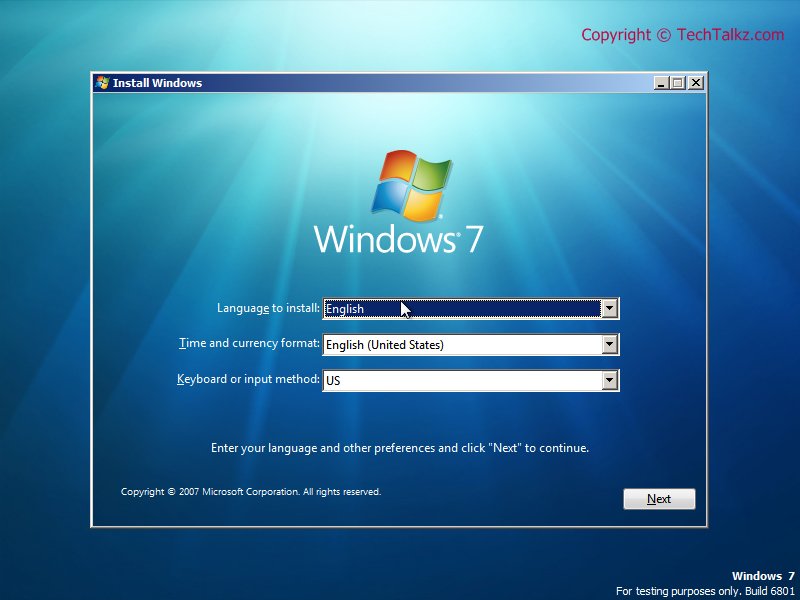
ctdnv.jpg

Unlike this image however, I have no cursor and there seems to be no response to keyboard input. This is in contrast to when I open the BIOS menu and both mouse and keyboard work.

If anyone knows what is going on, I'd love to hear your thoughts. Thanks

Build:
CPU: Intel i5 2500k
MOBO: ASUS p8p67-le-v3
GPU: Powercolour Radeon 6950
RAM: Gskill Ripjaws 1600 2x2GB
HDD: Samsung 1TB spinpoint f3
PSU: Antec Green 650W
 

My Computer My Computer

At a glance

windows 7 ultimate x64
OS
windows 7 ultimate x64
thanks og, that was really helpful
 

My Computer My Computer

At a glance

windows 7 ultimate x64
OS
windows 7 ultimate x64
Hello Rancor, welcome to Seven Forums!


Have you sorted the issue and now have Windows 7 installed?
 

My Computer My Computer

At a glance

W 7 64-bit UltimateIntel Q9550 Yorkfield8GB Dominator 8500C5DATI : XFX 5870
Computer Manufacturer/Model Number
* BFK Customs *
OS
W 7 64-bit Ultimate
CPU
Intel Q9550 Yorkfield
Motherboard
ASUS P5Q Pro
Memory
8GB Dominator 8500C5D
Graphics Card(s)
ATI : XFX 5870
Sound Card
Realtek HD Audio 7-1
Monitor(s) Displays
1x 47" LCD HDMI & 3x 26" LCD HDMI
Screen Resolution
1920x1080P & 1920x1200
Hard Drives
1x 80GB Intel X25-M G2 SSD : 1x 500GB & 1x 640GB WD Caviar Black(s)
PSU
Corsair 620HX
Case
Cooler Master RC-690
Cooling
Tuniq Tower 120, 2x 140mm and 3x 120mm case fans
Keyboard
Microsoft 500
Mouse
Razer Diamondback 3G
Internet Speed
14 Mb/s
Other Info
1x Koutech 3Gb/s SATA HDD Hot Swap Rack
Where did you get Win7? If you burned the DVD, confirm ISO source and burn another at 4x speed.

Try removing all but 2gb of RAM to try install. Swap RAM next. Then test RAM: RAM - Test with Memtest86+

Next reset the CMOS: Clear CMOS - 3 Ways to Clear the CMOS - Reset BIOS

While in BIOS setup set SATA controller to AHCI first, then if install fails try IDE mode.

Next test the HD using maker's diag/repair extended CD scan: HD Diagnostic. Then use the CD to wipe the HD of possible boot sector corruption.
 
Thanks everyone, sadly I've been stranded out of town for a few weeks, so haven't had as many resources to tackle this issue as I'd like, namely a burner.

So far I've tried switching between AHCI and IDE mode and have swapped out each stick of RAM and tried the other separately. I've also tried disconnecting the HDD, all to no avail.

I have my GPU plugged into the monitor, and that works, so I assume the GPU is OK. The BIOS launch correctly so I assume the mobo is OK, and the processor seems to be working(?).

The next things I may try are figuring out how to reset the CMOS, doing a scan of the HDD, re-burning the CD, once I get back home next week, and possibly considering the PSU as the problem (ive heard some stories about switching the PSU has solved the problem).

Atm, I'm really hoping its simply a bad CD.
 

My Computer My Computer

At a glance

windows 7 ultimate x64
OS
windows 7 ultimate x64
Where are you getting the ISO? Confirm its integrity or download another?

Besides burning another at 4x speed with ImgBurn, you can also write to flash stick using this UltraISO trial verison: On File tab select Open DVD or ISO, on Bootable tab select Write Disk Image, Format, Write. Boot under USB, Removable or HD's in BIOS setup or using one-time BIOS Boot Menu key.
 
I'm using the win7 cd of a friend, which was burnt about 1yr ago, but he assures me that it was working when it was made.

Once I get home at the end of this week I'll be able to try that USB boot too, hopefully something works eventually!
 

My Computer My Computer

At a glance

windows 7 ultimate x64
OS
windows 7 ultimate x64
Work through the steps given so far, report back with any questions or results. We'll have other steps then.
 
Back
Top