Solved Win7 Ultimate x64 SP1 Explorer.exe The Oddest Issue Ever

laidbacktokyo

New member
Member
VIP
Local time
7:37 AM
Messages
112
Howdy Brink,

Sorry to bother you directly this time but my custom to contact you @ this web once every couple of years with some another very much particularly odd win7 issue seems remain same :p

Anyhow this another issue details follow:

A pretty aged but yet nice for my purposes Dell Precision M4300 laptop with Win7 Ultimate SP1 x64 Genuine OEM (all MS updates to the moment applied, except 3 ones for Win10 upgrade & telemetry skipped) that operates perfectly all the time continuously 24 hours per day. Here I wanna stress that I'd likely never meet/experience this issue if I'd turn this laptop off or restart it at least once in 2 days.

In short - explorer.exe is like-crashed, or anyway stops operate normally, w/o any sign of error or issue in win7 logs every 2-3 days of continuous win7 operation when a size or explorer.exe process reaches some 100MB size. Then explorer.exe process shall be restarted manually to get back to normal.

Also it's likely in some way linked to use of the mouse right click actions, mainly a right click on shortcuts in Win7 Recent Items menu.

Well it's a long lasting issue - so I've studied abnormally many options around - change various drivers incl. video, disable many context menus, etc etc with same result. This issue persists.

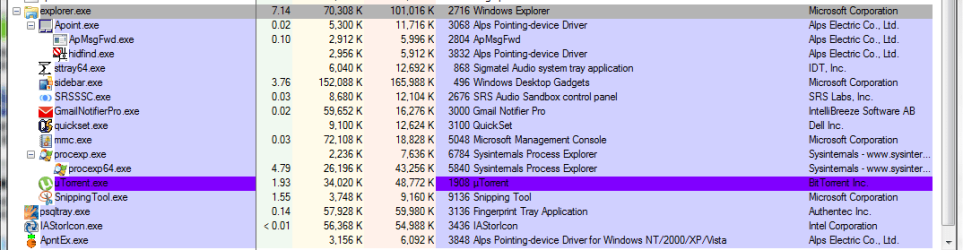
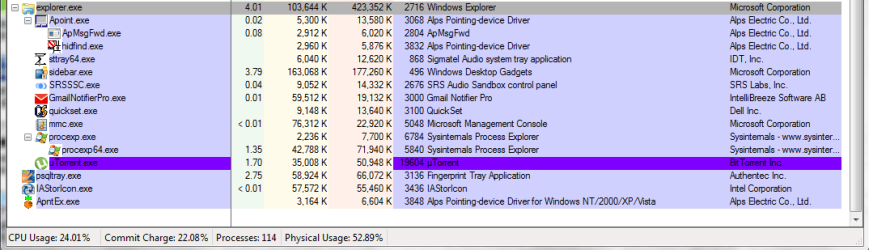
Pls first find 2 attached snapshots taken of Process Explorer utility with a view on explorer process size under normal operation and a couple of days later at the moment of the issue.

Pls 2nd find the attached snapshot of a sample of a folder broken view after this explorer issue occurred. Another 1st visible effect of this issue is no normal popup menu when right click at all.

Pls don't bother on attached files names.

Any ideas? :o

Thanx a lot.

P.S. Actually I have a pretty lot of info and files incl. the explprer.exe dumps concerning this issue. So pls just prompt any way to dig into ;)

UPDATE: oops, sorry - here is a minidump of explorer.exe taken by Process Explorer v16.12 utility today right after z moment of explorer.exe like-crash. a full dump file is around 450MB as u could see at the 2nd snapshot attached.
 

Attachments

  • #18-2.2016-07-09-Sat_SampleView_Explorer.exeCrashIssueWhenRightClickOnRecentDocs_Capture.PNG
    #18-2.2016-07-09-Sat_SampleView_Explorer.exeCrashIssueWhenRightClickOnRecentDocs_Capture.PNG
    18.7 KB · Views: 84
  • #18-4-1.2016-09-05-Mon_ProcessExplorerV16.12_AllProcesses+TheirSizesUnderExplorer.exe@NormalOper.PNG
    #18-4-1.2016-09-05-Mon_ProcessExplorerV16.12_AllProcesses+TheirSizesUnderExplorer.exe@NormalOper.PNG
    22.8 KB · Views: 8
  • #18-4-2.2016-09-07-Wed_ProcessExplorerV16.12_AllProcesses+TheirSizesUnderExplorer.exe@TimeOfIssu.PNG
    #18-4-2.2016-09-07-Wed_ProcessExplorerV16.12_AllProcesses+TheirSizesUnderExplorer.exe@TimeOfIssu.PNG
    24.1 KB · Views: 4
  • #18-5-1.2016-09-07-Wed_explorer_MiniDump@TimeOfIssueStart.rar
    #[email protected]
    487.8 KB · Views: 4
Last edited:

My Computer My Computer

At a glance

Windows 7 Ultimate x64 SP1u OEM Dell & OEM AsusIntel Core 2 T9500 2.60GHz & Core 2 Duo E7500...DDR2 - 2x4GB Hyundai SODIMM 800Mhz & 2x2GB Ge...nVIDIA Quadro FX360M & Mobo Integrated Intel4500
Computer type
Laptop
Computer Manufacturer/Model Number
Dell Laptop & Asus Desktop
OS
Windows 7 Ultimate x64 SP1u OEM Dell & OEM Asus
CPU
Intel Core 2 T9500 2.60GHz & Core 2 Duo E7500 @ 2.93GHz
Motherboard
DELL PRECISION M4300 & ASUS P5Q-EM
Memory
DDR2 - 2x4GB Hyundai SODIMM 800Mhz & 2x2GB GeIL DIMM 1066MHz
Graphics Card(s)
nVIDIA Quadro FX360M & Mobo Integrated Intel4500
Sound Card
Mobos' Integrated SigmaTel & RealTek ALC1200 8Ch HD Audio
Monitor(s) Displays
Samsung 15.4" LCD & Samsung SyncMaster 245B+ Monitor
Screen Resolution
1920x1200 both
Hard Drives
SSDs Kingston, HDDs WDC & HGST - many
PSU
DELL & Some PSU of 450W
Case
DELL & IRBIS
Cooling
Dell & Cooler Master
Keyboard
Dell & Logitech
Mouse
Logitech & Genuis
Internet Speed
100Mbps
Antivirus
N360 + MalwareBytes on both
Browser
IE11 + latest Chrome on both
First job would be to check all drives for errors as this is the normal reason for this
 

My Computer My Computer

At a glance

win 8 32 bit
Computer type
PC/Desktop
OS
win 8 32 bit
If you've got an explorer crash dump zip it and upload it. If you need to configure explorer crash dumps found here:

C:\LocalDumps

Then read this thread and view the link in Post #2

http://www.sevenforums.com/performance-maintenance/388694-windows-explorer-crashing-lot.html

Also uncheck "Launch folder windows in a separate process" in folder view options. "Computer > Organize > folder Options"

Maybe the problem is with a shell extension (added by third party software) or it could be down to corrupt media files located on anywhere on your hard drive or any other connected drive.
 

My Computer My Computer

At a glance

Microsoft Windows 7 Home Premium 64-bit 7601 ...AMD C-60 APU with Radeon(tm) HD Graphics4.00 GBAMD Radeon HD 6290 Graphics
Computer type
Laptop
Computer Manufacturer/Model Number
ASUS
OS
Microsoft Windows 7 Home Premium 64-bit 7601 Multiprocessor Free Service Pack 1
CPU
AMD C-60 APU with Radeon(tm) HD Graphics
Motherboard
ASUSTeK COMPUTER INC. X501U
Memory
4.00 GB
Graphics Card(s)
AMD Radeon HD 6290 Graphics
Sound Card
(1) AMD High Definition Audio Device (2) Realtek High Defi
Screen Resolution
1366 x 768 x 32 bits (4294967296 colors) @ 60 Hz
Hard Drives
Hitachi HTS545050A7E380 SATA Disk Device
Antivirus
Comodo CIS & FW, SecureAplus App Whitelisting, Threatfire
Browser
Cyberfox 64bit, Opera 64bit, Airfox
Other Info
Spy-The-Spy, HitmanPro.Alert, Norton Connect Safe, MJRegWatcher, BitDefender TrafficLight, Voodoo Shield, Zemana AntiMalware
First job would be to check all drives for errors as this is the normal reason for this

well... as it was already said I've checked/replaced many of drivers many times with no effect. also there is absolutely no sign of error in all win 7 logs @ z moment when issue occurred.

can u point to some particular driver(s) to check?

appreciate.

UPDATE: sorry, my fault. I misread your 'drives' as 'drivers'.
 
Last edited:

My Computer My Computer

At a glance

Windows 7 Ultimate x64 SP1u OEM Dell & OEM AsusIntel Core 2 T9500 2.60GHz & Core 2 Duo E7500...DDR2 - 2x4GB Hyundai SODIMM 800Mhz & 2x2GB Ge...nVIDIA Quadro FX360M & Mobo Integrated Intel4500
Computer type
Laptop
Computer Manufacturer/Model Number
Dell Laptop & Asus Desktop
OS
Windows 7 Ultimate x64 SP1u OEM Dell & OEM Asus
CPU
Intel Core 2 T9500 2.60GHz & Core 2 Duo E7500 @ 2.93GHz
Motherboard
DELL PRECISION M4300 & ASUS P5Q-EM
Memory
DDR2 - 2x4GB Hyundai SODIMM 800Mhz & 2x2GB GeIL DIMM 1066MHz
Graphics Card(s)
nVIDIA Quadro FX360M & Mobo Integrated Intel4500
Sound Card
Mobos' Integrated SigmaTel & RealTek ALC1200 8Ch HD Audio
Monitor(s) Displays
Samsung 15.4" LCD & Samsung SyncMaster 245B+ Monitor
Screen Resolution
1920x1200 both
Hard Drives
SSDs Kingston, HDDs WDC & HGST - many
PSU
DELL & Some PSU of 450W
Case
DELL & IRBIS
Cooling
Dell & Cooler Master
Keyboard
Dell & Logitech
Mouse
Logitech & Genuis
Internet Speed
100Mbps
Antivirus
N360 + MalwareBytes on both
Browser
IE11 + latest Chrome on both
Check drives command is:

chkdsk /r /f

From an elevated command prompt or run as administrator from Start > Run dialog box.

A reboot is needed to run the check. It probably will not fix the problem but if you haven't run a disk check recently then it won't hurt.
 

My Computer My Computer

At a glance

Microsoft Windows 7 Home Premium 64-bit 7601 ...AMD C-60 APU with Radeon(tm) HD Graphics4.00 GBAMD Radeon HD 6290 Graphics
Computer type
Laptop
Computer Manufacturer/Model Number
ASUS
OS
Microsoft Windows 7 Home Premium 64-bit 7601 Multiprocessor Free Service Pack 1
CPU
AMD C-60 APU with Radeon(tm) HD Graphics
Motherboard
ASUSTeK COMPUTER INC. X501U
Memory
4.00 GB
Graphics Card(s)
AMD Radeon HD 6290 Graphics
Sound Card
(1) AMD High Definition Audio Device (2) Realtek High Defi
Screen Resolution
1366 x 768 x 32 bits (4294967296 colors) @ 60 Hz
Hard Drives
Hitachi HTS545050A7E380 SATA Disk Device
Antivirus
Comodo CIS & FW, SecureAplus App Whitelisting, Threatfire
Browser
Cyberfox 64bit, Opera 64bit, Airfox
Other Info
Spy-The-Spy, HitmanPro.Alert, Norton Connect Safe, MJRegWatcher, BitDefender TrafficLight, Voodoo Shield, Zemana AntiMalware
If you've got an explorer crash dump zip it and upload it. If you need to configure explorer crash dumps found here:

C:\LocalDumps

Then read this thread and view the link in Post #2

http://www.sevenforums.com/performance-maintenance/388694-windows-explorer-crashing-lot.html

Also uncheck "Launch folder windows in a separate process" in folder view options. "Computer > Organize > folder Options"

Maybe the problem is with a shell extension (added by third party software) or it could be down to corrupt media files located on anywhere on your hard drive or any other connected drive.

1. sure I have dumps of explorer.exe @ z moment after issue but even the mini one is too big to attach here.

2. "Launch folder windows in a separate process" now set to its default = uncheck. anyhow I've duly checked this option on & off w/o success.

3. shell extensions also checked in a pretty detailed way w/o success.

appreciate.

update: oops, sorry - here is a minidump of explorer.exe taken by Process Explorer v16.12 utility today right after z moment of explorer.exe like-crash. a full dump file is around 450MB as u could see at the 2nd snapshot attached.
 

Attachments

My Computer My Computer

At a glance

Windows 7 Ultimate x64 SP1u OEM Dell & OEM AsusIntel Core 2 T9500 2.60GHz & Core 2 Duo E7500...DDR2 - 2x4GB Hyundai SODIMM 800Mhz & 2x2GB Ge...nVIDIA Quadro FX360M & Mobo Integrated Intel4500
Computer type
Laptop
Computer Manufacturer/Model Number
Dell Laptop & Asus Desktop
OS
Windows 7 Ultimate x64 SP1u OEM Dell & OEM Asus
CPU
Intel Core 2 T9500 2.60GHz & Core 2 Duo E7500 @ 2.93GHz
Motherboard
DELL PRECISION M4300 & ASUS P5Q-EM
Memory
DDR2 - 2x4GB Hyundai SODIMM 800Mhz & 2x2GB GeIL DIMM 1066MHz
Graphics Card(s)
nVIDIA Quadro FX360M & Mobo Integrated Intel4500
Sound Card
Mobos' Integrated SigmaTel & RealTek ALC1200 8Ch HD Audio
Monitor(s) Displays
Samsung 15.4" LCD & Samsung SyncMaster 245B+ Monitor
Screen Resolution
1920x1200 both
Hard Drives
SSDs Kingston, HDDs WDC & HGST - many
PSU
DELL & Some PSU of 450W
Case
DELL & IRBIS
Cooling
Dell & Cooler Master
Keyboard
Dell & Logitech
Mouse
Logitech & Genuis
Internet Speed
100Mbps
Antivirus
N360 + MalwareBytes on both
Browser
IE11 + latest Chrome on both
Check drives command is:

chkdsk /r /f

From an elevated command prompt or run as administrator from Start > Run dialog box.

A reboot is needed to run the check. It probably will not fix the problem but if you haven't run a disk check recently then it won't hurt.

well... pls let me say that all common ways like sfc /scannow & chkdsk have been performed first... along with many others...

that's why I'm now calling to Brink & posting here...;)

thanx
 

My Computer My Computer

At a glance

Windows 7 Ultimate x64 SP1u OEM Dell & OEM AsusIntel Core 2 T9500 2.60GHz & Core 2 Duo E7500...DDR2 - 2x4GB Hyundai SODIMM 800Mhz & 2x2GB Ge...nVIDIA Quadro FX360M & Mobo Integrated Intel4500
Computer type
Laptop
Computer Manufacturer/Model Number
Dell Laptop & Asus Desktop
OS
Windows 7 Ultimate x64 SP1u OEM Dell & OEM Asus
CPU
Intel Core 2 T9500 2.60GHz & Core 2 Duo E7500 @ 2.93GHz
Motherboard
DELL PRECISION M4300 & ASUS P5Q-EM
Memory
DDR2 - 2x4GB Hyundai SODIMM 800Mhz & 2x2GB GeIL DIMM 1066MHz
Graphics Card(s)
nVIDIA Quadro FX360M & Mobo Integrated Intel4500
Sound Card
Mobos' Integrated SigmaTel & RealTek ALC1200 8Ch HD Audio
Monitor(s) Displays
Samsung 15.4" LCD & Samsung SyncMaster 245B+ Monitor
Screen Resolution
1920x1200 both
Hard Drives
SSDs Kingston, HDDs WDC & HGST - many
PSU
DELL & Some PSU of 450W
Case
DELL & IRBIS
Cooling
Dell & Cooler Master
Keyboard
Dell & Logitech
Mouse
Logitech & Genuis
Internet Speed
100Mbps
Antivirus
N360 + MalwareBytes on both
Browser
IE11 + latest Chrome on both
1. sure I have dumps of explorer.exe @ z moment after issue but even the mini one is too big to attach here.

appreciate.

If you imported the reg key correctly your dump will be named something lie:

explorer.exe.(number).dmp

example: explorer.exe.8140.dmp

It shouldn't be very big in size. Evem if it's a few Mb's zip it and upload it. Actually if explorer crashes regularly you should have lots of separate dumps listed in C:/Localdumps. upload a few please.

Also just for now grab a copy of Explorer++ portable.

Extract the files to a folder somewhere - say on your desktop and right click the executable and run as administrator. a screenshot of the context menu like this:

Navigate to where you'd normally get a crash when right clicking and right click. If there's no crash (using Explorer++) post a screenshot of the context menu like this:

Links - Explorer++ [Administrators].jpg

It's certainly possible that a .dll related to one of the third party software enties displayed is responsible but there could be other reasons too.
 

My Computer My Computer

At a glance

Microsoft Windows 7 Home Premium 64-bit 7601 ...AMD C-60 APU with Radeon(tm) HD Graphics4.00 GBAMD Radeon HD 6290 Graphics
Computer type
Laptop
Computer Manufacturer/Model Number
ASUS
OS
Microsoft Windows 7 Home Premium 64-bit 7601 Multiprocessor Free Service Pack 1
CPU
AMD C-60 APU with Radeon(tm) HD Graphics
Motherboard
ASUSTeK COMPUTER INC. X501U
Memory
4.00 GB
Graphics Card(s)
AMD Radeon HD 6290 Graphics
Sound Card
(1) AMD High Definition Audio Device (2) Realtek High Defi
Screen Resolution
1366 x 768 x 32 bits (4294967296 colors) @ 60 Hz
Hard Drives
Hitachi HTS545050A7E380 SATA Disk Device
Antivirus
Comodo CIS & FW, SecureAplus App Whitelisting, Threatfire
Browser
Cyberfox 64bit, Opera 64bit, Airfox
Other Info
Spy-The-Spy, HitmanPro.Alert, Norton Connect Safe, MJRegWatcher, BitDefender TrafficLight, Voodoo Shield, Zemana AntiMalware
that's why I'm now calling to Brink & posting here...;)

thanx

Brink is welcome to answer of course. Not sure if explorer crashes is his thing though.
 
Last edited:

My Computer My Computer

At a glance

Microsoft Windows 7 Home Premium 64-bit 7601 ...AMD C-60 APU with Radeon(tm) HD Graphics4.00 GBAMD Radeon HD 6290 Graphics
Computer type
Laptop
Computer Manufacturer/Model Number
ASUS
OS
Microsoft Windows 7 Home Premium 64-bit 7601 Multiprocessor Free Service Pack 1
CPU
AMD C-60 APU with Radeon(tm) HD Graphics
Motherboard
ASUSTeK COMPUTER INC. X501U
Memory
4.00 GB
Graphics Card(s)
AMD Radeon HD 6290 Graphics
Sound Card
(1) AMD High Definition Audio Device (2) Realtek High Defi
Screen Resolution
1366 x 768 x 32 bits (4294967296 colors) @ 60 Hz
Hard Drives
Hitachi HTS545050A7E380 SATA Disk Device
Antivirus
Comodo CIS & FW, SecureAplus App Whitelisting, Threatfire
Browser
Cyberfox 64bit, Opera 64bit, Airfox
Other Info
Spy-The-Spy, HitmanPro.Alert, Norton Connect Safe, MJRegWatcher, BitDefender TrafficLight, Voodoo Shield, Zemana AntiMalware
that's why I'm now calling to Brink & posting here...;)

thanx

Brink is welcome to answer of course. Not sure if explorer crashes is his thing though.

naturally I much appreciate any help.:p

also I've uploaded an explorer dump above. may I ask you to take a look?

but I didn't either download or apply that .reg patch. yet. when I don't believe that this nice but common technique will come out with any result if win7 doesn't see any crash/error of explorer.exe. am I wrong?:)

anyhow, again, I guess z key point of this odd issue is the abnormal big size of explorer.exe process as acquired thru a pretty long time of the perfectly normal operations, incl. right clicks and so on. also win7 itself doesn't see any problem at the moment of issue when explorer.exe just gets stuck and needed to be restarted manually.

thank you.
 
Last edited:

My Computer My Computer

At a glance

Windows 7 Ultimate x64 SP1u OEM Dell & OEM AsusIntel Core 2 T9500 2.60GHz & Core 2 Duo E7500...DDR2 - 2x4GB Hyundai SODIMM 800Mhz & 2x2GB Ge...nVIDIA Quadro FX360M & Mobo Integrated Intel4500
Computer type
Laptop
Computer Manufacturer/Model Number
Dell Laptop & Asus Desktop
OS
Windows 7 Ultimate x64 SP1u OEM Dell & OEM Asus
CPU
Intel Core 2 T9500 2.60GHz & Core 2 Duo E7500 @ 2.93GHz
Motherboard
DELL PRECISION M4300 & ASUS P5Q-EM
Memory
DDR2 - 2x4GB Hyundai SODIMM 800Mhz & 2x2GB GeIL DIMM 1066MHz
Graphics Card(s)
nVIDIA Quadro FX360M & Mobo Integrated Intel4500
Sound Card
Mobos' Integrated SigmaTel & RealTek ALC1200 8Ch HD Audio
Monitor(s) Displays
Samsung 15.4" LCD & Samsung SyncMaster 245B+ Monitor
Screen Resolution
1920x1200 both
Hard Drives
SSDs Kingston, HDDs WDC & HGST - many
PSU
DELL & Some PSU of 450W
Case
DELL & IRBIS
Cooling
Dell & Cooler Master
Keyboard
Dell & Logitech
Mouse
Logitech & Genuis
Internet Speed
100Mbps
Antivirus
N360 + MalwareBytes on both
Browser
IE11 + latest Chrome on both
You mean RAM/ CPU usage of explorer process? Right clicks =shell extension problem ususally. I'm looking at your dump but an explrer specific crash dump "might" be more useful to pinpoint the possible cause(s)

See:

http://www.sevenforums.com/903148-post1.html
 

My Computer My Computer

At a glance

Microsoft Windows 7 Home Premium 64-bit 7601 ...AMD C-60 APU with Radeon(tm) HD Graphics4.00 GBAMD Radeon HD 6290 Graphics
Computer type
Laptop
Computer Manufacturer/Model Number
ASUS
OS
Microsoft Windows 7 Home Premium 64-bit 7601 Multiprocessor Free Service Pack 1
CPU
AMD C-60 APU with Radeon(tm) HD Graphics
Motherboard
ASUSTeK COMPUTER INC. X501U
Memory
4.00 GB
Graphics Card(s)
AMD Radeon HD 6290 Graphics
Sound Card
(1) AMD High Definition Audio Device (2) Realtek High Defi
Screen Resolution
1366 x 768 x 32 bits (4294967296 colors) @ 60 Hz
Hard Drives
Hitachi HTS545050A7E380 SATA Disk Device
Antivirus
Comodo CIS & FW, SecureAplus App Whitelisting, Threatfire
Browser
Cyberfox 64bit, Opera 64bit, Airfox
Other Info
Spy-The-Spy, HitmanPro.Alert, Norton Connect Safe, MJRegWatcher, BitDefender TrafficLight, Voodoo Shield, Zemana AntiMalware
All I get from your dump is this:

Code:
SYMBOL_NAME:  shell32!CDesktopBrowser::_MessageLoop+51

FOLLOWUP_NAME:  MachineOwner

MODULE_NAME: shell32

IMAGE_NAME:  shell32.dll

DEBUG_FLR_IMAGE_TIMESTAMP:  55c3a0ed

FAILURE_BUCKET_ID:  STATUS_BREAKPOINT_80000003_shell32.dll!CDesktopBrowser::_MessageLoop

BUCKET_ID:  X64_APPLICATION_FAULT_STATUS_BREAKPOINT_shell32!CDesktopBrowser::_MessageLoop+51

So it looks like a shell extension issue but that dump will not pinpoint which shell extension.

Try the other method - it's your call.
 

My Computer My Computer

At a glance

Microsoft Windows 7 Home Premium 64-bit 7601 ...AMD C-60 APU with Radeon(tm) HD Graphics4.00 GBAMD Radeon HD 6290 Graphics
Computer type
Laptop
Computer Manufacturer/Model Number
ASUS
OS
Microsoft Windows 7 Home Premium 64-bit 7601 Multiprocessor Free Service Pack 1
CPU
AMD C-60 APU with Radeon(tm) HD Graphics
Motherboard
ASUSTeK COMPUTER INC. X501U
Memory
4.00 GB
Graphics Card(s)
AMD Radeon HD 6290 Graphics
Sound Card
(1) AMD High Definition Audio Device (2) Realtek High Defi
Screen Resolution
1366 x 768 x 32 bits (4294967296 colors) @ 60 Hz
Hard Drives
Hitachi HTS545050A7E380 SATA Disk Device
Antivirus
Comodo CIS & FW, SecureAplus App Whitelisting, Threatfire
Browser
Cyberfox 64bit, Opera 64bit, Airfox
Other Info
Spy-The-Spy, HitmanPro.Alert, Norton Connect Safe, MJRegWatcher, BitDefender TrafficLight, Voodoo Shield, Zemana AntiMalware

My Computer My Computer

At a glance

Microsoft Windows 7 Home Premium 64-bit 7601 ...AMD C-60 APU with Radeon(tm) HD Graphics4.00 GBAMD Radeon HD 6290 Graphics
Computer type
Laptop
Computer Manufacturer/Model Number
ASUS
OS
Microsoft Windows 7 Home Premium 64-bit 7601 Multiprocessor Free Service Pack 1
CPU
AMD C-60 APU with Radeon(tm) HD Graphics
Motherboard
ASUSTeK COMPUTER INC. X501U
Memory
4.00 GB
Graphics Card(s)
AMD Radeon HD 6290 Graphics
Sound Card
(1) AMD High Definition Audio Device (2) Realtek High Defi
Screen Resolution
1366 x 768 x 32 bits (4294967296 colors) @ 60 Hz
Hard Drives
Hitachi HTS545050A7E380 SATA Disk Device
Antivirus
Comodo CIS & FW, SecureAplus App Whitelisting, Threatfire
Browser
Cyberfox 64bit, Opera 64bit, Airfox
Other Info
Spy-The-Spy, HitmanPro.Alert, Norton Connect Safe, MJRegWatcher, BitDefender TrafficLight, Voodoo Shield, Zemana AntiMalware
You mean RAM/ CPU usage of explorer process? Right clicks =shell extension problem ususally. I'm looking at your dump but an explrer specific crash dump "might" be more useful to pinpoint the possible cause(s)

See:

http://www.sevenforums.com/903148-post1.html

yep. I mean exactly a size of single & only one explorer.exe process as could be visible in Windows Task Manager > Processes Tab for instance, and as 2 first attached pics of Process Explorer (top line in both - marked grey) where explorer.exe size there is some 70MB (Private Bytes) & 101MB (Working Set) when normal but some 103MB (Private Bytes) & 423MB [abnormally big!] (Working Set) while issue.
 
Last edited:

My Computer My Computer

At a glance

Windows 7 Ultimate x64 SP1u OEM Dell & OEM AsusIntel Core 2 T9500 2.60GHz & Core 2 Duo E7500...DDR2 - 2x4GB Hyundai SODIMM 800Mhz & 2x2GB Ge...nVIDIA Quadro FX360M & Mobo Integrated Intel4500
Computer type
Laptop
Computer Manufacturer/Model Number
Dell Laptop & Asus Desktop
OS
Windows 7 Ultimate x64 SP1u OEM Dell & OEM Asus
CPU
Intel Core 2 T9500 2.60GHz & Core 2 Duo E7500 @ 2.93GHz
Motherboard
DELL PRECISION M4300 & ASUS P5Q-EM
Memory
DDR2 - 2x4GB Hyundai SODIMM 800Mhz & 2x2GB GeIL DIMM 1066MHz
Graphics Card(s)
nVIDIA Quadro FX360M & Mobo Integrated Intel4500
Sound Card
Mobos' Integrated SigmaTel & RealTek ALC1200 8Ch HD Audio
Monitor(s) Displays
Samsung 15.4" LCD & Samsung SyncMaster 245B+ Monitor
Screen Resolution
1920x1200 both
Hard Drives
SSDs Kingston, HDDs WDC & HGST - many
PSU
DELL & Some PSU of 450W
Case
DELL & IRBIS
Cooling
Dell & Cooler Master
Keyboard
Dell & Logitech
Mouse
Logitech & Genuis
Internet Speed
100Mbps
Antivirus
N360 + MalwareBytes on both
Browser
IE11 + latest Chrome on both
All I get from your dump is this:

Code:
SYMBOL_NAME:  shell32!CDesktopBrowser::_MessageLoop+51
 
FOLLOWUP_NAME:  MachineOwner
 
MODULE_NAME: shell32
 
IMAGE_NAME:  shell32.dll
 
DEBUG_FLR_IMAGE_TIMESTAMP:  55c3a0ed
 
FAILURE_BUCKET_ID:  STATUS_BREAKPOINT_80000003_shell32.dll!CDesktopBrowser::_MessageLoop
 
BUCKET_ID:  X64_APPLICATION_FAULT_STATUS_BREAKPOINT_shell32!CDesktopBrowser::_MessageLoop+51

So it looks like a shell extension issue but that dump will not pinpoint which shell extension.

Try the other method - it's your call.

thank you very much for analysis! :)

well if a culprit is likely/maybe shell32.dll directly or indirectly, then first I'll try to change version of this win7 shell file.

OK. shell32.dll v6.1.7601.18952 has been updated to v6.1.7601.23155 by applying z m$ hotfix patch KB2891362. links:

Shell32.dll – Pre Service Pack 2 Revision History for Windows 7 SP1, Windows Server 2008 R2 SP1 and Windows Small Business Server 2011 (SBS 2011) | Aid In IT

https://support.microsoft.com/en-us/kb/2891362

this patch is originally targeted to an issue of paste/copy of files with long names. naturally I never experienced this particular issue but I like long file names. so maybe it could be helpful. pls give me a day or a couple to check if there is any good effect.;)
 

My Computer My Computer

At a glance

Windows 7 Ultimate x64 SP1u OEM Dell & OEM AsusIntel Core 2 T9500 2.60GHz & Core 2 Duo E7500...DDR2 - 2x4GB Hyundai SODIMM 800Mhz & 2x2GB Ge...nVIDIA Quadro FX360M & Mobo Integrated Intel4500
Computer type
Laptop
Computer Manufacturer/Model Number
Dell Laptop & Asus Desktop
OS
Windows 7 Ultimate x64 SP1u OEM Dell & OEM Asus
CPU
Intel Core 2 T9500 2.60GHz & Core 2 Duo E7500 @ 2.93GHz
Motherboard
DELL PRECISION M4300 & ASUS P5Q-EM
Memory
DDR2 - 2x4GB Hyundai SODIMM 800Mhz & 2x2GB GeIL DIMM 1066MHz
Graphics Card(s)
nVIDIA Quadro FX360M & Mobo Integrated Intel4500
Sound Card
Mobos' Integrated SigmaTel & RealTek ALC1200 8Ch HD Audio
Monitor(s) Displays
Samsung 15.4" LCD & Samsung SyncMaster 245B+ Monitor
Screen Resolution
1920x1200 both
Hard Drives
SSDs Kingston, HDDs WDC & HGST - many
PSU
DELL & Some PSU of 450W
Case
DELL & IRBIS
Cooling
Dell & Cooler Master
Keyboard
Dell & Logitech
Mouse
Logitech & Genuis
Internet Speed
100Mbps
Antivirus
N360 + MalwareBytes on both
Browser
IE11 + latest Chrome on both
A few more questions to throw at you.

Does this look familiar? Check first page of the thread:

http://www.sevenforums.com/performa...rer-exe-one-taking-all-my-rams-memory-10.html

Also is it possible you could have taken ownership of something that you should not have taken ownership of?

See: http://www.sevenforums.com/general-discussion/115149-stop-application-data-folder-replicating.html

http://www.sevenforums.com/general-...lder-replicating-post1381566.html#post1381566

oops. never experienced or even heard of both above issues.

anyhow your 1st case - absolutely NO; 2nd - well, basically it's possible that I could take an ownership of something that I shouldn't while repairing some win7 issue but as far as I remember I didn't do that in this install of win7.:D

BTW, special thanks for z bottom web link when it's about Symbolic Links.
I mean that z next version of shell32.dll, if current one will give me no result, I plan to try is this one https://support.microsoft.com/en-us/kb/3009986 when I guess here could be a problem of this laptop & win7 configuration that is pretty uncommon:

1st primary disk is 120GB SSD attached thru SATA2 AHCI with 3 partitions - all 3 created as z primary ones, i.e. no logical ones:
1. small Dell OEM Diagnostics of some 71MB FAT16
(actually it's not a hidden one but like hidden and naturally not visible in standard view of explorer.exe)
2. standard win7 reserved of 100MB NTFS
(active but naturally not visible in standard view of explorer.exe)
3. win7 install of some 111GB NTFS visible & in use as Drive C:

2nd disk is 1TB HDD attached as z replacement to DVD Drive into DVD slot thru old IDE ATA with 4 partitions - all 4 created as z primary ones, i.e. no logical ones:
1. small Dell OEM Diagnostics of some 71MB FAT16
(actually it's not a hidden one but like hidden and naturally not visible in standard view of explorer.exe)
2. standard win7 reserved of 100MB NTFS
(active, and can be visible in standard view of explorer.exe by default but drive letter removed manually, and then it's now non visible in standard view of explorer.exe)
3. win7 install of some 111GB NTFS
(can be visible in standard view of explorer.exe by default but drive letter removed manually, and then it's now non visible in standard view of explorer.exe)
4. data of 820GB NTFS - all standard - visible & in use as drive D:

3rd disk is a standard external USB2.0 1TB HDD with 1 primary NTFS data partition
(I guess here is nothing to discuss).

N.B. 1st SSD is basically a clone of 2nd HDD with its 4th partition skipped while cloning some year ago. this special system configuration has been created just for safety when I can easily boot laptop from HDD (to outdated & IDE slow but working win7) if any trouble of SSD.
 
Last edited:

My Computer My Computer

At a glance

Windows 7 Ultimate x64 SP1u OEM Dell & OEM AsusIntel Core 2 T9500 2.60GHz & Core 2 Duo E7500...DDR2 - 2x4GB Hyundai SODIMM 800Mhz & 2x2GB Ge...nVIDIA Quadro FX360M & Mobo Integrated Intel4500
Computer type
Laptop
Computer Manufacturer/Model Number
Dell Laptop & Asus Desktop
OS
Windows 7 Ultimate x64 SP1u OEM Dell & OEM Asus
CPU
Intel Core 2 T9500 2.60GHz & Core 2 Duo E7500 @ 2.93GHz
Motherboard
DELL PRECISION M4300 & ASUS P5Q-EM
Memory
DDR2 - 2x4GB Hyundai SODIMM 800Mhz & 2x2GB GeIL DIMM 1066MHz
Graphics Card(s)
nVIDIA Quadro FX360M & Mobo Integrated Intel4500
Sound Card
Mobos' Integrated SigmaTel & RealTek ALC1200 8Ch HD Audio
Monitor(s) Displays
Samsung 15.4" LCD & Samsung SyncMaster 245B+ Monitor
Screen Resolution
1920x1200 both
Hard Drives
SSDs Kingston, HDDs WDC & HGST - many
PSU
DELL & Some PSU of 450W
Case
DELL & IRBIS
Cooling
Dell & Cooler Master
Keyboard
Dell & Logitech
Mouse
Logitech & Genuis
Internet Speed
100Mbps
Antivirus
N360 + MalwareBytes on both
Browser
IE11 + latest Chrome on both
I'd still merge the reg file and look at explorer crash dumps as they might point to something more specific that cannot be pinpointed using the dump you provided. As for replacing shell32.dll - well it's worth a try.

Did you try Explorer++ and did you get the same right click crash issue? If the answer is that there was no crash when using Explorer++ - post a screenshot of the context menu that appeared.

Also: It's likely that I will be offline for one week and possibly will not be responding to any posts during that time.
 

My Computer My Computer

At a glance

Microsoft Windows 7 Home Premium 64-bit 7601 ...AMD C-60 APU with Radeon(tm) HD Graphics4.00 GBAMD Radeon HD 6290 Graphics
Computer type
Laptop
Computer Manufacturer/Model Number
ASUS
OS
Microsoft Windows 7 Home Premium 64-bit 7601 Multiprocessor Free Service Pack 1
CPU
AMD C-60 APU with Radeon(tm) HD Graphics
Motherboard
ASUSTeK COMPUTER INC. X501U
Memory
4.00 GB
Graphics Card(s)
AMD Radeon HD 6290 Graphics
Sound Card
(1) AMD High Definition Audio Device (2) Realtek High Defi
Screen Resolution
1366 x 768 x 32 bits (4294967296 colors) @ 60 Hz
Hard Drives
Hitachi HTS545050A7E380 SATA Disk Device
Antivirus
Comodo CIS & FW, SecureAplus App Whitelisting, Threatfire
Browser
Cyberfox 64bit, Opera 64bit, Airfox
Other Info
Spy-The-Spy, HitmanPro.Alert, Norton Connect Safe, MJRegWatcher, BitDefender TrafficLight, Voodoo Shield, Zemana AntiMalware
I'd still merge the reg file and look at explorer crash dumps as they might point to something more specific that cannot be pinpointed using the dump you provided. As for replacing shell32.dll - well it's worth a try.

Did you try Explorer++ and did you get the same right click crash issue? If the answer is that there was no crash when using Explorer++ - post a screenshot of the context menu that appeared.

Also: It's likely that I will be offline for one week and possibly will not be responding to any posts during that time.

I really appreciate your kind attention to this matter!

1. I surely got a point of z recommended by you technique of download & applying that registry patch to get explorer.exe dumps in this way. No problem to do. Just pls let me do it later after testing z current & maybe another mentioned versions of shell32.dll.

2. Some month ago I've tried another similar substitute to explorer.exe - Better Explorer - and wasn't impressed. However pls also let me do a try to Explorer++ later after testing options of shell32.dll.

3. I appreciate a kind prompt of your possible offline plan for a week. Have a nice time in real world! :p I'll just test shell32.dll options meanwhile.;)

yours,

p.s. it's a fun! I've done a lot of right clicks and other explorer operations today but explorer.exe size seems stuck around same 103MB (Private Bytes) but 140MB (Working Set), which seems to be normal vs 103MB (Private Bytes) & 423MB (Working Set) at z moment of issue as pic attached, in Process Monitor utility view; or around 85-90MB in Windows Task Manager > Processes Tab.

funny. maybe it's this explorer.exe custom/lifecycle to die once only after 2-3 days of normal operations...
 
Last edited:

My Computer My Computer

At a glance

Windows 7 Ultimate x64 SP1u OEM Dell & OEM AsusIntel Core 2 T9500 2.60GHz & Core 2 Duo E7500...DDR2 - 2x4GB Hyundai SODIMM 800Mhz & 2x2GB Ge...nVIDIA Quadro FX360M & Mobo Integrated Intel4500
Computer type
Laptop
Computer Manufacturer/Model Number
Dell Laptop & Asus Desktop
OS
Windows 7 Ultimate x64 SP1u OEM Dell & OEM Asus
CPU
Intel Core 2 T9500 2.60GHz & Core 2 Duo E7500 @ 2.93GHz
Motherboard
DELL PRECISION M4300 & ASUS P5Q-EM
Memory
DDR2 - 2x4GB Hyundai SODIMM 800Mhz & 2x2GB GeIL DIMM 1066MHz
Graphics Card(s)
nVIDIA Quadro FX360M & Mobo Integrated Intel4500
Sound Card
Mobos' Integrated SigmaTel & RealTek ALC1200 8Ch HD Audio
Monitor(s) Displays
Samsung 15.4" LCD & Samsung SyncMaster 245B+ Monitor
Screen Resolution
1920x1200 both
Hard Drives
SSDs Kingston, HDDs WDC & HGST - many
PSU
DELL & Some PSU of 450W
Case
DELL & IRBIS
Cooling
Dell & Cooler Master
Keyboard
Dell & Logitech
Mouse
Logitech & Genuis
Internet Speed
100Mbps
Antivirus
N360 + MalwareBytes on both
Browser
IE11 + latest Chrome on both
Hi. Explorer++ is portable and does not replace explorer. It works independently and if no crashes occur when reproducing right click actions that would crash explorer then it points to a third party software issue rather than a system file issue. So the point of running Explorer++ is just to see if you get the same crashes when right clicking.

As for the size of explorer.exe - is there any chance that it could be related to corrupt media (image or video files) located on any connected drive? (Explorer constantly trying to read those files but can't) - They can be tricky to detect easily but I know of a couple of ways.

For a start have a look here and scroll down to:

Test for picture files that may contain corruption


https://support.microsoft.com/en-gb/kb/2694911
 

My Computer My Computer

At a glance

Microsoft Windows 7 Home Premium 64-bit 7601 ...AMD C-60 APU with Radeon(tm) HD Graphics4.00 GBAMD Radeon HD 6290 Graphics
Computer type
Laptop
Computer Manufacturer/Model Number
ASUS
OS
Microsoft Windows 7 Home Premium 64-bit 7601 Multiprocessor Free Service Pack 1
CPU
AMD C-60 APU with Radeon(tm) HD Graphics
Motherboard
ASUSTeK COMPUTER INC. X501U
Memory
4.00 GB
Graphics Card(s)
AMD Radeon HD 6290 Graphics
Sound Card
(1) AMD High Definition Audio Device (2) Realtek High Defi
Screen Resolution
1366 x 768 x 32 bits (4294967296 colors) @ 60 Hz
Hard Drives
Hitachi HTS545050A7E380 SATA Disk Device
Antivirus
Comodo CIS & FW, SecureAplus App Whitelisting, Threatfire
Browser
Cyberfox 64bit, Opera 64bit, Airfox
Other Info
Spy-The-Spy, HitmanPro.Alert, Norton Connect Safe, MJRegWatcher, BitDefender TrafficLight, Voodoo Shield, Zemana AntiMalware
Hi. Explorer++ is portable and does not replace explorer. It works independently and if no crashes occur when reproducing right click actions that would crash explorer then it points to a third party software issue rather than a system file issue. So the point of running Explorer++ is just to see if you get the same crashes when right clicking.

As for the size of explorer.exe - is there any chance that it could be related to corrupt media (image or video files) located on any connected drive? (Explorer constantly trying to read those files but can't) - They can be tricky to detect easily but I know of a couple of ways.

For a start have a look here and scroll down to:

Test for picture files that may contain corruption


https://support.microsoft.com/en-gb/kb/2694911


1. WOW, we have z first progress with this issue after z first update of shell32.dll.

An hour ago z issue came back again but its effect & outlook were slightly different that before:
A) 1st sign of problem was a broken view of font of files' names. Sorry no picture this time. But it was like all letters of files' names in normally opened folder suddenly became bold. I'll duly take a pic next time!
B) Then at one of right clicks on one of Recent shortcuts here C:\Users\..\Recent or just clicks on Explorer (sorry I missed that moment) Explorer.exe process has been auto restarted (it's first time) with only 1 record in win7 applications log (again no errors or warnings) as below:

Log Name: Application
Source: Microsoft-Windows-Winlogon
Date: 2016-09-09-Fri 12:06:50 AM
Event ID: 1002
Task Category: None
Level: Information
Keywords: Classic
User: N/A
Computer: .....PC
Description:
The shell stopped unexpectedly and explorer.exe was restarted.
Event Xml:
<Event xmlns="http://schemas.microsoft.com/win/2004/08/events/event">
<System>
<Provider Name="Microsoft-Windows-Winlogon" Guid="{DBE9B383-7CF3-4331-91CC-A3CB16A3B538}" EventSourceName="Winlogon" />
<EventID Qualifiers="16384">1002</EventID>
<Version>0</Version>
<Level>4</Level>
<Task>0</Task>
<Opcode>0</Opcode>
<Keywords>0x80000000000000</Keywords>
<TimeCreated SystemTime="2016-09-08T15:06:50.000000000Z" />
<EventRecordID>154415</EventRecordID>
<Correlation />
<Execution ProcessID="0" ThreadID="0" />
<Channel>Application</Channel>
<Computer>...PC</Computer>
<Security />
</System>
<EventData>
<Data>explorer.exe</Data>
</EventData>
</Event>

2. well I've downloaded Explorer++ x64 and try it next time of issue.

3. Test for picture files that may contain corruption


Here I've applied folder settings as recommended for all folders!
  1. Place a check in the option to Always show Icons, never thumbnail
  2. Remove the check for the option to Display file icon on thumbnails
and check some folders with pics & videos w/o any problem or result except now no thumbnails but just icons as expected.

Thanks.


UPDATE: Meanwhile, I've applied z next m$ shell32.dll patch linked to Symbolic Links as promised but w/o win7 restore to earlier point or 1st patch removal.

Surprisingly, shell32.dll files aren't changed and remain same v6.1.7601.23155 but this new patch updated another neighbor files - shlwapi.dll from v6.1.7601.17514 to v6.1.7601.23049 (as listed in this patch description)

So testing now.
 
Last edited:

My Computer My Computer

At a glance

Windows 7 Ultimate x64 SP1u OEM Dell & OEM AsusIntel Core 2 T9500 2.60GHz & Core 2 Duo E7500...DDR2 - 2x4GB Hyundai SODIMM 800Mhz & 2x2GB Ge...nVIDIA Quadro FX360M & Mobo Integrated Intel4500
Computer type
Laptop
Computer Manufacturer/Model Number
Dell Laptop & Asus Desktop
OS
Windows 7 Ultimate x64 SP1u OEM Dell & OEM Asus
CPU
Intel Core 2 T9500 2.60GHz & Core 2 Duo E7500 @ 2.93GHz
Motherboard
DELL PRECISION M4300 & ASUS P5Q-EM
Memory
DDR2 - 2x4GB Hyundai SODIMM 800Mhz & 2x2GB GeIL DIMM 1066MHz
Graphics Card(s)
nVIDIA Quadro FX360M & Mobo Integrated Intel4500
Sound Card
Mobos' Integrated SigmaTel & RealTek ALC1200 8Ch HD Audio
Monitor(s) Displays
Samsung 15.4" LCD & Samsung SyncMaster 245B+ Monitor
Screen Resolution
1920x1200 both
Hard Drives
SSDs Kingston, HDDs WDC & HGST - many
PSU
DELL & Some PSU of 450W
Case
DELL & IRBIS
Cooling
Dell & Cooler Master
Keyboard
Dell & Logitech
Mouse
Logitech & Genuis
Internet Speed
100Mbps
Antivirus
N360 + MalwareBytes on both
Browser
IE11 + latest Chrome on both
Back
Top