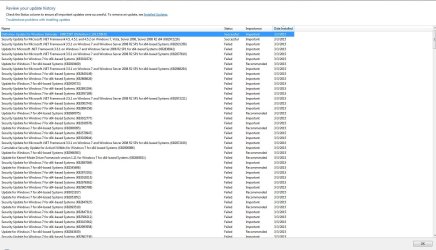
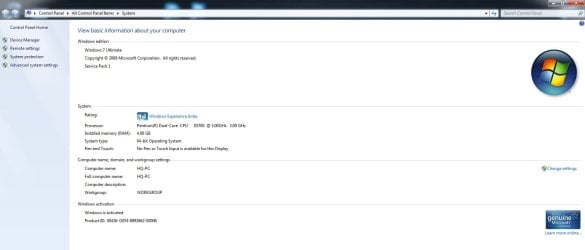
Yesterday my dear Win7 downloaded an update by itself, even tho I've disabled it for good (looks like that doesn't matter, I mean, I want those updates even tho I don't...right?)
and so I turned off my PC at the end of the day, and before shutting down it did it's usual "Configuring my a**" thingy
and today I turned it on just to find that Windows doesn't know how to install updates, because it' configuring and figuring out for about 1hr 17m and 43s (yes, I've mesured it)...so I figure yeah it's too dumb to do what it's made to do, that's why I've disabled them in the first place, so I restarted my rig, just to find myself yet again at "Failed updateing, reverting changes"... so I have sat there, with my stopwatch on, and after 30 so minutes, I decided that I don't want Win98 - how long it took, it wouldn't suprise me at all....so somehow it got a hold of it's mind and finally I got my desktop....after an hour of cleaning s*hit up and constant lagging, I did system restore and got an even more lagged out situation....so to cut it short
-Why did it install and download updates when I disabled that s*hit long ago
-Why is it dumb and can't install so basic thing?
-What can cause this lags (except Windows)?
-And how to solve it before I go back to Ubuntu and plead to recieve me back?
Thank you.
P.S. I know my way around my rig, I'm not a programmer but I know a lot of things about software and hardware, so before you tell me to do sys restore, safe mode, delete updates, run from bios etc. remember that I've tried all of that
and so I turned off my PC at the end of the day, and before shutting down it did it's usual "Configuring my a**" thingy
and today I turned it on just to find that Windows doesn't know how to install updates, because it' configuring and figuring out for about 1hr 17m and 43s (yes, I've mesured it)...so I figure yeah it's too dumb to do what it's made to do, that's why I've disabled them in the first place, so I restarted my rig, just to find myself yet again at "Failed updateing, reverting changes"... so I have sat there, with my stopwatch on, and after 30 so minutes, I decided that I don't want Win98 - how long it took, it wouldn't suprise me at all....so somehow it got a hold of it's mind and finally I got my desktop....after an hour of cleaning s*hit up and constant lagging, I did system restore and got an even more lagged out situation....so to cut it short
-Why did it install and download updates when I disabled that s*hit long ago
-Why is it dumb and can't install so basic thing?
-What can cause this lags (except Windows)?
-And how to solve it before I go back to Ubuntu and plead to recieve me back?
Thank you.
P.S. I know my way around my rig, I'm not a programmer but I know a lot of things about software and hardware, so before you tell me to do sys restore, safe mode, delete updates, run from bios etc. remember that I've tried all of that
My Computer
- Computer type
- PC/Desktop
- OS
- Windows 7 Ultimate x64