JavaScript is disabled. For a better experience, please enable JavaScript in your browser before proceeding.
You are using an out of date browser. It may not display this or other websites correctly.
You should upgrade or use an
alternative browser .
I have a Gateway desktop that came with Vista32-bit Home
Windows 7 32bit AMD Athlon™ 64 X2 dual core 4000+ processor 2048 MB DDR2, 667 MHz, (PC2-5300) Pny NVIDIA GeForce gt610 1024mb ddr3 PC/Desktop Gateway GM5470E Desktop Computer Windows 7 32bit AMD Athlon™ 64 X2 dual core 4000+ processor ECS MCP61P-AM motherboard(micro_atx) 2048 MB DDR2, 667 MHz, (PC2-5300) Pny NVIDIA GeForce gt610 1024mb ddr3 on-board integrated Vizio 24 inch 1920x1080 hd Tv 1920x1080 Intel 3500 series 120gb Corsair 430 Gateway wireless Gateway wireless 2.2 .868 Seamonkey
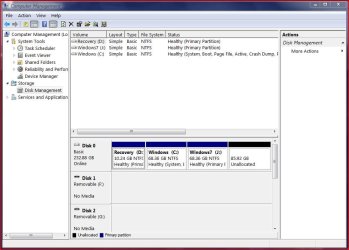
Post a screenshot of disk management so we have complete understanding of system which enables us to advise with best accuracy, please.
7600.20510 x86 P4 550 3.4 GHz HT running at 3.5 GHz OCZ 2 GB(2x1GB) DDR400mHz running @ 414 mHz HIS Radeon HD 3850 IceQ 3 Turbo HDMI Dual DL-... self built 7600.20510 x86 P4 550 3.4 GHz HT running at 3.5 GHz MSI PM8M3-V (MS-7211 v1.x) Micro-ATX mainboard OCZ 2 GB(2x1GB) DDR400mHz running @ 414 mHz HIS Radeon HD 3850 IceQ 3 Turbo HDMI Dual DL-DVI AGP MOTU Traveler firewire studio interface 192 kHz 24 bit 22" widescreen Acer X223W LCD, 17" Compaq P75 CRT 1680x1050 and 1280x1024 SATA I x2 WD, 400 GB and 120 GB, SATA 2 WD Caviar Black 1 TB 350W generic Cybertronpc, it glows blue stock cpu fan, Ice-Q 3 gpu and system, many case fans Logitch Classical Keyboard 200 Logitech Mediaplay cordless 1792/448 kbits/sec SATA II PCI fake RAID adapter, 1 GB Readyboost, original ATI Remote Wonder (even works with WMC perfectly), Logitech Rumblepad 2 game controller x2
New member
Power User
Thread Starter
Post a screenshot of disk management so we have complete understanding of system which enables us to advise with best accuracy, please.
Here you go. C:\ is Vista
Diskman.JPG
77 KB
· Views: 27
Windows 7 32bit AMD Athlon™ 64 X2 dual core 4000+ processor 2048 MB DDR2, 667 MHz, (PC2-5300) Pny NVIDIA GeForce gt610 1024mb ddr3 PC/Desktop Gateway GM5470E Desktop Computer Windows 7 32bit AMD Athlon™ 64 X2 dual core 4000+ processor ECS MCP61P-AM motherboard(micro_atx) 2048 MB DDR2, 667 MHz, (PC2-5300) Pny NVIDIA GeForce gt610 1024mb ddr3 on-board integrated Vizio 24 inch 1920x1080 hd Tv 1920x1080 Intel 3500 series 120gb Corsair 430 Gateway wireless Gateway wireless 2.2 .868 Seamonkey
Your case is simple. Quick format J: to NTFS. Use Easybcd to remove the bcd entry to J's Win7 so the boot choice screen will be gone.
7600.20510 x86 P4 550 3.4 GHz HT running at 3.5 GHz OCZ 2 GB(2x1GB) DDR400mHz running @ 414 mHz HIS Radeon HD 3850 IceQ 3 Turbo HDMI Dual DL-... self built 7600.20510 x86 P4 550 3.4 GHz HT running at 3.5 GHz MSI PM8M3-V (MS-7211 v1.x) Micro-ATX mainboard OCZ 2 GB(2x1GB) DDR400mHz running @ 414 mHz HIS Radeon HD 3850 IceQ 3 Turbo HDMI Dual DL-DVI AGP MOTU Traveler firewire studio interface 192 kHz 24 bit 22" widescreen Acer X223W LCD, 17" Compaq P75 CRT 1680x1050 and 1280x1024 SATA I x2 WD, 400 GB and 120 GB, SATA 2 WD Caviar Black 1 TB 350W generic Cybertronpc, it glows blue stock cpu fan, Ice-Q 3 gpu and system, many case fans Logitch Classical Keyboard 200 Logitech Mediaplay cordless 1792/448 kbits/sec SATA II PCI fake RAID adapter, 1 GB Readyboost, original ATI Remote Wonder (even works with WMC perfectly), Logitech Rumblepad 2 game controller x2
New member
Power User
Thread Starter
Your case is simple. Quick format J: to NTFS. Use Easbcd to remove the bcd entry to J's Win7 so the boot choice screen will be gone.
That's what I thought. Thanks a bunch.
Windows 7 32bit AMD Athlon™ 64 X2 dual core 4000+ processor 2048 MB DDR2, 667 MHz, (PC2-5300) Pny NVIDIA GeForce gt610 1024mb ddr3 PC/Desktop Gateway GM5470E Desktop Computer Windows 7 32bit AMD Athlon™ 64 X2 dual core 4000+ processor ECS MCP61P-AM motherboard(micro_atx) 2048 MB DDR2, 667 MHz, (PC2-5300) Pny NVIDIA GeForce gt610 1024mb ddr3 on-board integrated Vizio 24 inch 1920x1080 hd Tv 1920x1080 Intel 3500 series 120gb Corsair 430 Gateway wireless Gateway wireless 2.2 .868 Seamonkey