Win7 & Vista

marciokoko

New member
Local time
5:59 PM
Messages
5
On my dell xps1330 i had vista that came with my pc.

I created a secondary partition when win7 came out and installed it on it. But the partition I had Vista on was very small, so now i cant even install office on it. So i want to erase the old, vista, original, primary partition and fuse it to my secondary, new, win7 partition. But from win7 I cannot format or erase the vista one. Disk Manager wont let me.

Hlp pls
 

My Computer

OS
win7 32bit
Partiton or Volume Extend. Try this tutorial. There is a link in it for Partition Wizard home Ed which may be helpful.
The Vista partition can't be marked as active.
 

My Computer

Computer type
PC/Desktop
Computer Manufacturer/Model Number
Home Built Desktop By DataTech
OS
Windows 7 Ultimate X64 SP1
CPU
Intel i5-2550K, Differing ~4.4-4.8GHz No built in GPU
Motherboard
ASUS P8Z68-V PRO/GEN3
Memory
16GB G.Skill Sniper 1866MHz @ 2133MHz 2x8GB
Graphics Card(s)
ASUS GTX650TIB-DC2OC-2GD5, (650TI Boost)
Sound Card
Onboard Realtek 5-1
Monitor(s) Displays
Samsung P2570HD
Screen Resolution
1920x1080
Hard Drives
Samsung 840 Pro 256GB SSD for OS, 500GB Seagate Constellation (Enterprise drive) for Data
PSU
Corsair HX650W
Case
Inwin Dragon Rider
Cooling
Hyper 212 EVO w/two Noctua fans, push-pull, @1300 RPM
Keyboard
E-Z Eyes, bright yellow keys with large characters
Mouse
steelseries SENSEI Laser Pro Gaming
Internet Speed
48-51Mbs Mbs down, 11 Mbs up Xfinity Cable
Antivirus
Norton Internet Security 2013
Browser
IE 10, Opera, Pale Moon if needed
Other Info
4 case fans, LG BluRay-RE, ASUS DVD-RW, Mr. Fusion power supply, 1.21 gigawatts.
It won't let me delete the partition

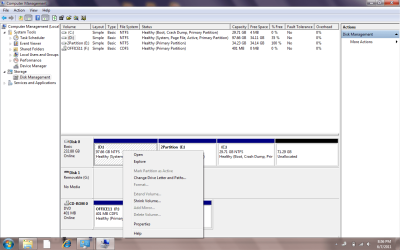
Yes but when I go into disk management, and select the vista partition and right click, the Delete option is greyed out.

The vista partition reads System, Page File, primary, healthy.

The win7 partition reads boot, crash dump, healthy, primary.

A third partition is empty.
 

My Computer

OS
win7 32bit

My Computer

Computer type
PC/Desktop
Computer Manufacturer/Model Number
Home Built Desktop By DataTech
OS
Windows 7 Ultimate X64 SP1
CPU
Intel i5-2550K, Differing ~4.4-4.8GHz No built in GPU
Motherboard
ASUS P8Z68-V PRO/GEN3
Memory
16GB G.Skill Sniper 1866MHz @ 2133MHz 2x8GB
Graphics Card(s)
ASUS GTX650TIB-DC2OC-2GD5, (650TI Boost)
Sound Card
Onboard Realtek 5-1
Monitor(s) Displays
Samsung P2570HD
Screen Resolution
1920x1080
Hard Drives
Samsung 840 Pro 256GB SSD for OS, 500GB Seagate Constellation (Enterprise drive) for Data
PSU
Corsair HX650W
Case
Inwin Dragon Rider
Cooling
Hyper 212 EVO w/two Noctua fans, push-pull, @1300 RPM
Keyboard
E-Z Eyes, bright yellow keys with large characters
Mouse
steelseries SENSEI Laser Pro Gaming
Internet Speed
48-51Mbs Mbs down, 11 Mbs up Xfinity Cable
Antivirus
Norton Internet Security 2013
Browser
IE 10, Opera, Pale Moon if needed
Other Info
4 case fans, LG BluRay-RE, ASUS DVD-RW, Mr. Fusion power supply, 1.21 gigawatts.
disk management

here is the screenshot
 

Attachments

  • diskmanager.png
    diskmanager.png
    46.5 KB · Views: 15

My Computer

OS
win7 32bit
Click Properties and see if you can format the volume. Then remove the drive letter, and try my first suggestion.
 

My Computer

Computer type
PC/Desktop
Computer Manufacturer/Model Number
Home Built Desktop By DataTech
OS
Windows 7 Ultimate X64 SP1
CPU
Intel i5-2550K, Differing ~4.4-4.8GHz No built in GPU
Motherboard
ASUS P8Z68-V PRO/GEN3
Memory
16GB G.Skill Sniper 1866MHz @ 2133MHz 2x8GB
Graphics Card(s)
ASUS GTX650TIB-DC2OC-2GD5, (650TI Boost)
Sound Card
Onboard Realtek 5-1
Monitor(s) Displays
Samsung P2570HD
Screen Resolution
1920x1080
Hard Drives
Samsung 840 Pro 256GB SSD for OS, 500GB Seagate Constellation (Enterprise drive) for Data
PSU
Corsair HX650W
Case
Inwin Dragon Rider
Cooling
Hyper 212 EVO w/two Noctua fans, push-pull, @1300 RPM
Keyboard
E-Z Eyes, bright yellow keys with large characters
Mouse
steelseries SENSEI Laser Pro Gaming
Internet Speed
48-51Mbs Mbs down, 11 Mbs up Xfinity Cable
Antivirus
Norton Internet Security 2013
Browser
IE 10, Opera, Pale Moon if needed
Other Info
4 case fans, LG BluRay-RE, ASUS DVD-RW, Mr. Fusion power supply, 1.21 gigawatts.
Format Option Greyed Out

If you can see in the picture, the Format & delete options are greyed out! I cant.
 

My Computer

OS
win7 32bit
If you can see in the picture, the Format & delete options are greyed out! I cant.

I'll let the experts give you a definite answer but I suspect it might be because it is at the beginning of the drive, I don't see a system reserved either so your MBR is probably in that partition since it was the original OS.
 

My Computer

Computer type
PC/Desktop
Computer Manufacturer/Model Number
Self Built
OS
Win 10 Pro x64
CPU
Intel I5-2500K @3.3GHz
Motherboard
Asrock P67 Extreme4
Memory
16GB G.Skill Ripjaws X (4x4GB)
Graphics Card(s)
EVGA GeForce 750 Ti SC 2GB
Sound Card
ASUS Xonar DG 5.1 Channels 24-bit 96KHz PCI Interface Sound
Monitor(s) Displays
auria eq2367
Screen Resolution
1920 x 1080
Hard Drives
250GB Samsung 850 EVO SSD
1TB WD Blue
1TB Hitachi
PSU
SeaSonic X 650W 80 Plus Gold
Case
Corsair Obsidian 750D
Cooling
Corsair H60, Three 140mm case fans
Keyboard
Logitech Wireless Keyboard K520
Mouse
Logitech Wireless Mouse M310
Internet Speed
Wave Broadband ~ 100 dn 5 up
Antivirus
Windows Defender, Malwarebytes Premium
Browser
Edge, IE11, Chrome
Other Info
Laptop specs: HP g7-1365dx /
CPU: AMD A6-3420M APU with Radeon(tm) HD Graphics /
RAM: Crucial 8Gb (2x4Gb) /
SSD: Crucial M4-CT128M4SSD2 ATA Device/ FW 000F /
GFX: AMD Radeon HD 6520G /
OS: Windows 10 Pro x64
The vista partition is the system partition which means it contains the boot files, thats why disk management wont let you finger it. Use this tut to mark the win7 partition active.

http://www.sevenforums.com/tutorials/71432-partition-mark-active.html

Reboot, windows wont boot because the win7 partition doesnt contain the required files. So now boot from the install dvd or a system repair disk and run startup repair upto 3 times with reboots.

http://www.sevenforums.com/tutorials/105541-startup-repair-run-3-separate-times.html
 

My Computer

Computer Manufacturer/Model Number
Too many to describe...
OS
Windows 7 x64 pro/ Windows 7 x86 Pro/ XP SP3 x86
Ok, lemme ask you this. As you can see I have up to 2 more partitions, or rather, another partition and an un-allocated space. Could I just add those 2 to my win7 partition to make it bigger and leave the vista(D:) partition untouched?
 

My Computer

OS
win7 32bit
Ok, lemme ask you this. As you can see I have up to 2 more partitions, or rather, another partition and an un-allocated space. Could I just add those 2 to my win7 partition to make it bigger and leave the vista(D:) partition untouched?
Yes, you can. Only thing is you'll need to use Partition wizard because the E: partition that you want to merge is located on the left of the win7 partition. The native disk management lets you add only space to the RIGHT and contiguos of the parent partition. Use this tut to merge.

http://www.sevenforums.com/tutorials/93322-partition-wizard-use-bootable-cd.html?ltr=P

Before doing all this, back up any important data on the 2 partitions that are going to be merged into the win7 partition. Then using PW, delete those 2 partitions and pull the slider across to merge, as explained in the tut.

Make sure you dont mix up the partition letters.
 

My Computer

Computer Manufacturer/Model Number
Too many to describe...
OS
Windows 7 x64 pro/ Windows 7 x86 Pro/ XP SP3 x86
Back
Top