Win7 Winamp integration

dmex

New member
Guru
VIP
Local time
4:26 AM
Messages
1,288
Location
Fremantle, Australia
Win7shell is a simple plugin for Winamp, that integrates it with the new taskbar of Windows 7. As you may know the taskbar offers lots of new features, which you can read about everywhere, including here. Why would you need this? The new taskbar features were designed to improve the convenience of the user, adding visible information and shortcuts where you need it, but Winamp doesn't take advantage of these. Until now.

Features

The plugin's features, briefly:

shows playback status and progress in the icon background of the taskbar icon
uses taskbar icon to display a "VU meter"
shows playback status using icon overlays on the taskbar icon
customizes the aero peek thumbnail with:
Winamp logo
album art
customized information about the current media playing
custom image file
progress bar, showing playback progress
adds customizable player control buttons on the aero peek thumbnail
adds 'Recent', 'Frequent' and 'Tasks' categories to the jump list
Winamp is now easier to find in 3DFlip

win7shell - Project Hosting on Google Code

25ulf6u.png
a2srx1.png
2lad7ih.png


25uglqe.jpg
2kowb6.jpg
fks7rc.jpg


Its also fully configurable:
2qbvfcy.png
 
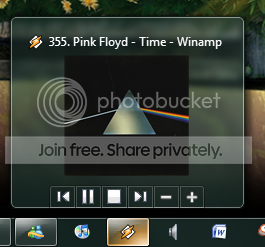
I like it a lot, although I'm not using it fully, I removed the rating-button and added two volume buttons, lastly I removed the text, because I don't really need it. So this pops up when I hover on the button:

Hovringplusapp.png


Though, I was wondering, am I able to change the title? I mean where it says '355. Pink Floyd - Time - Winamp' in the picture I added.
 

My Computer

Computer Manufacturer/Model Number
Custom
OS
Windows 7 Ultimate(64-bit)
CPU
AMD Phenom(tm) II X4 955 Processor, MMX, 3DNow (4 CPUs), ~1.
Motherboard
Gigabyte Ultra Durable Motherboard GA-MA790GP-UD4H
Memory
4096MB RAM
Graphics Card(s)
ATI Radeon HD 4870
Sound Card
Realtek HD Audio output
Monitor(s) Displays
Acer P203W 20"W LCD Monitor 1680x1050
Hard Drives
1 TB+1,5 TB External
PSU
Silencer 750 Quad
Case
Antec 300 Versatile Mini Tower
Cooling
2 Fans
Ive been using this a while, nice little program.
 

My Computer

Computer Manufacturer/Model Number
self built
OS
Windows 7 Professional 64-bit
CPU
Intel E8400 3GHz
Motherboard
Intel DX48BT2
Memory
Kingston PC3-10700H 4Gb
Graphics Card(s)
XFX Radeon HD 5850 BlackEd.
Sound Card
Asus Xonar DG
Monitor(s) Displays
2x Samsung SM-T220HD 22"
Screen Resolution
1680x1050 on two monitors
Hard Drives
OCZ Vertex 2 120gb 3.5" (OS)
Seagate Momentus XT 500gb
Samsung F3 1Tb (games)
2x Samsung F1 1Tb
PSU
Thermaltake ToughPower 850w
Case
Thermaltake Armor
Cooling
Scythe Mugen II
Keyboard
Microsoft Comfort Curve USB
Mouse
Razer Diamondback 3G
Internet Speed
8128/443
I like this prog as well. I recently started using it after you posted a link to it

Thanks OP
 

My Computer

Computer Manufacturer/Model Number
custom build
OS
Windows 7 Pro X64
CPU
AMD Phenom II X4 975 Black Edition
Motherboard
MSI 870A-G54 (FX)
Memory
CORSAIR Vengeance 8GB (2 x 4GB) 240-Pin DDR3 SDRAM DDR3 1600
Graphics Card(s)
ASUS EN9800GT HB/HTDI/512M GeForce 9800 GT 512MB 256-bit GDD
Sound Card
Realtek ALC892
Monitor(s) Displays
Viewsonic 19' 16:10
Screen Resolution
1680X1050
Hard Drives
Western Digital Caviar Black WD6401AALS 640GB 7200 RPM SATA,
Western Digital Caviar Black 1TB 7200RPM SATA
PSU
Thermaltake Purepower W0100RU 500W ATX 12V
Case
COOLER MASTER Elite RC-331-KKN1-GP Black SECC ATX Mid Tower
Cooling
Nothing beyond what etch part came with
Keyboard
Logitech G11
Mouse
USB Logitech gaming mouse
Internet Speed
Cable
Other Info
New CPU, Motherboard, and Ram installed 02/2012

Logitech G35 Headset
Back
Top