Win7 won't start - it loops on the repair option of the install DVD

crockhamtown

New member
Local time
10:28 PM
Messages
15
There are so many posts about repairing win7 that I have become confused. Perhaps I could state my problem.

I have an HP Compaq nx7400 64 bit laptop. It came with Win7 but I upgraded to Win10. After a short while Win10 refused to start properly and started looping. I tried many suggested ways of curing this to no avail.

I decided to go back to Win7. But because the laptop came with Win7 pre-installed, I had no disks. I therefore bought a new Win7 legal Microsoft DVD with an official product key. It included Service Pack 1. This loaded okay and I was so pleased to see Win7 back again. However it started playing up and wouldn't start properly. I used the repair menu on the install DVD but a message said 1si_fc.sys is missing. Then after another go wmilib.sys missing.

On one of the repair cycles it started looking at my hard disk and found numerous errors which it corrected. I decided to use Killdisk to erase the entire hard drive with zeros so that Win7 would have a clean sheet to install upon. But it still won't start properly the latest message is winload is missing.

I would much appreciate some advice on what repair/recovery ISO to download so that it bypasses the installed Win7 and adds the missing drivers files, etc from outside.
 

My Computer My Computer

At a glance

Windows7 64 bit
Computer type
Laptop
Computer Manufacturer/Model Number
HP
OS
Windows7 64 bit
hello crockhamtown,

welcome to seven forums!!


Firstly, we need to establish i) whether there is any personal data/programs on the drive and, ii) how many partitions are on the drive?
 

My Computer My Computer

At a glance

Windows 7 x64, Vista x64, 8.1 smartphoneIntel E8400 65W 64-bitDDR2 2 x 2GB, 1GB x 2XFX Radeon HD5750
Computer type
PC/Desktop
OS
Windows 7 x64, Vista x64, 8.1 smartphone
CPU
Intel E8400 65W 64-bit
Motherboard
Gigabyte EP45-UD3LR
Memory
DDR2 2 x 2GB, 1GB x 2
Graphics Card(s)
XFX Radeon HD5750
Sound Card
AMD High Definition Audio; Realtek High Definition Audio
Monitor(s) Displays
iiyama prolite X2377HDS
Screen Resolution
1920 x 1080
Hard Drives
500GB 7200 rpm Seagate ST3500413AS 16MB, 500GB 5400 rpm Toshiba MQ02ABF050H 32MB, 200GB 7200 rpm Seagate ST3200820AS 8MB, 2TB 7200 rpm Western Digital WD20EZRX 64MB
PSU
Enermax Liberty Modular
Case
Antec P193 Midi Tower
Keyboard
Mionix ZIBAL 60
Mouse
Razer USB 2.0 Diamondback Mouse or Huion Graphics Tablet
Browser
Internet Explorer, Lunascape, Firefox, Opera, Avast Safezone
i) No personal data or programs.
ii) On one install there were two partitions. On the latest install there was only one.
 

My Computer My Computer

At a glance

Windows7 64 bit
Computer type
Laptop
Computer Manufacturer/Model Number
HP
OS
Windows7 64 bit
Okay.

Next question, would you prefer Windows 10 OS, or do you still wish to return to the Windows 7 Operating System?
 

My Computer My Computer

At a glance

Windows 7 x64, Vista x64, 8.1 smartphoneIntel E8400 65W 64-bitDDR2 2 x 2GB, 1GB x 2XFX Radeon HD5750
Computer type
PC/Desktop
OS
Windows 7 x64, Vista x64, 8.1 smartphone
CPU
Intel E8400 65W 64-bit
Motherboard
Gigabyte EP45-UD3LR
Memory
DDR2 2 x 2GB, 1GB x 2
Graphics Card(s)
XFX Radeon HD5750
Sound Card
AMD High Definition Audio; Realtek High Definition Audio
Monitor(s) Displays
iiyama prolite X2377HDS
Screen Resolution
1920 x 1080
Hard Drives
500GB 7200 rpm Seagate ST3500413AS 16MB, 500GB 5400 rpm Toshiba MQ02ABF050H 32MB, 200GB 7200 rpm Seagate ST3200820AS 8MB, 2TB 7200 rpm Western Digital WD20EZRX 64MB
PSU
Enermax Liberty Modular
Case
Antec P193 Midi Tower
Keyboard
Mionix ZIBAL 60
Mouse
Razer USB 2.0 Diamondback Mouse or Huion Graphics Tablet
Browser
Internet Explorer, Lunascape, Firefox, Opera, Avast Safezone
Thanks iko22 for your interest.

Windows 7 is my preferred option.
 

My Computer My Computer

At a glance

Windows7 64 bit
Computer type
Laptop
Computer Manufacturer/Model Number
HP
OS
Windows7 64 bit
Use your Windows 7 Installation Disk as a System Repair Disk, to access the CMD prompt. And from the CMD prompt, use bootrec to rebuild the BCD installation of Windows 7.
To do this:

Access the CMD Prompt
Insert Installation DVD in drive, and boot the computer. You may need to select the DVD drive as the main boot device, either in BIOS or from the Boot Manager.
On the Install Windows screen, select language, and keyboard.
Then select "Repair Your Computer". Ie., DO NOT select "Install now"
Then select "Command Prompt".​
Use BCDedit to rebuild the BCD installation, from the CMD Command Prompt
Type the following, pressing <Enter> once at the end of every line. As each line executes, make note of the output results.
Code:
bcdedit /export c:\bcd_bak
c:
cd boot
attrib bcd -s -h -r
ren c:\boot\bcd bcd.old
bootrec /rebuildbcd
 

My Computer My Computer

At a glance

Windows 7 x64, Vista x64, 8.1 smartphoneIntel E8400 65W 64-bitDDR2 2 x 2GB, 1GB x 2XFX Radeon HD5750
Computer type
PC/Desktop
OS
Windows 7 x64, Vista x64, 8.1 smartphone
CPU
Intel E8400 65W 64-bit
Motherboard
Gigabyte EP45-UD3LR
Memory
DDR2 2 x 2GB, 1GB x 2
Graphics Card(s)
XFX Radeon HD5750
Sound Card
AMD High Definition Audio; Realtek High Definition Audio
Monitor(s) Displays
iiyama prolite X2377HDS
Screen Resolution
1920 x 1080
Hard Drives
500GB 7200 rpm Seagate ST3500413AS 16MB, 500GB 5400 rpm Toshiba MQ02ABF050H 32MB, 200GB 7200 rpm Seagate ST3200820AS 8MB, 2TB 7200 rpm Western Digital WD20EZRX 64MB
PSU
Enermax Liberty Modular
Case
Antec P193 Midi Tower
Keyboard
Mionix ZIBAL 60
Mouse
Razer USB 2.0 Diamondback Mouse or Huion Graphics Tablet
Browser
Internet Explorer, Lunascape, Firefox, Opera, Avast Safezone
This could take a bit time - other domestic problems have intervened.
 

My Computer My Computer

At a glance

Windows7 64 bit
Computer type
Laptop
Computer Manufacturer/Model Number
HP
OS
Windows7 64 bit
All of above went in okay.
The last one said,
Total identfied windows installations: 2
[1] D:\Windows
Add installation to boot list Y N A

Shall I say yes?
 

My Computer My Computer

At a glance

Windows7 64 bit
Computer type
Laptop
Computer Manufacturer/Model Number
HP
OS
Windows7 64 bit
Looks like you still have two partitions on the HDD. Nevermind. Say "Yes" for now.
 

My Computer My Computer

At a glance

Windows 7 x64, Vista x64, 8.1 smartphoneIntel E8400 65W 64-bitDDR2 2 x 2GB, 1GB x 2XFX Radeon HD5750
Computer type
PC/Desktop
OS
Windows 7 x64, Vista x64, 8.1 smartphone
CPU
Intel E8400 65W 64-bit
Motherboard
Gigabyte EP45-UD3LR
Memory
DDR2 2 x 2GB, 1GB x 2
Graphics Card(s)
XFX Radeon HD5750
Sound Card
AMD High Definition Audio; Realtek High Definition Audio
Monitor(s) Displays
iiyama prolite X2377HDS
Screen Resolution
1920 x 1080
Hard Drives
500GB 7200 rpm Seagate ST3500413AS 16MB, 500GB 5400 rpm Toshiba MQ02ABF050H 32MB, 200GB 7200 rpm Seagate ST3200820AS 8MB, 2TB 7200 rpm Western Digital WD20EZRX 64MB
PSU
Enermax Liberty Modular
Case
Antec P193 Midi Tower
Keyboard
Mionix ZIBAL 60
Mouse
Razer USB 2.0 Diamondback Mouse or Huion Graphics Tablet
Browser
Internet Explorer, Lunascape, Firefox, Opera, Avast Safezone
Seems obvious to say yes. I did for 1 then 2 (presumably the 2 partitions).

Now restarting going through
Copying windows files
Expanding windows files
Installing features
Installing updates
Completing installation

Now waiting for those to finish .........
 

My Computer My Computer

At a glance

Windows7 64 bit
Computer type
Laptop
Computer Manufacturer/Model Number
HP
OS
Windows7 64 bit
Error code0x80070570
"The file or directory D:\windows\winsxs please run chkdsk utility"

Computer has taken over and is running repair, found an issue with D: (wasnt quick enough to get words)and starting windows again.
 

My Computer My Computer

At a glance

Windows7 64 bit
Computer type
Laptop
Computer Manufacturer/Model Number
HP
OS
Windows7 64 bit
Still won't start properly. This time there was a blue screen 'crash dump' which quickly disappeared. And the consequent 'cant start' message. I have to give up for now and will have another go tomorrow. One interesting sighting was during a repair was
Disk 0 partition 1 System Reserved. 100mb 71mb System
Disk 0 partition 2 117.7gb 99.2mb(?) Primary

Thanks iko22
 

My Computer My Computer

At a glance

Windows7 64 bit
Computer type
Laptop
Computer Manufacturer/Model Number
HP
OS
Windows7 64 bit
Okay.

The partitions might be remnants of Windows 10 install, and is probably why Windows 7 is now getting stuck.

You had told me earlier, that there are no personal data or programs on the disk, It seems best to me to delete the partitions and clean install Windows 7.

To delete the partitions, we need to know how many partitions are on the disk.

When tomorrow arrives, find all unwanted partitions and proceed to delete them. Then you are safe to clean install Windows 7.

Firstly, remove any USB stick or external disk drive that is connected to the computer.
Then, insert installation DVD into DVD drive. Boot to DVD and select CMD prompt.
From the CMD prompt, type
diskpart <Enter>
list disk <Enter>
list disk will probably list only the one disk, if it lists more than one disk, take a photo of the list, and upload this picture to the forum.
Then assuming there is only the one disk, type:
select disk 0 <Enter>
list partition <Enter>


take a picture of the list and upload image to another post in this thread. If the list shows nothing out of the ordinary, you are safe to proceed and delete all the partitions on disk 0.
To delete a particular partition, type:
select partition n <Enter>
delete partition <Enter>
list partition <Enter>


Once delete partition has been completed for all unwanted partitions, then you are clear to proceed and clean install windows 7 from the installation DVD.
Here is tutorial on how to perform a clean install of Windows 7: Clean Install Windows 7

Hope that helps!!
 

My Computer My Computer

At a glance

Windows 7 x64, Vista x64, 8.1 smartphoneIntel E8400 65W 64-bitDDR2 2 x 2GB, 1GB x 2XFX Radeon HD5750
Computer type
PC/Desktop
OS
Windows 7 x64, Vista x64, 8.1 smartphone
CPU
Intel E8400 65W 64-bit
Motherboard
Gigabyte EP45-UD3LR
Memory
DDR2 2 x 2GB, 1GB x 2
Graphics Card(s)
XFX Radeon HD5750
Sound Card
AMD High Definition Audio; Realtek High Definition Audio
Monitor(s) Displays
iiyama prolite X2377HDS
Screen Resolution
1920 x 1080
Hard Drives
500GB 7200 rpm Seagate ST3500413AS 16MB, 500GB 5400 rpm Toshiba MQ02ABF050H 32MB, 200GB 7200 rpm Seagate ST3200820AS 8MB, 2TB 7200 rpm Western Digital WD20EZRX 64MB
PSU
Enermax Liberty Modular
Case
Antec P193 Midi Tower
Keyboard
Mionix ZIBAL 60
Mouse
Razer USB 2.0 Diamondback Mouse or Huion Graphics Tablet
Browser
Internet Explorer, Lunascape, Firefox, Opera, Avast Safezone
View attachment 407709
The attachment shows success in dealing with the 2 partitions.

I finished with trying the bcdedit process but that didn't want to work, so I am trying to install again.

Will let you know how I get on.
 

My Computer My Computer

At a glance

Windows7 64 bit
Computer type
Laptop
Computer Manufacturer/Model Number
HP
OS
Windows7 64 bit
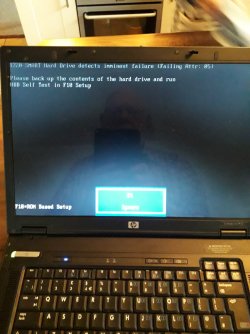
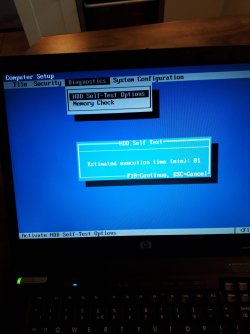
1147133057_20190407_085244_5474235_resized.jpg

-1421414358_20190407_085319_4658869_resized.jpg

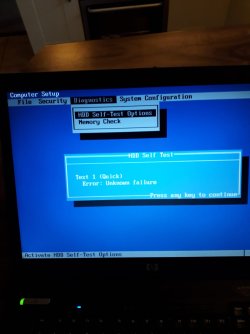
2069594668_20190407_085342_3808819_resized.jpg

I've come to the end of the road. The attachments show that my HDD has failed. I suppose that has always been the problem about being unable to install Win7 successfully.

Many many thanks for ICO22 for taking the trouble to find a solution.
 

My Computer My Computer

At a glance

Windows7 64 bit
Computer type
Laptop
Computer Manufacturer/Model Number
HP
OS
Windows7 64 bit
Yes looking at the error code, it would appear that the HDD has expired. As the computer is still good, you can still look into replacing the HDD.
I had a look at the specification of the HP nx7400, and it is stated that the HDD interface is SATA 150, meaning the maximum data transfer rate possible over the HDD connection is 1.5 Gb/s.
 

My Computer My Computer

At a glance

Windows 7 x64, Vista x64, 8.1 smartphoneIntel E8400 65W 64-bitDDR2 2 x 2GB, 1GB x 2XFX Radeon HD5750
Computer type
PC/Desktop
OS
Windows 7 x64, Vista x64, 8.1 smartphone
CPU
Intel E8400 65W 64-bit
Motherboard
Gigabyte EP45-UD3LR
Memory
DDR2 2 x 2GB, 1GB x 2
Graphics Card(s)
XFX Radeon HD5750
Sound Card
AMD High Definition Audio; Realtek High Definition Audio
Monitor(s) Displays
iiyama prolite X2377HDS
Screen Resolution
1920 x 1080
Hard Drives
500GB 7200 rpm Seagate ST3500413AS 16MB, 500GB 5400 rpm Toshiba MQ02ABF050H 32MB, 200GB 7200 rpm Seagate ST3200820AS 8MB, 2TB 7200 rpm Western Digital WD20EZRX 64MB
PSU
Enermax Liberty Modular
Case
Antec P193 Midi Tower
Keyboard
Mionix ZIBAL 60
Mouse
Razer USB 2.0 Diamondback Mouse or Huion Graphics Tablet
Browser
Internet Explorer, Lunascape, Firefox, Opera, Avast Safezone
I was thinking of getting a SSD. Crucial Memory Ltd has.one specially for my HP nx7400.

I'm a bit puzzled how it connects within the old HDD recess. I think it comes with an adapter that connects with the internal connection strip.

Another issue is how the HP's BIOS works with an SSD. SSD is not listed so I wonder whether it accessed by the HDD selection. Perhaps the BIOS be updated. But if so, how.
 

My Computer My Computer

At a glance

Windows7 64 bit
Computer type
Laptop
Computer Manufacturer/Model Number
HP
OS
Windows7 64 bit
By all means, you can replace your HDD with a SSD. I just wanted to add, that you might not see some of the performance benefits of the SSD because the laptop disk controller is limited to 1.5 Gb/s.

A HDD to SDD converter essentially converts a 3.5" sized SATA bay into a 2.5" sized SATA bay. However, since laptop SATA drives are already 2.5", then you do not require an adaptor for the laptop.

The BIOS will recognise the SSD as a SATA drive, and as such, a properly installed SSD will be listed where the HDD selection is.

The Operating System, when being installed, should use a generic SATA driver for the installation. When Windows 7 is up and running, then you can update this with the correct driver from the SSD manufacturer. Just check Device Manager to update the device and check for any issues.
 

My Computer My Computer

At a glance

Windows 7 x64, Vista x64, 8.1 smartphoneIntel E8400 65W 64-bitDDR2 2 x 2GB, 1GB x 2XFX Radeon HD5750
Computer type
PC/Desktop
OS
Windows 7 x64, Vista x64, 8.1 smartphone
CPU
Intel E8400 65W 64-bit
Motherboard
Gigabyte EP45-UD3LR
Memory
DDR2 2 x 2GB, 1GB x 2
Graphics Card(s)
XFX Radeon HD5750
Sound Card
AMD High Definition Audio; Realtek High Definition Audio
Monitor(s) Displays
iiyama prolite X2377HDS
Screen Resolution
1920 x 1080
Hard Drives
500GB 7200 rpm Seagate ST3500413AS 16MB, 500GB 5400 rpm Toshiba MQ02ABF050H 32MB, 200GB 7200 rpm Seagate ST3200820AS 8MB, 2TB 7200 rpm Western Digital WD20EZRX 64MB
PSU
Enermax Liberty Modular
Case
Antec P193 Midi Tower
Keyboard
Mionix ZIBAL 60
Mouse
Razer USB 2.0 Diamondback Mouse or Huion Graphics Tablet
Browser
Internet Explorer, Lunascape, Firefox, Opera, Avast Safezone
I now have a much clearer idea of what to do. I'm much obliged ico22.
 

My Computer My Computer

At a glance

Windows7 64 bit
Computer type
Laptop
Computer Manufacturer/Model Number
HP
OS
Windows7 64 bit
Back
Top