JackPollack
New member
- Local time
- 3:42 PM
- Messages
- 20
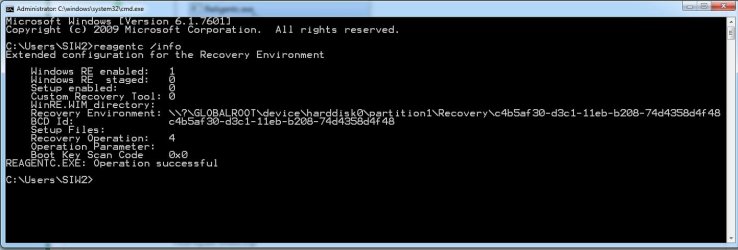
My startup option “Launch startup repair” is not working on my Windows 7 Pro install.
If I choose it I get a error message that the BCD contains some invalid entries and a GUID.
The same GUID is the name of a folder in the invisible folder name "recovery" in the root directory of the drive.
What I have tried:
What are the correct permissions & owner for the recovery folder?
Any other thing I can try? BCD commands, etc?
Is the recovery folder unique to this install, or can I copy one from another working install?
If I choose it I get a error message that the BCD contains some invalid entries and a GUID.
The same GUID is the name of a folder in the invisible folder name "recovery" in the root directory of the drive.
What I have tried:
- I tried replacing the recovery folder with a copy extracted from a backup from the original clean install years ago
- I tried the repair startup option after booting from USB installation media
- USB Install -> Command Prompt -> bootrec /rebuildbcd
- USB Install -> Command Prompt -> bcdboot c:\windows /s c: (for some reason this computer doesn't have a 100mb boot partition so the active partition is "C" and the boot files (boot directory, bootmgr, bootdect.bak) are all on C)
- If I rename the above, the above steps replace everything (except the recovery directory) with fresh versions
What are the correct permissions & owner for the recovery folder?
Any other thing I can try? BCD commands, etc?
Is the recovery folder unique to this install, or can I copy one from another working install?
My Computer
At a glance
Windows 7 64
- OS
- Windows 7 64