Win7 x64 build7100 ends up as Win7 x32 build7000

pjd1952

New member
Local time
6:26 PM
Messages
25
I've had no luck with this in Installation & Setup so I thought I'd try here.

I'm running an Abit I45-c MB (all documentation tells me it is 64-bit capable) with an Intel Pentium D 945 3.2GHz CPU (again 64-bit capable), with 4GB of Ram and during boot my Bios reports an "EM64T CPU".

I have downloaded the 64-bit Win7 RC image "7100.0.090421-1700_x64fre_client_en-us_retail_ultimate-grc1culxfrer_en_dvd.iso" twice and burned both versions to DVD. Both give the same results: Install reports that it is installing Build7000. After a successful install I end up with Build7000 (ver. 6.1) at 32-bit. How is that possible? My last attempt included the second downloaded image and partion destruction, partition recreation, and format, all to no avail.

Paul D.
 

My Computer My Computer

At a glance

windows 7 RCPentium D 945 3,2GHz Dual Core4 GBATI Radeon x1300
Computer Manufacturer/Model Number
Custom Made
OS
windows 7 RC
CPU
Pentium D 945 3,2GHz Dual Core
Motherboard
Abit I45-C
Memory
4 GB
Graphics Card(s)
ATI Radeon x1300
Sound Card
Onboard
Monitor(s) Displays
Acer P221w (22in LCD WS)
Screen Resolution
1680x1050
Hard Drives
2 - WD 80GB IDEs
1 - WD 500GB SATA
Cooling
plenty
Keyboard
MS Ergonomic 4000 v1.0
Mouse
Logitech TrackMan Wheel
Internet Speed
Comcast @ 15Mb
Did you get it via MS or torrents?
 

My Computer My Computer

At a glance

Windows 7 Ultimate x86AMD Sempron 3600+ATI Radeon Xpress 1150
Computer Manufacturer/Model Number
Dell Vostro 1000
OS
Windows 7 Ultimate x86
CPU
AMD Sempron 3600+
Graphics Card(s)
ATI Radeon Xpress 1150
Monitor(s) Displays
Generic PnP Monitor
Screen Resolution
1200 x 800
Hard Drives
WD Scorpio Blue 500 GB (WD5000BEVT)
Mouse
Logitech V320 Cordless Optical Mouse
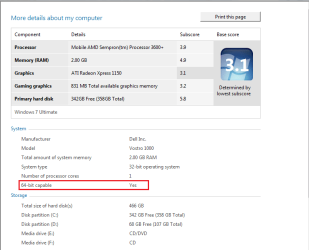
Oh, and a way to find out if it's 64 bit capable is to go to:
Start -> right click on computer -> left click properties -> left click on your windows experience index -> left click on view and print detailed preformance and system information (under your wei number) -> and you can see it here:

Capture3.PNG


Nobody laugh and my wei, thats not the point :p
 

My Computer My Computer

At a glance

Windows 7 Ultimate x86AMD Sempron 3600+ATI Radeon Xpress 1150
Computer Manufacturer/Model Number
Dell Vostro 1000
OS
Windows 7 Ultimate x86
CPU
AMD Sempron 3600+
Graphics Card(s)
ATI Radeon Xpress 1150
Monitor(s) Displays
Generic PnP Monitor
Screen Resolution
1200 x 800
Hard Drives
WD Scorpio Blue 500 GB (WD5000BEVT)
Mouse
Logitech V320 Cordless Optical Mouse
Absolutely downloaded from MS, wouldn't try it any other way.

As for 64-bit capability, I will have to boot up Win 7 and check it, XP-Pro does not give me that info.

But regardless, if my machine was not capable I would expect an error or the inability to run the OS. How could the install program know and then adjust itself and install "Build7000 x32"? The install files have different names and different sizes.
 

My Computer My Computer

At a glance

windows 7 RCPentium D 945 3,2GHz Dual Core4 GBATI Radeon x1300
Computer Manufacturer/Model Number
Custom Made
OS
windows 7 RC
CPU
Pentium D 945 3,2GHz Dual Core
Motherboard
Abit I45-C
Memory
4 GB
Graphics Card(s)
ATI Radeon x1300
Sound Card
Onboard
Monitor(s) Displays
Acer P221w (22in LCD WS)
Screen Resolution
1680x1050
Hard Drives
2 - WD 80GB IDEs
1 - WD 500GB SATA
Cooling
plenty
Keyboard
MS Ergonomic 4000 v1.0
Mouse
Logitech TrackMan Wheel
Internet Speed
Comcast @ 15Mb
Interestingly I can't run the Windows Experience Index successfully. I mean it seems like it runs...it runs through the whole process and posts "Assessment Complete" but immediately pops up another dialogue box stating that the Assessment cannot complete due to a problem with some driver. It figures. So, I cannot get Win7 to tell me whether my machine is 64-bit capable. That begs the question though of how running the Build7100 x64 install ends up installing Build7000 x32.
 

My Computer My Computer

At a glance

windows 7 RCPentium D 945 3,2GHz Dual Core4 GBATI Radeon x1300
Computer Manufacturer/Model Number
Custom Made
OS
windows 7 RC
CPU
Pentium D 945 3,2GHz Dual Core
Motherboard
Abit I45-C
Memory
4 GB
Graphics Card(s)
ATI Radeon x1300
Sound Card
Onboard
Monitor(s) Displays
Acer P221w (22in LCD WS)
Screen Resolution
1680x1050
Hard Drives
2 - WD 80GB IDEs
1 - WD 500GB SATA
Cooling
plenty
Keyboard
MS Ergonomic 4000 v1.0
Mouse
Logitech TrackMan Wheel
Internet Speed
Comcast @ 15Mb
You could download cpuz and look under the instructions section on the first window. If it is 64bit it will say x86-64.
 

My Computer My Computer

At a glance

Windows 7 Build 7600|16384- 64bitAMD Phenom II X4 810 - 2.61ghz Deneb4GB DDR3 Mushkin (1600 O.C. Rated)ATI HD Radeon 4890 1GB
Computer Manufacturer/Model Number
Custom Made
OS
Windows 7 Build 7600|16384- 64bit
CPU
AMD Phenom II X4 810 - 2.61ghz Deneb
Motherboard
Asus M4A79T Deluxe
Memory
4GB DDR3 Mushkin (1600 O.C. Rated)
Graphics Card(s)
ATI HD Radeon 4890 1GB
Sound Card
Realtek HD Onboard Audio
Monitor(s) Displays
AOC 912vwa-1
Screen Resolution
1440x900 (Max Monitor)
Hard Drives
10000RPM 150GB Western Digital Velociraptor
PSU
Corsair TSX750W
Case
Antec Nine Hundred
Cooling
Air Cooled
Keyboard
Logitech Elite
Mouse
Logitech MX518
Internet Speed
Comcast High-Speed (+Powerboost)

My Computer My Computer

At a glance

Windows 7 Ultimate x86AMD Sempron 3600+ATI Radeon Xpress 1150
Computer Manufacturer/Model Number
Dell Vostro 1000
OS
Windows 7 Ultimate x86
CPU
AMD Sempron 3600+
Graphics Card(s)
ATI Radeon Xpress 1150
Monitor(s) Displays
Generic PnP Monitor
Screen Resolution
1200 x 800
Hard Drives
WD Scorpio Blue 500 GB (WD5000BEVT)
Mouse
Logitech V320 Cordless Optical Mouse
What is the size of your download. My x64 from Microsoft is 3,194,168 KB and earlier today I downloaded x86 on a friends pc which came in at approx 2.6+ gb (I think it was, but know for sure it was less than 3gb). The name you give is the one I have for x64. Check the following:

cntl-panel/Performance Info & Tools/Advanced tools/view advanced system details in system Information.

Find "Version" Mine shows 6.1.7100 Build 7100
Find "System Type" Mine shows x64-based PC

By the way Build 7000 is the "Beta 1" version not the RC

I downloaded from here: Windows 7 Release Candidate
 
Last edited:

My Computer My Computer

At a glance

Windows 7 Ultimate x64Q6600 @2.4ghz (G0 stepping)8 gb OCZ vista essential sli PC-6400Dual 9800gt in SLI mode
Computer Manufacturer/Model Number
Systemax N2000 Gaming PC
OS
Windows 7 Ultimate x64
CPU
Q6600 @2.4ghz (G0 stepping)
Motherboard
XFX nforce 680i LT
Memory
8 gb OCZ vista essential sli PC-6400
Graphics Card(s)
Dual 9800gt in SLI mode
Sound Card
Integrated 8.1 High Definition Audio
Monitor(s) Displays
Dual Sceptre x246w 24 inch monitors
Screen Resolution
1920 x 1200 each monitor
Hard Drives
500 GB SATA II / 7500 rpm
PSU
Cooler Master Real Power Pro 1250W
Case
N2000 server tower
Cooling
Thermaltake Bigwater 760 is
Keyboard
MS Intelitype 6000 v2.0
Mouse
MS Intelipoint 6000
Internet Speed
Wi-power 1.5GB up / 512k down
Other Info
Windows 7 Ultimate x64, Windows 7 Pro x64, Windows Home Premium X86, Windows XP pro, Windows Home Server x86, Ubuntu 10.4 x86 and x64, Ubuntu server 10.4, SQL Server 2005, MySQL 5.0

My Computer My Computer

At a glance

Windows 7 Ultimate x86AMD Sempron 3600+ATI Radeon Xpress 1150
Computer Manufacturer/Model Number
Dell Vostro 1000
OS
Windows 7 Ultimate x86
CPU
AMD Sempron 3600+
Graphics Card(s)
ATI Radeon Xpress 1150
Monitor(s) Displays
Generic PnP Monitor
Screen Resolution
1200 x 800
Hard Drives
WD Scorpio Blue 500 GB (WD5000BEVT)
Mouse
Logitech V320 Cordless Optical Mouse
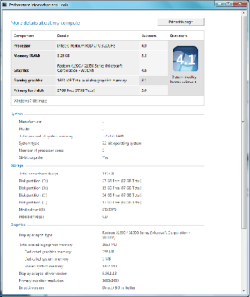
Okay, as I suspected, I downloaded the x32 RC from the MS site and I end up with Build7100 32-bit. I ran the WEI (haven't figured out out to paste it in here but I tadded it as an attachment) and it tells me my computer is 64-bit capable.

So, here's the mystery, why when I boot up to the "7100.0.090421-1700_x64fre_client_en-us_retail_ultimate-grc1culxfrer_en_dvd" DVD does the install screen tell me that it is installing Build7000? I've downloaded the image twice and used three different DVD burns. Is the image at the site misnamed?
 

Attachments

  • x32build7100.png
    x32build7100.png
    16.4 KB · Views: 89

My Computer My Computer

At a glance

windows 7 RCPentium D 945 3,2GHz Dual Core4 GBATI Radeon x1300
Computer Manufacturer/Model Number
Custom Made
OS
windows 7 RC
CPU
Pentium D 945 3,2GHz Dual Core
Motherboard
Abit I45-C
Memory
4 GB
Graphics Card(s)
ATI Radeon x1300
Sound Card
Onboard
Monitor(s) Displays
Acer P221w (22in LCD WS)
Screen Resolution
1680x1050
Hard Drives
2 - WD 80GB IDEs
1 - WD 500GB SATA
Cooling
plenty
Keyboard
MS Ergonomic 4000 v1.0
Mouse
Logitech TrackMan Wheel
Internet Speed
Comcast @ 15Mb

My Computer My Computer

At a glance

Windows 7 Build 7600|16384- 64bitAMD Phenom II X4 810 - 2.61ghz Deneb4GB DDR3 Mushkin (1600 O.C. Rated)ATI HD Radeon 4890 1GB
Computer Manufacturer/Model Number
Custom Made
OS
Windows 7 Build 7600|16384- 64bit
CPU
AMD Phenom II X4 810 - 2.61ghz Deneb
Motherboard
Asus M4A79T Deluxe
Memory
4GB DDR3 Mushkin (1600 O.C. Rated)
Graphics Card(s)
ATI HD Radeon 4890 1GB
Sound Card
Realtek HD Onboard Audio
Monitor(s) Displays
AOC 912vwa-1
Screen Resolution
1440x900 (Max Monitor)
Hard Drives
10000RPM 150GB Western Digital Velociraptor
PSU
Corsair TSX750W
Case
Antec Nine Hundred
Cooling
Air Cooled
Keyboard
Logitech Elite
Mouse
Logitech MX518
Internet Speed
Comcast High-Speed (+Powerboost)
I am currently burning a freshly downloaded x64 image to DVD from within Win7 Build7100 x32 from that site (which is where I have always gotten my installs). I'll see if there's any difference.
 

My Computer My Computer

At a glance

windows 7 RCPentium D 945 3,2GHz Dual Core4 GBATI Radeon x1300
Computer Manufacturer/Model Number
Custom Made
OS
windows 7 RC
CPU
Pentium D 945 3,2GHz Dual Core
Motherboard
Abit I45-C
Memory
4 GB
Graphics Card(s)
ATI Radeon x1300
Sound Card
Onboard
Monitor(s) Displays
Acer P221w (22in LCD WS)
Screen Resolution
1680x1050
Hard Drives
2 - WD 80GB IDEs
1 - WD 500GB SATA
Cooling
plenty
Keyboard
MS Ergonomic 4000 v1.0
Mouse
Logitech TrackMan Wheel
Internet Speed
Comcast @ 15Mb
FYI this is a much faster way of installing if you want ;)
 

My Computer My Computer

At a glance

Windows 7 Ultimate x86AMD Sempron 3600+ATI Radeon Xpress 1150
Computer Manufacturer/Model Number
Dell Vostro 1000
OS
Windows 7 Ultimate x86
CPU
AMD Sempron 3600+
Graphics Card(s)
ATI Radeon Xpress 1150
Monitor(s) Displays
Generic PnP Monitor
Screen Resolution
1200 x 800
Hard Drives
WD Scorpio Blue 500 GB (WD5000BEVT)
Mouse
Logitech V320 Cordless Optical Mouse
It's possible you're accidentally renaming the file when you download it by clicking on the erroneous file by overwriting.
 

My Computer My Computer

At a glance

7264x64/7260x86
OS
7264x64/7260x86
That could happen although I don't want to believe it :). Anyway, I finally resolved the issue. I downloaded the x64 image from within Win7 Build7100 x32 and burned the image with "ISO Burner".
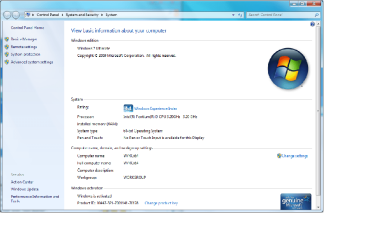
Having said that, one of the reasons I decided to play around with the 64-bit version was that I had upgraded from 2 to 4 GB of memory and understood that 32-bit systems could not see beyond about 3.25GB. So what do I get? Well, I ran the Windows Experience Index and it only reports 3.25GB of Ram. When I look at the System info via START/RC Computer/Properties I see nothing reported under "Installed Memory". Oh well, I didn't have anything to do this weekend anyway. So now that I finally got x64 installed I will proceed to find out what's up with the memory usage.

Thanks for the help everyone.
 

Attachments

  • X64Build7100.png
    X64Build7100.png
    49.1 KB · Views: 32

My Computer My Computer

At a glance

windows 7 RCPentium D 945 3,2GHz Dual Core4 GBATI Radeon x1300
Computer Manufacturer/Model Number
Custom Made
OS
windows 7 RC
CPU
Pentium D 945 3,2GHz Dual Core
Motherboard
Abit I45-C
Memory
4 GB
Graphics Card(s)
ATI Radeon x1300
Sound Card
Onboard
Monitor(s) Displays
Acer P221w (22in LCD WS)
Screen Resolution
1680x1050
Hard Drives
2 - WD 80GB IDEs
1 - WD 500GB SATA
Cooling
plenty
Keyboard
MS Ergonomic 4000 v1.0
Mouse
Logitech TrackMan Wheel
Internet Speed
Comcast @ 15Mb
Sometimes your BIOS also limits what your OS sees. My BIOS only recognizes i have more then 4gb by an extended memory mapping and my motherboard is only 2 months old.

Glad you got it to work though.
 

My Computer My Computer

At a glance

Windows 7 Build 7600|16384- 64bitAMD Phenom II X4 810 - 2.61ghz Deneb4GB DDR3 Mushkin (1600 O.C. Rated)ATI HD Radeon 4890 1GB
Computer Manufacturer/Model Number
Custom Made
OS
Windows 7 Build 7600|16384- 64bit
CPU
AMD Phenom II X4 810 - 2.61ghz Deneb
Motherboard
Asus M4A79T Deluxe
Memory
4GB DDR3 Mushkin (1600 O.C. Rated)
Graphics Card(s)
ATI HD Radeon 4890 1GB
Sound Card
Realtek HD Onboard Audio
Monitor(s) Displays
AOC 912vwa-1
Screen Resolution
1440x900 (Max Monitor)
Hard Drives
10000RPM 150GB Western Digital Velociraptor
PSU
Corsair TSX750W
Case
Antec Nine Hundred
Cooling
Air Cooled
Keyboard
Logitech Elite
Mouse
Logitech MX518
Internet Speed
Comcast High-Speed (+Powerboost)
Just checked for a memory mapping option on my I-45CV Abit board and there is no such option. The MB spec states it can utilize 4GB (2-2GB sticks) and the BIOS counts up the full 4GB.
 

My Computer My Computer

At a glance

windows 7 RCPentium D 945 3,2GHz Dual Core4 GBATI Radeon x1300
Computer Manufacturer/Model Number
Custom Made
OS
windows 7 RC
CPU
Pentium D 945 3,2GHz Dual Core
Motherboard
Abit I45-C
Memory
4 GB
Graphics Card(s)
ATI Radeon x1300
Sound Card
Onboard
Monitor(s) Displays
Acer P221w (22in LCD WS)
Screen Resolution
1680x1050
Hard Drives
2 - WD 80GB IDEs
1 - WD 500GB SATA
Cooling
plenty
Keyboard
MS Ergonomic 4000 v1.0
Mouse
Logitech TrackMan Wheel
Internet Speed
Comcast @ 15Mb
Does your graphics card share physical memory? As in, doesnt have dedicated onboard memory?
 

My Computer My Computer

At a glance

Windows 7 Ultimate x64Intel Core i7-260016Gb DDR3-1600ATI Radeon 7950
OS
Windows 7 Ultimate x64
CPU
Intel Core i7-2600
Memory
16Gb DDR3-1600
Graphics Card(s)
ATI Radeon 7950
Sound Card
Creative X-Fi Extreme Gamer
Monitor(s) Displays
(2) 22" LG WideScreens
Screen Resolution
1920 x 1080
Hard Drives
(1) Samsung 840 Pro 256GB
(1) WD RE4 1Tb SATA3 Drive
PSU
Antec TruPower 750W
Internet Speed
50Mbps
ATI Radeon PCIe X1300 with 256MB of onboard memory.
 

My Computer My Computer

At a glance

windows 7 RCPentium D 945 3,2GHz Dual Core4 GBATI Radeon x1300
Computer Manufacturer/Model Number
Custom Made
OS
windows 7 RC
CPU
Pentium D 945 3,2GHz Dual Core
Motherboard
Abit I45-C
Memory
4 GB
Graphics Card(s)
ATI Radeon x1300
Sound Card
Onboard
Monitor(s) Displays
Acer P221w (22in LCD WS)
Screen Resolution
1680x1050
Hard Drives
2 - WD 80GB IDEs
1 - WD 500GB SATA
Cooling
plenty
Keyboard
MS Ergonomic 4000 v1.0
Mouse
Logitech TrackMan Wheel
Internet Speed
Comcast @ 15Mb
pid1952
You 32bit? 32 and recognize 4gig but must use a portion of that to map (PAE) and if you video car uses shares the highest I have seen is 3317K. Mine looks like this
Ken
 
Last edited:

My Computer My Computer

At a glance

Win 8 Release candidate 8400[email protected]4 gigsNvidia 9600M
Computer Manufacturer/Model Number
HP Pavillion dv-7 1005 Tx
OS
Win 8 Release candidate 8400
CPU
[email protected]
Memory
4 gigs
Graphics Card(s)
Nvidia 9600M
Sound Card
HD built-in
Monitor(s) Displays
17" Wxga
Screen Resolution
1440x900
Cooling
none
Internet Speed
45Mb down 5Mb up
Back
Top