Win7 x64 clean install problem with device safe-remove

RacingSOUL

New member
Local time
10:56 PM
Messages
14
Location
Moscow
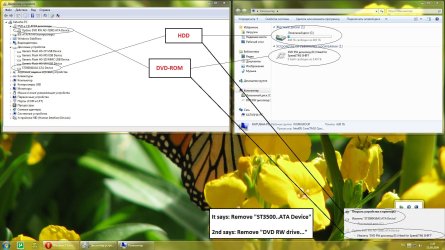
Hello guys! I've just installed windows 7 x64 ultimate (clean install) build 7600 final and got a strange problem which I never ever had before with build 7100 on this system. For some strange reason I've got both my HDD and DVD-ROM in the device safe removing area. I've made the screenshot so you can understand better what I mean:

I installed all drivers that were needed on my system but still... there is that message about safe removing HDD and DVD-ROM :mad:
Please help to make everything back to normal like it was in 7100 build :o:cry:
 

My Computer

Computer Manufacturer/Model Number
Custom
OS
Windows 7 x64 build 7600 Final
CPU
Intel Quad Core Q9550 @ 2.83 GHz
Motherboard
Asus P5Q SE
Memory
2 x 2GB Kingston 800 MHz
Graphics Card(s)
ASUS nvidia 260GTX 216sp
Sound Card
Realtek HD audio
Monitor(s) Displays
Viewsonic VX2433wm
Screen Resolution
1920x1080
Hard Drives
500GB SATA
PSU
600 Watt
Case
Custom case
Cooling
Air
Keyboard
Logitech G15 version 2
Mouse
Logitech G9
Internet Speed
10/10 Mbits/sec
Picture is way too small. Try using the built in snipping tool (type snipping tool in search)

thanks

Ken
 

My Computer

Computer Manufacturer/Model Number
HP Pavillion dv-7 1005 Tx
OS
Win 8 Release candidate 8400
CPU
[email protected]
Memory
4 gigs
Graphics Card(s)
Nvidia 9600M
Sound Card
HD built-in
Monitor(s) Displays
17" Wxga
Screen Resolution
1440x900
Cooling
none
Internet Speed
45Mb down 5Mb up
Im sorry, I thought that thumbnail will work here...
 

Attachments

  • saferemove.jpg
    saferemove.jpg
    225.9 KB · Views: 96

My Computer

Computer Manufacturer/Model Number
Custom
OS
Windows 7 x64 build 7600 Final
CPU
Intel Quad Core Q9550 @ 2.83 GHz
Motherboard
Asus P5Q SE
Memory
2 x 2GB Kingston 800 MHz
Graphics Card(s)
ASUS nvidia 260GTX 216sp
Sound Card
Realtek HD audio
Monitor(s) Displays
Viewsonic VX2433wm
Screen Resolution
1920x1080
Hard Drives
500GB SATA
PSU
600 Watt
Case
Custom case
Cooling
Air
Keyboard
Logitech G15 version 2
Mouse
Logitech G9
Internet Speed
10/10 Mbits/sec
Hello guys! I've just installed windows 7 x64 ultimate (clean install) build 7600 final and got a strange problem which I never ever had before with build 7100 on this system. For some strange reason I've got both my HDD and DVD-ROM in the device safe removing area. I've made the screenshot so you can understand better what I mean:

I installed all drivers that were needed on my system but still... there is that message about safe removing HDD and DVD-ROM :mad:
Please help to make everything back to normal like it was in 7100 build :o:cry:

Hi RacingSoul,

I see your sata controller is in AHCI mode.

This means you can hotswap drives.
Therefor it is in the safe to remove section.

I have a laptop with hotswapable DVD drive, and it's in the safe to remove section as to be expected.

By the way? Why would it be a problem?
The only way to make it go away is to switch sata back to ide and reinstall everything.

Greetz
 

My Computer

OS
Win7 Build 7600 x86
CPU
Pentium II 300MHz
Motherboard
Asus
Memory
32mb EDO RAM
Graphics Card(s)
Diamond Viper
Sound Card
Soundblaster 16
Monitor(s) Displays
14" AOC CRT 16K color
Screen Resolution
800x600
Hard Drives
300mb Quantum fireball
PSU
110 Watts
Cooling
Passive
Keyboard
Trust Ergonomic
Mouse
Generic
Internet Speed
256K u 128K d
Well, I can be called a cleanfreak)) Just can't sleep if something is wrong with my PC...

By the way, I have netbook asus n10j and storage is set to AHCI mode too, but I don't have this safe remove notification with the same win7 build (the only difference is x86 system).

Gotta reinstall the whole system again because when I set storage to IDE mode, I get BSOD...

Thanks for help!!!

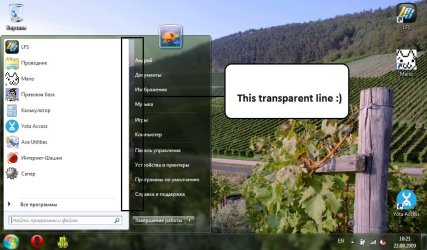
1 more question please))) How to get rid of the strange transparent vertical line in the center of the launch menu?
 

My Computer

Computer Manufacturer/Model Number
Custom
OS
Windows 7 x64 build 7600 Final
CPU
Intel Quad Core Q9550 @ 2.83 GHz
Motherboard
Asus P5Q SE
Memory
2 x 2GB Kingston 800 MHz
Graphics Card(s)
ASUS nvidia 260GTX 216sp
Sound Card
Realtek HD audio
Monitor(s) Displays
Viewsonic VX2433wm
Screen Resolution
1920x1080
Hard Drives
500GB SATA
PSU
600 Watt
Case
Custom case
Cooling
Air
Keyboard
Logitech G15 version 2
Mouse
Logitech G9
Internet Speed
10/10 Mbits/sec
Well, I can be called a cleanfreak)) Just can't sleep if something is wrong with my PC...

By the way, I have netbook asus n10j and storage is set to AHCI mode too, but I don't have this safe remove notification with the same win7 build (the only difference is x86 system).

Gotta reinstall the whole system again because when I set storage to IDE mode, I get BSOD...

Thanks for help!!!

1 more question please))) How to get rid of the strange transparent vertical line in the center of the launch menu?

As cleanfreak, please realize that trying to fix this minor annoyance (not problem), might mess up your system.
If it works, and your apps run happy, don't touch it.


About a transparent vertical line? Screenshot?

greetz
 

My Computer

OS
Win7 Build 7600 x86
CPU
Pentium II 300MHz
Motherboard
Asus
Memory
32mb EDO RAM
Graphics Card(s)
Diamond Viper
Sound Card
Soundblaster 16
Monitor(s) Displays
14" AOC CRT 16K color
Screen Resolution
800x600
Hard Drives
300mb Quantum fireball
PSU
110 Watts
Cooling
Passive
Keyboard
Trust Ergonomic
Mouse
Generic
Internet Speed
256K u 128K d
squonksc, here it is:
Taken the screenshot from my netbook but there is the same line on PC:eek:

By the way, as you suggested I've reinstalled the system on my PC with IDE storage configuration and this annoying safe removing notification's gone :)
 

Attachments

  • transparent line.jpg
    transparent line.jpg
    98.8 KB · Views: 84

My Computer

Computer Manufacturer/Model Number
Custom
OS
Windows 7 x64 build 7600 Final
CPU
Intel Quad Core Q9550 @ 2.83 GHz
Motherboard
Asus P5Q SE
Memory
2 x 2GB Kingston 800 MHz
Graphics Card(s)
ASUS nvidia 260GTX 216sp
Sound Card
Realtek HD audio
Monitor(s) Displays
Viewsonic VX2433wm
Screen Resolution
1920x1080
Hard Drives
500GB SATA
PSU
600 Watt
Case
Custom case
Cooling
Air
Keyboard
Logitech G15 version 2
Mouse
Logitech G9
Internet Speed
10/10 Mbits/sec
squonksc, here it is:
Taken the screenshot from my netbook but there is the same line on PC:eek:

By the way, as you suggested I've reinstalled the system on my PC with IDE storage configuration and this annoying safe removing notification's gone :)

Never seen that before.

I suggest switching to another theme, reboot, and then switch back to your current theme.

Other than that I have no clue.

Greetz
 

My Computer

OS
Win7 Build 7600 x86
CPU
Pentium II 300MHz
Motherboard
Asus
Memory
32mb EDO RAM
Graphics Card(s)
Diamond Viper
Sound Card
Soundblaster 16
Monitor(s) Displays
14" AOC CRT 16K color
Screen Resolution
800x600
Hard Drives
300mb Quantum fireball
PSU
110 Watts
Cooling
Passive
Keyboard
Trust Ergonomic
Mouse
Generic
Internet Speed
256K u 128K d
I searched the web and finally found that this transparent line is only in windows 7 final build with russian language and there is the special fix for it - people with that line should replace aero.msstyles.mui with original file from english version... :D
Russian font somehow causes that strange visual effect (in other words something doesn't fit something lol).
 

My Computer

Computer Manufacturer/Model Number
Custom
OS
Windows 7 x64 build 7600 Final
CPU
Intel Quad Core Q9550 @ 2.83 GHz
Motherboard
Asus P5Q SE
Memory
2 x 2GB Kingston 800 MHz
Graphics Card(s)
ASUS nvidia 260GTX 216sp
Sound Card
Realtek HD audio
Monitor(s) Displays
Viewsonic VX2433wm
Screen Resolution
1920x1080
Hard Drives
500GB SATA
PSU
600 Watt
Case
Custom case
Cooling
Air
Keyboard
Logitech G15 version 2
Mouse
Logitech G9
Internet Speed
10/10 Mbits/sec
Back
Top