Hi,
I have a problem with running Windows 7 (RC, 7100 i think) and XP on the same machine:
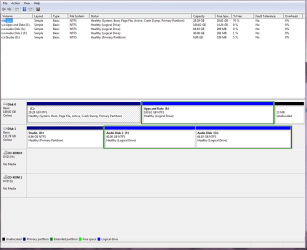
I previously had 2 XP installations - one on the C drive for general useage and one on another drive for audio recording (both are SATA) My C drive XP has been slow and rubbish for a while and so I thought I would reinstall windows on that drive, which I've done before a few times. Then I thought I'd like to try Windows 7 so I installed that. During the installation I formatted the C drive (looking back on it maybe not so clever - there was no data I needed on there but maybe I deleted important files?) and installed 7 on there.
Now, my problem is that I can boot into windows 7 fine, but I am having real difficulty in getting XP to work, due to various things. I have used easyBCD to try and sort out my OS choice at startup, as per some walkthroughs on this forum. When I reboot I have a strange problem where I cant see the screen where I choose the OS, but I know its there because the computer waits for a bit, unless I press enter (to choose windows 7) or down and enter (to choose XP) - so its there but not being displayed on screen.
That's not such a problem, but when I choose XP from the OS select (or what I assume is XP given that I can't see it) the computer just restarts right from the beginning. There was no ntldr in the D drive (where the XP installation is) so i copied it from the XP installation disk.
Also, when I used to be able to get into the 'Studio' XP installation, it thought the D: drive was the I: drive, if you see what I mean...
If anyone can help me I would be so grateful!
Thanks,
Matthew
I have a problem with running Windows 7 (RC, 7100 i think) and XP on the same machine:
I previously had 2 XP installations - one on the C drive for general useage and one on another drive for audio recording (both are SATA) My C drive XP has been slow and rubbish for a while and so I thought I would reinstall windows on that drive, which I've done before a few times. Then I thought I'd like to try Windows 7 so I installed that. During the installation I formatted the C drive (looking back on it maybe not so clever - there was no data I needed on there but maybe I deleted important files?) and installed 7 on there.
Now, my problem is that I can boot into windows 7 fine, but I am having real difficulty in getting XP to work, due to various things. I have used easyBCD to try and sort out my OS choice at startup, as per some walkthroughs on this forum. When I reboot I have a strange problem where I cant see the screen where I choose the OS, but I know its there because the computer waits for a bit, unless I press enter (to choose windows 7) or down and enter (to choose XP) - so its there but not being displayed on screen.
That's not such a problem, but when I choose XP from the OS select (or what I assume is XP given that I can't see it) the computer just restarts right from the beginning. There was no ntldr in the D drive (where the XP installation is) so i copied it from the XP installation disk.
Also, when I used to be able to get into the 'Studio' XP installation, it thought the D: drive was the I: drive, if you see what I mean...
If anyone can help me I would be so grateful!
Thanks,
Matthew
Last edited:
My Computer
- OS
- WIN XP / 7