
Win7 & XP network issue ?

trinaz

New member
Member
VIP
Local time
4:00 PM
Messages
477
Location
Phoenix
Hope this is the right place to post...Seven Forums was great with helping setup two 7 machines...got nothing on the following from Microsoft forums...

moz-screenshot.png
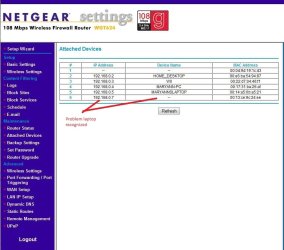
Running network with Win 7 Pro and XP Home Edition. Have one problem laptop that connects to/recognizes the wireless router...but can't connect to the internet ? Prior to changing the WEP key for the system...this laptop would connect ?

Have another laptop and a couple printers working fine on this wireless router (keys changed also on these)...but the Toshiba laptop will not go on-line ?

The only other thing that changed is the 2 desktops now have Win 7 Pro...the other laptop that's connecting is XP Home SP3 and the problem Laptop is also XP Home SP3, Have checked and double checked the key...it is correct and must be if the router recognizes the laptop in the router configuration/attached devices.

Please suggest what might be going on here...and how I can get the laptop re-connected to the Internet ?

On problem laptop...Network Connections shows a status of "Connected" as does the little network icon in system tray.

Thanks, Tim
 

Attachments
  • 0026.jpg
    0026.jpg
    135.3 KB · Views: 49

My Computer

Computer type
PC/Desktop
Computer Manufacturer/Model Number
Self built
OS
Windows 7 Pro 64bit SP1
CPU
AMD FX-6100 Six-Core Processor
Motherboard
M5A78L-M LX PLUS
Memory
2ea Corsair-1333MHz-PC3-10666-240-pin-CMX4GX3M1A1333C9
Graphics Card(s)
NVIDIA GeForce GT 630 - 1023MB (EVGA)
Sound Card
OnBoard Via High Def Audio
Monitor(s) Displays
Samsung 204B main - ASUS VS228 secondary
Screen Resolution
1920x1080 main - 1920x1080 secondary
Hard Drives
Samsung SSD 840 128GB Win7 Pro 64bit - Western Digital WDC 465GB - Seagate 640GB Sata B/U - Maxtor 500GB Sata B/U - Maxtor 200GB Sata
PSU
Antec 650 watt
Cooling
Multiple case fans
Keyboard
MS USB dual Wireless Keyboard - IntelliType Pro
Mouse
MS USB dual Wireless Mouse - IntelliPoint
Internet Speed
Cox Cable
Antivirus
Bitdefender IS 2014
Browser
FireFox Primary - IE 11
Other Info
Hauppaguge Win TV HVR-1250 (Model 22xxx, Hybrid ATSC/QAM)
Samsung HD103SI USB 1TB Desktop Drive - Backup & Disk Image storage
So the Toshiba is the laptop that can connect to the wireless network, but not access the internet? Can you try flushing th DNS

C:\ipconfig /fluashdns.

Please provide ipconfig /all details, after. Also provide ipconfig details of the machine that has no issues.
 

My Computer

Computer Manufacturer/Model Number
Lenovo ThinkPad T60
OS
Windows 7 Ultimate 64Bit
CPU
GenuineIntel Intel(R) Core(TM) DuoCore T2400 @ 1.83GHz
Motherboard
Intel(R) 82801G (ICH7 Family)
Memory
2.00 GB
Graphics Card(s)
Mobile Intel(R) 945 Express Chipset
Sound Card
SoundMAX Integrated Digital HD Audio
Monitor(s) Displays
ThinkPad Display
Screen Resolution
1400x1050
Hard Drives
100Gb SATA
Keyboard
Standard Keyboard
Mouse
HID-compliant Mouse
Internet Speed
Cable Broadband - 54Mbps
Other Info
Intel(R) PRO/1000 PL Network Connection
11a/b/g Wireless LAN Mini PCI Express Adapter
Thanks for helping aem...here's the two ipconfig /all's...there are definitely differences but I know very little about networks/ip configuration.

Note: unless I manually set ip address on problem laptop to 192.168.0.7...the router does NOT recognize the laptop ? ( I get ip address of 169.254.57.152 if set to auto ip )

Problem laptop:
Microsoft Windows XP [Version 5.1.2600]
(C) Copyright 1985-2001 Microsoft Corp.

C:\Documents and Settings\Tim>ipconfig /flushdns

Windows IP Configuration

Successfully flushed the DNS Resolver Cache.

C:\Documents and Settings\Tim>ipconfig /all

Windows IP Configuration

Host Name . . . . . . . . . . . . : ROADWARRIOR
Primary Dns Suffix . . . . . . . :
Node Type . . . . . . . . . . . . : Hybrid
IP Routing Enabled. . . . . . . . : No
WINS Proxy Enabled. . . . . . . . : No

Ethernet adapter Local Area Connection:

Media State . . . . . . . . . . . : Media disconnected
Description . . . . . . . . . . . : Realtek RTL8139/810x Family Fast Eth
ernet NIC
Physical Address. . . . . . . . . : 00-0F-B0-A3-28-5C

Ethernet adapter Wireless Network Connection:

Connection-specific DNS Suffix . :
Description . . . . . . . . . . . : Intel(R) PRO/Wireless 2200BG Network
Connection
Physical Address. . . . . . . . . : 00-13-CE-9C-24-EE
Dhcp Enabled. . . . . . . . . . . : No
IP Address. . . . . . . . . . . . : 192.168.0.7
Subnet Mask . . . . . . . . . . . : 255.255.255.0
Default Gateway . . . . . . . . . :

C:\Documents and Settings\Tim>

Working laptop:
Microsoft Windows XP [Version 5.1.2600]
(C) Copyright 1985-2001 Microsoft Corp.

C:\Documents and Settings\Mary Ann>ipconfig /all

Windows IP Configuration

Host Name . . . . . . . . . . . . : MaryAnnslaptop
Primary Dns Suffix . . . . . . . :
Node Type . . . . . . . . . . . . : Unknown
IP Routing Enabled. . . . . . . . : Yes
WINS Proxy Enabled. . . . . . . . : Yes

Ethernet adapter Wireless Network Connection 2:

Connection-specific DNS Suffix . :
Description . . . . . . . . . . . : Broadcom 802.11b/g WLAN
Physical Address. . . . . . . . . : 00-14-A5-6B-A5-21
Dhcp Enabled. . . . . . . . . . . : Yes
Autoconfiguration Enabled . . . . : Yes
IP Address. . . . . . . . . . . . : 192.168.0.5
Subnet Mask . . . . . . . . . . . : 255.255.255.0
Default Gateway . . . . . . . . . : 192.168.0.1
DHCP Server . . . . . . . . . . . : 192.168.0.1
DNS Servers . . . . . . . . . . . : 192.168.0.1
Lease Obtained. . . . . . . . . . : Saturday, February 20, 2010 9:04:35
AM
Lease Expires . . . . . . . . . . : Sunday, February 21, 2010 8:45:48 AM


Ethernet adapter Local Area Connection:

Media State . . . . . . . . . . . : Media disconnected
Description . . . . . . . . . . . : Realtek RTL8139/810x Family Fast Eth
ernet NIC
Physical Address. . . . . . . . . : 00-16-36-06-1C-C8

C:\Documents and Settings\Mary Ann>
 

My Computer

Computer type
PC/Desktop
Computer Manufacturer/Model Number
Self built
OS
Windows 7 Pro 64bit SP1
CPU
AMD FX-6100 Six-Core Processor
Motherboard
M5A78L-M LX PLUS
Memory
2ea Corsair-1333MHz-PC3-10666-240-pin-CMX4GX3M1A1333C9
Graphics Card(s)
NVIDIA GeForce GT 630 - 1023MB (EVGA)
Sound Card
OnBoard Via High Def Audio
Monitor(s) Displays
Samsung 204B main - ASUS VS228 secondary
Screen Resolution
1920x1080 main - 1920x1080 secondary
Hard Drives
Samsung SSD 840 128GB Win7 Pro 64bit - Western Digital WDC 465GB - Seagate 640GB Sata B/U - Maxtor 500GB Sata B/U - Maxtor 200GB Sata
PSU
Antec 650 watt
Cooling
Multiple case fans
Keyboard
MS USB dual Wireless Keyboard - IntelliType Pro
Mouse
MS USB dual Wireless Mouse - IntelliPoint
Internet Speed
Cox Cable
Antivirus
Bitdefender IS 2014
Browser
FireFox Primary - IE 11
Other Info
Hauppaguge Win TV HVR-1250 (Model 22xxx, Hybrid ATSC/QAM)
Samsung HD103SI USB 1TB Desktop Drive - Backup & Disk Image storage
Connection-specific DNS Suffix . :
Description . . . . . . . . . . . : Intel(R) PRO/Wireless 2200BG Network
Connection
Physical Address. . . . . . . . . : 00-13-CE-9C-24-EE
Dhcp Enabled. . . . . . . . . . . : No
IP Address. . . . . . . . . . . . : 192.168.0.7
Subnet Mask . . . . . . . . . . . : 255.255.255.0
Default Gateway . . . . . . . . . :Needs to be 192.168.0.1
DHCP Server . . . . . . . . . . . : 192.168.0.1 These need to be here also
DNS Servers . . . . . . . . . . . : 192.168.0.1 These need to be here also


One obvious problem I see is that you are showing no default Gateway,no DNS or DHCP server for the Laptop. You need the default gateway to be 192.168.0.1 on the laptop before anything will work correctly. You can set it up to obtain the default gateway IP automatically or you can set it up manually if that doesn't work.

Once you set it to obtain the default gateway automatically resetting the router should get you back online. You can also set it up manually if that doesn't work. Also it seems that Win 7 likes using WAP or WAP2 type security rather than the outdated and much less secure WEP, so you might consider changing that.

The link to the guide below will help you do that.

If you have any type of A/V software of a third party firewall on the Win 7 machine it's best to uninstall it for now.

Change TCP/IP settings
 
Last edited:

My Computer

Computer type
PC/Desktop
Computer Manufacturer/Model Number
Home built
OS
Windows 7 Ult, Windows 8.1 Pro,
CPU
Q9650-4.275GHz, E8600 4.5GHz, E6750-3.8GHz
Motherboard
Evga 780i FTW
Memory
G.Skill PC2 9600 1200Mhz 5 5 5 15 2T
Graphics Card(s)
GTX480
Sound Card
Asus Xonar D2
Monitor(s) Displays
HannsG
Screen Resolution
1680X1050
Hard Drives
GSkill Phoenix Pro 120GB SSD
PSU
ThermalTake Toughpower 1000Watt modular
Case
ThermalTake XaserV
Cooling
Xigmatek S1283
Keyboard
Logitech G15
Mouse
Logitech G9
Internet Speed
T1
Thanks...one problem I have is the Toshiba came equipped with a network/internet configuration software ( Toshiba ConfigFree ) and that has complicated things a little since I'm used to manually configuring the various PC's at home.. I'm off to the office now and will tackle this problem laptop tomorrow....and post back if I still have issues ?

One question...my main desktop has BitDefender Firewall enabled...but why would this affect communication from the Router to the laptop ? There is currentrly no AV or firewall (XP Firewall disabled) enabled on the laptop until I can get an internet connection.

Tim
 

My Computer

Computer type
PC/Desktop
Computer Manufacturer/Model Number
Self built
OS
Windows 7 Pro 64bit SP1
CPU
AMD FX-6100 Six-Core Processor
Motherboard
M5A78L-M LX PLUS
Memory
2ea Corsair-1333MHz-PC3-10666-240-pin-CMX4GX3M1A1333C9
Graphics Card(s)
NVIDIA GeForce GT 630 - 1023MB (EVGA)
Sound Card
OnBoard Via High Def Audio
Monitor(s) Displays
Samsung 204B main - ASUS VS228 secondary
Screen Resolution
1920x1080 main - 1920x1080 secondary
Hard Drives
Samsung SSD 840 128GB Win7 Pro 64bit - Western Digital WDC 465GB - Seagate 640GB Sata B/U - Maxtor 500GB Sata B/U - Maxtor 200GB Sata
PSU
Antec 650 watt
Cooling
Multiple case fans
Keyboard
MS USB dual Wireless Keyboard - IntelliType Pro
Mouse
MS USB dual Wireless Mouse - IntelliPoint
Internet Speed
Cox Cable
Antivirus
Bitdefender IS 2014
Browser
FireFox Primary - IE 11
Other Info
Hauppaguge Win TV HVR-1250 (Model 22xxx, Hybrid ATSC/QAM)
Samsung HD103SI USB 1TB Desktop Drive - Backup & Disk Image storage
It's strange how it says "Ethernet adapter Wireless Network Connection". It's a hybrid? :confused:

Could you not use configuration software for the Toshiba and also use DHCP for the problem laptop? If it works, it could be this software.
 

My Computer

Computer Manufacturer/Model Number
Lenovo ThinkPad T60
OS
Windows 7 Ultimate 64Bit
CPU
GenuineIntel Intel(R) Core(TM) DuoCore T2400 @ 1.83GHz
Motherboard
Intel(R) 82801G (ICH7 Family)
Memory
2.00 GB
Graphics Card(s)
Mobile Intel(R) 945 Express Chipset
Sound Card
SoundMAX Integrated Digital HD Audio
Monitor(s) Displays
ThinkPad Display
Screen Resolution
1400x1050
Hard Drives
100Gb SATA
Keyboard
Standard Keyboard
Mouse
HID-compliant Mouse
Internet Speed
Cable Broadband - 54Mbps
Other Info
Intel(R) PRO/1000 PL Network Connection
11a/b/g Wireless LAN Mini PCI Express Adapter
Progress...sort of....the issue with the software is that it has worked relatively flawlessly for 3 or 4 years...it's just started burping a week ago ( if that's the cause )

I'm down to just three settings I think:

IP Routing Enabled. . . . . . . . : No (Needs to be 'yes')
WINS Proxy Enabled. . . . . . . . : No ( Needs to be 'yes')
Dhcp Enabled. . . . . . . . . . . : No (Needs to be 'yes')
DNS Servers........................: Needs to be 192.168.0.1

Is there a way I can manually set these in XP ? Cannot find them in the TCP settings ?

Updated ipconfig /all

Microsoft Windows XP [Version 5.1.2600]
(C) Copyright 1985-2001 Microsoft Corp.

C:\Documents and Settings\Tim>ipconfig /all

Windows IP Configuration

Host Name . . . . . . . . . . . . : ROADWARRIOR
Primary Dns Suffix . . . . . . . :
Node Type . . . . . . . . . . . . : Hybrid
IP Routing Enabled. . . . . . . . : No (should be yes)
WINS Proxy Enabled. . . . . . . . : No (should be yes)

Ethernet adapter Local Area Connection:

Media State . . . . . . . . . . . : Media disconnected
Description . . . . . . . . . . . : Realtek RTL8139/810x Family Fast Ethernet NIC
Physical Address. . . . . . . . . : 00-0F-B0-A3-28-5C

Ethernet adapter Wireless Network Connection:

Connection-specific DNS Suffix . :
Description . . . . . . . . . . . : Intel(R) PRO/Wireless 2200BG Network Connection
Physical Address. . . . . . . . . : 00-13-CE-9C-24-EE
Dhcp Enabled. . . . . . . . . . . : No (should be yes)
IP Address. . . . . . . . . . . . : 192.168.0.7
Subnet Mask . . . . . . . . . . . : 255.255.255.0
Default Gateway . . . . . . . . . : 192.168.0.1
DNS Servers . . . . . . . . . . . : 192.168.0.1

C:\Documents and Settings\Tim>
 

My Computer

Computer type
PC/Desktop
Computer Manufacturer/Model Number
Self built
OS
Windows 7 Pro 64bit SP1
CPU
AMD FX-6100 Six-Core Processor
Motherboard
M5A78L-M LX PLUS
Memory
2ea Corsair-1333MHz-PC3-10666-240-pin-CMX4GX3M1A1333C9
Graphics Card(s)
NVIDIA GeForce GT 630 - 1023MB (EVGA)
Sound Card
OnBoard Via High Def Audio
Monitor(s) Displays
Samsung 204B main - ASUS VS228 secondary
Screen Resolution
1920x1080 main - 1920x1080 secondary
Hard Drives
Samsung SSD 840 128GB Win7 Pro 64bit - Western Digital WDC 465GB - Seagate 640GB Sata B/U - Maxtor 500GB Sata B/U - Maxtor 200GB Sata
PSU
Antec 650 watt
Cooling
Multiple case fans
Keyboard
MS USB dual Wireless Keyboard - IntelliType Pro
Mouse
MS USB dual Wireless Mouse - IntelliPoint
Internet Speed
Cox Cable
Antivirus
Bitdefender IS 2014
Browser
FireFox Primary - IE 11
Other Info
Hauppaguge Win TV HVR-1250 (Model 22xxx, Hybrid ATSC/QAM)
Samsung HD103SI USB 1TB Desktop Drive - Backup & Disk Image storage
Ethernet adapter Wireless Network Connection:

Connection-specific DNS Suffix . :
Description . . . . . . . . . . . : Intel(R) PRO/Wireless 2200BG Network Connection
Physical Address. . . . . . . . . : 00-13-CE-9C-24-EE
Dhcp Enabled. . . . . . . . . . . : No (should be yes)
IP Address. . . . . . . . . . . . : 192.168.0.7
Subnet Mask . . . . . . . . . . . : 255.255.255.0
Default Gateway . . . . . . . . . : 192.168.0.1
DNS Servers . . . . . . . . . . . : 192.168.0.1

Is the tcp/ipv4 setting in your "Intel(R) PRO/Wireless 2200BG Network Connection" adapter set to Obtain IP addess automaticaly. One would think not give by this.

IP Routing enable...i think you may have to restart machine after changing.

http://support.microsoft.com/kb/315236

For enable WINS, go into Regedit:

HKEY_LOCAL_MACHINE\SYSTEM\CurrentControlSet\Services\NetBT\Parameters

Create a entry in there called EnableProxy, with D-WORD and give value 1.
 

My Computer

Computer Manufacturer/Model Number
Lenovo ThinkPad T60
OS
Windows 7 Ultimate 64Bit
CPU
GenuineIntel Intel(R) Core(TM) DuoCore T2400 @ 1.83GHz
Motherboard
Intel(R) 82801G (ICH7 Family)
Memory
2.00 GB
Graphics Card(s)
Mobile Intel(R) 945 Express Chipset
Sound Card
SoundMAX Integrated Digital HD Audio
Monitor(s) Displays
ThinkPad Display
Screen Resolution
1400x1050
Hard Drives
100Gb SATA
Keyboard
Standard Keyboard
Mouse
HID-compliant Mouse
Internet Speed
Cable Broadband - 54Mbps
Other Info
Intel(R) PRO/1000 PL Network Connection
11a/b/g Wireless LAN Mini PCI Express Adapter
Ethernet adapter Wireless Network Connection:

Connection-specific DNS Suffix . :
Description . . . . . . . . . . . : Intel(R) PRO/Wireless 2200BG Network Connection
Physical Address. . . . . . . . . : 00-13-CE-9C-24-EE
Dhcp Enabled. . . . . . . . . . . : No (should be yes)
IP Address. . . . . . . . . . . . : 192.168.0.7
Subnet Mask . . . . . . . . . . . : 255.255.255.0
Default Gateway . . . . . . . . . : 192.168.0.1
DNS Servers . . . . . . . . . . . : 192.168.0.1
Is the tcp/ipv4 setting in your "Intel(R) PRO/Wireless 2200BG Network Connection" adapter set to Obtain IP address automatically. One would think not give by this.

Sorry...I know this is confusing based on the multiple posts I've made. The "Obtain IP address automatically is not set to automatic because if I do,...then the router does not recognize the laptop and the laptop network icon has a red X and says little or no connectivity ?

Here's the ipconfig \all with the ip automatic setting: ( Also the laptop does not lsit this as connection as "tcp/ipv4" but as "local area wireless connection 3" )

Microsoft Windows XP [Version 5.1.2600]
(C) Copyright 1985-2001 Microsoft Corp.

C:\Documents and Settings\Tim>ipconfig /release

Windows IP Configuration

No operation can be performed on Local Area Connection 3 while it has its media
disconnected.

Ethernet adapter Local Area Connection 3:

Media State . . . . . . . . . . . : Media disconnected

Ethernet adapter Wireless Network Connection 3:

Connection-specific DNS Suffix . :
IP Address. . . . . . . . . . . . : 0.0.0.0
Subnet Mask . . . . . . . . . . . : 0.0.0.0
Default Gateway . . . . . . . . . :

C:\Documents and Settings\Tim>


Microsoft Windows XP [Version 5.1.2600]
(C) Copyright 1985-2001 Microsoft Corp.

C:\Documents and Settings\Tim>ipconfig /all

Windows IP Configuration

Host Name . . . . . . . . . . . . : ROADWARRIOR
Primary Dns Suffix . . . . . . . :
Node Type . . . . . . . . . . . . : Hybrid
IP Routing Enabled. . . . . . . . : No
WINS Proxy Enabled. . . . . . . . : No

Ethernet adapter Local Area Connection 3:

Media State . . . . . . . . . . . : Media disconnected
Description . . . . . . . . . . . : Realtek RTL8139 Family PCI Fast Ethe
rnet NIC #3
Physical Address. . . . . . . . . : 00-0F-B0-A3-28-5C

Ethernet adapter Wireless Network Connection 3:

Connection-specific DNS Suffix . :
Description . . . . . . . . . . . : Intel(R) PRO/Wireless 2200BG Network
Connection
Physical Address. . . . . . . . . : 00-13-CE-9C-24-EE
Dhcp Enabled. . . . . . . . . . . : Yes
Autoconfiguration Enabled . . . . : Yes
IP Address. . . . . . . . . . . . : 0.0.0.0
Subnet Mask . . . . . . . . . . . : 0.0.0.0
Default Gateway . . . . . . . . . :
DHCP Server . . . . . . . . . . . : 255.255.255.255

C:\Documents and Settings\Tim>

Thanks
 

My Computer

Computer type
PC/Desktop
Computer Manufacturer/Model Number
Self built
OS
Windows 7 Pro 64bit SP1
CPU
AMD FX-6100 Six-Core Processor
Motherboard
M5A78L-M LX PLUS
Memory
2ea Corsair-1333MHz-PC3-10666-240-pin-CMX4GX3M1A1333C9
Graphics Card(s)
NVIDIA GeForce GT 630 - 1023MB (EVGA)
Sound Card
OnBoard Via High Def Audio
Monitor(s) Displays
Samsung 204B main - ASUS VS228 secondary
Screen Resolution
1920x1080 main - 1920x1080 secondary
Hard Drives
Samsung SSD 840 128GB Win7 Pro 64bit - Western Digital WDC 465GB - Seagate 640GB Sata B/U - Maxtor 500GB Sata B/U - Maxtor 200GB Sata
PSU
Antec 650 watt
Cooling
Multiple case fans
Keyboard
MS USB dual Wireless Keyboard - IntelliType Pro
Mouse
MS USB dual Wireless Mouse - IntelliPoint
Internet Speed
Cox Cable
Antivirus
Bitdefender IS 2014
Browser
FireFox Primary - IE 11
Other Info
Hauppaguge Win TV HVR-1250 (Model 22xxx, Hybrid ATSC/QAM)
Samsung HD103SI USB 1TB Desktop Drive - Backup & Disk Image storage
I thought you wanted the DHCP Enabled to be Yes (from the red text)? If the router does not recognise the laptop, it could be that the adapter is not been learnt by the router. Is there a MAC option in the router's control panel?
 

My Computer

Computer Manufacturer/Model Number
Lenovo ThinkPad T60
OS
Windows 7 Ultimate 64Bit
CPU
GenuineIntel Intel(R) Core(TM) DuoCore T2400 @ 1.83GHz
Motherboard
Intel(R) 82801G (ICH7 Family)
Memory
2.00 GB
Graphics Card(s)
Mobile Intel(R) 945 Express Chipset
Sound Card
SoundMAX Integrated Digital HD Audio
Monitor(s) Displays
ThinkPad Display
Screen Resolution
1400x1050
Hard Drives
100Gb SATA
Keyboard
Standard Keyboard
Mouse
HID-compliant Mouse
Internet Speed
Cable Broadband - 54Mbps
Other Info
Intel(R) PRO/1000 PL Network Connection
11a/b/g Wireless LAN Mini PCI Express Adapter
PROBLEM SOLVED...!! Thanks for all your effirts aem...learned alot thru your answers.

I started thinking about the fact that the alptop used to run fine before my W7 isntall on the desktop. So what did I change ?? I didn't beleive anything on the destop would affect the laptop..but then I remembered afafter W& was up and running on both home desktops...I turned to the laptop. Uninstalled a number of old things...inckluding Trend Mico Fiarewall and Spyware Doctor 6.1 w/antivirus.

The system must of done a restore point for these uninstalls...because a found one a couple weeks ago that I don't remember creating.

Anyway...the restore reinitialized both Trend Micro Firewall and Spyware Doctor. Re-uninstalled the TM Firewall service...and everything was ok.

Re-uninstalled Spyware Doctor and my connectoon prolbems returned ? Re-installed SD and still had problems. After this..SD would not let me uninstall again. Found lots of people/posts saying they too were having trouble un-installing Spyware Doctor with little if any help from PC Tools. Found a third party free uninstall utility on the net that unitsalls programs and program registry entires....and after uninstalling SD...with this program...and restarting...my network connections were working fine again ?

Don't know what Spyware Doctor did or was doing regarding networks (no Firewall settings)...but uninstalling and cleaning registry fixed the problem.

Thank you again for helping with this...
 

My Computer

Computer type
PC/Desktop
Computer Manufacturer/Model Number
Self built
OS
Windows 7 Pro 64bit SP1
CPU
AMD FX-6100 Six-Core Processor
Motherboard
M5A78L-M LX PLUS
Memory
2ea Corsair-1333MHz-PC3-10666-240-pin-CMX4GX3M1A1333C9
Graphics Card(s)
NVIDIA GeForce GT 630 - 1023MB (EVGA)
Sound Card
OnBoard Via High Def Audio
Monitor(s) Displays
Samsung 204B main - ASUS VS228 secondary
Screen Resolution
1920x1080 main - 1920x1080 secondary
Hard Drives
Samsung SSD 840 128GB Win7 Pro 64bit - Western Digital WDC 465GB - Seagate 640GB Sata B/U - Maxtor 500GB Sata B/U - Maxtor 200GB Sata
PSU
Antec 650 watt
Cooling
Multiple case fans
Keyboard
MS USB dual Wireless Keyboard - IntelliType Pro
Mouse
MS USB dual Wireless Mouse - IntelliPoint
Internet Speed
Cox Cable
Antivirus
Bitdefender IS 2014
Browser
FireFox Primary - IE 11
Other Info
Hauppaguge Win TV HVR-1250 (Model 22xxx, Hybrid ATSC/QAM)
Samsung HD103SI USB 1TB Desktop Drive - Backup & Disk Image storage
Good to see it's solved :) Thanks for getting back to us.
 

My Computer

Computer Manufacturer/Model Number
Lenovo ThinkPad T60
OS
Windows 7 Ultimate 64Bit
CPU
GenuineIntel Intel(R) Core(TM) DuoCore T2400 @ 1.83GHz
Motherboard
Intel(R) 82801G (ICH7 Family)
Memory
2.00 GB
Graphics Card(s)
Mobile Intel(R) 945 Express Chipset
Sound Card
SoundMAX Integrated Digital HD Audio
Monitor(s) Displays
ThinkPad Display
Screen Resolution
1400x1050
Hard Drives
100Gb SATA
Keyboard
Standard Keyboard
Mouse
HID-compliant Mouse
Internet Speed
Cable Broadband - 54Mbps
Other Info
Intel(R) PRO/1000 PL Network Connection
11a/b/g Wireless LAN Mini PCI Express Adapter
Back
Top