

eliodeangelis
New member
- Local time
- 7:26 AM
- Messages
- 9
Win 64Bit Keeps making my drives Disk (Volume) attributes "read-only". I can Unlock the drives by using the command prompt and using diskpart to clear the attributes on each drive and volume, but this is tedious, and I have to do it almost every day. What is causing this and what can I do?
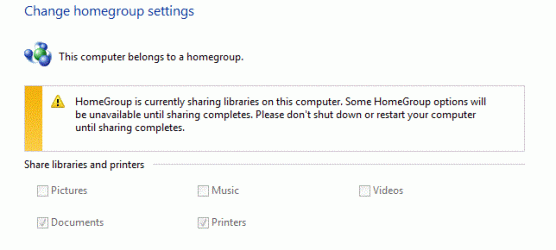
I have a feeling it may be related to another problem I have. I tried to change my homegroup settings but closed down my PC before it had finished making the changes. Now, when I try to change the homegroup settings all I see is a notice saying that it is still sharing my Libraries, or something similar. This message is permanent, and I can make no changes. What can I do about this issue please?
I have a feeling it may be related to another problem I have. I tried to change my homegroup settings but closed down my PC before it had finished making the changes. Now, when I try to change the homegroup settings all I see is a notice saying that it is still sharing my Libraries, or something similar. This message is permanent, and I can make no changes. What can I do about this issue please?
My Computer
- Computer Manufacturer/Model Number
- Self-Built
- OS
- Windows 7
- CPU
- AMD Phenom II x4 955 3.20 Ghz
- Motherboard
- Gigabyte AM3 AMD 790X DDR3 ATX A L
- Memory
- OCZ Technology DDR3 4gb (2X2) Platinum 2000Mhz
- Graphics Card(s)
- 2x MSI RADEON RX3850 512MB DUAL DVI PCIE DDR3 690/1.6 Over C
