Win7codecs

A lot of people have NVIDIA cards (9800GT, GT220, GT280, you name it) and don't have this problem. People with ATI cards are having this problem as well, though, so I don't see it as being an NVIDIA related issue. Regardless, absolutely no one can figure it out. Is it directx related? Is it particulary video card related? Is it monitor related? Is it just something inherent in the OS that only causes this in certain configurations? The problem is that whenever we try to narrow it down to a certain card or vendor, someone chimes in that they have no problem. So, there are one of two things happening here - either it's not a particular card/vendor issue and is something else, or people that are chiming in saying they don't have the problem maybe are just unaware of it due to lack of comparison or ability to discern the difference.
 

My Computer

OS
XP / Win7 x64 Pro
CPU
Intel Quad-Core Q9450 @ 3.2GHz
Motherboard
Asus P5-E
Memory
2x2GB GSkill DDR2
Graphics Card(s)
NVIDIA GeForce 8600 GTS (EVGA)
Monitor(s) Displays
Dell 2408WFP
Screen Resolution
1920x1200
Released today, version 2.2.1 for Windows 7 users and version 2.2.5 of the x64 addon . . .

HIGHLIGHT: Update Haali components to a November 14, 2009 build.
 

My Computer

Computer Manufacturer/Model Number
Selfbuilt
OS
Windows 7 Ultimate 64bit
CPU
i7 2600k
Motherboard
asus P8Z68-V LE
Memory
16GB (4x4) corsair vengeance
Graphics Card(s)
Intel HD3000 iGPU / AMD HD6870 1024MB
Sound Card
bitstreamed to an Onkyo 609
Monitor(s) Displays
Asus VE278 27" LED / Bravia EX7 60" LED
Screen Resolution
native 1080p x2
Hard Drives
4x 2TB int. + 2x 2TB external and a SSD for the boot drive.
PSU
650w Antec
Case
NZXT tempest evo
Cooling
air/stock
Keyboard
Dell
Mouse
logitech m505
Internet Speed
dual: cable/blackberry tether for travel use
Other Info
BD re-writer //
asus notebook G73Jw
Well, as of last night (haven't downloaded latest Shark build yet), most video seems to be better. I have no idea how or why, but it is. I downloaded the latest NVIDIA drivers after it started looking better as well in case that would help.

However, pictures still look pixelated and blocky, particularly upon zoom.
 

My Computer

OS
XP / Win7 x64 Pro
CPU
Intel Quad-Core Q9450 @ 3.2GHz
Motherboard
Asus P5-E
Memory
2x2GB GSkill DDR2
Graphics Card(s)
NVIDIA GeForce 8600 GTS (EVGA)
Monitor(s) Displays
Dell 2408WFP
Screen Resolution
1920x1200
Wow... Thanks a million, Shark007! Appreciate your work! :)
 

My Computer

Computer Manufacturer/Model Number
coolfire
OS
7 Home Premium x64
CPU
Intel(R) Core(TM)2 Quad CPU Q8300 @ 2.50GHz
Motherboard
GIGABYTE GA-G31M-ES2L
Memory
4.00 GB
Graphics Card(s)
Inno3D® GeForce™ 9800 GT
Sound Card
Onboard
Monitor(s) Displays
Philips 240SW9
Screen Resolution
1920 x 1200 pixels
Hard Drives
Hitachi HDP725050GLA360 500GB
Internet Speed
10Mbps downstream & 1Mbps upstream
thank you for all your hard work, your package is the second thing i install after my anti virus!
 

My Computer

OS
windows 7 home premium
Are Satsuki Decoder pack is compatiable??
 

My Computer

Computer Manufacturer/Model Number
Assembled Desktop
OS
windows 7 @ 32 bit
CPU
AMD ATHLON 5400+
Motherboard
Asus M2N68VM
Memory
2GB DDR2
Graphics Card(s)
NVIDIA 8500GT
Monitor(s) Displays
VIEWSONIC
Screen Resolution
1440 x 900
Hard Drives
Segate 250 GB sata internal, 2x 1TB external
Mouse
Microsoft Basic Optical
Internet Speed
256 kbps
Shark, you can save the configuration of your codec's, right? So, if I wanted to upgrade to the latest version, what are the necessary steps to do so as to not lose my current configuration? Or, do I just remember the config, completely uninstall what I have now, then do a clean install of your latest update?
 

My Computer

OS
XP / Win7 x64 Pro
CPU
Intel Quad-Core Q9450 @ 3.2GHz
Motherboard
Asus P5-E
Memory
2x2GB GSkill DDR2
Graphics Card(s)
NVIDIA GeForce 8600 GTS (EVGA)
Monitor(s) Displays
Dell 2408WFP
Screen Resolution
1920x1200
Shark, you can save the configuration of your codec's, right? So, if I wanted to upgrade to the latest version, what are the necessary steps to do so as to not lose my current configuration? Or, do I just remember the config, completely uninstall what I have now, then do a clean install of your latest update?

On the MISC TAB are Save/Restore buttons. Or upon selecting UNINSTALL from the Hep TAB you will be offerred to either Save current settings OR delete previously saved settings.

If you have saved your settings, you can perform a complete uninstall / re-install, and then go to the MISC TAB after installing and choose to Restore the settings.
 

My Computer

Computer Manufacturer/Model Number
Selfbuilt
OS
Windows 7 Ultimate 64bit
CPU
i7 2600k
Motherboard
asus P8Z68-V LE
Memory
16GB (4x4) corsair vengeance
Graphics Card(s)
Intel HD3000 iGPU / AMD HD6870 1024MB
Sound Card
bitstreamed to an Onkyo 609
Monitor(s) Displays
Asus VE278 27" LED / Bravia EX7 60" LED
Screen Resolution
native 1080p x2
Hard Drives
4x 2TB int. + 2x 2TB external and a SSD for the boot drive.
PSU
650w Antec
Case
NZXT tempest evo
Cooling
air/stock
Keyboard
Dell
Mouse
logitech m505
Internet Speed
dual: cable/blackberry tether for travel use
Other Info
BD re-writer //
asus notebook G73Jw
Thanks!
 

My Computer

OS
XP / Win7 x64 Pro
CPU
Intel Quad-Core Q9450 @ 3.2GHz
Motherboard
Asus P5-E
Memory
2x2GB GSkill DDR2
Graphics Card(s)
NVIDIA GeForce 8600 GTS (EVGA)
Monitor(s) Displays
Dell 2408WFP
Screen Resolution
1920x1200
I cant seem to uninstall the existing version since theres no "uninstall" option in control panel, only repair. Which means I cant update the codecs.
 

My Computer

Computer Manufacturer/Model Number
self built
OS
Windows 7 Professional 64-bit
CPU
Intel E8400 3GHz
Motherboard
Intel DX48BT2
Memory
Kingston PC3-10700H 4Gb
Graphics Card(s)
XFX Radeon HD 5850 BlackEd.
Sound Card
Asus Xonar DG
Monitor(s) Displays
2x Samsung SM-T220HD 22"
Screen Resolution
1680x1050 on two monitors
Hard Drives
OCZ Vertex 2 120gb 3.5" (OS)
Seagate Momentus XT 500gb
Samsung F3 1Tb (games)
2x Samsung F1 1Tb
PSU
Thermaltake ToughPower 850w
Case
Thermaltake Armor
Cooling
Scythe Mugen II
Keyboard
Microsoft Comfort Curve USB
Mouse
Razer Diamondback 3G
Internet Speed
8128/443
I cant seem to uninstall the existing version since theres no "uninstall" option in control panel, only repair. Which means I cant update the codecs.

On the information page... in bright pink text... twice...

When choosing to uninstall this software you MUST use the button on the Help TAB.
 

My Computer

Computer Manufacturer/Model Number
Selfbuilt
OS
Windows 7 Ultimate 64bit
CPU
i7 2600k
Motherboard
asus P8Z68-V LE
Memory
16GB (4x4) corsair vengeance
Graphics Card(s)
Intel HD3000 iGPU / AMD HD6870 1024MB
Sound Card
bitstreamed to an Onkyo 609
Monitor(s) Displays
Asus VE278 27" LED / Bravia EX7 60" LED
Screen Resolution
native 1080p x2
Hard Drives
4x 2TB int. + 2x 2TB external and a SSD for the boot drive.
PSU
650w Antec
Case
NZXT tempest evo
Cooling
air/stock
Keyboard
Dell
Mouse
logitech m505
Internet Speed
dual: cable/blackberry tether for travel use
Other Info
BD re-writer //
asus notebook G73Jw
Hey, new guy here. I formally used CCCP codec pack with good success, but after reading al this stuff about shark's codec pack i uninstalled it and gave it a go in an attempt to resolve this minor but nitpicky issue.

I can't get mkv thumbnails to show at all. I still cannot even with shark's codec pack, any suggestions? The 2 players i use are WMP 12 and WMP classic. The default for ALL video associations is WMP 12. I'm on Win 7 64 bit, Ultimate Ed.
 

My Computer

OS
Windows 7 Ultimate
CPU
AMD x3 720 Black Edition
Motherboard
MSI 790FX GD70
Memory
OCZ DDR3 1600
Graphics Card(s)
ATI Radeon HD 4870 1GB GDDR5
Monitor(s) Displays
Dell 2408 WFP rev A01
Hard Drives
Western Digital Caviar Black 1TB
PSU
Cooler Master 700W
Case
Cooler Master CM 690
Cooling
Cooler Master Hyper 212
I can't get mkv thumbnails to show at all. I still cannot even with shark's codec pack, any suggestions?

In the 32bit settings application, on the help tab, set filetype associations for the windows players.
In the x64 app, on the h264 tab, set ffdshow on the righthand side.
 

My Computer

Computer Manufacturer/Model Number
Selfbuilt
OS
Windows 7 Ultimate 64bit
CPU
i7 2600k
Motherboard
asus P8Z68-V LE
Memory
16GB (4x4) corsair vengeance
Graphics Card(s)
Intel HD3000 iGPU / AMD HD6870 1024MB
Sound Card
bitstreamed to an Onkyo 609
Monitor(s) Displays
Asus VE278 27" LED / Bravia EX7 60" LED
Screen Resolution
native 1080p x2
Hard Drives
4x 2TB int. + 2x 2TB external and a SSD for the boot drive.
PSU
650w Antec
Case
NZXT tempest evo
Cooling
air/stock
Keyboard
Dell
Mouse
logitech m505
Internet Speed
dual: cable/blackberry tether for travel use
Other Info
BD re-writer //
asus notebook G73Jw
I cant seem to uninstall the existing version since theres no "uninstall" option in control panel, only repair. Which means I cant update the codecs.

On the information page... in bright pink text... twice...

When choosing to uninstall this software you MUST use the button on the Help TAB.


:o Thank you.

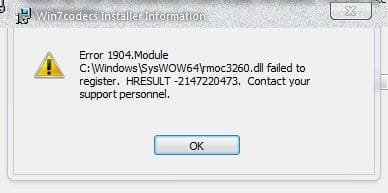
However on install of newest version I get this error:

win7codec2.JPG
 

My Computer

Computer Manufacturer/Model Number
self built
OS
Windows 7 Professional 64-bit
CPU
Intel E8400 3GHz
Motherboard
Intel DX48BT2
Memory
Kingston PC3-10700H 4Gb
Graphics Card(s)
XFX Radeon HD 5850 BlackEd.
Sound Card
Asus Xonar DG
Monitor(s) Displays
2x Samsung SM-T220HD 22"
Screen Resolution
1680x1050 on two monitors
Hard Drives
OCZ Vertex 2 120gb 3.5" (OS)
Seagate Momentus XT 500gb
Samsung F3 1Tb (games)
2x Samsung F1 1Tb
PSU
Thermaltake ToughPower 850w
Case
Thermaltake Armor
Cooling
Scythe Mugen II
Keyboard
Microsoft Comfort Curve USB
Mouse
Razer Diamondback 3G
Internet Speed
8128/443
However on install of newest version I get this error . . .

This error is caused by having real alternative installed. My release covers all real alt gives you so the installer removed it but this resulted in files installed by my release also getting removed.

I suggest to uninstall my release and re install it, there will be no more error. If you're a firefox user, that program may need to be re-installed also to pick up on the new location of the realmedia plugins since real alt is gone now.
 

My Computer

Computer Manufacturer/Model Number
Selfbuilt
OS
Windows 7 Ultimate 64bit
CPU
i7 2600k
Motherboard
asus P8Z68-V LE
Memory
16GB (4x4) corsair vengeance
Graphics Card(s)
Intel HD3000 iGPU / AMD HD6870 1024MB
Sound Card
bitstreamed to an Onkyo 609
Monitor(s) Displays
Asus VE278 27" LED / Bravia EX7 60" LED
Screen Resolution
native 1080p x2
Hard Drives
4x 2TB int. + 2x 2TB external and a SSD for the boot drive.
PSU
650w Antec
Case
NZXT tempest evo
Cooling
air/stock
Keyboard
Dell
Mouse
logitech m505
Internet Speed
dual: cable/blackberry tether for travel use
Other Info
BD re-writer //
asus notebook G73Jw
Thank you, no error 2nd time around. Happy Christmas to you.
 

My Computer

Computer Manufacturer/Model Number
self built
OS
Windows 7 Professional 64-bit
CPU
Intel E8400 3GHz
Motherboard
Intel DX48BT2
Memory
Kingston PC3-10700H 4Gb
Graphics Card(s)
XFX Radeon HD 5850 BlackEd.
Sound Card
Asus Xonar DG
Monitor(s) Displays
2x Samsung SM-T220HD 22"
Screen Resolution
1680x1050 on two monitors
Hard Drives
OCZ Vertex 2 120gb 3.5" (OS)
Seagate Momentus XT 500gb
Samsung F3 1Tb (games)
2x Samsung F1 1Tb
PSU
Thermaltake ToughPower 850w
Case
Thermaltake Armor
Cooling
Scythe Mugen II
Keyboard
Microsoft Comfort Curve USB
Mouse
Razer Diamondback 3G
Internet Speed
8128/443
Thanks a lot! haven't tried it yet but I'm sure it might work now lol. ONe thing i noticed though. My volume when running mkvs has drastically lowered in WMP 12 but it's marginally better in WMC HC. I have to resort to turning up teh speaker voume WAY more than usual (over the half max line).
Any suggestions on that? i put the audio to 5.1 in the tab, didn't seem to help.

edit:
Thumbnails show yay!! but it seems to select the thumbnail based on the first frame of the video, so they're all black cuz all movies start with a black screen. Is there a fix for that?

BTW thanks for all the help and beautiful pack, it's awesome. I'm going to donate soon. This is too awesome to be free.
 

My Computer

OS
Windows 7 Ultimate
CPU
AMD x3 720 Black Edition
Motherboard
MSI 790FX GD70
Memory
OCZ DDR3 1600
Graphics Card(s)
ATI Radeon HD 4870 1GB GDDR5
Monitor(s) Displays
Dell 2408 WFP rev A01
Hard Drives
Western Digital Caviar Black 1TB
PSU
Cooler Master 700W
Case
Cooler Master CM 690
Cooling
Cooler Master Hyper 212
ONe thing i noticed though. My volume when running mkvs has drastically lowered in WMP 12 but it's marginally better in WMC HC. I have to resort to turning up teh speaker voume WAY more than usual (over the half max line).
Any suggestions on that? i put the audio to 5.1 in the tab, didn't seem to help.

I always thought this was an MKV issue. I have to do the exact same thing when playing these files as well.
 

My Computer

OS
Win 7 Ultimate x64
CPU
Intel i7 950 OC'd @ 4.0Ghz (SpeedStep ON)
Motherboard
ASUS P6X58D-E BIOS 0303
Memory
3x2GB Patriot Extreme Viper II Sector 7 DDR3 @ 1600mhz
Graphics Card(s)
ATI MSI 5870 900mhz/1300mhz
Sound Card
Onboard Realtek ALC889
Monitor(s) Displays
2 X 24" BenQ G2412HD
Screen Resolution
1920x1080p
Hard Drives
Intel X25-M 80 GB (SSD)
W.D. Caviar Black 1TB (SATA)
Seagate Barricuda 1TB (SATA)
Seagate Barricuda 80GB (SATA)
PSU
Corsair AX850
Case
Antec 1200
Cooling
Lots and Lots of Air!
Keyboard
Razer Lycosa
Mouse
Microsoft Sidewinder
Internet Speed
25Mbps/1Mbps
ONe thing i noticed though. My volume when running mkvs has drastically lowered in WMP 12 but it's marginally better in WMC HC. I have to resort to turning up teh speaker voume WAY more than usual (over the half max line).
Any suggestions on that? i put the audio to 5.1 in the tab, didn't seem to help.

I always thought this was an MKV issue. I have to do the exact same thing when playing these files as well.

I have a suggestion, but it breaks live TV

On the SWAP TAB, choose to disable the Microsoft Audio Decoder
On the Audio TAB, choose to Enable Audio normalization

If liveTV is important to you, re-enable the microsoft audio decoder as required
 

My Computer

Computer Manufacturer/Model Number
Selfbuilt
OS
Windows 7 Ultimate 64bit
CPU
i7 2600k
Motherboard
asus P8Z68-V LE
Memory
16GB (4x4) corsair vengeance
Graphics Card(s)
Intel HD3000 iGPU / AMD HD6870 1024MB
Sound Card
bitstreamed to an Onkyo 609
Monitor(s) Displays
Asus VE278 27" LED / Bravia EX7 60" LED
Screen Resolution
native 1080p x2
Hard Drives
4x 2TB int. + 2x 2TB external and a SSD for the boot drive.
PSU
650w Antec
Case
NZXT tempest evo
Cooling
air/stock
Keyboard
Dell
Mouse
logitech m505
Internet Speed
dual: cable/blackberry tether for travel use
Other Info
BD re-writer //
asus notebook G73Jw
i don't even know what liveTV is haha, anyway i don't think your suggestion made much of a difference though, but it's ok though, i'm content :) thanks for all your help
 

My Computer

OS
Windows 7 Ultimate
CPU
AMD x3 720 Black Edition
Motherboard
MSI 790FX GD70
Memory
OCZ DDR3 1600
Graphics Card(s)
ATI Radeon HD 4870 1GB GDDR5
Monitor(s) Displays
Dell 2408 WFP rev A01
Hard Drives
Western Digital Caviar Black 1TB
PSU
Cooler Master 700W
Case
Cooler Master CM 690
Cooling
Cooler Master Hyper 212
Back
Top