JavaScript is disabled. For a better experience, please enable JavaScript in your browser before proceeding.
You are using an out of date browser. It may not display this or other websites correctly.
You should upgrade or use an
alternative browser .
Win7's non-destructive re-install
Hi guys.
I need to
urgently make a non-destructive re-install on my 32bits Win7 Home Premium system.
I have the original DVD and license keys.
The DVD came without the SP-1, but later on it was added using the Windows Update.
I know that I have to remove this SP1 (KB:976932)before starting the re-install.
How do I remove this SP1 if it doesn't show up in Control Panel remove programs.
It appears only in CP's actualization history.
I welcome any urgent help.
Regards,
Flores:
Computer type Laptop Computer Manufacturer/Model Number DELL Vostro 1510 OS Windows 7 Home Premium 32bits Hard Drives Seagate external HD 500Gb Browser IE11 and Chrome Other Info DELL Vostro 1510
New member
Guru
Gold Member
VIP
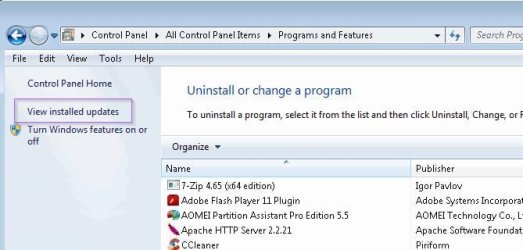
Did you click on View Installed Updates at top left?
Computer type PC/Desktop Computer Manufacturer/Model Number Lenovo IdeaCenter 450 OS Windows 10 Pro X64 CPU Intel Quad Core i7-4770 @ 3.4Ghz Memory 16.0GB PC3-12800 DDR3 SDRAM 1600 MHz Graphics Card(s) Intel Integrated HD Graphics Sound Card Realtek HD Audio Monitor(s) Displays HP 22" LCD Screen Resolution 1680 x 1050 Hard Drives 250GB Samsung EVO SATA-3 SSD Keyboard Dell USB Mouse Lenovo USB Internet Speed Cable via Road Runner 3MB Upload, 30MB Download Antivirus Windows Defender, MBAM Pro, MBAE Browser Seamonkey Other Info UEFI/GPT
New member
Guru
Gold Member
VIP
You could also try adding SP1 to your Windows 7 DVD using
NTLite . You end up creating a new DVD to install from that includes SP1.
Computer type PC/Desktop Computer Manufacturer/Model Number Lenovo IdeaCenter 450 OS Windows 10 Pro X64 CPU Intel Quad Core i7-4770 @ 3.4Ghz Memory 16.0GB PC3-12800 DDR3 SDRAM 1600 MHz Graphics Card(s) Intel Integrated HD Graphics Sound Card Realtek HD Audio Monitor(s) Displays HP 22" LCD Screen Resolution 1680 x 1050 Hard Drives 250GB Samsung EVO SATA-3 SSD Keyboard Dell USB Mouse Lenovo USB Internet Speed Cable via Road Runner 3MB Upload, 30MB Download Antivirus Windows Defender, MBAM Pro, MBAE Browser Seamonkey Other Info UEFI/GPT
New member
Member
Thread Starter
...Did you click on View Installed Updates at top left?
Hey Ztruker,
Yes, I did.
Really, it was not there so I had to use
C: \Windows\system32>wusa.exe /uninstall /kb: 976932.
Anyway, thanks for your help.
Flores
Computer type Laptop Computer Manufacturer/Model Number DELL Vostro 1510 OS Windows 7 Home Premium 32bits Hard Drives Seagate external HD 500Gb Browser IE11 and Chrome Other Info DELL Vostro 1510