
Window Color and Appearance Shortcut - Create

How to Create a "Window Color and Appearance" Shortcut

   Information
This will show you how to create or download a Window Color and Appearance shortcut that opens directly to Advanced appearance settings.

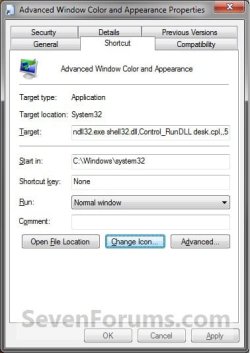
EXAMPLE: Advanced Window Color and Appearance
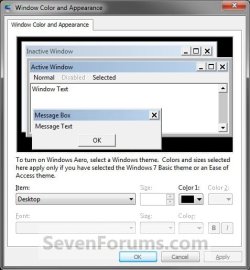
Window_Color_and_Appearance.jpg


OPTION ONE

To Download the "Window Color and Appearance" Shortcut


1. Click on the Download button below to download the file below.
Advanced_Window_Color_and_Appearance.zip

Download


2. Click on Save, and save the .zip file to the desktop.

3. Open the .zip file and extract the Window Color and Appearance shortcut to the desktop.

4. Right click on the Window Color and Appearance shortcut, and click on Properties, General tab, and on the Unblock button. (See screenshot below)
NOTE: If you do not have a Unblock button under the General tab, then the shortcut is already unblocked and you can continue on to step 5.
Unblock.jpg
5. You can now Pin to Taskbar or Pin to Start Menu this shortcut, assign a keyboard shortcut to it, or move it where you like for easy use.

6. When done, you can delete the downloaded .zip file on the desktop if you like, or save it to use again.


OPTION TWO

To Manually Create the "Window Color and Appearance" Shortcut


1. Right click on a empty area on desktop, and click on New and Shortcut.

2. Copy and paste either command below into the location area, and click on the Next button. (See screenshot below)
rundll32.exe shell32.dll,Control_RunDLL desk.cpl,,5
OR
Code:
%windir%\System32\rundll32.exe shell32.dll,Control_RunDLL desk.cpl,Advanced,@Advanced
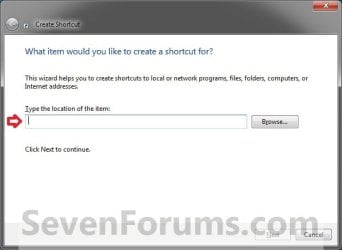
Step1.jpg
3. Type Window Color and Appearance for the name, and click on the Finish button. (See screenshot below)
NOTE: You can name this anything you would like though.
Step2.jpg
4. Right click on the new Window Color and Appearance shortcut on the Desktop and click on Properties.

5. Click on the Shortcut tab, then click on the Change Icon button. (See screenshot below)
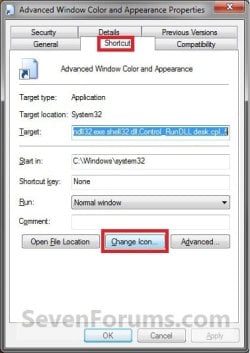
Step3.jpg
6. In the line under "Look for icons in this file", copy and paste the location below and press Enter. (See screenshot below)
%windir%\System32\themecpl.dll
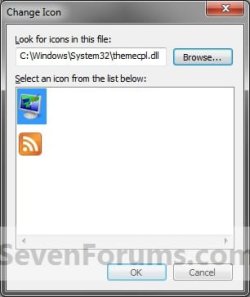
Step4.jpg
7. Select the icon highlighted in blue above and click on OK. (See screenshot above)
NOTE: You can use any icon that you would like instead though.

8. Click on OK. (See screenshot below)
Step5.jpg
9. You can now Pin to Taskbar or Pin to Start Menu this shortcut, assign a keyboard shortcut to it, or move it where you like for easy use.
That's it,
Shawn


Attachments

Last edited:
Wow, your link's string is rather complex. How can anybody remember that.

Code:
 rundll32.exe shell32.dll,Control_RunDLL desk.cpl,,5
I did some research for this and found that it is much easier and thought I would share it with you.

There is an easier version of this command:
Code:
 c:\windows\system32\desk.cpl ,5
Or in Windows | Run, you can just type in

Code:
 desk.cpl ,5
I am not sure how you figured out that big, long, ugly rundll.exe line. While it works, it is not going to be something you will remember very easily.

So I decided to share with the next guy who hits this link the shorter version. :-)
 
Last edited by a moderator:

My Computer My Computer

OS
Windows 7 64 bit
Hello Rhyous,

Thank you for an alternative option. The only downside to using either of those commands instead of the one in the tutorial is that you do not have a "Pin to taskbar" option in the context menu, and you have to press and hold "Shift" and right click to see the "Pin to Start Menu" option. Another downside is that you cannot drag and drop it on the taskbar as it's own separate pinned icon since it will only be pinned inside the Control Panel icon's jump list instead.

If that is not a need or concern for the user, then it's a great alternative.

Thank you again. :)
 

My Computer My Computer

Computer type
PC/Desktop
Computer Manufacturer/Model Number
Self built custom
OS
64-bit Windows 11 Pro for Workstations
CPU
Intel i7-8700K OC'd to 5 GHz
Motherboard
ASUS ROG Maximus XI Formula Z390
Memory
64 GB (4x16GB) G.SKILL TridentZ RGB DDR4 3600 MHz
Graphics Card(s)
ASUS ROG-STRIX-GTX1080TI-O11G-GAMING
Sound Card
Integrated
Monitor(s) Displays
2 x Samsung Odyssey G7 27"
Screen Resolution
2560x1440
Hard Drives
1TB Samsung 990 PRO M.2,
4TB Samsung 990 PRO PRO M.2,
TerraMaster F8 SSD Plus NAS
PSU
Seasonic Prime Titanium 850W
Case
Thermaltake Core P3
Cooling
Corsair Hydro H115i
Keyboard
Logitech wireless K800
Mouse
Logitech MX Master 4
Internet Speed
2 Gb/s Download and 100 Mb/s Upload
Antivirus
Malwarebyte Anti-Malware Premium
Browser
Google Chrome
Other Info
Logitech Z625 speaker system,
Logitech BRIO 4K Pro webcam,
HP Color LaserJet Pro MFP M477fdn,
APC SMART-UPS RT 1000 XL - SURT1000XLI,
Galaxy S23 Plus phone
That is a good to know. I never really thought about pinning it.

I am more of a fan of launching things from Start | Run or making my own Toolbars than I am a fan of using the pinning feature.
 

My Computer My Computer

OS
Windows 7 64 bit
That's true. Pinning is good only for those items that you always use instead.
 

My Computer My Computer

Computer type
PC/Desktop
Computer Manufacturer/Model Number
Self built custom
OS
64-bit Windows 11 Pro for Workstations
CPU
Intel i7-8700K OC'd to 5 GHz
Motherboard
ASUS ROG Maximus XI Formula Z390
Memory
64 GB (4x16GB) G.SKILL TridentZ RGB DDR4 3600 MHz
Graphics Card(s)
ASUS ROG-STRIX-GTX1080TI-O11G-GAMING
Sound Card
Integrated
Monitor(s) Displays
2 x Samsung Odyssey G7 27"
Screen Resolution
2560x1440
Hard Drives
1TB Samsung 990 PRO M.2,
4TB Samsung 990 PRO PRO M.2,
TerraMaster F8 SSD Plus NAS
PSU
Seasonic Prime Titanium 850W
Case
Thermaltake Core P3
Cooling
Corsair Hydro H115i
Keyboard
Logitech wireless K800
Mouse
Logitech MX Master 4
Internet Speed
2 Gb/s Download and 100 Mb/s Upload
Antivirus
Malwarebyte Anti-Malware Premium
Browser
Google Chrome
Other Info
Logitech Z625 speaker system,
Logitech BRIO 4K Pro webcam,
HP Color LaserJet Pro MFP M477fdn,
APC SMART-UPS RT 1000 XL - SURT1000XLI,
Galaxy S23 Plus phone
Thank you so much! I am constantly needing this desktop shortcut because I am picky about my fonts, and going into the personlization settings constantly is a PITA; especially when you have 100's of pictures set in your wallpaper folder. Why couldn't Windows leave the Desktop settings alone?

BTW, when you first create the shortcut you may not be able to pull up the properties with a right click. I believe this is more Windows security crap. I am always in Admin mode and have no UAC. What I had to do was use "Unlocker" v.1.88 (google it) on it first. (Higher versions don't work for unlocking security.) Install Unlocker, right click the Appearance shortcut and "Unlock" it. Keep "no action" selected and press OK. It simply removes the restriction temporarily. Keep Unlocker around because it's very handy.

I also changed my "Open In" setting to C:\ in stead of C:\Windows\system32 just in case, because Windows really hates it when you mess with system32.

I like the tip about Run>>desk cpl ,5. After the first run, I can just type "d" into the run dialogue and pull the settings right up too!
 

My Computer My Computer

Computer Manufacturer/Model Number
HP Pavillion DV2000 Notebook
OS
Windows 7/ Ubuntu
CPU
AMD Turion X2 1.6ghz
Motherboard
Wistron 30B5
Memory
1.5Gb
Graphics Card(s)
Nvidia Geforce Go 6150
Sound Card
Conexant HD/ Creative Xmod USB
Monitor(s) Displays
Laptop Built in
Hard Drives
Fujitsu 120Gb
Cooling
GPU Runs Hot! Using NHC to cycle down cpu and keep cool.
You're most welcome Melaney. :)

It would be best though to have the "Open In" set as the default C:\Windows\system32 since that is the location of the dll files referenced in the location.
 

My Computer My Computer

Computer type
PC/Desktop
Computer Manufacturer/Model Number
Self built custom
OS
64-bit Windows 11 Pro for Workstations
CPU
Intel i7-8700K OC'd to 5 GHz
Motherboard
ASUS ROG Maximus XI Formula Z390
Memory
64 GB (4x16GB) G.SKILL TridentZ RGB DDR4 3600 MHz
Graphics Card(s)
ASUS ROG-STRIX-GTX1080TI-O11G-GAMING
Sound Card
Integrated
Monitor(s) Displays
2 x Samsung Odyssey G7 27"
Screen Resolution
2560x1440
Hard Drives
1TB Samsung 990 PRO M.2,
4TB Samsung 990 PRO PRO M.2,
TerraMaster F8 SSD Plus NAS
PSU
Seasonic Prime Titanium 850W
Case
Thermaltake Core P3
Cooling
Corsair Hydro H115i
Keyboard
Logitech wireless K800
Mouse
Logitech MX Master 4
Internet Speed
2 Gb/s Download and 100 Mb/s Upload
Antivirus
Malwarebyte Anti-Malware Premium
Browser
Google Chrome
Other Info
Logitech Z625 speaker system,
Logitech BRIO 4K Pro webcam,
HP Color LaserJet Pro MFP M477fdn,
APC SMART-UPS RT 1000 XL - SURT1000XLI,
Galaxy S23 Plus phone
Shawn, although this posting is rather old I do have a quick question. I would like to execute this through the context menu. What data should I input for the command? Thank you very much for your help. I'm sure your a busy busy man, answering all our questions =P Thank You again!
 

My Computer My Computer

Computer Manufacturer/Model Number
HP 2000 Notebook
OS
Windows 7 Home Premium (64-bit)
CPU
AMD E-350 [1.60 Ghz]
Memory
3G DDR3
Graphics Card(s)
AMD Radeon HD [1.42G]
Monitor(s) Displays
15,6" HD LED [HP]
Screen Resolution
1366 x 768
Hard Drives
320G - SATA [Internal]
2T - Western Digital "My Book Essential"
Other Info
New Desktop "In-Progress"

My Computer My Computer

Computer type
PC/Desktop
Computer Manufacturer/Model Number
Self built custom
OS
64-bit Windows 11 Pro for Workstations
CPU
Intel i7-8700K OC'd to 5 GHz
Motherboard
ASUS ROG Maximus XI Formula Z390
Memory
64 GB (4x16GB) G.SKILL TridentZ RGB DDR4 3600 MHz
Graphics Card(s)
ASUS ROG-STRIX-GTX1080TI-O11G-GAMING
Sound Card
Integrated
Monitor(s) Displays
2 x Samsung Odyssey G7 27"
Screen Resolution
2560x1440
Hard Drives
1TB Samsung 990 PRO M.2,
4TB Samsung 990 PRO PRO M.2,
TerraMaster F8 SSD Plus NAS
PSU
Seasonic Prime Titanium 850W
Case
Thermaltake Core P3
Cooling
Corsair Hydro H115i
Keyboard
Logitech wireless K800
Mouse
Logitech MX Master 4
Internet Speed
2 Gb/s Download and 100 Mb/s Upload
Antivirus
Malwarebyte Anti-Malware Premium
Browser
Google Chrome
Other Info
Logitech Z625 speaker system,
Logitech BRIO 4K Pro webcam,
HP Color LaserJet Pro MFP M477fdn,
APC SMART-UPS RT 1000 XL - SURT1000XLI,
Galaxy S23 Plus phone
I'm new to this forum.

Over the years I've used all versions of Windows made 3.1/95/98SE/ME/2000/XP/Vista. I'm relatively new to Win7 even though I've used it at work for a couple of years but everything is locked by admin so you can change virtually nothing.

Thanks for the tip on changing Advanced Window Color and Appearance but can get the same option if you Control Panel\Appearance and Personalization\Personalization\Window Color and Appearance and click Advanced Appearance Settings... and it shows the same options as the downloaded shortcut.

There are alot of annoying features of Win7 which I hate. I will search this forum for solutions and if nothing if found I'm afraid I will be putting my Vista Home Premium 32bit back even though there are annoying features on there but all the thing I use on Windows still work on it.
 

My Computer My Computer

Computer type
Laptop
Computer Manufacturer/Model Number
Samsung won't charge Now Dell Inspiron 17 3793
OS
Windows 7 Professional 32bit SP1, Windows 10 Home 64-bit at the moment
CPU
Intel Pentium B970 @ 2.30GHz, DELL DELL Intel 3793 Core i5 1
Motherboard
DELL 0C9WH2
Memory
8GB
Graphics Card(s)
NVIDIA GeForce MX230 (Dell)
Sound Card
Realtek High Definition Audio
Monitor(s) Displays
17.3" HD+ LED Display
Screen Resolution
1920x1040
Hard Drives
99GB (RAID SHIT SSD), Seagate 1TB SATA III DATA

Seagate ST1000LM048-2E7172 (SATA III)
Mouse
USB remote
Antivirus
Avast Free Antivirus 20.10.2442
Browser
Internet Explorer 11, FireFox
Other Info
DELL shit Its the worst laptop design ever made the laptop battery is inbuilt who the hell makes a laptop battery inbuilt DELL shit does, can't wait until the 1TB HDD is replaced and RAID shit is removed

My Computer My Computer

Computer type
PC/Desktop
Computer Manufacturer/Model Number
Self built custom
OS
64-bit Windows 11 Pro for Workstations
CPU
Intel i7-8700K OC'd to 5 GHz
Motherboard
ASUS ROG Maximus XI Formula Z390
Memory
64 GB (4x16GB) G.SKILL TridentZ RGB DDR4 3600 MHz
Graphics Card(s)
ASUS ROG-STRIX-GTX1080TI-O11G-GAMING
Sound Card
Integrated
Monitor(s) Displays
2 x Samsung Odyssey G7 27"
Screen Resolution
2560x1440
Hard Drives
1TB Samsung 990 PRO M.2,
4TB Samsung 990 PRO PRO M.2,
TerraMaster F8 SSD Plus NAS
PSU
Seasonic Prime Titanium 850W
Case
Thermaltake Core P3
Cooling
Corsair Hydro H115i
Keyboard
Logitech wireless K800
Mouse
Logitech MX Master 4
Internet Speed
2 Gb/s Download and 100 Mb/s Upload
Antivirus
Malwarebyte Anti-Malware Premium
Browser
Google Chrome
Other Info
Logitech Z625 speaker system,
Logitech BRIO 4K Pro webcam,
HP Color LaserJet Pro MFP M477fdn,
APC SMART-UPS RT 1000 XL - SURT1000XLI,
Galaxy S23 Plus phone
How to prevent changes in Advanced Color and Appearance ?

Yeas, It's works great, BUT how to prevent changes in Advanced Color and Appearance ??? Wired question, it is just rundll32.exe ! There is a lot of shortcuts come (also many Windows tasks). Is it even possible? When is changed theme or themepack all is messed out !!! Well color, sounds and screen saver can be easy reverted, but who can remember or write every option in Advanced Color and Appearance ??? I suppose that must be some way to save that's settings in Registry or wherever ! But have not any idea how to do this !!! Is anybody can solve this really tricky puzzle, I, and sure many more will be extremely graceful !!! Thanks in advance for every try to answer and hope solve that wired question !!! Love for all, Respectfully yours Zenicablues (8:30 9.7.2016)
 

My Computer My Computer

Computer type
PC/Desktop
Computer Manufacturer/Model Number
HP
OS
Windows 7 Ultimate x64

My Computer My Computer

Computer type
PC/Desktop
Computer Manufacturer/Model Number
Self built custom
OS
64-bit Windows 11 Pro for Workstations
CPU
Intel i7-8700K OC'd to 5 GHz
Motherboard
ASUS ROG Maximus XI Formula Z390
Memory
64 GB (4x16GB) G.SKILL TridentZ RGB DDR4 3600 MHz
Graphics Card(s)
ASUS ROG-STRIX-GTX1080TI-O11G-GAMING
Sound Card
Integrated
Monitor(s) Displays
2 x Samsung Odyssey G7 27"
Screen Resolution
2560x1440
Hard Drives
1TB Samsung 990 PRO M.2,
4TB Samsung 990 PRO PRO M.2,
TerraMaster F8 SSD Plus NAS
PSU
Seasonic Prime Titanium 850W
Case
Thermaltake Core P3
Cooling
Corsair Hydro H115i
Keyboard
Logitech wireless K800
Mouse
Logitech MX Master 4
Internet Speed
2 Gb/s Download and 100 Mb/s Upload
Antivirus
Malwarebyte Anti-Malware Premium
Browser
Google Chrome
Other Info
Logitech Z625 speaker system,
Logitech BRIO 4K Pro webcam,
HP Color LaserJet Pro MFP M477fdn,
APC SMART-UPS RT 1000 XL - SURT1000XLI,
Galaxy S23 Plus phone
Back
Top