
Window Error Recovery Everytime Resuming from Sleep

Flowright138

New member
Local time
10:13 AM
Messages
18
Location
Australia
Hi. I have have been away from my PC for a few months only to boot it recently. I have realised that every time I put my PC to sleep, when resumed with pressing my Power Button (as I have set all my USB wake off), it takes a while for the screen to come up. The POST comes first, then a Window Error Recovery screen. The Window Error Recovery screen gave me 3 choices; either to boot normally (default), enter safe mode, or Safe mode CMD.

There was no BSOD or any associated log as BlueScreenViewer didn't capture any of that. I tried disabling all startup services via MSconfig and tried sleeping with all startups turned off; that didn't work.

I updated my graphic driver to the latest offered for my GTX570. I am running Window 7 Ultimate x64.

I am currently running with Power Settings in Control panel on "High Performance" with
Sleep After: never
Hybrid sleep: On
Hibernate after: never
Allow wake up Timer: disable

Tried setting to Balanced, didn't fix the issue either.

The booting is just irritating where I have to find myself staring the black POST screen and selecting the "start normally" option in the Window Error Recovery Option.

Any help welcome.

Thank you.
 

My Computer My Computer

Computer type
PC/Desktop
Computer Manufacturer/Model Number
Custom build
OS
Microsoft Windows 7 Ultimate 64-bit 7601 Multiprocessor Free Service Pack 1
CPU
Intel(R) Core(TM) i5 CPU 650 @ 3.20GHz
Motherboard
Gigabyte Technology Co., Ltd. P55A-UD3
Memory
12.00 GB
Graphics Card(s)
NVIDIA GeForce GTX 570
Sound Card
(1) High Definition Audio Device (2) High Definition Audio
Monitor(s) Displays
BenQ 21"
Screen Resolution
1920 x 1080 x 32 bits (4294967296 colors) @ 60 Hz
Hard Drives
(1) WDC WD15EARS-00S8B1 ATA Device (2) WDC WD20EARS-00MVWB0 ATA Device (3) Samsung SSD 840 Series SCSI Disk Device
Flowright mate some system specs please - helps us in helping .
http://www.sevenforums.com/tutorials/180324-system-info-see-your-system-specs.html

Now try running these for starters

http://www.sevenforums.com/tutorials/1538-sfc-scannow-command-system-file-checker.html

http://www.sevenforums.com/tutorials/433-disk-check.html
You might even try using CCleaner like most of us do to keep the machine clutter free.

http://www.sevenforums.com/tutorials/306648-ccleaner-delete-junk-files.html
Just note before you clean go to Options and then Cookies and pick the ones you have a password with and send it to the right list by highlighting it and clicking the to the right arrow. When do go back to the Cleaner and run
 

My Computer My Computer

Computer type
PC/Desktop
Computer Manufacturer/Model Number
Own build (new) Desk1 / Asus ROG Win 7 / Desk2 1st build
OS
Desk1 7 Home Prem / Desk2 10 Pro / Main lap Asus ROG 10 Pro 2 laptop Toshiba 7 Pro Asus P2520 7 & 10
CPU
Desk1 i5 3750K / Laptop i7 GTX 860M / Desk2 i5 2500
Motherboard
Desk1 Asus P877-V / Desk2 Gigabyte H67 UD3H / Laptop ?
Memory
Desk1 8GB (1866) / Desk2 16GB (1333) / Laptop 8Gb DDR3
Graphics Card(s)
Desk 1& 2NVidia GTX 650 & Laptops on board Intel
Sound Card
Desk 1 & 2 -XONAR DG Realtek High Def audio Laptop
Monitor(s) Displays
Desk 1 Benq HD 2450 / Desk2 Philips 24" / Laptop 17.5"
Screen Resolution
1920x1080 D1 & D2 & Laptop 1
Hard Drives
Desk1 Samsung 120GB 830 SSD
Asus ROG 256GB 850 Pro SSD
Desk2 Samsung 840 256 SSD
Toshiba 120GB EVO
PSU
Desk 1 Corsair HX 1050/ Laptop ? / Desk 2 Corsair HX 650
Case
Desk 1 Cooler HAF XM ? Toshiba laptop / Desk2 Coolermaster
Cooling
Fans on all Desk1 -2 Desk2 - all Coolermasters 5 Laptop ?
Keyboard
Desk 1 MS Sidewinder X6 Desk 2 MS Sidewinder X 4
Mouse
Desk 1&2 - Gigabyte MS 900 gamer - laptop - Logitec wireless
Internet Speed
ADSL2+
Other Info
One other Desktop (tester) and spare Toshba laptop both with SSD's
Running Kaspersky 2016 ISS on all machines config'd identically
Logitec audio stereo systems on each machine (x3)
Canon MG5250MFC
Router/modem TP-Link running WPA2SK
Hi ICit2,

Thank you for your support. I have updated my PC specs; hope it is helpful.

I am currently running the sfc/scannow in CMD. Will tell you if there is any error. If not, I will continue trying your 2nd link and CCleaner.

EDIT1: the scan showed that corrupted files were found and unable to be repaired. A log was generated and attached. Tried the Diskrepair from MyComputer, also failed to fix it.

EDIT2: Tried CCleaner, also failed. Still resume sleep with a black screen titled Window Error Recovery Mode.
 
Last edited:

My Computer My Computer

Computer type
PC/Desktop
Computer Manufacturer/Model Number
Custom build
OS
Microsoft Windows 7 Ultimate 64-bit 7601 Multiprocessor Free Service Pack 1
CPU
Intel(R) Core(TM) i5 CPU 650 @ 3.20GHz
Motherboard
Gigabyte Technology Co., Ltd. P55A-UD3
Memory
12.00 GB
Graphics Card(s)
NVIDIA GeForce GTX 570
Sound Card
(1) High Definition Audio Device (2) High Definition Audio
Monitor(s) Displays
BenQ 21"
Screen Resolution
1920 x 1080 x 32 bits (4294967296 colors) @ 60 Hz
Hard Drives
(1) WDC WD15EARS-00S8B1 ATA Device (2) WDC WD20EARS-00MVWB0 ATA Device (3) Samsung SSD 840 Series SCSI Disk Device
Doesn't look that crash hot mate have you backed up all the data you need if not do so straight away.

If you cannot use something running in Windows to do this

BOOTABLE UBUNTU

Make a bootable Ubuntu disk http://www.ubuntu.com/download

Set the BIOS to boot from the optical when the machine boots it will show you a screen with TRY or INSTALL> select TRY

When it is finished - it takes very little time you will get a screen like in the pic .

Open the drive you want > User and dig down until you get to the data / settings you may be able to copy / paste the material you want to an external source or other installed drive doing this.

I am not sure if it will but I have recovered tons of data etc using this method both on "dead" or just plain drives that you cannot get data from using Windows.

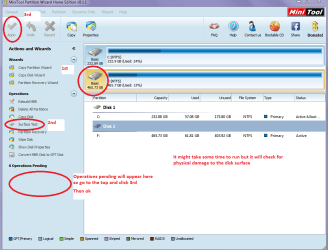
Having said that it could be the hard drive is going south try these for testing SeaTools for Windows | Seagate &

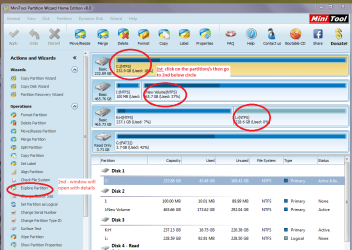
Best Free Partition Manager Freeware and free partition magic for Windows 7, Windows 8, Windows Vista and Windows XP 32 bit & 64 bit. MiniTool Free Partition Manager Software Home Edition. see my pic for what to do with this one

With this program you can also see what is on the drive see pic
 

Attachments

  • PW SURFACE.PNG
    PW SURFACE.PNG
    39.4 KB · Views: 0
  • MINI TOOL4.PNG
    MINI TOOL4.PNG
    58.4 KB · Views: 0

My Computer My Computer

Computer type
PC/Desktop
Computer Manufacturer/Model Number
Own build (new) Desk1 / Asus ROG Win 7 / Desk2 1st build
OS
Desk1 7 Home Prem / Desk2 10 Pro / Main lap Asus ROG 10 Pro 2 laptop Toshiba 7 Pro Asus P2520 7 & 10
CPU
Desk1 i5 3750K / Laptop i7 GTX 860M / Desk2 i5 2500
Motherboard
Desk1 Asus P877-V / Desk2 Gigabyte H67 UD3H / Laptop ?
Memory
Desk1 8GB (1866) / Desk2 16GB (1333) / Laptop 8Gb DDR3
Graphics Card(s)
Desk 1& 2NVidia GTX 650 & Laptops on board Intel
Sound Card
Desk 1 & 2 -XONAR DG Realtek High Def audio Laptop
Monitor(s) Displays
Desk 1 Benq HD 2450 / Desk2 Philips 24" / Laptop 17.5"
Screen Resolution
1920x1080 D1 & D2 & Laptop 1
Hard Drives
Desk1 Samsung 120GB 830 SSD
Asus ROG 256GB 850 Pro SSD
Desk2 Samsung 840 256 SSD
Toshiba 120GB EVO
PSU
Desk 1 Corsair HX 1050/ Laptop ? / Desk 2 Corsair HX 650
Case
Desk 1 Cooler HAF XM ? Toshiba laptop / Desk2 Coolermaster
Cooling
Fans on all Desk1 -2 Desk2 - all Coolermasters 5 Laptop ?
Keyboard
Desk 1 MS Sidewinder X6 Desk 2 MS Sidewinder X 4
Mouse
Desk 1&2 - Gigabyte MS 900 gamer - laptop - Logitec wireless
Internet Speed
ADSL2+
Other Info
One other Desktop (tester) and spare Toshba laptop both with SSD's
Running Kaspersky 2016 ISS on all machines config'd identically
Logitec audio stereo systems on each machine (x3)
Canon MG5250MFC
Router/modem TP-Link running WPA2SK
HI Ict2lol,

Thank you for your extensive help, but I decided to reformat my whole window 7 after backing up everything. I appreciate for your help.

Post closed
 

My Computer My Computer

Computer type
PC/Desktop
Computer Manufacturer/Model Number
Custom build
OS
Microsoft Windows 7 Ultimate 64-bit 7601 Multiprocessor Free Service Pack 1
CPU
Intel(R) Core(TM) i5 CPU 650 @ 3.20GHz
Motherboard
Gigabyte Technology Co., Ltd. P55A-UD3
Memory
12.00 GB
Graphics Card(s)
NVIDIA GeForce GTX 570
Sound Card
(1) High Definition Audio Device (2) High Definition Audio
Monitor(s) Displays
BenQ 21"
Screen Resolution
1920 x 1080 x 32 bits (4294967296 colors) @ 60 Hz
Hard Drives
(1) WDC WD15EARS-00S8B1 ATA Device (2) WDC WD20EARS-00MVWB0 ATA Device (3) Samsung SSD 840 Series SCSI Disk Device
Back
Top