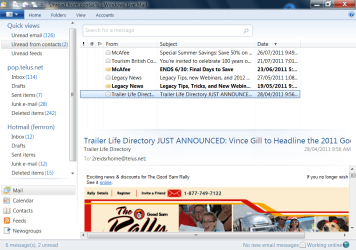
Solved Window Live Mail Default settings

perplexed

New member
Member
Local time
3:15 PM
Messages
13
Location
Canada
Is there some way I can restore the previous settings? I've somehow changed the view (or look) and I do not know what I've done or how to undo it.Could I just do a re-install of Windows Live Mail and that will give me the original settings? If so,will that create any issues with the mail already in the various folders?
 

My Computer

OS
windows 7
If you uninstall and reinstall WLM then I think it is likely to give you the default settings. However there is no guarantee that that is what you want.
 

My Computer

Computer Manufacturer/Model Number
Custom Built
OS
Windows 7 Pro with SP1 32bit
Motherboard
Intel D845GVS1 X86-based PC
Memory
2 gigs of RAM
Graphics Card(s)
Intel(R) 82845G/GL/GE/PE/GV Graphics Controller
Sound Card
Realtek AC'97 Audio
Monitor(s) Displays
Samsung SyncMaster 931BF Black 19" LCD Monitor
Screen Resolution
1280X960
Hard Drives
1. SAMSUNG SP0822N ATA Device ~ 80 GigaBytes

2. Seagate FreeAgent Go USB Device ~ 500 GigaBytes
Keyboard
COMPAQ Standard PS/2 Keyboard
Mouse
iBall Laser Precise Speedster
Internet Speed
4 mb/sec
Is there some way I can restore the previous settings? I've somehow changed the view (or look) and I do not know what I've done or how to undo it.Could I just do a re-install of Windows Live Mail and that will give me the original settings? If so,will that create any issues with the mail already in the various folders?

Please explain exactly what do you mean by " previous settings ".

.... I've somehow changed the view (or look)......
I have the impression that you were talking about the different view (or look ) between WLM 2009 and 2011.
This is how 2011 version looks like. Does yours look like this ?

wlm%20toolbar.png
 

My Computer

Computer Manufacturer/Model Number
Acer Aspire 7741Z
OS
Windows 7 Home Premium 64-bit, SP1
CPU
Intel Pentium P6200, Cores 2, 2.13 GHz
Memory
4 GB
Graphics Card(s)
Intel HD
Sound Card
unknown
Monitor(s) Displays
17.3 inches
Screen Resolution
1600 x 900
Hard Drives
640 GB, 5400 PRM
Thanks for your post-I've been trying to find a solution myself since my first post so I apoligize for not getting back.I just uninstalled and reinstalled WLM and it made no difference.The view I see is the same as before the reinstall.I fired up an older computer and compared them and the old one has the look that I want.It is hard to describe but basically on the left side is a list titled Quickview,then on the body of the screen all of the messages in my Inbox are displayed and if you click on one that message list disappears and the selected message opens.On my new computer,I have the same Quickview and then the same message list in a larger print vertical column and another column that a selected message opens in -Have I lost you yet?
The only difference I could find in settings is in the old computer properties it has a Target and Start in C|Program Files|etc and in the new computer the address has (x86 added) I checked updates to see if this was recently changed but all I found were security updates.

 

My Computer

OS
windows 7
>>>>I fired up an older computer and compared them and the old one has the look that I want.

The only thing I can make out of is.....
your old computer has WLM 2009 version.
your new one has the 2011 version, which looks like the screenshot I gave you from my last reply.
I'll try to google for the look of WLM 2009. If I find one, I'll post bak.
 

My Computer

Computer Manufacturer/Model Number
Acer Aspire 7741Z
OS
Windows 7 Home Premium 64-bit, SP1
CPU
Intel Pentium P6200, Cores 2, 2.13 GHz
Memory
4 GB
Graphics Card(s)
Intel HD
Sound Card
unknown
Monitor(s) Displays
17.3 inches
Screen Resolution
1600 x 900
Hard Drives
640 GB, 5400 PRM
I think Perplexed would get the view that he wants if he goes to the View Menu and chooses the reading pane location at the bottom of the message list. It is a matter of configuring the view of the WLM Window to ones liking.
 

My Computer

Computer Manufacturer/Model Number
Custom Built
OS
Windows 7 Pro with SP1 32bit
Motherboard
Intel D845GVS1 X86-based PC
Memory
2 gigs of RAM
Graphics Card(s)
Intel(R) 82845G/GL/GE/PE/GV Graphics Controller
Sound Card
Realtek AC'97 Audio
Monitor(s) Displays
Samsung SyncMaster 931BF Black 19" LCD Monitor
Screen Resolution
1280X960
Hard Drives
1. SAMSUNG SP0822N ATA Device ~ 80 GigaBytes

2. Seagate FreeAgent Go USB Device ~ 500 GigaBytes
Keyboard
COMPAQ Standard PS/2 Keyboard
Mouse
iBall Laser Precise Speedster
Internet Speed
4 mb/sec
wlm%202009%20version.jpg


wlm%202011.jpg
 

My Computer

Computer Manufacturer/Model Number
Acer Aspire 7741Z
OS
Windows 7 Home Premium 64-bit, SP1
CPU
Intel Pentium P6200, Cores 2, 2.13 GHz
Memory
4 GB
Graphics Card(s)
Intel HD
Sound Card
unknown
Monitor(s) Displays
17.3 inches
Screen Resolution
1600 x 900
Hard Drives
640 GB, 5400 PRM
Thanks for your post-I've been trying to find a solution myself since my first post so I apoligize for not getting back.I just uninstalled and reinstalled WLM and it made no difference.The view I see is the same as before the reinstall.I fired up an older computer and compared them and the old one has the look that I want.It is hard to describe but basically on the left side is a list titled Quickview,then on the body of the screen all of the messages in my Inbox are displayed and if you click on one that message list disappears and the selected message opens.On my new computer,I have the same Quickview and then the same message list in a larger print vertical column and another column that a selected message opens in -Have I lost you yet?
The only difference I could find in settings is in the old computer properties it has a Target and Start in C|Program Files|etc and in the new computer the address has (x86 added) I checked updates to see if this was recently changed but all I found were security updates.


The best way to understand your " different view " issue is to be able to see what you mean by way of posting screenshots. Just like I did.

Read the tutorial below and see if you can post a screenshot of the way you want WLM to be like.
http://www.sevenforums.com/tutorials/9733-screenshots-files-upload-post-seven-forums.html
 

My Computer

Computer Manufacturer/Model Number
Acer Aspire 7741Z
OS
Windows 7 Home Premium 64-bit, SP1
CPU
Intel Pentium P6200, Cores 2, 2.13 GHz
Memory
4 GB
Graphics Card(s)
Intel HD
Sound Card
unknown
Monitor(s) Displays
17.3 inches
Screen Resolution
1600 x 900
Hard Drives
640 GB, 5400 PRM
new WLM.png

hope you can see this-this is all new to me.This is the way it looks now.I'll work on the "look" from my old computer as soon as I send this.
 

My Computer

OS
windows 7
old WLM.png
This is the look from my old computer and it looked the same on my new one until a few weeks ago.So,ething I did or Windows did has changed the look.
The WLM headers look the same on both computers so I'm pretty sure we are looking at the same version.
Thanks a lot for your interest and help
 

My Computer

OS
windows 7
What you have is the Reading Pane. Click on View and then click Reading Pane and select OFF.

Jim :geek:
 

My Computer

Computer type
PC/Desktop
Computer Manufacturer/Model Number
Home Built
OS
Windows 8.1 Pro w/Media Center 64bit, Windows 7 HP 64bit
CPU
Phenom II X6 1100T
Motherboard
ASUS M5A99X EVO
Memory
Crucial Balistic 8gb DDR3-1866 CL9
Graphics Card(s)
MSI R6850 Cyclone IGD5 PE
Sound Card
On Board
Monitor(s) Displays
ASUS VE258Q 25" LED with DVI-HDMI-DisplayPort
Screen Resolution
1920 x 1080
Hard Drives
Two WD Cavier Black 2TB Sata III, WD My Book Essential 2TB USB 3.0
PSU
Seasonic X650 80 Plus GOLD Modular
Case
Corsair 400R
Cooling
Antec Kuhler H2O 620, Two 120mm and four 140mm
Keyboard
Logitech K120
Mouse
Logitech Marble Mouse USB, Logitech Precision Game Pad
Internet Speed
15MB
Antivirus
Norton IS 2013, Malwarebytes Pro Beta 2
Browser
IE-11, FF-27
Other Info
APC UPS ES 750, Netgear WNR3500L Gigabit & Wireless N Router with SamKnows Test Program, Motorola SB6120 Gigabit Cable Modem. Brother HL-2170W Laser Printer, Epson V300 Scanner
Also, not sure if you want single line like your original, or the milti-line view of the message list, but under View you can change that also.
 

My Computer

Computer Manufacturer/Model Number
Toshiba Satellite L455D
OS
Windows 7 Home Premium
CPU
Amd Semperon 2.10GHz
Memory
2 Gig
Graphics Card(s)
ATI Radeon 3100
Sound Card
Realtek
Monitor(s) Displays
15.6 inch
Screen Resolution
1366x768
Hard Drives
250gig
Mouse
Logitech Wireless
Internet Speed
16/2 cable
Perhaps you did not try what I had suggested. Had you done that you would have got the view that you want. All that is required is to put the reading pane at the bottom.

Good luck.
 

My Computer

Computer Manufacturer/Model Number
Custom Built
OS
Windows 7 Pro with SP1 32bit
Motherboard
Intel D845GVS1 X86-based PC
Memory
2 gigs of RAM
Graphics Card(s)
Intel(R) 82845G/GL/GE/PE/GV Graphics Controller
Sound Card
Realtek AC'97 Audio
Monitor(s) Displays
Samsung SyncMaster 931BF Black 19" LCD Monitor
Screen Resolution
1280X960
Hard Drives
1. SAMSUNG SP0822N ATA Device ~ 80 GigaBytes

2. Seagate FreeAgent Go USB Device ~ 500 GigaBytes
Keyboard
COMPAQ Standard PS/2 Keyboard
Mouse
iBall Laser Precise Speedster
Internet Speed
4 mb/sec
Thanks too all for your help,the reading pane change was all I needed to do-duuuuh! Wanchoo,you had it right,I just did not understand what you were trying to tell me.
I will mark this as solved and hopefully not have to involve everbody again.
 

My Computer

OS
windows 7
I think this thread should now be marked as solved.
 

My Computer

Computer Manufacturer/Model Number
Custom Built
OS
Windows 7 Pro with SP1 32bit
Motherboard
Intel D845GVS1 X86-based PC
Memory
2 gigs of RAM
Graphics Card(s)
Intel(R) 82845G/GL/GE/PE/GV Graphics Controller
Sound Card
Realtek AC'97 Audio
Monitor(s) Displays
Samsung SyncMaster 931BF Black 19" LCD Monitor
Screen Resolution
1280X960
Hard Drives
1. SAMSUNG SP0822N ATA Device ~ 80 GigaBytes

2. Seagate FreeAgent Go USB Device ~ 500 GigaBytes
Keyboard
COMPAQ Standard PS/2 Keyboard
Mouse
iBall Laser Precise Speedster
Internet Speed
4 mb/sec
Back
Top