Solved window maximizes when I touch the upper frame

icacream

New member
Member
Local time
10:45 PM
Messages
89
hello
I have already set how my mouse works by preventing windows from being automatically arranged when moved to the edge of the screen but I now have a new aggravation : the windows maximize when I touch their upper frame - and I do that to move them on the screen, not to MAXIMIZE them !!! :mad:

truth is, I have the feeling my mouse has been behaving strangely for a week or so - it's a regular cordless logitech, it suddenly also seems to open files at a single click (it's not set to do that) instead of just selecting them, besides resizing windows when I don't want to...

has some window update mixed things up for me ? :devil:

any suggestions as to what I can do will be very welcome ! :)
 

My Computer

Computer type
PC/Desktop
OS
win7 x64 ultimate
CPU
3.30 gigahertz Intel Core i5-4590
Motherboard
Asus H97M-PLUS
Memory
8 MB
Graphics Card(s)
PNY Quadro K600
Screen Resolution
1920 x 1080
Maybe you tap it twice? Normally tapping once would not minimize(and maximize)window. Tapping twice would.
 

My Computer

Computer type
Laptop
Computer Manufacturer/Model Number
HP Pavilion dv7-2173cl Entertainment Notebook PC
OS
W7 pro 32-bit.
Memory
4GB
Graphics Card(s)
ATI Mobility Radeon HD 4650 (M96)
Sound Card
•Altec Lansing with SRS Premium Sound and Sub-Woofer
Monitor(s) Displays
17.3” Diagonal HD+ High-Definition HP LED BrightView W
Screen Resolution
1600 x 900
Hard Drives
500GB (5400RPM)
Keyboard
101-key compatible with full size keyboard
Antivirus
MSE
Browser
IE 11

My Computer

Computer type
PC/Desktop
Computer Manufacturer/Model Number
Self Assembled
OS
Microsoft Windows 10 Pro Insider Preview 64-bit
CPU
Intel(R) Core(TM) i3-4130 CPU @ 3.40GHz
Motherboard
Gigabyte Technology Co., Ltd. B85M-D3H
Memory
Corsair Vengence 4GB x2 (8.00GB Dual-Channel DDR3 @ 798MHz)
Graphics Card(s)
2047MB GeForce GTS 450 (ZOTAC International)
Sound Card
Onboard (Realtek High Definition Audio)
Monitor(s) Displays
LG Flatron E2040T
Screen Resolution
1600x900
Hard Drives
Western Digital 1 TB
Seagate 500 GB
PSU
Corsair VS550
Case
Cooler Master K380
Cooling
Cooler Master Seidon 120V Plus
Keyboard
Logitech MK260r
Mouse
Logitech MK260r
Internet Speed
PMPL Broadband
Antivirus
Windows Defender + MBAM
Browser
Firefox
Other Info
Dell Studio 15" Laptop
Your mouse is double clicking, seen this happen quite a bit were a single click is translated to a double click, flaky mice get flaky when old. Dont know why.
 

My Computer

Computer type
PC/Desktop
Computer Manufacturer/Model Number
Alienware Aurora ALX R4
OS
Windows 10 Pro (x64)
CPU
Intel Core i7-3930K (3.2GHz - 4.5GHz)
Motherboard
Alienware Aurora-R4 x79
Memory
4x Samsung 4GB PC3-12800 DDR3 (16GB 1600MHz)
Graphics Card(s)
Nvidia Geforce GTX 690
Sound Card
SteelSeries Siberia Elite
Monitor(s) Displays
Dell UltraSharp U3011
Screen Resolution
2560x1600
Hard Drives
Samsung 850 Pro 256 GB, Seagate 1TB Desktop Hybrid HDD, 2x Western Digital 4TB Green HDD
PSU
875W Some Dell PSU <.<
Case
Alienware Aurora ALX
Cooling
Custom Liquid Cooling (EK CPU & GPU blocks) dual EK 480RAD
Keyboard
Logitech G710+ Mechanical
Mouse
Logitech G700s
Internet Speed
Verizon Fios (50 mbps average)
Other Info
Server: Intel NUC D54250WYK: i5-4250U, 16GB, 256 GB mSATA, Windows Server 2012 R2
Your mouse is double clicking, seen this happen quite a bit were a single click is translated to a double click, flaky mice get flaky when old. Dont know why.

That is not any mouse related issue but a feature of windows only called Aero Snap.

If you have Aero enabled, drag any non-maximized window to the top. Whenever the mouse pointer will touch the top frame, the window will be maximized for you, too; with a little water wave like visual effect. And that is what is supposed to happen.
 

My Computer

Computer type
PC/Desktop
Computer Manufacturer/Model Number
Self Assembled
OS
Microsoft Windows 10 Pro Insider Preview 64-bit
CPU
Intel(R) Core(TM) i3-4130 CPU @ 3.40GHz
Motherboard
Gigabyte Technology Co., Ltd. B85M-D3H
Memory
Corsair Vengence 4GB x2 (8.00GB Dual-Channel DDR3 @ 798MHz)
Graphics Card(s)
2047MB GeForce GTS 450 (ZOTAC International)
Sound Card
Onboard (Realtek High Definition Audio)
Monitor(s) Displays
LG Flatron E2040T
Screen Resolution
1600x900
Hard Drives
Western Digital 1 TB
Seagate 500 GB
PSU
Corsair VS550
Case
Cooler Master K380
Cooling
Cooler Master Seidon 120V Plus
Keyboard
Logitech MK260r
Mouse
Logitech MK260r
Internet Speed
PMPL Broadband
Antivirus
Windows Defender + MBAM
Browser
Firefox
Other Info
Dell Studio 15" Laptop
Hi Bill :)

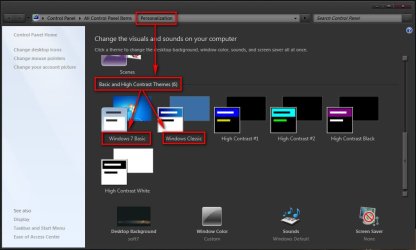
To turn Aero off entirely, one has to apply the basic themes.

2014-01-24_124200.jpg

But, Aero looks cool, and gives some functionality too. I find Aero Snap very useful to cascade windows easily. Moreover, Aero has a lot of other features which are really good.

I suggested the OP to turn off one feature only, Aero Snap. Which is seeming to be problematic to him :)
 

My Computer

Computer type
PC/Desktop
Computer Manufacturer/Model Number
Self Assembled
OS
Microsoft Windows 10 Pro Insider Preview 64-bit
CPU
Intel(R) Core(TM) i3-4130 CPU @ 3.40GHz
Motherboard
Gigabyte Technology Co., Ltd. B85M-D3H
Memory
Corsair Vengence 4GB x2 (8.00GB Dual-Channel DDR3 @ 798MHz)
Graphics Card(s)
2047MB GeForce GTS 450 (ZOTAC International)
Sound Card
Onboard (Realtek High Definition Audio)
Monitor(s) Displays
LG Flatron E2040T
Screen Resolution
1600x900
Hard Drives
Western Digital 1 TB
Seagate 500 GB
PSU
Corsair VS550
Case
Cooler Master K380
Cooling
Cooler Master Seidon 120V Plus
Keyboard
Logitech MK260r
Mouse
Logitech MK260r
Internet Speed
PMPL Broadband
Antivirus
Windows Defender + MBAM
Browser
Firefox
Other Info
Dell Studio 15" Laptop
Hello icacream :)
Arc and I are just comparing notes.

If you want to to disable the Aero maximize feature, then
all Aero features will have to be disabled by selecting a basic theme in
Control Panel\All Control Panel Items\Personalization

You can experiment with Aero and Basic themes to see what is preferred, knowing the feature set of Aero.

If you like one, you can Right click on the Unsaved Theme and save it. Then you can try some others, saving the ones you like.


edit: removed confusion on Aero - but that leaves Arc's post hanging in mid-air
 
Last edited:

My Computer

Computer type
Laptop
Computer Manufacturer/Model Number
HP Pavilion dv6-6c10us
OS
x64 (6.3.9600) Win8.1 Pro & soon dual boot x64 (6.1.7601) Win7_SP1 HomePrem
CPU
AMD A6-3420M APU with Radeon(tm) HD Graphics
Motherboard
Hewlett-Packard 1805
Memory
6.00 GB
Graphics Card(s)
AMD Radeon(TM) HD 6520G
Sound Card
(1) AMD High Definition Audio Device (2) IDT High Definiti
Monitor(s) Displays
HP W2072a 20" LCD (1600 x 900) @ 60 Hz
Screen Resolution
1366 x 768 x 32 bits (4294967296 colors) @ 60 Hz
Hard Drives
ST640LM0 00 HM641JI SATA Disk Device
Keyboard
Logitech k520 wireless KB
Mouse
Logitech m320 wireless mouse (bundled with KB)
Internet Speed
15/5 | 54 MB Wireless 'n'
Antivirus
Realtime: Defender or Avast | On-demand: Malwarebytes, ESET
Browser
IE 11 on Win8, IE 10 on win 7
Other Info
Media: [Gimp, Audacity, VLC] || Comm: [WEmail 2012, Skype] || Productivity: [OpenOffice,| Textpad] || Utils: [Sysinternals, cCleaner, Speccy, Defraggler]
ok, thanks for all the input
I have already selected to prevent windows from being automatically arranged when moved to the edge of the screen
said that in my first post ;)


I would like to keep the aero look, I like it, have used it for years
and the problems I report are NEW !

so I'll read again all you say and make some tests... even try a new mouse (logicearth's suggestion)
have a nice happy day all of you !
 

My Computer

Computer type
PC/Desktop
OS
win7 x64 ultimate
CPU
3.30 gigahertz Intel Core i5-4590
Motherboard
Asus H97M-PLUS
Memory
8 MB
Graphics Card(s)
PNY Quadro K600
Screen Resolution
1920 x 1080
It is not Aero Snap folks. Aero Snap is when you move the window to the edge of the screen and the cursor touches the edge it causes the window to do whatever. This issue has nothing to do with Aero Snap.

As the OP clearly described in the first post, this happens when s/he clicks on the title bar. Double clicking the title bar maximizes the window, it has always done this. The OP later pointed out that files/shortcuts were opening with a single click. This alone tells me the mouse is malfunctioning and reporting double clicks when it should be a single click.
 

My Computer

Computer type
PC/Desktop
Computer Manufacturer/Model Number
Alienware Aurora ALX R4
OS
Windows 10 Pro (x64)
CPU
Intel Core i7-3930K (3.2GHz - 4.5GHz)
Motherboard
Alienware Aurora-R4 x79
Memory
4x Samsung 4GB PC3-12800 DDR3 (16GB 1600MHz)
Graphics Card(s)
Nvidia Geforce GTX 690
Sound Card
SteelSeries Siberia Elite
Monitor(s) Displays
Dell UltraSharp U3011
Screen Resolution
2560x1600
Hard Drives
Samsung 850 Pro 256 GB, Seagate 1TB Desktop Hybrid HDD, 2x Western Digital 4TB Green HDD
PSU
875W Some Dell PSU <.<
Case
Alienware Aurora ALX
Cooling
Custom Liquid Cooling (EK CPU & GPU blocks) dual EK 480RAD
Keyboard
Logitech G710+ Mechanical
Mouse
Logitech G700s
Internet Speed
Verizon Fios (50 mbps average)
Other Info
Server: Intel NUC D54250WYK: i5-4250U, 16GB, 256 GB mSATA, Windows Server 2012 R2
It is not Aero Snap folks. Aero Snap is when you move the window to the edge of the screen and the cursor touches the edge it causes the window to do whatever. This issue has nothing to do with Aero Snap.

As the OP clearly described in the first post, this happens when s/he clicks on the title bar. Double clicking the title bar maximizes the window, it has always done this. The OP later pointed out that files/shortcuts were opening with a single click. This alone tells me the mouse is malfunctioning and reporting double clicks when it should be a single click.

Exactly. Absolutely not an Aero Snap issue but rather because of a technical fault in mouse.

I've just replaced my Logitech Performance MX mouse on one of the desktops, as this exact thing started to happen. Somehow the mechanism in the mouse was faulting, a left click kind of "stucked" and Windows read it as a double click. Also sometimes left clicking in for instance a web page and then moving the pointer caused everything being selected because the left button is not released and Windows reads the button being down.

It's time for the OP to either replace the mouse or at least try if clening it would help.

Kari
 

My Computer

Computer type
Laptop
Computer Manufacturer/Model Number
HP ENVY 17-1150eg
OS
Windows 10 Pro x64 EN-GB
CPU
1.6 GHz Intel Core i7-720QM Processor
Memory
6 GB
Graphics Card(s)
ATI Mobility Radeon HD 5850 Graphics
Sound Card
Beats sound system with integrated subwoofer
Monitor(s) Displays
17" laptop display, 22" LED and 32" Full HD TV through HDMI
Screen Resolution
1600*900 (1), 1920*1080 (2&3)
Hard Drives
Internal: 2 x 500 GB SATA Hard Disk Drive 7200 rpm
External: 2TB for backups, 3TB USB3 network drive for media
Cooling
As Envy runs a bit warm, I have it on a Cooler Master pad
Keyboard
Logitech diNovo Media Desktop Laser (bluetooth)
Mouse
Logitech Performance Mouse MX
Internet Speed
50/10 Mbps VDSL
Antivirus
Windows Defender 4.3.9431.0
Browser
Maxthon 3.5.2., IE11
Sorry for not understanding it properly. :o
 

My Computer

Computer type
PC/Desktop
Computer Manufacturer/Model Number
Self Assembled
OS
Microsoft Windows 10 Pro Insider Preview 64-bit
CPU
Intel(R) Core(TM) i3-4130 CPU @ 3.40GHz
Motherboard
Gigabyte Technology Co., Ltd. B85M-D3H
Memory
Corsair Vengence 4GB x2 (8.00GB Dual-Channel DDR3 @ 798MHz)
Graphics Card(s)
2047MB GeForce GTS 450 (ZOTAC International)
Sound Card
Onboard (Realtek High Definition Audio)
Monitor(s) Displays
LG Flatron E2040T
Screen Resolution
1600x900
Hard Drives
Western Digital 1 TB
Seagate 500 GB
PSU
Corsair VS550
Case
Cooler Master K380
Cooling
Cooler Master Seidon 120V Plus
Keyboard
Logitech MK260r
Mouse
Logitech MK260r
Internet Speed
PMPL Broadband
Antivirus
Windows Defender + MBAM
Browser
Firefox
Other Info
Dell Studio 15" Laptop
I did some housekeeping on the thread and took down my Aero posts (except for the one re: save theme). I was a bit over zealous and deleted my early post re: mouse. My doing this left one of Arc's post hanging in mid-air, sorry Arc.

A simple question: have you changed the mouse batteries recently?
 

My Computer

Computer type
Laptop
Computer Manufacturer/Model Number
HP Pavilion dv6-6c10us
OS
x64 (6.3.9600) Win8.1 Pro & soon dual boot x64 (6.1.7601) Win7_SP1 HomePrem
CPU
AMD A6-3420M APU with Radeon(tm) HD Graphics
Motherboard
Hewlett-Packard 1805
Memory
6.00 GB
Graphics Card(s)
AMD Radeon(TM) HD 6520G
Sound Card
(1) AMD High Definition Audio Device (2) IDT High Definiti
Monitor(s) Displays
HP W2072a 20" LCD (1600 x 900) @ 60 Hz
Screen Resolution
1366 x 768 x 32 bits (4294967296 colors) @ 60 Hz
Hard Drives
ST640LM0 00 HM641JI SATA Disk Device
Keyboard
Logitech k520 wireless KB
Mouse
Logitech m320 wireless mouse (bundled with KB)
Internet Speed
15/5 | 54 MB Wireless 'n'
Antivirus
Realtime: Defender or Avast | On-demand: Malwarebytes, ESET
Browser
IE 11 on Win8, IE 10 on win 7
Other Info
Media: [Gimp, Audacity, VLC] || Comm: [WEmail 2012, Skype] || Productivity: [OpenOffice,| Textpad] || Utils: [Sysinternals, cCleaner, Speccy, Defraggler]
Or use touchpad if PC is a laptop.

Or check if you are infected.
 

My Computer

Computer type
Laptop
Computer Manufacturer/Model Number
HP Pavilion dv7-2173cl Entertainment Notebook PC
OS
W7 pro 32-bit.
Memory
4GB
Graphics Card(s)
ATI Mobility Radeon HD 4650 (M96)
Sound Card
•Altec Lansing with SRS Premium Sound and Sub-Woofer
Monitor(s) Displays
17.3” Diagonal HD+ High-Definition HP LED BrightView W
Screen Resolution
1600 x 900
Hard Drives
500GB (5400RPM)
Keyboard
101-key compatible with full size keyboard
Antivirus
MSE
Browser
IE 11
My Logitech trackball began to double-click on its own, too, and I found this post from (I think) a company rep. I'm sorry I no longer have the actual source, as I kept the one post only as a text file. It did work for me and for many with the same issue.

"This can be caused by static energy trapped inside the capacitors in the mouse. To drain this static energy, please plug the Unifying receiver into a different USB port and follow this procedure:

1. Shut off the mouse and remove the batteries.
2. Press all the buttons repeatedly for 30 seconds. This will drain all the static energy that may be trapped in the mouse.
3. Put the batteries back in the mouse and turn it on.
4. Wait a few seconds for it to re-connect and test the buttons.

If this does not fix your issue, please contact the customer support team in your region for more assistance, including a possible warranty replacement."

Hope this helps.
 

My Computer

Computer Manufacturer/Model Number
Dell Inspiron 580s
OS
Windows 7 Home Premium SP1
CPU
i3
Memory
6 GB
Graphics Card(s)
ATI Radeon
right on logicearth ! :D
it was a hardware problem : I bought a new mouse and all is fine again !
I guess I had never kept a mouse so long, so I had no idea such could happen.

THANKS LOGICEARTH and thanks to you all for your input, gini, I'll try and see if my mouse can be used again with your instructions

the OP is happy !!! :party:
 

My Computer

Computer type
PC/Desktop
OS
win7 x64 ultimate
CPU
3.30 gigahertz Intel Core i5-4590
Motherboard
Asus H97M-PLUS
Memory
8 MB
Graphics Card(s)
PNY Quadro K600
Screen Resolution
1920 x 1080
Tiz da Mouse

Mine was doing it, too, so I dug a different mouse out of a drawer and it works fine now. Mice get old, too.:cry:
 

My Computer

Computer type
PC/Desktop
OS
Windows 7
Motherboard
Gigabyte
Memory
4gb
Hard Drives
seagate 1T
Back
Top