Solved window update history?

GradeAbra

New member
Member
VIP
Local time
6:42 AM
Messages
223
Well, i lost all my window update history after disk cleanup and deteting of my temp folder. Is this normal?

I also receive a error 80070003 just now.
 

My Computer

Computer Manufacturer/Model Number
Acer eMachines EL1850
OS
Windows 7 Home Premium 64bit
CPU
Pentium(R) Dual-Core CPU E5800 @ 3.20GHz
Motherboard
eMachines EL1850
Memory
4.00 GB
Graphics Card(s)
Intel(R) G41 Express Chipset
Sound Card
Realtek High Definition Audio
Monitor(s) Displays
Intel(R) G41 Express Chipset
Screen Resolution
1600 x 900 x 32 bits (4294967296 colors) @ 59 Hz
Hard Drives
(1) Hitachi HDS721032CLA362 ATA Device (2) Generic- Compact Flash USB Device (3) Multiple Flash Reader USB Device
Deleting temporary update files will help solve the problem, but it will also delete the history in Windows Update. You can still see which updates are installed on your computer by going to Installed Updates

"quote" from here > Windows Update error 80070003
 

My Computer

Computer type
PC/Desktop
Computer Manufacturer/Model Number
Bruce ... somewhere in his 40's
OS
Windows 7 Ultimate 32bit SP1
CPU
Intel(R) Core(TM)2 Quad CPU @ 2.40GHz, 2400 MHz
Motherboard
INTEL/D975XBX2
Memory
4 GB
Graphics Card(s)
ATI Radeon HD 2600 Pro
Monitor(s) Displays
Samsung SyncMaster 914v
Screen Resolution
1280 x 1024
Hard Drives
2/500GB each ... ST3500630AS ATA Device.
One is not connected
PSU
Rocketfish 700 W
Case
G.Skill Gigabyte Chassis
Keyboard
Standard PS/2 Keyboard
Mouse
Microsoft PS/2 Mouse
Internet Speed
DSL
Antivirus
Avira Internet Security
Browser
IE 11
Other Info
ATI HDMI Audio

My Computer

Computer type
PC/Desktop
Computer Manufacturer/Model Number
Self built custom
OS
64-bit Windows 11 Pro for Workstations
CPU
Intel i7-8700K OC'd to 5 GHz
Motherboard
ASUS ROG Maximus XI Formula Z390
Memory
64 GB (4x16GB) G.SKILL TridentZ RGB DDR4 3600 MHz
Graphics Card(s)
ASUS ROG-STRIX-GTX1080TI-O11G-GAMING
Sound Card
Integrated
Monitor(s) Displays
2 x Samsung Odyssey G7 27"
Screen Resolution
2560x1440
Hard Drives
1TB Samsung 990 PRO M.2,
4TB Samsung 990 PRO PRO M.2,
TerraMaster F8 SSD Plus NAS
PSU
Seasonic Prime Titanium 850W
Case
Thermaltake Core P3
Cooling
Corsair Hydro H115i
Keyboard
Logitech wireless K800
Mouse
Logitech MX Master 4
Internet Speed
2 Gb/s Download and 100 Mb/s Upload
Antivirus
Malwarebyte Anti-Malware Premium
Browser
Google Chrome
Other Info
Logitech Z625 speaker system,
Logitech BRIO 4K Pro webcam,
HP Color LaserJet Pro MFP M477fdn,
APC SMART-UPS RT 1000 XL - SURT1000XLI,
Galaxy S23 Plus phone
Hi thanks for that brink.

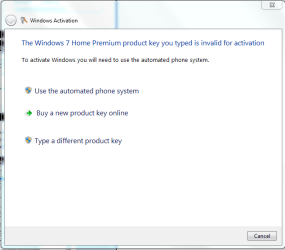
By the way while i was clicking away playing around with my computer, i accidentally hit something and come across this message. I never come across this before. I am sure i have the correct product key all along. Could that be a bug that causes when i change my bios setting? Now everything is ok..
 

Attachments

  • Capture.PNG
    Capture.PNG
    16.3 KB · Views: 12

My Computer

Computer Manufacturer/Model Number
Acer eMachines EL1850
OS
Windows 7 Home Premium 64bit
CPU
Pentium(R) Dual-Core CPU E5800 @ 3.20GHz
Motherboard
eMachines EL1850
Memory
4.00 GB
Graphics Card(s)
Intel(R) G41 Express Chipset
Sound Card
Realtek High Definition Audio
Monitor(s) Displays
Intel(R) G41 Express Chipset
Screen Resolution
1600 x 900 x 32 bits (4294967296 colors) @ 59 Hz
Hard Drives
(1) Hitachi HDS721032CLA362 ATA Device (2) Generic- Compact Flash USB Device (3) Multiple Flash Reader USB Device
Did what Jacee and I posted sort your Windows Update issue?

Does your Windows 7 show as being activated and genuine in your "System" page? (Control Panel (icons view) -> System)
 

My Computer

Computer type
PC/Desktop
Computer Manufacturer/Model Number
Self built custom
OS
64-bit Windows 11 Pro for Workstations
CPU
Intel i7-8700K OC'd to 5 GHz
Motherboard
ASUS ROG Maximus XI Formula Z390
Memory
64 GB (4x16GB) G.SKILL TridentZ RGB DDR4 3600 MHz
Graphics Card(s)
ASUS ROG-STRIX-GTX1080TI-O11G-GAMING
Sound Card
Integrated
Monitor(s) Displays
2 x Samsung Odyssey G7 27"
Screen Resolution
2560x1440
Hard Drives
1TB Samsung 990 PRO M.2,
4TB Samsung 990 PRO PRO M.2,
TerraMaster F8 SSD Plus NAS
PSU
Seasonic Prime Titanium 850W
Case
Thermaltake Core P3
Cooling
Corsair Hydro H115i
Keyboard
Logitech wireless K800
Mouse
Logitech MX Master 4
Internet Speed
2 Gb/s Download and 100 Mb/s Upload
Antivirus
Malwarebyte Anti-Malware Premium
Browser
Google Chrome
Other Info
Logitech Z625 speaker system,
Logitech BRIO 4K Pro webcam,
HP Color LaserJet Pro MFP M477fdn,
APC SMART-UPS RT 1000 XL - SURT1000XLI,
Galaxy S23 Plus phone
Did what Jacee and I posted sort your Windows Update issue?

Does your Windows 7 show as being activated and genuine in your "System" page? (Control Panel (icons view) -> System)

I can update now after i restarted my computer. Everything seems normal now. As for the activation... here is the pic. Is everything alright?
 
Last edited:

My Computer

Computer Manufacturer/Model Number
Acer eMachines EL1850
OS
Windows 7 Home Premium 64bit
CPU
Pentium(R) Dual-Core CPU E5800 @ 3.20GHz
Motherboard
eMachines EL1850
Memory
4.00 GB
Graphics Card(s)
Intel(R) G41 Express Chipset
Sound Card
Realtek High Definition Audio
Monitor(s) Displays
Intel(R) G41 Express Chipset
Screen Resolution
1600 x 900 x 32 bits (4294967296 colors) @ 59 Hz
Hard Drives
(1) Hitachi HDS721032CLA362 ATA Device (2) Generic- Compact Flash USB Device (3) Multiple Flash Reader USB Device
All looks good. No need to worry about the activation window you triggered by mistake since you are already activated. :)
 

My Computer

Computer type
PC/Desktop
Computer Manufacturer/Model Number
Self built custom
OS
64-bit Windows 11 Pro for Workstations
CPU
Intel i7-8700K OC'd to 5 GHz
Motherboard
ASUS ROG Maximus XI Formula Z390
Memory
64 GB (4x16GB) G.SKILL TridentZ RGB DDR4 3600 MHz
Graphics Card(s)
ASUS ROG-STRIX-GTX1080TI-O11G-GAMING
Sound Card
Integrated
Monitor(s) Displays
2 x Samsung Odyssey G7 27"
Screen Resolution
2560x1440
Hard Drives
1TB Samsung 990 PRO M.2,
4TB Samsung 990 PRO PRO M.2,
TerraMaster F8 SSD Plus NAS
PSU
Seasonic Prime Titanium 850W
Case
Thermaltake Core P3
Cooling
Corsair Hydro H115i
Keyboard
Logitech wireless K800
Mouse
Logitech MX Master 4
Internet Speed
2 Gb/s Download and 100 Mb/s Upload
Antivirus
Malwarebyte Anti-Malware Premium
Browser
Google Chrome
Other Info
Logitech Z625 speaker system,
Logitech BRIO 4K Pro webcam,
HP Color LaserJet Pro MFP M477fdn,
APC SMART-UPS RT 1000 XL - SURT1000XLI,
Galaxy S23 Plus phone
How did i triggered that thing anyway?
 

My Computer

Computer Manufacturer/Model Number
Acer eMachines EL1850
OS
Windows 7 Home Premium 64bit
CPU
Pentium(R) Dual-Core CPU E5800 @ 3.20GHz
Motherboard
eMachines EL1850
Memory
4.00 GB
Graphics Card(s)
Intel(R) G41 Express Chipset
Sound Card
Realtek High Definition Audio
Monitor(s) Displays
Intel(R) G41 Express Chipset
Screen Resolution
1600 x 900 x 32 bits (4294967296 colors) @ 59 Hz
Hard Drives
(1) Hitachi HDS721032CLA362 ATA Device (2) Generic- Compact Flash USB Device (3) Multiple Flash Reader USB Device
I'm afraid I don't know since you were just clicking around randomly. :(
 

My Computer

Computer type
PC/Desktop
Computer Manufacturer/Model Number
Self built custom
OS
64-bit Windows 11 Pro for Workstations
CPU
Intel i7-8700K OC'd to 5 GHz
Motherboard
ASUS ROG Maximus XI Formula Z390
Memory
64 GB (4x16GB) G.SKILL TridentZ RGB DDR4 3600 MHz
Graphics Card(s)
ASUS ROG-STRIX-GTX1080TI-O11G-GAMING
Sound Card
Integrated
Monitor(s) Displays
2 x Samsung Odyssey G7 27"
Screen Resolution
2560x1440
Hard Drives
1TB Samsung 990 PRO M.2,
4TB Samsung 990 PRO PRO M.2,
TerraMaster F8 SSD Plus NAS
PSU
Seasonic Prime Titanium 850W
Case
Thermaltake Core P3
Cooling
Corsair Hydro H115i
Keyboard
Logitech wireless K800
Mouse
Logitech MX Master 4
Internet Speed
2 Gb/s Download and 100 Mb/s Upload
Antivirus
Malwarebyte Anti-Malware Premium
Browser
Google Chrome
Other Info
Logitech Z625 speaker system,
Logitech BRIO 4K Pro webcam,
HP Color LaserJet Pro MFP M477fdn,
APC SMART-UPS RT 1000 XL - SURT1000XLI,
Galaxy S23 Plus phone
Hi brink, i still receive the same message and notification again. What is wrong actually?

Edited:
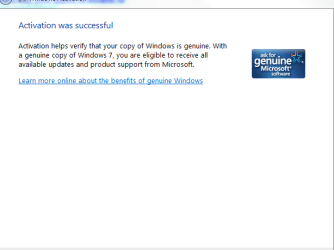
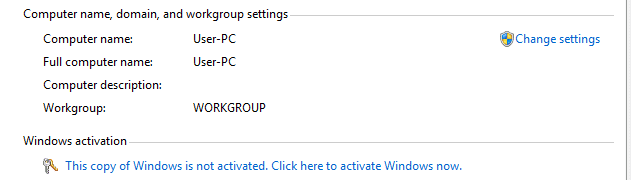
I tried to type in my license code again and this is what i got. see attached pic. Is there anything wrong? This copy of Windows is not activated.' when it is.. However i still got this message at the bottom of this page.
 

Attachments

  • Capture6.PNG
    Capture6.PNG
    9.3 KB · Views: 15
  • Capture5.PNG
    Capture5.PNG
    3.9 KB · Views: 12
Last edited:

My Computer

Computer Manufacturer/Model Number
Acer eMachines EL1850
OS
Windows 7 Home Premium 64bit
CPU
Pentium(R) Dual-Core CPU E5800 @ 3.20GHz
Motherboard
eMachines EL1850
Memory
4.00 GB
Graphics Card(s)
Intel(R) G41 Express Chipset
Sound Card
Realtek High Definition Audio
Monitor(s) Displays
Intel(R) G41 Express Chipset
Screen Resolution
1600 x 900 x 32 bits (4294967296 colors) @ 59 Hz
Hard Drives
(1) Hitachi HDS721032CLA362 ATA Device (2) Generic- Compact Flash USB Device (3) Multiple Flash Reader USB Device
The left screenshot says that activation was successful. Do you still see the right screenshot in "System" after you got the left screenshot?
 

My Computer

Computer type
PC/Desktop
Computer Manufacturer/Model Number
Self built custom
OS
64-bit Windows 11 Pro for Workstations
CPU
Intel i7-8700K OC'd to 5 GHz
Motherboard
ASUS ROG Maximus XI Formula Z390
Memory
64 GB (4x16GB) G.SKILL TridentZ RGB DDR4 3600 MHz
Graphics Card(s)
ASUS ROG-STRIX-GTX1080TI-O11G-GAMING
Sound Card
Integrated
Monitor(s) Displays
2 x Samsung Odyssey G7 27"
Screen Resolution
2560x1440
Hard Drives
1TB Samsung 990 PRO M.2,
4TB Samsung 990 PRO PRO M.2,
TerraMaster F8 SSD Plus NAS
PSU
Seasonic Prime Titanium 850W
Case
Thermaltake Core P3
Cooling
Corsair Hydro H115i
Keyboard
Logitech wireless K800
Mouse
Logitech MX Master 4
Internet Speed
2 Gb/s Download and 100 Mb/s Upload
Antivirus
Malwarebyte Anti-Malware Premium
Browser
Google Chrome
Other Info
Logitech Z625 speaker system,
Logitech BRIO 4K Pro webcam,
HP Color LaserJet Pro MFP M477fdn,
APC SMART-UPS RT 1000 XL - SURT1000XLI,
Galaxy S23 Plus phone

My Computer

Computer type
Laptop
Computer Manufacturer/Model Number
Asus K52F or Lenovo B51-80
OS
Win 7 x64 Home Premium (and x86 VirtualBox VM)/Win10
CPU
i3 370M/i7 6500U
Motherboard
Asus/Lenovo
Memory
8GB - finally :)/8GB
Graphics Card(s)
it's an i3, dude!/dual Intel&nVidia
Sound Card
onboard
Monitor(s) Displays
15.6" built-in
Screen Resolution
1366x768/1920x1080
Hard Drives
750GB Seagate internal
Sundry external drives attached to other computers on the local network
1TB SSD on the Lenovo
PSU
n/a
Internet Speed
as much as I can get - usually on a dongle/phone, so <1MB/s
Antivirus
MSE/Defender
Browser
IE11/12/Edge/Chrome/FF(if I must)
The left screenshot says that activation was successful. Do you still see the right screenshot in "System" after you got the left screenshot?

Yes. I wanted to know why. I restarted a few times but still see the right screen.

Code:
Diagnostic Report (1.9.0027.0):
-----------------------------------------
Windows Validation Data-->

Validation Code: 0
Cached Online Validation Code: 0x0
Windows Product Key: *****-*****-6DGCT-K86QQ-G2FB2
Windows Product Key Hash: xbl7Lt7ZbEnmHmd7FbSvJn7ZT9Y=
Windows Product ID: 00359-OEM-9813644-49116
Windows Product ID Type: 8
Windows License Type: COA SLP
Windows OS version: 6.1.7600.2.00010300.0.0.003
ID: {E904E9F5-4341-4EAE-A682-45B1BFAF1616}(1)
Is Admin: Yes
TestCab: 0x0
LegitcheckControl ActiveX: N/A, hr = 0x80070002
Signed By: N/A, hr = 0x80070002
Product Name: Windows 7 Home Premium
Architecture: 0x00000009
Build lab: 7600.win7_gdr.120503-2030
TTS Error: 
Validation Diagnostic: 
Resolution Status: N/A

Vista WgaER Data-->
ThreatID(s): N/A, hr = 0x80070002
Version: N/A, hr = 0x80070002

Windows XP Notifications Data-->
Cached Result: N/A, hr = 0x80070002
File Exists: No
Version: N/A, hr = 0x80070002
WgaTray.exe Signed By: N/A, hr = 0x80070002
WgaLogon.dll Signed By: N/A, hr = 0x80070002

OGA Notifications Data-->
Cached Result: N/A, hr = 0x80070002
Version: N/A, hr = 0x80070002
OGAExec.exe Signed By: N/A, hr = 0x80070002
OGAAddin.dll Signed By: N/A, hr = 0x80070002

OGA Data-->
Office Status: 100 Genuine
Microsoft Office Enterprise 2007 - 100 Genuine
OGA Version: N/A, 0x80070002
Signed By: N/A, hr = 0x80070002
Office Diagnostics: 025D1FF3-364-80041010_025D1FF3-229-80041010_025D1FF3-230-1_025D1FF3-517-80040154_025D1FF3-237-80040154_025D1FF3-238-2_025D1FF3-244-80070002_025D1FF3-258-3_E2AD56EA-765-d003_E2AD56EA-766-0_E2AD56EA-134-80004005_E2AD56EA-765-8009_E2AD56EA-766-2efd_E2AD56EA-148-80004005_16E0B333-89-80004005_B4D0AA8B-1029-80004005

Browser Data-->
Proxy settings: N/A
User Agent: Mozilla/4.0 (compatible; MSIE 8.0; Win32)
Default Browser: C:\Program Files (x86)\Opera\Opera.exe
Download signed ActiveX controls: Prompt
Download unsigned ActiveX controls: Disabled
Run ActiveX controls and plug-ins: Allowed
Initialize and script ActiveX controls not marked as safe: Disabled
Allow scripting of Internet Explorer Webbrowser control: Disabled
Active scripting: Allowed
Script ActiveX controls marked as safe for scripting: Allowed

File Scan Data-->
File Mismatch: C:\Windows\system32\systemcpl.dll[6.1.7600.16384], Hr = 0x800b0100
File Mismatch: C:\Windows\system32\user32.dll[6.1.7600.16384], Hr = 0x800b0100

Other data-->
Office Details: <GenuineResults><MachineData><UGUID>{E904E9F5-4341-4EAE-A682-45B1BFAF1616}</UGUID><Version>1.9.0027.0</Version><OS>6.1.7600.2.00010300.0.0.003</OS><Architecture>x64</Architecture><PKey>*****-*****-*****-*****-G2FB2</PKey><PID>00359-OEM-9813644-49116</PID><PIDType>8</PIDType><SID>S-1-5-21-3514224317-2285765790-428270974</SID><SYSTEM><Manufacturer>Gigabyte Technology Co., Ltd.</Manufacturer><Model>G41M-Combo</Model></SYSTEM><BIOS><Manufacturer>Award Software International, Inc.</Manufacturer><Version>FA</Version><SMBIOSVersion major="2" minor="4"/><Date>20120229000000.000000+000</Date></BIOS><HWID>C3BA3607018400F8</HWID><UserLCID>4809</UserLCID><SystemLCID>0409</SystemLCID><TimeZone>Malay Peninsula Standard Time(GMT+08:00)</TimeZone><iJoin>0</iJoin><SBID><stat>3</stat><msppid></msppid><name></name><model></model></SBID><OEM/><GANotification/></MachineData><Software><Office><Result>100</Result><Products><Product GUID="{90120000-0030-0000-0000-0000000FF1CE}"><LegitResult>100</LegitResult><Name>Microsoft Office Enterprise 2007</Name><Ver>12</Ver><Val>1960F5EDBD8ED86</Val><Hash>UqNnJH1Zy1Lo+zxU+a2CPGn6vZA=</Hash><Pid>89388-707-0253756-65113</Pid><PidType>14</PidType></Product></Products><Applications><App Id="15" Version="12" Result="100"/><App Id="16" Version="12" Result="100"/><App Id="18" Version="12" Result="100"/><App Id="19" Version="12" Result="100"/><App Id="1A" Version="12" Result="100"/><App Id="1B" Version="12" Result="100"/><App Id="44" Version="12" Result="100"/><App Id="A1" Version="12" Result="100"/><App Id="BA" Version="12" Result="100"/></Applications></Office></Software></GenuineResults>  

Spsys.log Content: 0x80070002

Licensing Data-->
Software licensing service version: 6.1.7600.16385

Name: Windows(R) 7, HomePremium edition
Description: Windows Operating System - Windows(R) 7, OEM_COA_SLP channel
Activation ID: 5e017a8a-f3f9-4167-b1bd-ba3e236a4d8f
Application ID: 55c92734-d682-4d71-983e-d6ec3f16059f
Extended PID: 00359-00196-136-449116-02-18441-7600.0000-2002012
Installation ID: 002505039082013523409583871863503205769274345345973705
Partial Product Key: G2FB2
License Status: Licensed

Windows Activation Technologies-->
HrOffline: 0x00000000
HrOnline: 0x00000000
HealthStatus: 0x0000000000000000
Event Time Stamp: 7:17:2012 01:40
ActiveX: Registered, Version: 7.1.7600.16395
Admin Service: Registered, Version: 7.1.7600.16395
HealthStatus Bitmask Output:


HWID Data-->
HWID Hash Current: LAAAAAEAAgABAAEAAAABAAAAAQABAAEA6GEm4LzFqnYG6PaVTDb0AfShRso=

OEM Activation 1.0 Data-->
N/A

OEM Activation 2.0 Data-->
BIOS valid for OA 2.0: yes, but no SLIC table
Windows marker version: N/A
OEMID and OEMTableID Consistent: N/A
BIOS Information: 
  ACPI Table Name	OEMID Value	OEMTableID Value
  APIC			GBT   		GBTUACPI
  FACP			GBT   		GBTUACPI
  HPET			GBT   		GBTUACPI
  MCFG			GBT   		GBTUACPI
  MSDM			GBT   		GBTUACPI
  TAMG			GBT   		GBT   B0
  SSDT			PmRef		CpuPm

 

My Computer

Computer Manufacturer/Model Number
Acer eMachines EL1850
OS
Windows 7 Home Premium 64bit
CPU
Pentium(R) Dual-Core CPU E5800 @ 3.20GHz
Motherboard
eMachines EL1850
Memory
4.00 GB
Graphics Card(s)
Intel(R) G41 Express Chipset
Sound Card
Realtek High Definition Audio
Monitor(s) Displays
Intel(R) G41 Express Chipset
Screen Resolution
1600 x 900 x 32 bits (4294967296 colors) @ 59 Hz
Hard Drives
(1) Hitachi HDS721032CLA362 ATA Device (2) Generic- Compact Flash USB Device (3) Multiple Flash Reader USB Device
Well, it does show that you are using the correct COA number.

You might see if doing the "Validate Now" Windows and Diagnostics options to see what they come up with next.
 

My Computer

Computer type
PC/Desktop
Computer Manufacturer/Model Number
Self built custom
OS
64-bit Windows 11 Pro for Workstations
CPU
Intel i7-8700K OC'd to 5 GHz
Motherboard
ASUS ROG Maximus XI Formula Z390
Memory
64 GB (4x16GB) G.SKILL TridentZ RGB DDR4 3600 MHz
Graphics Card(s)
ASUS ROG-STRIX-GTX1080TI-O11G-GAMING
Sound Card
Integrated
Monitor(s) Displays
2 x Samsung Odyssey G7 27"
Screen Resolution
2560x1440
Hard Drives
1TB Samsung 990 PRO M.2,
4TB Samsung 990 PRO PRO M.2,
TerraMaster F8 SSD Plus NAS
PSU
Seasonic Prime Titanium 850W
Case
Thermaltake Core P3
Cooling
Corsair Hydro H115i
Keyboard
Logitech wireless K800
Mouse
Logitech MX Master 4
Internet Speed
2 Gb/s Download and 100 Mb/s Upload
Antivirus
Malwarebyte Anti-Malware Premium
Browser
Google Chrome
Other Info
Logitech Z625 speaker system,
Logitech BRIO 4K Pro webcam,
HP Color LaserJet Pro MFP M477fdn,
APC SMART-UPS RT 1000 XL - SURT1000XLI,
Galaxy S23 Plus phone

Attachments

  • Capture7.PNG
    Capture7.PNG
    32.9 KB · Views: 9

My Computer

Computer Manufacturer/Model Number
Acer eMachines EL1850
OS
Windows 7 Home Premium 64bit
CPU
Pentium(R) Dual-Core CPU E5800 @ 3.20GHz
Motherboard
eMachines EL1850
Memory
4.00 GB
Graphics Card(s)
Intel(R) G41 Express Chipset
Sound Card
Realtek High Definition Audio
Monitor(s) Displays
Intel(R) G41 Express Chipset
Screen Resolution
1600 x 900 x 32 bits (4294967296 colors) @ 59 Hz
Hard Drives
(1) Hitachi HDS721032CLA362 ATA Device (2) Generic- Compact Flash USB Device (3) Multiple Flash Reader USB Device

My Computer

Computer type
PC/Desktop
Computer Manufacturer/Model Number
Self built custom
OS
64-bit Windows 11 Pro for Workstations
CPU
Intel i7-8700K OC'd to 5 GHz
Motherboard
ASUS ROG Maximus XI Formula Z390
Memory
64 GB (4x16GB) G.SKILL TridentZ RGB DDR4 3600 MHz
Graphics Card(s)
ASUS ROG-STRIX-GTX1080TI-O11G-GAMING
Sound Card
Integrated
Monitor(s) Displays
2 x Samsung Odyssey G7 27"
Screen Resolution
2560x1440
Hard Drives
1TB Samsung 990 PRO M.2,
4TB Samsung 990 PRO PRO M.2,
TerraMaster F8 SSD Plus NAS
PSU
Seasonic Prime Titanium 850W
Case
Thermaltake Core P3
Cooling
Corsair Hydro H115i
Keyboard
Logitech wireless K800
Mouse
Logitech MX Master 4
Internet Speed
2 Gb/s Download and 100 Mb/s Upload
Antivirus
Malwarebyte Anti-Malware Premium
Browser
Google Chrome
Other Info
Logitech Z625 speaker system,
Logitech BRIO 4K Pro webcam,
HP Color LaserJet Pro MFP M477fdn,
APC SMART-UPS RT 1000 XL - SURT1000XLI,
Galaxy S23 Plus phone
Should i restart the computer after step 6?
 

My Computer

Computer Manufacturer/Model Number
Acer eMachines EL1850
OS
Windows 7 Home Premium 64bit
CPU
Pentium(R) Dual-Core CPU E5800 @ 3.20GHz
Motherboard
eMachines EL1850
Memory
4.00 GB
Graphics Card(s)
Intel(R) G41 Express Chipset
Sound Card
Realtek High Definition Audio
Monitor(s) Displays
Intel(R) G41 Express Chipset
Screen Resolution
1600 x 900 x 32 bits (4294967296 colors) @ 59 Hz
Hard Drives
(1) Hitachi HDS721032CLA362 ATA Device (2) Generic- Compact Flash USB Device (3) Multiple Flash Reader USB Device
No. That's just there to show you what you will see if you restart the computer without activating first.

You would just need to activate Windows as usual again. :)
 

My Computer

Computer type
PC/Desktop
Computer Manufacturer/Model Number
Self built custom
OS
64-bit Windows 11 Pro for Workstations
CPU
Intel i7-8700K OC'd to 5 GHz
Motherboard
ASUS ROG Maximus XI Formula Z390
Memory
64 GB (4x16GB) G.SKILL TridentZ RGB DDR4 3600 MHz
Graphics Card(s)
ASUS ROG-STRIX-GTX1080TI-O11G-GAMING
Sound Card
Integrated
Monitor(s) Displays
2 x Samsung Odyssey G7 27"
Screen Resolution
2560x1440
Hard Drives
1TB Samsung 990 PRO M.2,
4TB Samsung 990 PRO PRO M.2,
TerraMaster F8 SSD Plus NAS
PSU
Seasonic Prime Titanium 850W
Case
Thermaltake Core P3
Cooling
Corsair Hydro H115i
Keyboard
Logitech wireless K800
Mouse
Logitech MX Master 4
Internet Speed
2 Gb/s Download and 100 Mb/s Upload
Antivirus
Malwarebyte Anti-Malware Premium
Browser
Google Chrome
Other Info
Logitech Z625 speaker system,
Logitech BRIO 4K Pro webcam,
HP Color LaserJet Pro MFP M477fdn,
APC SMART-UPS RT 1000 XL - SURT1000XLI,
Galaxy S23 Plus phone
No. That's just there to show you what you will see if you restart the computer without activating first.

You would just need to activate Windows as usual again. :)

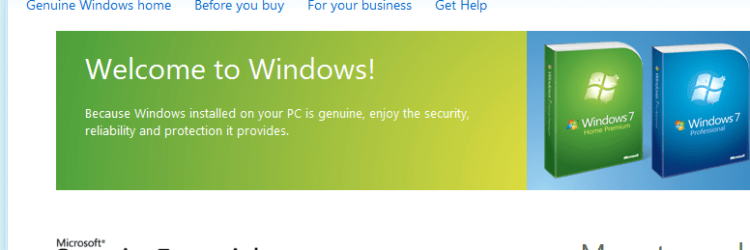
I restarted the computer and it prompted me to enter the product key. However after i entered, it still the same. I wonder why the logo and icon just won't appear.
 

My Computer

Computer Manufacturer/Model Number
Acer eMachines EL1850
OS
Windows 7 Home Premium 64bit
CPU
Pentium(R) Dual-Core CPU E5800 @ 3.20GHz
Motherboard
eMachines EL1850
Memory
4.00 GB
Graphics Card(s)
Intel(R) G41 Express Chipset
Sound Card
Realtek High Definition Audio
Monitor(s) Displays
Intel(R) G41 Express Chipset
Screen Resolution
1600 x 900 x 32 bits (4294967296 colors) @ 59 Hz
Hard Drives
(1) Hitachi HDS721032CLA362 ATA Device (2) Generic- Compact Flash USB Device (3) Multiple Flash Reader USB Device
Yes. I wanted to know why. I restarted a few times but still see the right screen.

Code:
Diagnostic Report (1.9.0027.0):
-----------------------------------------
Windows Validation Data-->
 
Validation Code: 0
Cached Online Validation Code: 0x0
Windows Product Key: *****-*****-6DGCT-K86QQ-G2FB2
Windows Product Key Hash: xbl7Lt7ZbEnmHmd7FbSvJn7ZT9Y=
Windows Product ID: 00359-OEM-9813644-49116
Windows Product ID Type: 8
Windows License Type: COA SLP
Windows OS version: 6.1.7600.2.00010300.0.0.003
 
[B]File Mismatch: C:\Windows\system32\systemcpl.dll[6.1.7600.16384], Hr = 0x800b0100[/B]
[B]File Mismatch: C:\Windows\system32\user32.dll[6.1.7600.16384], Hr = 0x800b0100[/B]

It's counterfeit - using RemoveWAT to force the activation status
 
Last edited:

My Computer

Computer type
Laptop
Computer Manufacturer/Model Number
Asus K52F or Lenovo B51-80
OS
Win 7 x64 Home Premium (and x86 VirtualBox VM)/Win10
CPU
i3 370M/i7 6500U
Motherboard
Asus/Lenovo
Memory
8GB - finally :)/8GB
Graphics Card(s)
it's an i3, dude!/dual Intel&nVidia
Sound Card
onboard
Monitor(s) Displays
15.6" built-in
Screen Resolution
1366x768/1920x1080
Hard Drives
750GB Seagate internal
Sundry external drives attached to other computers on the local network
1TB SSD on the Lenovo
PSU
n/a
Internet Speed
as much as I can get - usually on a dongle/phone, so <1MB/s
Antivirus
MSE/Defender
Browser
IE11/12/Edge/Chrome/FF(if I must)
Back
Top