Window updates?

GradeAbra

New member
Member
VIP
Local time
2:32 AM
Messages
223
Should i set check for updates automatically or never check for updates? I find that annoying actually.
 

My Computer

Computer Manufacturer/Model Number
Acer eMachines EL1850
OS
Windows 7 Home Premium 64bit
CPU
Pentium(R) Dual-Core CPU E5800 @ 3.20GHz
Motherboard
eMachines EL1850
Memory
4.00 GB
Graphics Card(s)
Intel(R) G41 Express Chipset
Sound Card
Realtek High Definition Audio
Monitor(s) Displays
Intel(R) G41 Express Chipset
Screen Resolution
1600 x 900 x 32 bits (4294967296 colors) @ 59 Hz
Hard Drives
(1) Hitachi HDS721032CLA362 ATA Device (2) Generic- Compact Flash USB Device (3) Multiple Flash Reader USB Device
I use. Download Updates and let me choose when to install.
That way I can see and decide whether to install. Keep in mind I check several times a day for updates so I don't get behind on them.
 

My Computer

Computer type
PC/Desktop
Computer Manufacturer/Model Number
Home made Desktop
OS
Windows 10 Pro. 64/ version 1709 Windows 7 Pro/64
CPU
Intel i7-6800K @ 4.3
Motherboard
ASUS X-99 Deluxe II
Memory
Corsair Platinum 16 gig @2400
Graphics Card(s)
EVGA GTX 1070 OC
Monitor(s) Displays
Asus 27" LED LCD/VE278Q
Screen Resolution
1920-1080 or 1280-720 HDMI
Hard Drives
INTEL SSD 730-240 Gb Sata 3.0/
PSU
EVGA Platium 1200W
Case
Phanteks Luxe Tempered Glass 8 fans/ one radiator
Cooling
XSPC/ Water Cooled CPU
Keyboard
Das 4 Professional
Mouse
Logitech M705/MX Anywhere 2-S
Internet Speed
100 mbits
Antivirus
Microsoft Security Essentials/ Malwarebytes Premium 3.0/ SAS
Browser
I.E. 11 default/Firefox/ ISP Time Warner Cable/Spectrum
Other Info
LG BluRay Burner/
Sound system-KLipsch-THX/
Icy Dock ssd Hot Swap bays.
How do i know which is important and which is not?
 

My Computer

Computer Manufacturer/Model Number
Acer eMachines EL1850
OS
Windows 7 Home Premium 64bit
CPU
Pentium(R) Dual-Core CPU E5800 @ 3.20GHz
Motherboard
eMachines EL1850
Memory
4.00 GB
Graphics Card(s)
Intel(R) G41 Express Chipset
Sound Card
Realtek High Definition Audio
Monitor(s) Displays
Intel(R) G41 Express Chipset
Screen Resolution
1600 x 900 x 32 bits (4294967296 colors) @ 59 Hz
Hard Drives
(1) Hitachi HDS721032CLA362 ATA Device (2) Generic- Compact Flash USB Device (3) Multiple Flash Reader USB Device
Hello GradeAbra,

It's more of a personal choice that depends on your needs and what you prefer. If you don't mind manually checking for updates at least every second Tuesday of each month, then you could set it to "Never..." so as not to worry about having updates (ex: drivers) that you may not want installed.

Hope this helps. :)


For more information, see also:

Description of the standard terminology that is used to describe Microsoft software updates

and

http://www.sevenforums.com/tutorials/2797-windows-update-settings-change.html
 

My Computer

Computer type
PC/Desktop
Computer Manufacturer/Model Number
Self built custom
OS
64-bit Windows 11 Pro for Workstations
CPU
Intel i7-8700K OC'd to 5 GHz
Motherboard
ASUS ROG Maximus XI Formula Z390
Memory
64 GB (4x16GB) G.SKILL TridentZ RGB DDR4 3600 MHz
Graphics Card(s)
ASUS ROG-STRIX-GTX1080TI-O11G-GAMING
Sound Card
Integrated
Monitor(s) Displays
2 x Samsung Odyssey G7 27"
Screen Resolution
2560x1440
Hard Drives
1TB Samsung 990 PRO M.2,
4TB Samsung 990 PRO PRO M.2,
TerraMaster F8 SSD Plus NAS
PSU
Seasonic Prime Titanium 850W
Case
Thermaltake Core P3
Cooling
Corsair Hydro H115i
Keyboard
Logitech wireless K800
Mouse
Logitech MX Master 4
Internet Speed
2 Gb/s Download and 100 Mb/s Upload
Antivirus
Malwarebyte Anti-Malware Premium
Browser
Google Chrome
Other Info
Logitech Z625 speaker system,
Logitech BRIO 4K Pro webcam,
HP Color LaserJet Pro MFP M477fdn,
APC SMART-UPS RT 1000 XL - SURT1000XLI,
Galaxy S23 Plus phone
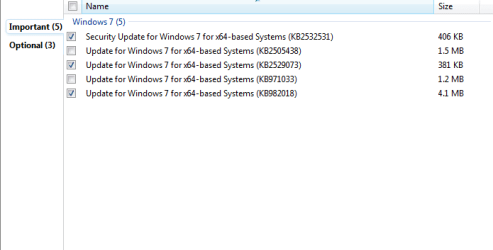
Normally should i install this kind of updates?
 

Attachments

  • Capture.PNG
    Capture.PNG
    5.3 KB · Views: 17

My Computer

Computer Manufacturer/Model Number
Acer eMachines EL1850
OS
Windows 7 Home Premium 64bit
CPU
Pentium(R) Dual-Core CPU E5800 @ 3.20GHz
Motherboard
eMachines EL1850
Memory
4.00 GB
Graphics Card(s)
Intel(R) G41 Express Chipset
Sound Card
Realtek High Definition Audio
Monitor(s) Displays
Intel(R) G41 Express Chipset
Screen Resolution
1600 x 900 x 32 bits (4294967296 colors) @ 59 Hz
Hard Drives
(1) Hitachi HDS721032CLA362 ATA Device (2) Generic- Compact Flash USB Device (3) Multiple Flash Reader USB Device
"It's more of a personal choice that depends on your needs and what you prefer. If you don't mind manually checking for updates at least every second Tuesday of each month, then you could set it to "Never..." so as not to worry about having updates (ex: drivers) that you may not want installed."

This is how I have it set up. I also visit this forum daily (to stay aware) and once in a blue moon, I'm alerted to an out-of-cycle Microsoft security update reported by a forum member.

As for deciding which to update, I generally accept all security updates even if I don't use the particular software module, such as wmp, ie, et al. The non-security updates require a few extra clicks beginning with the hyperlink, More Information, in the right column for each update. For example, a time-zone fix for a user in Bermuda would not apply for my system and I would ignore and have it hidden for future update scans.

Speaking of updates, it is past noon EDT and my check for updates since this morning has returned an up-to-date status. In the past Patch Tuesdays, I usually get results by 10-11am. Not even a MaliciousSoftwareRemovalTool. I hope that's not an indication of problems on my end.

Update: 13:00 EDT and the updates finally arrived. Also, clicking on More Information for security updates will net yourself a download to hold on to should a need arise to reinstall the OS. Those with data download limits will see the value of that.

 
Last edited:

My Computer

OS
Windows 7 Home Premium x64
Normally should i install this kind of updates?

Usually you should install all updates, but just decide to do so or not on the "Optional" ones.
 

My Computer

Computer type
PC/Desktop
Computer Manufacturer/Model Number
Self built custom
OS
64-bit Windows 11 Pro for Workstations
CPU
Intel i7-8700K OC'd to 5 GHz
Motherboard
ASUS ROG Maximus XI Formula Z390
Memory
64 GB (4x16GB) G.SKILL TridentZ RGB DDR4 3600 MHz
Graphics Card(s)
ASUS ROG-STRIX-GTX1080TI-O11G-GAMING
Sound Card
Integrated
Monitor(s) Displays
2 x Samsung Odyssey G7 27"
Screen Resolution
2560x1440
Hard Drives
1TB Samsung 990 PRO M.2,
4TB Samsung 990 PRO PRO M.2,
TerraMaster F8 SSD Plus NAS
PSU
Seasonic Prime Titanium 850W
Case
Thermaltake Core P3
Cooling
Corsair Hydro H115i
Keyboard
Logitech wireless K800
Mouse
Logitech MX Master 4
Internet Speed
2 Gb/s Download and 100 Mb/s Upload
Antivirus
Malwarebyte Anti-Malware Premium
Browser
Google Chrome
Other Info
Logitech Z625 speaker system,
Logitech BRIO 4K Pro webcam,
HP Color LaserJet Pro MFP M477fdn,
APC SMART-UPS RT 1000 XL - SURT1000XLI,
Galaxy S23 Plus phone
How do i know which is important and which is not?

Well, If Microsoft included them as Critical or Recommended updates, than they are important. You could attempt to read up on each and every one to determine if it's applicable to your system, or you could just accept them for what they are and install them.

On my home machines, I have it automatically check and install updates. No real issues to report using this method.
 

My Computer

Computer Manufacturer/Model Number
Self-Built in July 2009
OS
Windows 7 Ultimate x64
CPU
Intel Q9550 2.83Ghz OC'd to 3.40Ghz
Motherboard
Gigabyte GA-EP45-UD3R rev. 1.1, F12 BIOS
Memory
8GB G.Skill PI DDR2-800, 4-4-4-12 timings
Graphics Card(s)
EVGA 1280MB Nvidia GeForce GTX570
Sound Card
Realtek ALC899A 8 channel onboard audio
Monitor(s) Displays
23" Acer x233H
Screen Resolution
1920x1080
Hard Drives
Intel X25-M 80GB Gen 2 SSD
Western Digital 1TB Caviar Black, 32MB cache. WD1001FALS
PSU
Corsair 620HX modular
Case
Antec P182
Cooling
stock
Keyboard
ABS M1 Mechanical
Mouse
Logitech G9 Laser Mouse
Internet Speed
15/2 cable modem
Other Info
Windows and Linux enthusiast. Logitech G35 Headset.
Is the Window Defender update still necessary if i am using other Anti-virus programme?
 

My Computer

Computer Manufacturer/Model Number
Acer eMachines EL1850
OS
Windows 7 Home Premium 64bit
CPU
Pentium(R) Dual-Core CPU E5800 @ 3.20GHz
Motherboard
eMachines EL1850
Memory
4.00 GB
Graphics Card(s)
Intel(R) G41 Express Chipset
Sound Card
Realtek High Definition Audio
Monitor(s) Displays
Intel(R) G41 Express Chipset
Screen Resolution
1600 x 900 x 32 bits (4294967296 colors) @ 59 Hz
Hard Drives
(1) Hitachi HDS721032CLA362 ATA Device (2) Generic- Compact Flash USB Device (3) Multiple Flash Reader USB Device
Yes. :)
 

My Computer

Computer type
PC/Desktop
Computer Manufacturer/Model Number
Self built custom
OS
64-bit Windows 11 Pro for Workstations
CPU
Intel i7-8700K OC'd to 5 GHz
Motherboard
ASUS ROG Maximus XI Formula Z390
Memory
64 GB (4x16GB) G.SKILL TridentZ RGB DDR4 3600 MHz
Graphics Card(s)
ASUS ROG-STRIX-GTX1080TI-O11G-GAMING
Sound Card
Integrated
Monitor(s) Displays
2 x Samsung Odyssey G7 27"
Screen Resolution
2560x1440
Hard Drives
1TB Samsung 990 PRO M.2,
4TB Samsung 990 PRO PRO M.2,
TerraMaster F8 SSD Plus NAS
PSU
Seasonic Prime Titanium 850W
Case
Thermaltake Core P3
Cooling
Corsair Hydro H115i
Keyboard
Logitech wireless K800
Mouse
Logitech MX Master 4
Internet Speed
2 Gb/s Download and 100 Mb/s Upload
Antivirus
Malwarebyte Anti-Malware Premium
Browser
Google Chrome
Other Info
Logitech Z625 speaker system,
Logitech BRIO 4K Pro webcam,
HP Color LaserJet Pro MFP M477fdn,
APC SMART-UPS RT 1000 XL - SURT1000XLI,
Galaxy S23 Plus phone
Back
Top