
You are using an out of date browser. It may not display this or other websites correctly.
You should upgrade or use an alternative browser.
You should upgrade or use an alternative browser.
Window with 'Focus' won't stay on top of other windows
- Thread starter Nisko
- Start date

Is this what you want?
Window focus() Method
Window focus() Method
My Computer
At a glance
Microsoft Windows 7 Home Premium 64-bit 7601 ...Intel(R) Core(TM) i7-3770 CPU @ 3.40GHz8.00 GBIntel(R) HD Graphics 4000
- Computer type
- PC/Desktop
- OS
- Microsoft Windows 7 Home Premium 64-bit 7601 Multiprocessor Free Service Pack 1
- CPU
- Intel(R) Core(TM) i7-3770 CPU @ 3.40GHz
- Motherboard
- ASUSTeK COMPUTER INC. P8H77-M
- Memory
- 8.00 GB
- Graphics Card(s)
- Intel(R) HD Graphics 4000
- Sound Card
- On Board
- Monitor(s) Displays
- Dell 24"
- Screen Resolution
- 1920 x 1080
- Hard Drives
- (1) INTEL SSDSC2CT180A3 ATA Device (2) ST500DM002-1BD142 ATA Device (3) WDC WD3200AAKS-75L9A0 ATA Device (4) Generic- Compact Flash USB Device (5) Generic- MS/MS-Pro USB Device (6) Generic- SD/MMC USB Device (7) Generic- SM/xD-Picture USB
- PSU
- 500w Corsair
- Case
- Cooler Master
- Cooling
- 3 Fans
- Keyboard
- Logitech MK300
- Mouse
- Logitech WOM
- Internet Speed
- 75Mb
- Antivirus
- Norton 360
- Browser
- Firefox, Opera, IE
Sounds good if it works with ANY window - not just browser windows. However, I have no idea how to use the code so I can try it. If it's easy, please tell me what to do (even if it works with just browser windows). I've never used code with Windows before - but I'm pretty sure I can learn quickly. Thanks for the reply.
My Computer
At a glance
Windows 7
- Computer Manufacturer/Model Number
- HP Pavilion KQ574AV
- OS
- Windows 7

Does the focused window fall behind? Lose focus or something else? Can you give a bit more info?
Tried a clean startup yet? http://www.sevenforums.com/tutorial...ation-conflicts-performing-clean-startup.html
Tried a clean startup yet? http://www.sevenforums.com/tutorial...ation-conflicts-performing-clean-startup.html
My Computer
At a glance
Windows 7 Ultimate x64 SP1AMD Phenom 2 1090T2x8GB Kingston HyperX Fury Black 1600Mhz Unga...MSI GTX 970 Gaming 4G
- Computer type
- PC/Desktop
- Computer Manufacturer/Model Number
- Custom Build
- OS
- Windows 7 Ultimate x64 SP1
- CPU
- AMD Phenom 2 1090T
- Motherboard
- Gigabyte GA-890FXA-UD5
- Memory
- 2x8GB Kingston HyperX Fury Black 1600Mhz Unganged
- Graphics Card(s)
- MSI GTX 970 Gaming 4G
- Sound Card
- Realtek On-Board HD 7.1 Audio / Logitech G35
- Monitor(s) Displays
- 3xAcer GD245HQ
- Screen Resolution
- 1920x1080
- Hard Drives
- Samsung 850 Pro 512GB SSD - OS /
WD Caviar Black SATA 3 - 1 TBx2 - Dynamic RAID 0 /
WD Caviar Green SATA 2 - 640GBx2 - Dynamic RAID 0 /
WD Caviar Green SATA 2 - 640GB - Internal Backup /
Seagate Barracude SATA 3 - 3TB - External Backup/ Sync
- PSU
- HighPower 1000W
- Case
- Cooler Master HAF 932
- Cooling
- Noctua NH-D14
- Keyboard
- Logitech G19
- Mouse
- Logitech G500
- Internet Speed
- 100/4 Mbit Cable (100GB quota)
- Antivirus
- ZoneAlarm Extreme Security / MBAM Pro / MBAE Free / SAS Free
- Browser
- IE 11 - Firefox - Chrome
- Other Info
- Logitech F710/ G27/ G940/ Z5500 // TrackIR 5 // Nvidia 3D Surround Vision
Let's say I open a new program and I already have a window open. The new program will open behind the already open window. If I then click on the new window, it remains behind the originally open window. In this case, I can't tell if the new window has focus. Then, if I move the first open window and try to work on the new window, it does gain the focus and I can work with it. But I have to move the originally open window out of the way. Does this help?
My Computer
At a glance
Windows 7
- Computer Manufacturer/Model Number
- HP Pavilion KQ574AV
- OS
- Windows 7
Also, the Quick Launch area is set to autohide. If I have a window open and bring the cursor to the bottom of the screen, the Quick Launch opens as it should - but BEHIND the open window.
My Computer
At a glance
Windows 7
- Computer Manufacturer/Model Number
- HP Pavilion KQ574AV
- OS
- Windows 7
Definitely makes more sense now, and found a few suggestions:
Most promising:
Windows 7 Explorer window does not appear in front - Microsoft Community
Some more suggestions (including the above):
https://social.technet.microsoft.co...existing-window-how-to-modify?forum=w7itproui - scroll down a bit, suggestions start midway
If these won't help, try the clean startup I linked in post #4, and also see if Safe Mode does it too.
Most promising:
Windows 7 Explorer window does not appear in front - Microsoft Community
Some more suggestions (including the above):
https://social.technet.microsoft.co...existing-window-how-to-modify?forum=w7itproui - scroll down a bit, suggestions start midway
If these won't help, try the clean startup I linked in post #4, and also see if Safe Mode does it too.
My Computer
At a glance
Windows 7 Ultimate x64 SP1AMD Phenom 2 1090T2x8GB Kingston HyperX Fury Black 1600Mhz Unga...MSI GTX 970 Gaming 4G
- Computer type
- PC/Desktop
- Computer Manufacturer/Model Number
- Custom Build
- OS
- Windows 7 Ultimate x64 SP1
- CPU
- AMD Phenom 2 1090T
- Motherboard
- Gigabyte GA-890FXA-UD5
- Memory
- 2x8GB Kingston HyperX Fury Black 1600Mhz Unganged
- Graphics Card(s)
- MSI GTX 970 Gaming 4G
- Sound Card
- Realtek On-Board HD 7.1 Audio / Logitech G35
- Monitor(s) Displays
- 3xAcer GD245HQ
- Screen Resolution
- 1920x1080
- Hard Drives
- Samsung 850 Pro 512GB SSD - OS /
WD Caviar Black SATA 3 - 1 TBx2 - Dynamic RAID 0 /
WD Caviar Green SATA 2 - 640GBx2 - Dynamic RAID 0 /
WD Caviar Green SATA 2 - 640GB - Internal Backup /
Seagate Barracude SATA 3 - 3TB - External Backup/ Sync
- PSU
- HighPower 1000W
- Case
- Cooler Master HAF 932
- Cooling
- Noctua NH-D14
- Keyboard
- Logitech G19
- Mouse
- Logitech G500
- Internet Speed
- 100/4 Mbit Cable (100GB quota)
- Antivirus
- ZoneAlarm Extreme Security / MBAM Pro / MBAE Free / SAS Free
- Browser
- IE 11 - Firefox - Chrome
- Other Info
- Logitech F710/ G27/ G940/ Z5500 // TrackIR 5 // Nvidia 3D Surround Vision
OK, I looked up the ForegroundFlashCount. The default is 3. My Registry says mine is 0x00000007 (7). I assume that means 7 and my Registry is different from the default. True?
I also looked up the ForegroundLockTimeout. The default is (200000). My Registry says mine is 0x00030d40 (200000). I assume that my Registry matches the default. True?
Now, since I'm not proficient in using the Registry, please advise what I should do next. Thank you.
I also looked up the ForegroundLockTimeout. The default is (200000). My Registry says mine is 0x00030d40 (200000). I assume that my Registry matches the default. True?
Now, since I'm not proficient in using the Registry, please advise what I should do next. Thank you.
My Computer
At a glance
Windows 7
- Computer Manufacturer/Model Number
- HP Pavilion KQ574AV
- OS
- Windows 7
PS: The problem I've always had with a clean boot is that, in my case, not all the items in msconfig are checked off. So, I run a clean boot. Then, when I want to return to where I was, ALL the boxes in msconfig are checked off and I have to guess as to which ones I really don't want to run. It's a shame that the starup items don't return to their previous state. In any case, I'll do the clean boot if the first option doesn't work.
My Computer
At a glance
Windows 7
- Computer Manufacturer/Model Number
- HP Pavilion KQ574AV
- OS
- Windows 7
Easiest is to check in Safe Mode. http://www.sevenforums.com/tutorials/69585-safe-mode.html
Then go for a clean startup.
Those values you have is same as mine. No issues here.
Read the other suggestions in the 2nd link
Then go for a clean startup.
Those values you have is same as mine. No issues here.
Read the other suggestions in the 2nd link
My Computer
At a glance
Windows 7 Ultimate x64 SP1AMD Phenom 2 1090T2x8GB Kingston HyperX Fury Black 1600Mhz Unga...MSI GTX 970 Gaming 4G
- Computer type
- PC/Desktop
- Computer Manufacturer/Model Number
- Custom Build
- OS
- Windows 7 Ultimate x64 SP1
- CPU
- AMD Phenom 2 1090T
- Motherboard
- Gigabyte GA-890FXA-UD5
- Memory
- 2x8GB Kingston HyperX Fury Black 1600Mhz Unganged
- Graphics Card(s)
- MSI GTX 970 Gaming 4G
- Sound Card
- Realtek On-Board HD 7.1 Audio / Logitech G35
- Monitor(s) Displays
- 3xAcer GD245HQ
- Screen Resolution
- 1920x1080
- Hard Drives
- Samsung 850 Pro 512GB SSD - OS /
WD Caviar Black SATA 3 - 1 TBx2 - Dynamic RAID 0 /
WD Caviar Green SATA 2 - 640GBx2 - Dynamic RAID 0 /
WD Caviar Green SATA 2 - 640GB - Internal Backup /
Seagate Barracude SATA 3 - 3TB - External Backup/ Sync
- PSU
- HighPower 1000W
- Case
- Cooler Master HAF 932
- Cooling
- Noctua NH-D14
- Keyboard
- Logitech G19
- Mouse
- Logitech G500
- Internet Speed
- 100/4 Mbit Cable (100GB quota)
- Antivirus
- ZoneAlarm Extreme Security / MBAM Pro / MBAE Free / SAS Free
- Browser
- IE 11 - Firefox - Chrome
- Other Info
- Logitech F710/ G27/ G940/ Z5500 // TrackIR 5 // Nvidia 3D Surround Vision
- Local time
- 3:43 PM
- Messages
- 8,138
I see this window issue from time to time - so, I'm going to chime in.
From a fresh install of Windows 7 pro 64bit:
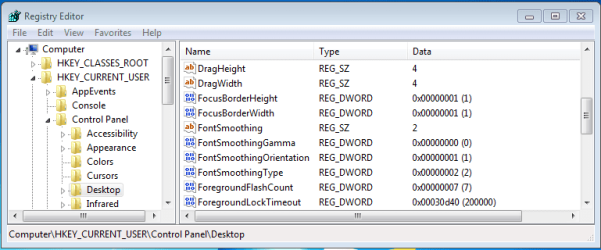
ForegroundFlashCount = 7.
In the "answers.microsoft" thread, styler918 mentions that ForegroundFlashCount = 7 for windows 7. styler918 is advised to change that to 3. Meghmala never meant to suggest that people change these values to fix the issue. Meghmala meant to tell people to set their values to the default values. Meghmala simply referenced the wrong default values.
The default value for ForegroundLockTimeout is 200 seconds (200000 milliseconds) for both Windows 2000 and Windows 7.
As mentioned, the "answers.microsoft" thread just wanted people to compare (and set, if need be) their values to the (wrong) default numbers. The suggestions in the "social.microsoft" thread can get confusing:
On 22 Oct 2011, johnqflorida links to the "answers.microsoft" thread.
On 06 Feb 2012, F00DSTAMP proclaims that changing the ForegroundFlashCount to 3 fixed things.
F00DSTAMP came away with the wrong setting and probably did not test long enough to know if the issue was really fixed.
On 22 Aug 2012, BillGateFollower suggests setting ForegroundLockTimeout to 0. Unfortunately, BillGateFollower also quotes the Windows 2000 default for ForegroundFlashCount as being 3.
On 09 July 2013, Eric Miner quotes BillGateFollower's post and says, "All it took was the number 3." Eric Miner makes no mention of setting ForegroundLockTimeout to 0 (which was the point of BillGateFollower's post).
On 02 Jan 2014, krish.badder123 proclaimed that setting ForegroundLockTimeout to 0 fixed the issue for one user profile, but the problem still happened for other users. On that computer, the issue seems to happen quite often.
There are other suggestions that don't make any sense. Some of them fall in the category of "the cure is worse than the disease".
So - what to do? What to change? Why so many different stories about which change fixed things?
Windows are placed on the desktop using X and Y coordinates. The Z axis (Z-order) is used to describe how windows are stacked on top of each other. The Z-order is a simple list - top window to bottom window. The Z-order of windows is handled by the video driver - which are influenced by themes. That Z-order gets messed up - windows get stuck on top - the window in focus is not always on top.
People might make a change in the registry and restart the computer. They might not wait long enough before declaring the issue solved. I don't see this issue every day. Perhaps others see it every few minutes. It probably depends on how messed up their video driver is and how various windows interact with the Z-order (e.g. how the window asks to be on top).
You can change these registry values if you want, but updating the videoDrivers (or maybe changing themes) might set them back to the correct default values. Some people mentioned that their registry changes did not hold.
I need to go ahead and make this post or the image that I attached will be deleted (because the post was not finalized soon enough). I'll ramble on in another post.
Edit:
...and it happened. The image was deleted. Even hitting the post preview button could not keep that attached image from being deleted. I type too much and too slowly :-(
FALSE. The info is wrong in those threads. The technet links posted in both threads are for the Windows 2000 operating system... and yet, the threads are mostly about Windows 7 systems.OK, I looked up the ForegroundFlashCount. The default is 3. My Registry says mine is 0x00000007 (7). I assume that means 7 and my Registry is different from the default. True?
From a fresh install of Windows 7 pro 64bit:
ForegroundFlashCount = 7.
In the "answers.microsoft" thread, styler918 mentions that ForegroundFlashCount = 7 for windows 7. styler918 is advised to change that to 3. Meghmala never meant to suggest that people change these values to fix the issue. Meghmala meant to tell people to set their values to the default values. Meghmala simply referenced the wrong default values.
The default value for ForegroundLockTimeout is 200 seconds (200000 milliseconds) for both Windows 2000 and Windows 7.
As mentioned, the "answers.microsoft" thread just wanted people to compare (and set, if need be) their values to the (wrong) default numbers. The suggestions in the "social.microsoft" thread can get confusing:
On 22 Oct 2011, johnqflorida links to the "answers.microsoft" thread.
On 06 Feb 2012, F00DSTAMP proclaims that changing the ForegroundFlashCount to 3 fixed things.
F00DSTAMP came away with the wrong setting and probably did not test long enough to know if the issue was really fixed.
On 22 Aug 2012, BillGateFollower suggests setting ForegroundLockTimeout to 0. Unfortunately, BillGateFollower also quotes the Windows 2000 default for ForegroundFlashCount as being 3.
On 09 July 2013, Eric Miner quotes BillGateFollower's post and says, "All it took was the number 3." Eric Miner makes no mention of setting ForegroundLockTimeout to 0 (which was the point of BillGateFollower's post).
On 02 Jan 2014, krish.badder123 proclaimed that setting ForegroundLockTimeout to 0 fixed the issue for one user profile, but the problem still happened for other users. On that computer, the issue seems to happen quite often.
There are other suggestions that don't make any sense. Some of them fall in the category of "the cure is worse than the disease".
So - what to do? What to change? Why so many different stories about which change fixed things?
Windows are placed on the desktop using X and Y coordinates. The Z axis (Z-order) is used to describe how windows are stacked on top of each other. The Z-order is a simple list - top window to bottom window. The Z-order of windows is handled by the video driver - which are influenced by themes. That Z-order gets messed up - windows get stuck on top - the window in focus is not always on top.
People might make a change in the registry and restart the computer. They might not wait long enough before declaring the issue solved. I don't see this issue every day. Perhaps others see it every few minutes. It probably depends on how messed up their video driver is and how various windows interact with the Z-order (e.g. how the window asks to be on top).
You can change these registry values if you want, but updating the videoDrivers (or maybe changing themes) might set them back to the correct default values. Some people mentioned that their registry changes did not hold.
I need to go ahead and make this post or the image that I attached will be deleted (because the post was not finalized soon enough). I'll ramble on in another post.
Edit:
...and it happened. The image was deleted. Even hitting the post preview button could not keep that attached image from being deleted. I type too much and too slowly :-(
Last edited:
My Computer
At a glance
W7 Pro SP1 64biti78GBIntel HD Graphics
- Computer type
- Laptop
- Computer Manufacturer/Model Number
- Employer provided Dell Latitude
- OS
- W7 Pro SP1 64bit
- CPU
- i7
- Memory
- 8GB
- Graphics Card(s)
- Intel HD Graphics
- Hard Drives
- crappy SSD
- Antivirus
- Employer mandated Symantec Endpoint Protection
- Browser
- Pale Moon 64bit, IE11 64bit & Chrome 64bit
Well, changing theme was hinted at one of the suggestions.
Another one that doesn't include changing registry is: toggle taskbar locking
Another one that doesn't include changing registry is: toggle taskbar locking
My Computer
At a glance
Windows 7 Ultimate x64 SP1AMD Phenom 2 1090T2x8GB Kingston HyperX Fury Black 1600Mhz Unga...MSI GTX 970 Gaming 4G
- Computer type
- PC/Desktop
- Computer Manufacturer/Model Number
- Custom Build
- OS
- Windows 7 Ultimate x64 SP1
- CPU
- AMD Phenom 2 1090T
- Motherboard
- Gigabyte GA-890FXA-UD5
- Memory
- 2x8GB Kingston HyperX Fury Black 1600Mhz Unganged
- Graphics Card(s)
- MSI GTX 970 Gaming 4G
- Sound Card
- Realtek On-Board HD 7.1 Audio / Logitech G35
- Monitor(s) Displays
- 3xAcer GD245HQ
- Screen Resolution
- 1920x1080
- Hard Drives
- Samsung 850 Pro 512GB SSD - OS /
WD Caviar Black SATA 3 - 1 TBx2 - Dynamic RAID 0 /
WD Caviar Green SATA 2 - 640GBx2 - Dynamic RAID 0 /
WD Caviar Green SATA 2 - 640GB - Internal Backup /
Seagate Barracude SATA 3 - 3TB - External Backup/ Sync
- PSU
- HighPower 1000W
- Case
- Cooler Master HAF 932
- Cooling
- Noctua NH-D14
- Keyboard
- Logitech G19
- Mouse
- Logitech G500
- Internet Speed
- 100/4 Mbit Cable (100GB quota)
- Antivirus
- ZoneAlarm Extreme Security / MBAM Pro / MBAE Free / SAS Free
- Browser
- IE 11 - Firefox - Chrome
- Other Info
- Logitech F710/ G27/ G940/ Z5500 // TrackIR 5 // Nvidia 3D Surround Vision
- Local time
- 3:43 PM
- Messages
- 8,138
According to the Windows 2000 info, ForegroundFlashCount:
I'm not sure what system means in this context. Probably the operating system and not the System account.
Do these settings impact how windows act when a user causes a window to open?
Using the default settings for the two registry settings being discussed:
If I tell Task Scheduler to open notepad in a few minutes. Then I leave the computer alone. The notepad window opens behind the window that I used to create the scheduled task.
Changing those two registry values*:
I can get notepad to launch in the foreground.
*without more testing, I'm hesitant to say what the values should be... and besides, I'm not seeing any impact on windows that a user launches - yet.
A scheduled task does seems to qualify as the system activating a background window.
I'm not sure what activated means in this context. Created?Specifies the number of times the taskbar button flashes to notify the user that the system has activated a background window. If the time elapsed since the last user input exceeds the value of the ForegroundLockTimeout entry, the window will automatically be brought to the foreground.
I'm not sure what system means in this context. Probably the operating system and not the System account.
Do these settings impact how windows act when a user causes a window to open?
Using the default settings for the two registry settings being discussed:
If I tell Task Scheduler to open notepad in a few minutes. Then I leave the computer alone. The notepad window opens behind the window that I used to create the scheduled task.
Changing those two registry values*:
I can get notepad to launch in the foreground.
*without more testing, I'm hesitant to say what the values should be... and besides, I'm not seeing any impact on windows that a user launches - yet.
A scheduled task does seems to qualify as the system activating a background window.
Last edited:
My Computer
At a glance
W7 Pro SP1 64biti78GBIntel HD Graphics
- Computer type
- Laptop
- Computer Manufacturer/Model Number
- Employer provided Dell Latitude
- OS
- W7 Pro SP1 64bit
- CPU
- i7
- Memory
- 8GB
- Graphics Card(s)
- Intel HD Graphics
- Hard Drives
- crappy SSD
- Antivirus
- Employer mandated Symantec Endpoint Protection
- Browser
- Pale Moon 64bit, IE11 64bit & Chrome 64bit
- Local time
- 3:43 PM
- Messages
- 8,138
Don't get me wrong, the links were helpful. Changing that one setting from 7 to 3 is not going to hurt anything. Changing themes or toggling various settings might indeed fix the issue (for a while). But it would be nice to know what puts the Windows OS into this broken state.Well, changing theme was hinted at one of the suggestions.
Another one that doesn't include changing registry is: toggle taskbar locking
For what it is worth, Process Monitor did not show those two registry settings being changed during a theme change or toggling the lock on the taskbar. (I did not update/change the videoDrivers.) So much for my theory on why some people's registry edits did not hold. Maybe their security software reverted their registry changes.
GokAy,
Do you ever see the Z-order get messed up?
Last edited:
My Computer
At a glance
W7 Pro SP1 64biti78GBIntel HD Graphics
- Computer type
- Laptop
- Computer Manufacturer/Model Number
- Employer provided Dell Latitude
- OS
- W7 Pro SP1 64bit
- CPU
- i7
- Memory
- 8GB
- Graphics Card(s)
- Intel HD Graphics
- Hard Drives
- crappy SSD
- Antivirus
- Employer mandated Symantec Endpoint Protection
- Browser
- Pale Moon 64bit, IE11 64bit & Chrome 64bit
If it counts, only sometimes certain pop-up windows stay behind, like auto-play options when inserting a USB flash/drive. Then the icon on taskbar flashes a few times to warn that it has opened, maybe it is the registry setting mentioned that change this behavior?
Any Window that I open myself are correctly come to the front.
Any Window that I open myself are correctly come to the front.
My Computer
At a glance
Windows 7 Ultimate x64 SP1AMD Phenom 2 1090T2x8GB Kingston HyperX Fury Black 1600Mhz Unga...MSI GTX 970 Gaming 4G
- Computer type
- PC/Desktop
- Computer Manufacturer/Model Number
- Custom Build
- OS
- Windows 7 Ultimate x64 SP1
- CPU
- AMD Phenom 2 1090T
- Motherboard
- Gigabyte GA-890FXA-UD5
- Memory
- 2x8GB Kingston HyperX Fury Black 1600Mhz Unganged
- Graphics Card(s)
- MSI GTX 970 Gaming 4G
- Sound Card
- Realtek On-Board HD 7.1 Audio / Logitech G35
- Monitor(s) Displays
- 3xAcer GD245HQ
- Screen Resolution
- 1920x1080
- Hard Drives
- Samsung 850 Pro 512GB SSD - OS /
WD Caviar Black SATA 3 - 1 TBx2 - Dynamic RAID 0 /
WD Caviar Green SATA 2 - 640GBx2 - Dynamic RAID 0 /
WD Caviar Green SATA 2 - 640GB - Internal Backup /
Seagate Barracude SATA 3 - 3TB - External Backup/ Sync
- PSU
- HighPower 1000W
- Case
- Cooler Master HAF 932
- Cooling
- Noctua NH-D14
- Keyboard
- Logitech G19
- Mouse
- Logitech G500
- Internet Speed
- 100/4 Mbit Cable (100GB quota)
- Antivirus
- ZoneAlarm Extreme Security / MBAM Pro / MBAE Free / SAS Free
- Browser
- IE 11 - Firefox - Chrome
- Other Info
- Logitech F710/ G27/ G940/ Z5500 // TrackIR 5 // Nvidia 3D Surround Vision
I changed the ForegroundFlashCount value in the Registry from 7 to 3 as the instructions stated. I left the ForegroundLockTimeout the same - as mine was the same as the default. I did this yesterday ans so far, the issue is fixed. I might have to wait for a few days to see if it is fixed for good. In the meantime, thanks for your help I'll let you know the verdict when I get one.
My Computer
At a glance
Windows 7
- Computer Manufacturer/Model Number
- HP Pavilion KQ574AV
- OS
- Windows 7

Have a look whether this little app will help. It is really neat and easy to use ==> DeskPins - Download
My Computer
At a glance
Vista, Windows7, Mint Mate, Zorin, Windows 8from 1.6GHz Duo to i7
- Computer Manufacturer/Model Number
- HP, Dell, Gateway, Toshiba - 4 laptops and 2 desktops
- OS
- Vista, Windows7, Mint Mate, Zorin, Windows 8
- CPU
- from 1.6GHz Duo to i7
- Monitor(s) Displays
- 2x HP w2207
- Hard Drives
- 5x HDD, 7x SSD, 12x Externals
- Keyboard
- with trackball - no mices
- Mouse
- Trackball mice
- Internet Speed
- DSL 6000
Similar threads

- Replies
- 2
- Views
- 8K
- Replies
- 3
- Views
- 2K
- Replies
- 16
- Views
- 2K
- Replies
- 29
- Views
- 3K

- Replies
- 0
- Views
- 658