
krazykat sevenf
New member
- Local time
- 2:41 AM
- Messages
- 16
Hello,
I hope I am posting in the correct forum. Let me know if I should post in a different winfows7 forum or the windows10 forum.
I have Windows 7 PRO (64bit) and cannot find a way to make an update to the Windows 10 Compatibility Appraiser.
What I have done:
Downloaded and installed KB3035583. I have the windows (flag /) icon in my task tray and successfully ran the Windows 10 Compatibility Appraiser. A report was generated on 5/26/2016 saying my PC (a desktop) was compatible and there was one software program that needed to be removed.
The software program is an “ older” copy of Acronis Home backup. I updated the Acronis program to a new version, and verified the new version works and makes backups.
I want to re-run the Windows 10 Compatibility Appraiser to verify my PC is now fully 100% compatible and the report does not list the Acronis software as incompatible.
I have been unable to find a way to manually run Windows 10 Compatibility Appraiser.
When I open the Windows 10 task tray icon I appear to be stuck at the completion of the last run (report dated 5/26/2016) with no way to request and update.
I did a Google search on how to manually start Windows 10 Compatibility Appraiser.
Two pages listed the following elevated command prompt to manually start Windows 10 Compatibility Appraiser.
[FONT="]Open an elevated command prompt window, type the following command, and hit Enter:[/FONT]
[FONT="]schtasks.exe /Run /TN "\Microsoft\Windows\Application Experience\Microsoft Compatibility Appraiser"[/FONT]
[FONT="] [/FONT]
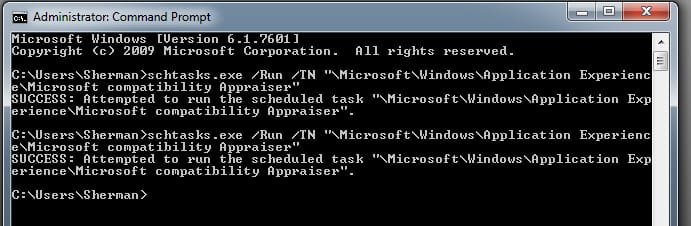
[FONT="]Here is a screen shot (attached) of the elevated command window showing the commands I sent (which match the screenshot on the Google page). [/FONT]
[FONT="] I sent the first command and waited about an hour and a half and then checked for an updated report in the [/FONT]Windows 10 Compatibility Appraiser. There appeared to no change, text of report is the same; Acronis software still flagged as a problem and the report was still dated 5/26/2016.
I sent the second, identical command. It has now been over 4 hours and a check of the Windows 10 Compatibility Appraiser report shows no change. Text of report is the same; Acronis software still flagged as a problem and the report was still dated 5/26/2016.
[FONT="] [/FONT]
[FONT="] [/FONT]
[FONT="] [/FONT]
What am I doing wrong? I need to have a current dated report showing the compatibility of the Acronis software status, so I can make changes or remove. Is there a way to manually start the Windows 10 Compatibility Appraiser and generate a current dated report?
I looked at the Task Scheduler and as far as I could tell the task scheduler , under Setup, gwx is supposed to run at log on. It may be running, but not generating an updated report. I am not familiar with the Task Scheduler, so my interpretation is probably not correct.
Suggestions and tips greatly appreciated,
krazykat
I hope I am posting in the correct forum. Let me know if I should post in a different winfows7 forum or the windows10 forum.
I have Windows 7 PRO (64bit) and cannot find a way to make an update to the Windows 10 Compatibility Appraiser.
What I have done:
Downloaded and installed KB3035583. I have the windows (flag /) icon in my task tray and successfully ran the Windows 10 Compatibility Appraiser. A report was generated on 5/26/2016 saying my PC (a desktop) was compatible and there was one software program that needed to be removed.
The software program is an “ older” copy of Acronis Home backup. I updated the Acronis program to a new version, and verified the new version works and makes backups.
I want to re-run the Windows 10 Compatibility Appraiser to verify my PC is now fully 100% compatible and the report does not list the Acronis software as incompatible.
I have been unable to find a way to manually run Windows 10 Compatibility Appraiser.
When I open the Windows 10 task tray icon I appear to be stuck at the completion of the last run (report dated 5/26/2016) with no way to request and update.
I did a Google search on how to manually start Windows 10 Compatibility Appraiser.
Two pages listed the following elevated command prompt to manually start Windows 10 Compatibility Appraiser.
[FONT="]Open an elevated command prompt window, type the following command, and hit Enter:[/FONT]
[FONT="]schtasks.exe /Run /TN "\Microsoft\Windows\Application Experience\Microsoft Compatibility Appraiser"[/FONT]
[FONT="] [/FONT]
[FONT="]Here is a screen shot (attached) of the elevated command window showing the commands I sent (which match the screenshot on the Google page). [/FONT]
[FONT="] I sent the first command and waited about an hour and a half and then checked for an updated report in the [/FONT]Windows 10 Compatibility Appraiser. There appeared to no change, text of report is the same; Acronis software still flagged as a problem and the report was still dated 5/26/2016.
I sent the second, identical command. It has now been over 4 hours and a check of the Windows 10 Compatibility Appraiser report shows no change. Text of report is the same; Acronis software still flagged as a problem and the report was still dated 5/26/2016.
[FONT="] [/FONT]
[FONT="] [/FONT]
[FONT="] [/FONT]
What am I doing wrong? I need to have a current dated report showing the compatibility of the Acronis software status, so I can make changes or remove. Is there a way to manually start the Windows 10 Compatibility Appraiser and generate a current dated report?
I looked at the Task Scheduler and as far as I could tell the task scheduler , under Setup, gwx is supposed to run at log on. It may be running, but not generating an updated report. I am not familiar with the Task Scheduler, so my interpretation is probably not correct.
Suggestions and tips greatly appreciated,
krazykat
Attachments
My Computer
At a glance
Windows 7 PRO 64 bit
- OS
- Windows 7 PRO 64 bit


