
Windows 10 update help

tarmarov

New member
Local time
1:34 PM
Messages
4
Hi, I am running Windows 7 ultimate service pack one. I managed to get the windows 10 icon to appear in my system tray, however when I click on it the window appears and then instantly closes. I have no idea how to fix this issue. Will I still be able to upgrade to windows 10?

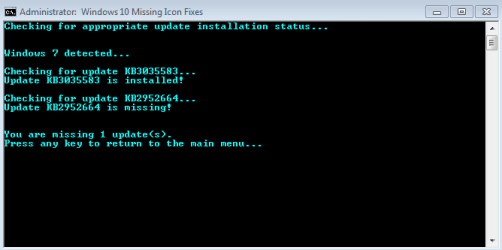
Update: I followed this How to get the Windows 10 upgrade icon if it's missing - CNET and I ended up with this screen shot. It says I am missing an update, however I do not know what update that is because my windows updater does not have anything else for me to update. Is there anyway I can download watever this missing update is online?
 

Attachments
  • win10.PNG
    win10.PNG
    4.6 KB · Views: 19

My Computer

Computer type
PC/Desktop
OS
windows 7
alright I just updated it and the windows 10 icon still instantly closes itself... any ideas?
None! I myself got rid of the W10 icon because it super slowed my startups and I have no plans to update my W7 install.
 

My Computer

OS
W7 Pro 64bit
alright I just updated it and the windows 10 icon still instantly closes itself... any ideas?
None! I myself got rid of the W10 icon because it super slowed my startups and I have no plans to update my W7 install.

:/ welp I guess I'll have to take a hit and buy it then. I think it's a good idea to buy it just incase I ever need new installs.
 

My Computer

Computer type
PC/Desktop
OS
windows 7
Would the icon simply not showing really keep the free upgrade from coming in?
 

My Computer

Computer type
Laptop
Computer Manufacturer/Model Number
Dell Latitude E7440
OS
Microsoft Windows 7 Professional 64-bit SP1
CPU
Intel(R) Core(TM) i5-4300U CPU @ 1.90GHz
Motherboard
Dell Inc. 091TRH
Memory
8.00 GB
Graphics Card(s)
Intel(R) HD Graphics Family
Sound Card
Realtek High Definition Audio
Screen Resolution
1366 x 768
Hard Drives
SAMSUNG SSD SM841N mSATA SCSI Disk Device
Antivirus
MalwareBytes Premium
Browser
Chrome
Would the icon simply not showing really keep the free upgrade from coming in?

Actually I fixed the problem. Soon after I downloaded that above update, my windows detected a crap load of important updates to install. I think like 200 updates needed to be installed, after that it worked so problem solved.
 

My Computer

Computer type
PC/Desktop
OS
windows 7
Back
Top