Solved Windows 10 Update?

pcspike

New member
Member
Local time
6:06 PM
Messages
41
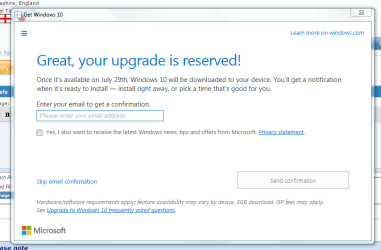
Having just appeared on my PC and laptop the ‘The Get Free Windows 10’ seemed like the way to go, so I have reserved an upgrade for download. However, am now having second thoughts as I’m not sure if all my software will work after the download and I don’t want to take that risk. I realise I should have thought of this before, but there you go. How do I cancel the automatic download until such time that I can do some tests?
 

My Computer

Computer type
Laptop
OS
Windows 7 Ultimate

My Computer

Computer type
PC/Desktop
OS
Windows 11
Hi,
Have tried that but the page only shows for a split second and then shows the page that I have attached
 

Attachments

  • win10.PNG
    win10.PNG
    26.3 KB · Views: 3

My Computer

Computer type
Laptop
OS
Windows 7 Ultimate
I'm running Windows 10 so I don't have it to try, however try clicking on the hamburger menu icon (3 lines) at the top left of the window and see if there is an option to do it from the 'View Confirmation' link.
 

My Computer

Computer type
PC/Desktop
OS
Windows 11
Hi

Thanks, that did the trick! Under 'View Confirmation' there is a second option to cancel that works.
 

My Computer

Computer type
Laptop
OS
Windows 7 Ultimate
I reserved and shortly after cancelled. I recall reading somewhere that regular 'automatic' file downloads would occur until the release, in order to make the install go faster. I hope the cancellation will disable this 'feature', as I was not 'asked' to d/l this icon and it occurred w/o my approval. Anyway to watchdog/prevent these 'automatic' d/l's?
 

My Computer

Computer type
PC/Desktop
Computer Manufacturer/Model Number
HP (HP-P6212F)
OS
Microsoft Windows 7 Home Premium 64-bit 7601 Multiprocessor Free Service Pack 1
CPU
Pentium(R) Dual-Core CPU E5300 @ 2.60GHz
Motherboard
PEGATRON CORPORATION Benicia
Memory
6.00 GB
Graphics Card(s)
Intel(R) G33/G31 Express Chipset Family
Sound Card
Realtek High Definition Audio
Monitor(s) Displays
24'' HP WS LCD
Screen Resolution
1920 x 1080 x 32 bits (4294967296 colors) @ 60 Hz
Hard Drives
(1) ATA Hitachi HDT72106 SCSI Disk Device (2) Generic- Compact Flash USB Device (3) Generic- MS/MS-Pro USB Device (4) Generic- SD/MMC USB Device (5) Generic- SM/xD-Picture USB Device (6) Verbatim STORE N GO USB Device
Keyboard
Logitech G510s
Mouse
Logitech Trackball M570
Antivirus
Microsoft Security Essentials / Malwarebytes
Browser
IE / Firefox / Chrome
I reserved and shortly after cancelled. I recall reading somewhere that regular 'automatic' file downloads would occur until the release, in order to make the install go faster. I hope the cancellation will disable this 'feature', as I was not 'asked' to d/l this icon and it occurred w/o my approval. Anyway to watchdog/prevent these 'automatic' d/l's?

I'd doubt if you'll get any "automatic" downloads if you have Windows Update set to "check for updates but let me choose whether to download and install them".

I did not reserve and have all of the Windows Updates related to Win 10 hidden.

Nevertheless, yesterday Windows Update had a few more updates for me that apparently are connected with the Win 10 update. I hid them too. But they were NOT downloaded due to my setting of "check for updates but.........................."
 

My Computer

Computer type
PC/Desktop
Computer Manufacturer/Model Number
Ignatz Special; 4 speed manual gearbox; factory air conditioning; one of one
OS
Windows 7 Home Premium SP1, 64-bit
CPU
Intel Skylake i5-6600K, not overclocked
Motherboard
AsRock Z170M Extreme 4, micro ATX
Memory
8 GB HyperX DDR4-2666 (2 x 4 GB)
Graphics Card(s)
none; graphics are integrated on CPU
Sound Card
onboard: Realtek ALC1150; external: USB Behringer UF0-202
Monitor(s) Displays
Dell S2340M 23 inch IPS
Screen Resolution
1600 x 900
Hard Drives
System: Crucial MX100 series SSD, 128 GB;
Data: Samsung Spinpoint 103SJ, 1 TB;
Backup: WD Caviar Green WD30EZRX-00D8PB0, 3 TB
PSU
Rosewill SilentNight 500 watt fanless, semi-modular
Case
Antec Solo II
Cooling
Noctua NH-U12S; Noctua F12 intake, Noctua S12A exhaust
Keyboard
Microsoft 200 6JH-00001 USB
Mouse
Dell or Microsoft optical wired; USB
Antivirus
Microsoft Security Essentials and Malwarebytes Premium
Browser
Pale Moon
Other Info
All fans PWM; speeds at idle: CPU circa 500 rpm; intake circa 600 rpm; exhaust circa 600 rpm; CPU temps 27 idle and 47 C load in a warm room (27 C/81 F) when running Intel Extreme Tuning Utility stress test.
I reserved and shortly after cancelled. I recall reading somewhere that regular 'automatic' file downloads would occur until the release, in order to make the install go faster. I hope the cancellation will disable this 'feature', as I was not 'asked' to d/l this icon and it occurred w/o my approval. Anyway to watchdog/prevent these 'automatic' d/l's?

I'd doubt if you'll get any "automatic" downloads if you have Windows Update set to "check for updates but let me choose whether to download and install them".

I did not reserve and have all of the Windows Updates related to Win 10 hidden.

Nevertheless, yesterday Windows Update had a few more updates for me that apparently are connected with the Win 10 update. I hid them too. But they were NOT downloaded due to my setting of "check for updates but.........................."

Having it set to that did not work for some reason on my system something changed it back to auto could have been any number of things, though installing some updates to MS Office was a possible suspect along with IE11 security updates... I have it now set to disabled and am only installing selected updates offline and checking that the damn thing is still disabled before going back online.
 

My Computer

Computer type
Laptop
Computer Manufacturer/Model Number
Sony
OS
Windows 7 x64 SP1
CPU
Intel
Motherboard
Sony
Memory
4gb
Graphics Card(s)
Nvidia
Hard Drives
WD
Internet Speed
Dial up wasn't as bad as this !
Antivirus
Avast
Browser
Firefox
... I'd doubt if you'll get any "automatic" downloads if you have Windows Update set to "check for updates but let me choose whether to download and install them".
... but.........................."
yeah, right. I do have my system configured that way but I still find 'updates' occurring w/o my express consent. This little Win10 icon appeared out of nowhere is a prime example. Either that or MS is sneaking this crap in, piggy-backing it on something unawares to me ...
 

My Computer

Computer type
PC/Desktop
Computer Manufacturer/Model Number
HP (HP-P6212F)
OS
Microsoft Windows 7 Home Premium 64-bit 7601 Multiprocessor Free Service Pack 1
CPU
Pentium(R) Dual-Core CPU E5300 @ 2.60GHz
Motherboard
PEGATRON CORPORATION Benicia
Memory
6.00 GB
Graphics Card(s)
Intel(R) G33/G31 Express Chipset Family
Sound Card
Realtek High Definition Audio
Monitor(s) Displays
24'' HP WS LCD
Screen Resolution
1920 x 1080 x 32 bits (4294967296 colors) @ 60 Hz
Hard Drives
(1) ATA Hitachi HDT72106 SCSI Disk Device (2) Generic- Compact Flash USB Device (3) Generic- MS/MS-Pro USB Device (4) Generic- SD/MMC USB Device (5) Generic- SM/xD-Picture USB Device (6) Verbatim STORE N GO USB Device
Keyboard
Logitech G510s
Mouse
Logitech Trackball M570
Antivirus
Microsoft Security Essentials / Malwarebytes
Browser
IE / Firefox / Chrome
I`m sorry but I beg to differ, the icon appeared because you installed an update. I have nothing GWX related on my PC and I have a list of updates not to install. If you want it just PM me.

I have updates set to check for, and I have never had windows install an update without me physically doing it myself.
 

My Computer

Computer type
PC/Desktop
Computer Manufacturer/Model Number
Skylake Special #666
OS
Windows 10 Pro x64
CPU
Intel Core i7 6700K
Motherboard
Asus Sabertooth Z170 Mark 1
Memory
GSkill TridentZ RGB 16GB 3600 16-16-16-36
Graphics Card(s)
EVGA GTX 980 Ti SC x2
Sound Card
Realtek High Definition
Monitor(s) Displays
AOC G2460PG
Screen Resolution
1920 x 1080 144Hz
Hard Drives
Samsung 860 Pro 256GB, Seagate Barracuda 4TB x2
PSU
EVGA 1000 P2, EVGA White Custom Braided Cables
Case
Corsair Vengeance C70 Gunmetal Black
Cooling
Corsair H100i v2, Corsair ML120 x2, Thermal Grizzly Kryonaut
Keyboard
Logitech G910 Orion Spectrum
Mouse
Logitech G700s
Internet Speed
Verizon Fios Quantum Gateway 75/75
Antivirus
Windows Defender, Malwarebytes Free 3.8.3
Browser
Chrome
Other Info
Corsair SP120 x4, LG Blu-ray Drive, Durabrand HT-395 100 Watt Dolby Digital Amp, Corsair H2100 Wireless 7.1 Headset
'My' experience is not everyone's experience. Moving on ...
 

My Computer

Computer type
PC/Desktop
Computer Manufacturer/Model Number
HP (HP-P6212F)
OS
Microsoft Windows 7 Home Premium 64-bit 7601 Multiprocessor Free Service Pack 1
CPU
Pentium(R) Dual-Core CPU E5300 @ 2.60GHz
Motherboard
PEGATRON CORPORATION Benicia
Memory
6.00 GB
Graphics Card(s)
Intel(R) G33/G31 Express Chipset Family
Sound Card
Realtek High Definition Audio
Monitor(s) Displays
24'' HP WS LCD
Screen Resolution
1920 x 1080 x 32 bits (4294967296 colors) @ 60 Hz
Hard Drives
(1) ATA Hitachi HDT72106 SCSI Disk Device (2) Generic- Compact Flash USB Device (3) Generic- MS/MS-Pro USB Device (4) Generic- SD/MMC USB Device (5) Generic- SM/xD-Picture USB Device (6) Verbatim STORE N GO USB Device
Keyboard
Logitech G510s
Mouse
Logitech Trackball M570
Antivirus
Microsoft Security Essentials / Malwarebytes
Browser
IE / Firefox / Chrome
Back
Top