
Windows 10 Upgrade Inexplicable Error

jimlau

New member
Member
Local time
2:49 AM
Messages
87
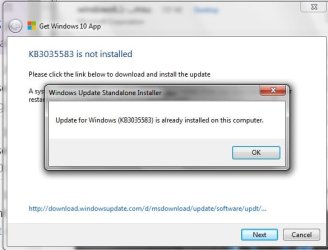
I ran the troubleshooter for windows 10 upgrade, as it's not happening. I qualify in all aspects, except it says KB3035583 not installed. but when I open my windows update history, it says this morning that was installed.

Any ideas on what's happening?

thanks.
 

Attachments
  • Untitled.jpg
    Untitled.jpg
    25.7 KB · Views: 13

My Computer

OS
Windows 7 Pro x64
Maybe reboot? I know from being in the insider program for a while there would be times that a reboot was needed and then the next version of the W10 TP would show up on windows update.

Especially if a person was on the slow ring and wanted to move to the fast ring (got updates quicker on the fast ring) a reboot would sometimes work right away.
 

My Computer

Computer type
PC/Desktop
Computer Manufacturer/Model Number
Self built
OS
Windows 11 Home x64
CPU
AMD Ryzen 5 5600G
Motherboard
ASUSTeK Prime B450M-A II
Memory
G.SKILL Ripjaws Gaming Series (2x8G) DDR4
Graphics Card(s)
None (AMD Radeon Graphics on MB and CPU)
Sound Card
None (integrated on MB)
Monitor(s) Displays
Acer S200HLAbd Black 20"
Screen Resolution
1600 x 900
Hard Drives
Samsung SSD 840 EVO 120GB (W10)
WD Blue 500G SATA 6G WDBAAX5000ENC-NRSN (Backup/Storage)
PSU
Corsair CX500 500W ATX12V v2.3 80 Plus Bronze Active PFC
Case
Unknown
Cooling
CPU-stock cooling fan, 1 extra 80mm case fan
Keyboard
Azio KB505U Large Print Tri-Color Illuminated USB Keyboard
Mouse
MS Optical Wheel Mouse (USB)
Internet Speed
ATT Fiber 5000/VOIP 5G down/5G up
Antivirus
Win Defender, SAS, Spyware Blaster all free editions
Browser
Firefox, Waterfox, sometimes Edge
Maybe reboot? I know from being in the insider program for a while there would be times that a reboot was needed and then the next version of the W10 TP would show up on windows update.

Especially if a person was on the slow ring and wanted to move to the fast ring (got updates quicker on the fast ring) a reboot would sometimes work right away.

rebooted multiple times. nada.
 

My Computer

OS
Windows 7 Pro x64
Hoping for the easy fix, figured you had rebooted but if not it wasn't going to hurt.

I guess W10 won't just download and install the update that it needs, that seems too much like the right thing to do. :rolleyes:

You might get some help on tenforums, or in one of Brink's tutorials for W10 installs there's something you could use, link to tenforums Windows 10 Forums - Windows 10 Forums
 

My Computer

Computer type
PC/Desktop
Computer Manufacturer/Model Number
Self built
OS
Windows 11 Home x64
CPU
AMD Ryzen 5 5600G
Motherboard
ASUSTeK Prime B450M-A II
Memory
G.SKILL Ripjaws Gaming Series (2x8G) DDR4
Graphics Card(s)
None (AMD Radeon Graphics on MB and CPU)
Sound Card
None (integrated on MB)
Monitor(s) Displays
Acer S200HLAbd Black 20"
Screen Resolution
1600 x 900
Hard Drives
Samsung SSD 840 EVO 120GB (W10)
WD Blue 500G SATA 6G WDBAAX5000ENC-NRSN (Backup/Storage)
PSU
Corsair CX500 500W ATX12V v2.3 80 Plus Bronze Active PFC
Case
Unknown
Cooling
CPU-stock cooling fan, 1 extra 80mm case fan
Keyboard
Azio KB505U Large Print Tri-Color Illuminated USB Keyboard
Mouse
MS Optical Wheel Mouse (USB)
Internet Speed
ATT Fiber 5000/VOIP 5G down/5G up
Antivirus
Win Defender, SAS, Spyware Blaster all free editions
Browser
Firefox, Waterfox, sometimes Edge
Back
Top