Windows 7 32 Bit - Wireless Driver Intel 7200 AGN - Code 31 Error

shripai

New member
Local time
11:34 PM
Messages
7
Hi,

I recently did a clean install of Windows 7 Home Premium 32 bit on my system, I backed out the data but did not back up the drivers.

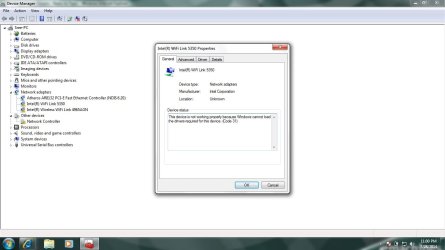
Now i see that everything else seems to be working fine except the Wifi function. The wired internet works fine. I can see the various wireless network adapters like Intel 5300 AGN, Intel 5100, Intel 7200 AGN and I have also installed the latest drivers for the same. But i keep getting this Code 31 error which says "The device is not working properly because Windows cannot load the driver"

Can someone pls help me troubleshoot this. I looked around on the internet but am unable to fix this. the machine is Acer e727 and I have a 1 GB RAM.

please let me know if you need more information.
 

My Computer

Computer type
PC/Desktop
OS
Windows 7 home Premium 32 Bit

My Computer

Computer Manufacturer/Model Number
W530-3630QM1
OS
windows 7 home 64bit
CPU
INTEL-CORE I7
Memory
16GB
Hard Drives
750GB
Browser
Chrome
Thanks for that. I used it to install a new driver for my wifi adapter but the problem still shows. Error 31 "This device is not working properly because Windows cannot load the drivers required for this device. (Code 31)"

I believe this has to do with something other than not having the driver file.
 

My Computer

Computer type
PC/Desktop
OS
Windows 7 home Premium 32 Bit
Thanks for that. I used it to install a new driver for my wifi adapter but the problem still shows. Error 31 "This device is not working properly because Windows cannot load the drivers required for this device. (Code 31)"

I believe this has to do with something other than not having the driver file.


Yes it could be a Hardware fault .. Can you Please Post a screenshot of the Device Manager with the Network Adapters expanded .. The Link below will help you achieve this ...

http://www.sevenforums.com/tutorials/9733-screenshots-files-upload-post-seven-forums.html
 

My Computer

Computer Manufacturer/Model Number
W530-3630QM1
OS
windows 7 home 64bit
CPU
INTEL-CORE I7
Memory
16GB
Hard Drives
750GB
Browser
Chrome
I have put in the screenshot here. If its a hardware issue, I am wondering why would it occur after the windows reinstall. The previous OS was Windows 7 32 bit as well. Also the wired internet works fine.
 

Attachments

  • Devicemgr.jpg
    Devicemgr.jpg
    70.6 KB · Views: 1

My Computer

Computer type
PC/Desktop
OS
Windows 7 home Premium 32 Bit
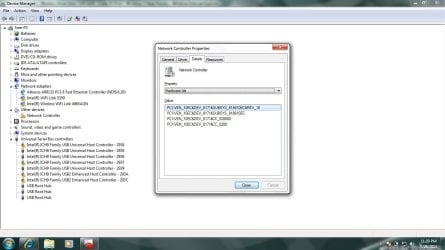
Select the other Device Network Controller right click on it Select Property's/ Hard ID .. Please Post back any Hardware ID if there is any there ?...
 

My Computer

Computer Manufacturer/Model Number
W530-3630QM1
OS
windows 7 home 64bit
CPU
INTEL-CORE I7
Memory
16GB
Hard Drives
750GB
Browser
Chrome
Hardware ids are

PCI\VEN_10EC&DEV_8171&SUBSYS_818610EC&REV_10
PCI\VEN_10EC&DEV_8171&SUBSYS_818610EC
PCI\VEN_10EC&DEV_8171&CC_028000
PCI\VEN_10EC&DEV_8171&CC_0280
 

Attachments

  • Controller.jpg
    Controller.jpg
    91.3 KB · Views: 0

My Computer

Computer type
PC/Desktop
OS
Windows 7 home Premium 32 Bit
From the Link i gave you please Download and Install the Chipset Driver .. I will get back to you about the other errors but i need to eat first .. Will not be to long ..
 

My Computer

Computer Manufacturer/Model Number
W530-3630QM1
OS
windows 7 home 64bit
CPU
INTEL-CORE I7
Memory
16GB
Hard Drives
750GB
Browser
Chrome
Download the Realtek Wireless LAN Driver ...
 

My Computer

Computer Manufacturer/Model Number
W530-3630QM1
OS
windows 7 home 64bit
CPU
INTEL-CORE I7
Memory
16GB
Hard Drives
750GB
Browser
Chrome
I installed the chipset drivers and now the realtek wireless driver. But no change in the device manager. I restarted after the chipset driver install not after the realtek. (I dont think i have the realtek adapter on my system?)
 

My Computer

Computer type
PC/Desktop
OS
Windows 7 home Premium 32 Bit
Please do another Reboot .. According to the Hardware ID you Posted you do have the realtek adapter ..
 

My Computer

Computer Manufacturer/Model Number
W530-3630QM1
OS
windows 7 home 64bit
CPU
INTEL-CORE I7
Memory
16GB
Hard Drives
750GB
Browser
Chrome
Ok i have restarted my system again. the device manager remains the same. I got to go to sleep now. Can u help me out tomorrow, pls post when you are online on this forum
 

My Computer

Computer type
PC/Desktop
OS
Windows 7 home Premium 32 Bit
No problem i will be here bright and early .. I am sure this will be easy sorted :)
 

My Computer

Computer Manufacturer/Model Number
W530-3630QM1
OS
windows 7 home 64bit
CPU
INTEL-CORE I7
Memory
16GB
Hard Drives
750GB
Browser
Chrome
You were right about that !!

The Realtek driver got installed now and the wireless works fine :) Thank u very much

Question though is why the other adapters still show a yellow mark and why wasnt this adapter showing up in device manager when i was doing 'Add Legacy Hardware'. Is there any way to see all the available adapters on your system so that we can try each one (is it through the list of hardware ids onnly?)
 

My Computer

Computer type
PC/Desktop
OS
Windows 7 home Premium 32 Bit
Most welcome glad you got the issue sorted .. If you boot from Safe Mode go to the Device Manager / View / Hidden Devices / ..

Please Post a screenshot of that ... And also the Device Manager in Normal mode with Network Adapters and USB Ports extended ...
 

My Computer

Computer Manufacturer/Model Number
W530-3630QM1
OS
windows 7 home 64bit
CPU
INTEL-CORE I7
Memory
16GB
Hard Drives
750GB
Browser
Chrome
Back
Top