Windows 7 32bit installation freezes at "completing installation" (AGA
Hello all!
for 3 days now iv been trying to install w7 32bit.
i have read a lot of messages here about fixing my problem and non of them was a success.
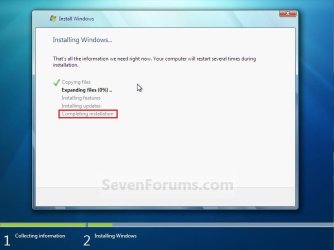
When installing w7, after the first reset, the installation returns to the screen where it shows the progress of the installation.
the only thing left is "completing installation". it hangs on that screen for hours and wouldnt contoniue. i can move my mouse but it dosent give much help.
things i tried untill now:
1, disconnecting all drives beside the one i want to install w7 on it.
2. disconnecting a pci card of USB2 slots.
3. disable all usb controls from bios (my mouse and keyboard are connected with "blue" and "purple" connections)
4. disable floppy ( which does not exist)- which didnt solve the problem but made the installation much faster)
5. Change in the bios from PCI to PEG
Additional Notes: I have only one monitor which is a LCD TV which connected to the nvidia graphic card with DVI to HD cable. in the installation it shows that i have 3 partitions in this hardisk and i have only 2 as far as i know. the third one has a 8MB capacity, mybe its related some how...
I have seen that people gave suggestions about a utility which fixes the hardrive and maybe solve the problem, but i have no operating system to do so.
I dont know much about my computer and i dont have any operating system to check it. i only know that i have intel core 1.8 ghz, 2gb ram, some gigabyte motherboard, and some nvidia graphic card.
Please help me! im one step away from installing XP again...
Hello all!
for 3 days now iv been trying to install w7 32bit.
i have read a lot of messages here about fixing my problem and non of them was a success.
When installing w7, after the first reset, the installation returns to the screen where it shows the progress of the installation.
the only thing left is "completing installation". it hangs on that screen for hours and wouldnt contoniue. i can move my mouse but it dosent give much help.
things i tried untill now:
1, disconnecting all drives beside the one i want to install w7 on it.
2. disconnecting a pci card of USB2 slots.
3. disable all usb controls from bios (my mouse and keyboard are connected with "blue" and "purple" connections)
4. disable floppy ( which does not exist)- which didnt solve the problem but made the installation much faster)
5. Change in the bios from PCI to PEG
Additional Notes: I have only one monitor which is a LCD TV which connected to the nvidia graphic card with DVI to HD cable. in the installation it shows that i have 3 partitions in this hardisk and i have only 2 as far as i know. the third one has a 8MB capacity, mybe its related some how...
I have seen that people gave suggestions about a utility which fixes the hardrive and maybe solve the problem, but i have no operating system to do so.
I dont know much about my computer and i dont have any operating system to check it. i only know that i have intel core 1.8 ghz, 2gb ram, some gigabyte motherboard, and some nvidia graphic card.
Please help me! im one step away from installing XP again...
My Computer
At a glance
Window XP
- OS
- Window XP