Windows 7, 64-bit: Linksys WUSB54GS 2.1 does not work

Spectrum

New member
Local time
7:07 PM
Messages
2
Hello.

I have the following problem: I am running a fresh installation of Windows 7, 64-bit version, and trying to get my Linksys WUSB54GS 2.1 wireless adapter to work. I can install the driver I have on a CD, but the adapter refuses to work. When I open the Linksys Wireless Manager, I get a nice graphical overview where none of the buttons (except "Exit") respond to clicks and where no wireless networks show up.

My adapter (and network) works fine in Linux, so I do not believe it is broken. I have, however, encountered the same problem before in Windows XP. On my first few installations of XP the adapter worked perfectly, but one day (when I reinstalled XP) the above problem appeared, and I have never gotten it to work in Windows since. Still works in Linux, though.

I have looked around on the Linksys website. I can find drivers for version 1.0 and 2.0 (for Windows Vista and XP), but none for version 2.1. The 2.0 drivers do not work at all. With them installed, I cannot even open the Wireless Manager.

Can anyone help? Thanks in advance.
 

My Computer My Computer

At a glance

Fedora 13 Linux, Windows 7 64 bitIntel Core i7-860 4x2,86 GHz LGA11568 GB DDR3-1333
Computer Manufacturer/Model Number
PC-Vision Game 80+ Silent Greenpower
OS
Fedora 13 Linux, Windows 7 64 bit
CPU
Intel Core i7-860 4x2,86 GHz LGA1156
Motherboard
MB1156 Gigabyte GA-P55-USB3
Memory
8 GB DDR3-1333
What Windows versions does the CD say it supports?
If it has a Vista 64 bit driver you could try and install that in compatibility mode.

Otherwise, see below for more advanced solution ideas:

driver for Linksys WUSB54G needed(Vista 64 bit) - Networking & Security

Linksys WUSB54G Driver

Be sure to completely uninstall and clean up any old drivers before trying any new ones. One good and easy method is to disable the device and then remove it from Device Manager, then do a System Restore to a point before you installed it and restart.
 

My Computer My Computer

At a glance

Windows 7 64 Bit Home Premium SP1i7-3820GSkill F3-14900CL9Q - 16GBEVGA GeForce GTX660 - Driver 352.86
Computer type
PC/Desktop
Computer Manufacturer/Model Number
Home Built - Jan 2013
OS
Windows 7 64 Bit Home Premium SP1
CPU
i7-3820
Motherboard
Asus P9X79-PRO - Bios 4608
Memory
GSkill F3-14900CL9Q - 16GB
Graphics Card(s)
EVGA GeForce GTX660 - Driver 352.86
Sound Card
On board Realtek ALC898
Monitor(s) Displays
Acer S271HL
Screen Resolution
1920 x 1080
Hard Drives
#1- Samsung 840 Pro Series
#2- Western Digital WD1002FAEX Sata3 Black
#3- Western Digital WD1002FAEX Sata3 Black
PSU
Corsair CMPSU-850TX-V2 - 850 watt (by Seasonic)
Case
Corsair Obsidian 550D
Cooling
Standard 3 120mm case fans, Cooler Master Hyper 212 EVO
Keyboard
MS KC-0405
Mouse
Intellimouse 5-button
Internet Speed
56 Mbits/Sec (on a good day)
Antivirus
Avast & Malwarebytes
Browser
Firefox
Other Info
Asus DVD - DRW-24B1ST 24X
Hello.

I have the following problem: I am running a fresh installation of Windows 7, 64-bit version, and trying to get my Linksys WUSB54GS 2.1 wireless adapter to work. I can install the driver I have on a CD, but the adapter refuses to work. When I open the Linksys Wireless Manager, I get a nice graphical overview where none of the buttons (except "Exit") respond to clicks and where no wireless networks show up.

My adapter (and network) works fine in Linux, so I do not believe it is broken. I have, however, encountered the same problem before in Windows XP. On my first few installations of XP the adapter worked perfectly, but one day (when I reinstalled XP) the above problem appeared, and I have never gotten it to work in Windows since. Still works in Linux, though.

I have looked around on the Linksys website. I can find drivers for version 1.0 and 2.0 (for Windows Vista and XP), but none for version 2.1. The 2.0 drivers do not work at all. With them installed, I cannot even open the Wireless Manager.

Can anyone help? Thanks in advance.
Welcome to the Windows 7 Support Forums,
Assuming you have a wireless network already established you are attempting to use a second pc/laptop using the linksys wireless adaptor?
Linksys advises on a fresh install to load the installation disk and run the set up file before connecting the wireless adaptor to your system. This way all the drivers load. When completing the installation you are prompted to connect the wireless device to the usb port.
Other possibilities could be that there is a conflict between an existing nic card already installed on the subject pc where you will see this in the device manager or the usb port may not function correctly.
 

My Computer My Computer

At a glance

Windows 7 7600 1 X64AMD PHENOM II X 550 PROCESSOR 3.1 ghzCorsair 4 gig ddr 3ati radeon 3300
Computer Manufacturer/Model Number
Custom Build
OS
Windows 7 7600 1 X64
CPU
AMD PHENOM II X 550 PROCESSOR 3.1 ghz
Motherboard
ASUS M4A78-TE
Memory
Corsair 4 gig ddr 3
Graphics Card(s)
ati radeon 3300
Sound Card
ati hd
Monitor(s) Displays
syncmaster 2033sw
Screen Resolution
1600X900 60 hz refresh
Hard Drives
twin_seagates SATA's 1 TB & 500 Gig, hitachi_slimline 160 gig
PSU
antec_550 watt
Case
cooler master GLite
Cooling
stock_heat sink
Internet Speed
20mbs up/ 1.5mbs down
Other Info
favorite child "stewie"
favorite dog "brian"
Attached device

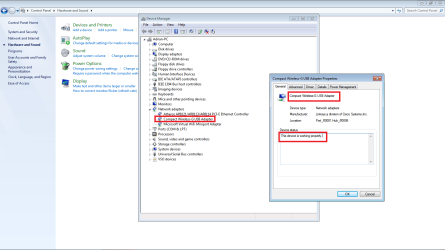
Hello Spectrum, attached is an image shot of my device manager. I have an extra wireless device and plugged into my desktop for you to review and check your device manager to see if you have your wireless device installed properly.
 

Attachments

  • wire.png
    wire.png
    57.4 KB · Views: 556

My Computer My Computer

At a glance

Windows 7 7600 1 X64AMD PHENOM II X 550 PROCESSOR 3.1 ghzCorsair 4 gig ddr 3ati radeon 3300
Computer Manufacturer/Model Number
Custom Build
OS
Windows 7 7600 1 X64
CPU
AMD PHENOM II X 550 PROCESSOR 3.1 ghz
Motherboard
ASUS M4A78-TE
Memory
Corsair 4 gig ddr 3
Graphics Card(s)
ati radeon 3300
Sound Card
ati hd
Monitor(s) Displays
syncmaster 2033sw
Screen Resolution
1600X900 60 hz refresh
Hard Drives
twin_seagates SATA's 1 TB & 500 Gig, hitachi_slimline 160 gig
PSU
antec_550 watt
Case
cooler master GLite
Cooling
stock_heat sink
Internet Speed
20mbs up/ 1.5mbs down
Other Info
favorite child "stewie"
favorite dog "brian"

My Computer My Computer

At a glance

Windows 7 7600 1 X64AMD PHENOM II X 550 PROCESSOR 3.1 ghzCorsair 4 gig ddr 3ati radeon 3300
Computer Manufacturer/Model Number
Custom Build
OS
Windows 7 7600 1 X64
CPU
AMD PHENOM II X 550 PROCESSOR 3.1 ghz
Motherboard
ASUS M4A78-TE
Memory
Corsair 4 gig ddr 3
Graphics Card(s)
ati radeon 3300
Sound Card
ati hd
Monitor(s) Displays
syncmaster 2033sw
Screen Resolution
1600X900 60 hz refresh
Hard Drives
twin_seagates SATA's 1 TB & 500 Gig, hitachi_slimline 160 gig
PSU
antec_550 watt
Case
cooler master GLite
Cooling
stock_heat sink
Internet Speed
20mbs up/ 1.5mbs down
Other Info
favorite child "stewie"
favorite dog "brian"
Thank you for all the replies. I managed to solve my problem. Here is what I did (detailed, in case anyone else has the same problem):

1. I moved my computer to a location where I could connect it to the internet with a cable.
2. Windows automatically detected the wired connection and allowed me to go on the net.
3. I right-clicked "My Computer", selected "Properties", then selected "Device Manager".
4. Under "Other devices" I located my Linksys adapter.
5. Double-clicked the Linksys adapter.
6. Clicked "Update driver".
7. Selected "Search for drivers online" (or something like that).
8. Windows found drivers and installed them for me.
9. Disconnect the network cable.
10. Insert Linksys adapter.
11. Now it worked.

Thanks again for the replies. :)
 

My Computer My Computer

At a glance

Fedora 13 Linux, Windows 7 64 bitIntel Core i7-860 4x2,86 GHz LGA11568 GB DDR3-1333
Computer Manufacturer/Model Number
PC-Vision Game 80+ Silent Greenpower
OS
Fedora 13 Linux, Windows 7 64 bit
CPU
Intel Core i7-860 4x2,86 GHz LGA1156
Motherboard
MB1156 Gigabyte GA-P55-USB3
Memory
8 GB DDR3-1333
Back
Top