Solved Windows 7 64 bit mute no longer has an effect.

xioSlayer

New member
Local time
10:54 AM
Messages
8
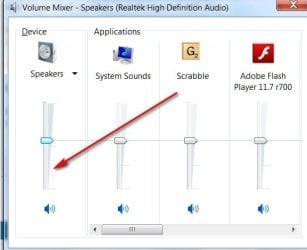
Just recently I noticed that when i mute my system from the speaker icon in the system tray, nothing happens. I see the muted symbol, but the sound still plays.

Anyone know of a fix for this? I could always turn the volume to 0% but thats annoying, since I can no longer use my mute button on my keyboard.

Any help would be appreciated, thanks.

EDIT:

I'm running a MSI p67 gd65 motherboard if that helps, it has realtek audio. When i open the realtek audio window, i try to mute it through there and it still fails to work.
 

My Computer My Computer

At a glance

Windows 7 Ultimate 64bit
OS
Windows 7 Ultimate 64bit
Are you muting the speakers?

Also, Check to see if your keyboard has a Mute button.

Mine is on the left by the volume buttons.
 

Attachments

  • realtek pic 7,3,13.jpg
    realtek pic 7,3,13.jpg
    23.8 KB · Views: 1
Last edited:

My Computer My Computer

At a glance

Windows 7 Professional X64Core i7 (2nd gen) i7-2600K / 3.40GHzDDR3 2400MHz (OC) 16gbIntel(R) HD Graphics 3000, -1988 Mb
Computer type
PC/Desktop
Computer Manufacturer/Model Number
Self-Built
OS
Windows 7 Professional X64
CPU
Core i7 (2nd gen) i7-2600K / 3.40GHz
Motherboard
ASUS P8Z77-V Intel 7 Series Motherboard
Memory
DDR3 2400MHz (OC) 16gb
Graphics Card(s)
Intel(R) HD Graphics 3000, -1988 Mb
Sound Card
8 ChannelsAudio Chipset Realtek ALC892
Monitor(s) Displays
LG 29UM65 Black 29"
Screen Resolution
2560 x 1080
Hard Drives
840 EVO 250 GB SSD ;2tb (2);Seagate;1tb Seagate; 750 gb Seagate; wd ext (2) 750 gb,WD 2tb X 2;WD 3TB Black
PSU
750 watt
Case
Thermaltake RX -1
Cooling
2120mm Fans Included 1Other Fan Ports 5x 200mm Fan Ports
Keyboard
Microsoft Digital Media Pro
Mouse
Microsoft Wireless 6000
Internet Speed
U-verse 18 mbps
Antivirus
MSE
Browser
Firefox, Chrome and my favorite: Pale Moon
Other Info
HdHomerun Dual Tuner.
SRS Audio Lab,
Pioneer BDR 208-DBK
PS3-What a difference in my Surround Sound Receiver!
HP 4540s - My new Toy.
Epson R280 Printer- To personalize my Dvds.
Canon MP 560 - For scanning.
Yes I was attempting to mute the speakers. I appreciate the help. It turns out I just needed to reinstall my audio drivers. Foolish mistake, I should've thought of that :P
 

My Computer My Computer

At a glance

Windows 7 Ultimate 64bit
OS
Windows 7 Ultimate 64bit
Glad you got it solved.

I'm a little confused - you say you had to reinstall the audio drivers, but you already had sound prior to that?
 

My Computer My Computer

At a glance

Windows 7 Professional X64Core i7 (2nd gen) i7-2600K / 3.40GHzDDR3 2400MHz (OC) 16gbIntel(R) HD Graphics 3000, -1988 Mb
Computer type
PC/Desktop
Computer Manufacturer/Model Number
Self-Built
OS
Windows 7 Professional X64
CPU
Core i7 (2nd gen) i7-2600K / 3.40GHz
Motherboard
ASUS P8Z77-V Intel 7 Series Motherboard
Memory
DDR3 2400MHz (OC) 16gb
Graphics Card(s)
Intel(R) HD Graphics 3000, -1988 Mb
Sound Card
8 ChannelsAudio Chipset Realtek ALC892
Monitor(s) Displays
LG 29UM65 Black 29"
Screen Resolution
2560 x 1080
Hard Drives
840 EVO 250 GB SSD ;2tb (2);Seagate;1tb Seagate; 750 gb Seagate; wd ext (2) 750 gb,WD 2tb X 2;WD 3TB Black
PSU
750 watt
Case
Thermaltake RX -1
Cooling
2120mm Fans Included 1Other Fan Ports 5x 200mm Fan Ports
Keyboard
Microsoft Digital Media Pro
Mouse
Microsoft Wireless 6000
Internet Speed
U-verse 18 mbps
Antivirus
MSE
Browser
Firefox, Chrome and my favorite: Pale Moon
Other Info
HdHomerun Dual Tuner.
SRS Audio Lab,
Pioneer BDR 208-DBK
PS3-What a difference in my Surround Sound Receiver!
HP 4540s - My new Toy.
Epson R280 Printer- To personalize my Dvds.
Canon MP 560 - For scanning.
Yes, which is odd.. I assume the drivers just developed some sort of error? Although its possible the error was at installation, because i rarely use the mute button. Its possible it was malfunctioning since I last installed the drivers and that I just didn't notice.
 

My Computer My Computer

At a glance

Windows 7 Ultimate 64bit
OS
Windows 7 Ultimate 64bit
Back
Top